

Google disavow links is the advanced Search Console workflow for asking Google to ignore specific backlinks when they create a real unnatural-link risk. It is not a routine cleanup tool, a shortcut for traffic drops, or a replacement for understanding why rankings changed.
The safe workflow is evidence-first: confirm the risk, rule out technical and content causes, document removal attempts when they are realistic, prepare a clean disavow file, upload it through Google's tool, and monitor the site without repeatedly changing the file out of panic.
When Google Disavow Links Is The Right Tool
Use disavow only when the link problem is serious enough that leaving the links in place is more risky than asking Google to ignore them. Google's own disavow links guidance frames it as an advanced feature, mainly for unnatural links that you control poorly and cannot remove.
That usually means one of these situations:
| Situation | Disavow fit | Why |
|---|---|---|
| Search Console shows a manual action for unnatural links | Strong | Google has already identified a serious link-quality issue. |
| A site inherited paid, hacked, private-network, or scaled links | Possible | The pattern may be clear enough to document and isolate. |
| You ran a past link scheme and cannot get links removed | Possible | Disavow can be part of remediation after cleanup attempts. |
| You see random spam links in a third-party tool | Weak | Most sites attract noise; panic disavows can create more risk. |
| Rankings dropped after a technical release or content change | Weak | Investigate crawl, indexation, content, and SERP causes first. |
The key question is not "Do some bad links exist?" Every visible site has odd links. The useful question is "Is there a documented pattern of unnatural links that Google may treat as a site-level quality problem?"
Run A Risk Triage Before Uploading Anything
Disavow decisions get dangerous when teams start with a backlink export and skip diagnosis. Start with a triage map.
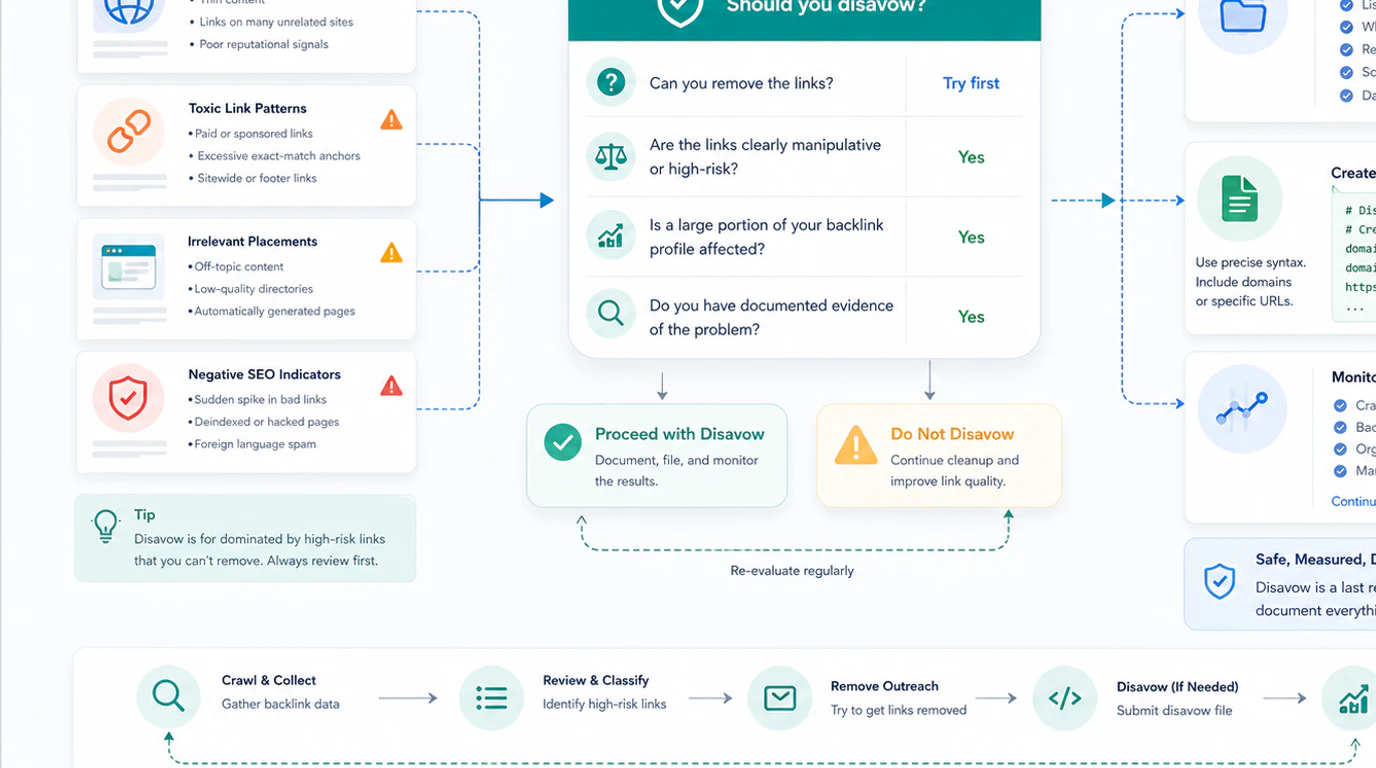
Use this order:
- Check Search Console for manual actions, security issues, and obvious crawl/indexation problems.
- Compare the suspected link issue with the timing of traffic changes.
- Look for repeated unnatural patterns, not one-off ugly domains.
- Separate external-link risk from internal technical issues such as noindex, canonical conflicts, broken redirects, or template changes.
- Document cleanup attempts when removal is practical.
- Decide whether a domain-level or URL-level disavow is safer.
This is where Searvora's crawler layer helps indirectly. A technical SEO crawler will not tell you which backlinks to disavow, but it can stop you from blaming links for an internal problem. If a traffic drop coincides with canonical changes, broken redirects, blocked pages, duplicate titles, or sitemap drift, fix that evidence before touching a disavow file.
Build A Clean Disavow File
A disavow file should be boring. It should contain only the links or domains you want Google to ignore, with comments that help your team understand why the file exists.
Use domain-level entries when the whole source is clearly unsafe:
# Paid guest-post network found during April 2026 review
domain:example-spam-network.com
domain:another-spam-source.example
Use URL-level entries only when the domain is generally legitimate but a specific URL is the problem:
# Old sponsored post that could not be removed
https://example.com/old-sponsored-post
Before uploading, run this checklist:
| Check | Why it matters |
|---|---|
| Keep a dated copy of the previous file | Uploads replace the old file; version history prevents accidental loss. |
| Remove domains you are unsure about | A false positive can weaken useful authority signals. |
Prefer domain: for sitewide spam sources | It is clearer than listing hundreds of URLs from the same bad source. |
| Keep comments concise | Future reviewers need rationale, not a novel. |
| Assign an owner | Someone should know why each batch was added. |
Do not include internal notes that expose private data, client names, or legal assumptions. The file is an operational artifact, not a full investigation report.
Upload Through Search Console And Keep Evidence
The upload should be treated like a controlled SEO change. Use Google's official disavow flow, keep a copy of the submitted file, and log the decision in the same place your team tracks technical SEO changes.
Useful evidence to keep:
- The manual action or risk signal that triggered review.
- The backlink samples and domains you evaluated.
- The removal attempts or reason removal was not practical.
- The final disavow file.
- The upload date, owner, and expected review window.
- Any related site changes shipped around the same time.
Google's spam policies are also worth reviewing before you decide. They help separate link spam patterns from normal web noise, expired-domain baggage, negative SEO anxiety, and broad ranking volatility.
What To Monitor After Disavow
Disavow is not instant, and it should not become a weekly guessing game. Monitor the site with the same discipline you would use for a migration, canonical cleanup, or ranking recovery project.
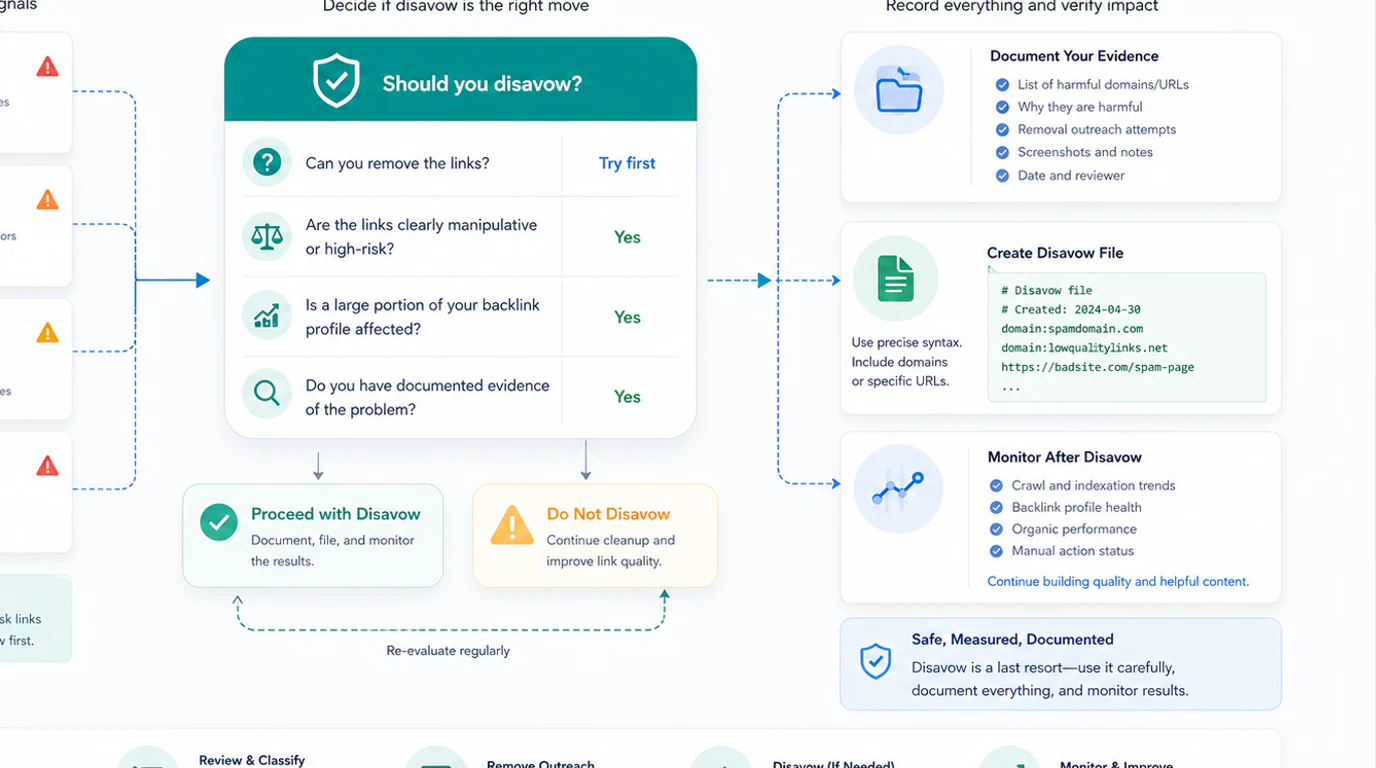
Track these signals:
| Signal | What it can tell you | What it cannot prove alone |
|---|---|---|
| Manual action status | Whether the explicit action was lifted or still needs work | Whether every ranking change came from disavow |
| Organic clicks and impressions | Whether affected page groups are stabilizing | Exact causal impact without context |
| Query and page mix | Whether recovery is broad or limited to a cluster | Link quality by itself |
| Crawl and indexability issues | Whether internal problems are blocking recovery | External-link risk |
| Content or SERP changes | Whether the search landscape changed during recovery | Disavow success or failure by itself |
If you use manual SERP checks during recovery, keep them focused. The Google Search Operators workflow is useful for sampling indexation, exact phrases, and competitor language, but it should be paired with structured monitoring.
Mistakes That Create More Risk
Most disavow mistakes come from treating the tool as a magic reset button.
| Mistake | Risk | Better move |
|---|---|---|
| Disavowing every low-quality-looking domain | You may remove links Google already ignores or links that still help | Disavow only documented unnatural patterns. |
| Uploading without saving the old file | You can accidentally erase historical rules | Version every upload. |
| Mixing technical fixes and disavow without notes | You cannot tell what changed | Log all SEO changes by date and owner. |
| Disavowing after every ranking drop | You chase symptoms and ignore real causes | Check crawl, content, SERP, and algorithmic context first. |
| Ignoring page overlap and intent problems | Link cleanup will not fix cannibalization | Review keyword cannibalization when several pages compete for the same job. |
For on-page and technical changes that happen during recovery, the Page Title SEO workflow is a good reminder: metadata, H1s, canonicals, and crawl status need validation after shipping, not just before.
A Practical Google Disavow Links Checklist
Use this checklist before anyone uploads a file:
- Confirm whether Search Console shows a manual action or other serious risk signal.
- Build a timeline of link events, traffic changes, technical releases, and content updates.
- Inspect link patterns for paid, hacked, automated, private-network, or manipulative sources.
- Rule out internal technical problems with a crawl.
- Document removal attempts when outreach is reasonable.
- Decide domain-level versus URL-level entries.
- Save the old disavow file before uploading a new one.
- Add comments that explain why each batch exists.
- Upload through the official Google tool.
- Monitor manual action status, affected page groups, crawl health, and content changes.
- Wait for evidence before changing the file again.
Google disavow links can be useful, but only when the evidence is strong and the process is controlled. Treat it as a last-resort risk management workflow. Rule out easier causes first, keep every decision auditable, and measure recovery with enough context to avoid undoing the wrong thing.