

Keyword cannibalization happens when multiple URLs compete for the same search job and make it harder for the stronger page to win consistently. The fix is rarely "delete one page because the keywords look similar." The fix is to decide whether the pages truly overlap in intent, page type, and business role, then choose the cleanest path forward.
The useful question is not whether two pages mention similar phrases. The useful question is whether search engines and users are being asked to choose between two pages that are trying to do the same thing. Once you frame it that way, keyword cannibalization becomes a diagnosis and prioritization problem, not a superstition.
What Keyword Cannibalization Actually Is
Two pages can rank for related queries without causing harm. A real cannibalization issue usually appears when the site has multiple indexable pages chasing the same core keyword, serving the same page type, and trying to satisfy the same user task.
| Situation | Real cannibalization? | Better move |
|---|---|---|
| Two guides both target the same query and answer the same question | Usually yes | Merge, redirect, or rewrite one page to own a distinct job |
| A glossary page and a tutorial rank for related terms | Usually no | Keep both, but make the page purpose clearer |
| A product page and a blog post overlap on vocabulary | Not by default | Clarify the commercial vs educational intent |
| Locale variants or printer-friendly duplicates compete | Sometimes | Use canonical, hreflang, or indexing controls correctly |
| Old campaign or migration URLs still rank against the new page | Often yes | Redirect or deindex obsolete URLs |
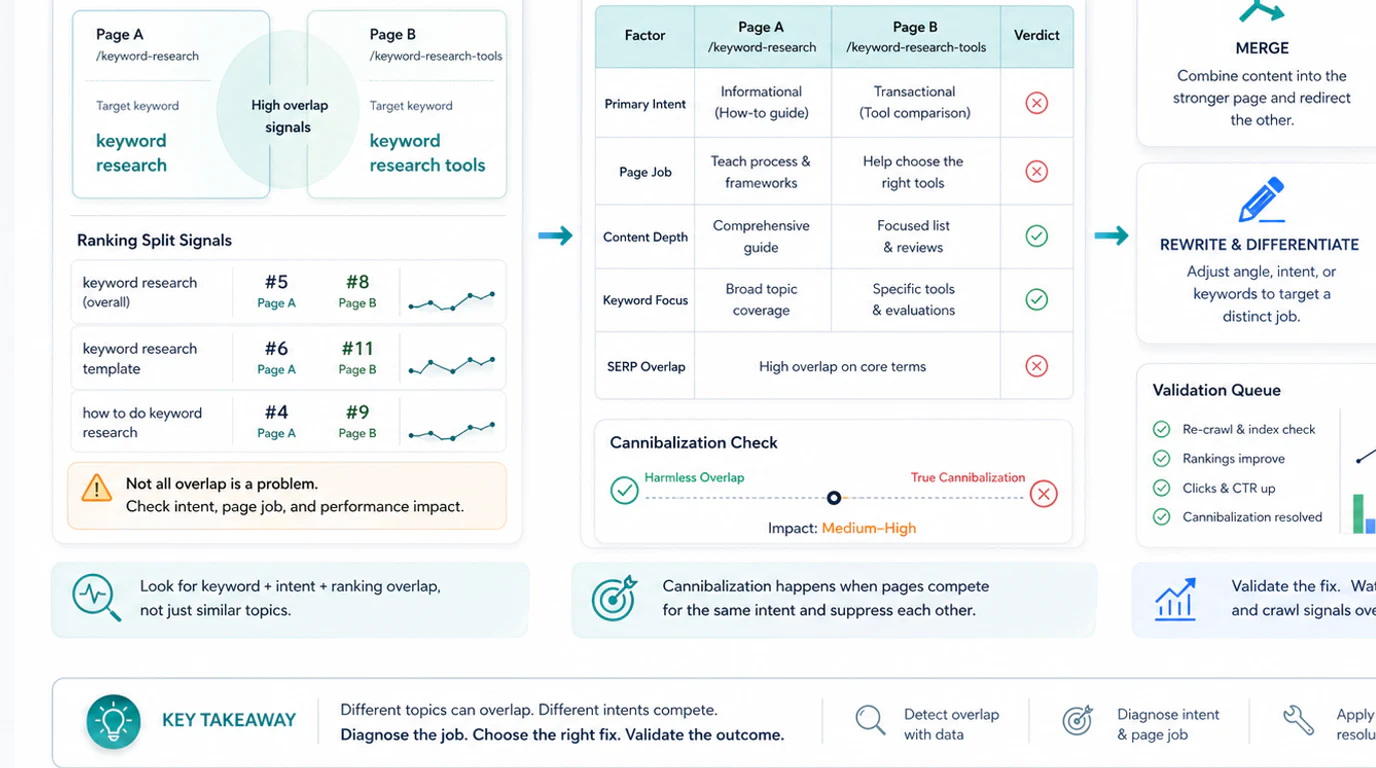
If only one of those overlap signals is true, you may be looking at normal topical coverage rather than a problem. That distinction matters because merging the wrong pages can remove useful coverage, break internal links, or weaken conversion paths.
Diagnose Keyword Cannibalization With Crawl And Query Evidence
Start by building a candidate set instead of guessing from memory. Pull the URLs that appear to overlap, then compare what each page is trying to do.
Use at least these inputs:
| Signal | What it tells you |
|---|---|
| URL and directory | Whether the page belongs to a guide, product, support, category, or archive section |
| Title and H1 | Whether the visible promise matches the search task |
| Canonical and indexability | Whether the page should even be eligible to rank |
| Internal links and anchor text | Which page the site is signaling as the preferred destination |
| Clicks, impressions, and queries | Whether the overlap is actually hurting performance |
| Conversions or business role | Whether a lower-traffic page still matters because it converts better |
Manual query sampling can help you spot overlap patterns quickly, but treat it as a lens, not proof. The workflow in Google Search Operators for SEO: Audit and Research Workflow is useful for finding visible overlap before you inspect the full URL set.
Once the pattern looks real, use a technical SEO crawler to inspect titles, canonicals, redirects, internal links, status codes, and template footprint at scale. Cannibalization decisions get much better when you know whether the issue affects two pages or two hundred.
Choose The Right Fix Path
There is no universal "merge everything" answer. The right fix depends on why the overlap exists and whether the pages still deserve separate roles.
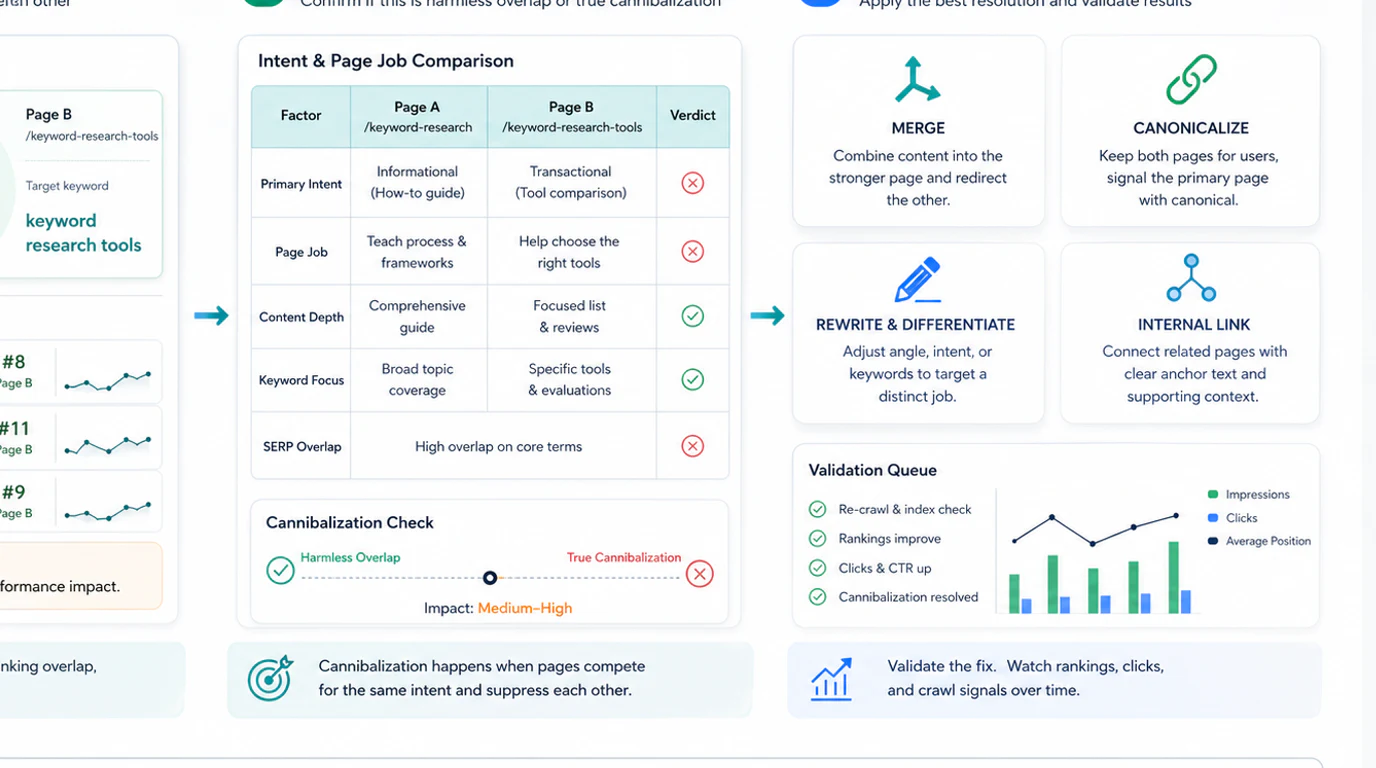
| If you find this pattern | Likely fix | Why it works |
|---|---|---|
| Two articles answer the same question with similar depth | Merge into the stronger page and redirect the weaker one | Concentrates authority, links, and user signals |
| One page should stay educational while another should help users compare or buy | Rewrite the angle and retarget each page | Preserves coverage while separating intent |
| Alternate URLs exist because of parameters, printer pages, or duplicate rendering paths | Fix canonical and indexing signals | Keeps one preferred winner without deleting necessary variants |
| An old page still ranks after a migration or content rewrite | Redirect or archive the obsolete URL | Removes stale competition and link dilution |
| Both pages are useful, but internal links point to the wrong one | Rework internal links and anchor language | Helps search engines and users reach the intended destination |
The common thread is clarity. Each surviving indexable page should own one primary job. If you cannot explain the difference between two URLs in one sentence, they probably need consolidation.
Validate The Fix Before You Call It Solved
Keyword cannibalization is not solved when the redirect ships or the title changes. It is solved when the preferred page becomes clearer, easier to crawl, and more stable in search.
Use this validation sequence:
- Re-crawl the affected URLs and confirm the intended canonical winner is indexable and internally linked.
- Check that the page title, H1, and page body now support the same promise. The process in Page Title SEO: Audit, Rewrite, and Validate Titles is useful here.
- Review search performance by page, not only by keyword, so you can see whether clicks and impressions are consolidating onto the right URL.
- Compare internal links and navigation anchors to make sure the site is reinforcing the preferred page.
- Give Google enough time to recrawl, then check whether the unwanted URL still appears for the same task.
- Record the decision so the team does not recreate the same overlap in the next content cycle.
Validation matters because some overlaps are intentional. A broad hub can coexist with a narrower child page. A product page can coexist with a guide. The win is not reducing the number of URLs. The win is making each page's role unmistakable.
Common Keyword Cannibalization Mistakes
Teams usually get this wrong in one of two ways: they ignore a real overlap, or they overreact to harmless similarity.
| Mistake | Why it causes trouble | Better move |
|---|---|---|
| Treating every similar phrase as cannibalization | You merge pages that actually serve different jobs | Compare page type and user task first |
| Looking at one SERP screenshot and stopping there | Search results can be noisy or temporary | Confirm with crawl, page data, and performance evidence |
| Redirecting before reviewing internal links | The site may keep sending authority to the wrong page | Update anchors and navigation with the content change |
| Keeping obsolete pages live after migrations | Old URLs keep competing for the same intent | Redirect, archive, or deindex old content cleanly |
| Fixing titles but not the page promise | Search engines still see mixed signals | Align title, H1, copy, internal links, and canonical target |
A Repeatable Keyword Cannibalization Workflow
Use this checklist when you suspect overlap across articles, landing pages, support pages, or migrated URLs:
- Pull the candidate URLs that appear to overlap.
- Label each page by page type, audience, and primary user job.
- Compare title, H1, canonical, internal links, and current performance.
- Decide whether the overlap is real or just part of a healthy topic cluster.
- Choose one fix path: merge, re-target, canonicalize, redirect, or keep distinct.
- Update the page copy and metadata so the surviving pages have clearer intent boundaries.
- Rework internal links to reinforce the preferred destination.
- Re-crawl and review performance until the winning page is stable.
- Add the decision to your operating rhythm so new content does not recreate the problem.
For teams that want to turn these diagnoses into a broader execution cadence, Geo SEO Foundations shows how to connect technical signals, prioritization, and shipped work.
Keyword cannibalization is not a penalty you detect with a single tool. It is a decision problem. When you compare search task, page type, and crawl evidence together, the right fix usually becomes obvious and much safer to ship.