

Faceted navigation SEO is the work of letting shoppers and readers filter a large set of listings without creating an uncontrolled crawl space. The goal is not to remove filters. The goal is to decide which filtered URLs deserve search access, which should consolidate signals, and which should stay out of crawler paths.
This matters most on ecommerce, marketplace, directory, travel, real estate, job, and catalog sites. A useful color, size, brand, location, or price filter can help people find the right item faster. The same filter system can also produce millions of thin URL combinations if every state becomes a crawlable link.
Start With The Facet Inventory
Before changing canonicals or robots rules, inventory the filter system as it exists in the rendered site. Facets are usually owned by several teams at once: merchandising, frontend, SEO, analytics, and engineering. A crawl gives everyone the same map.
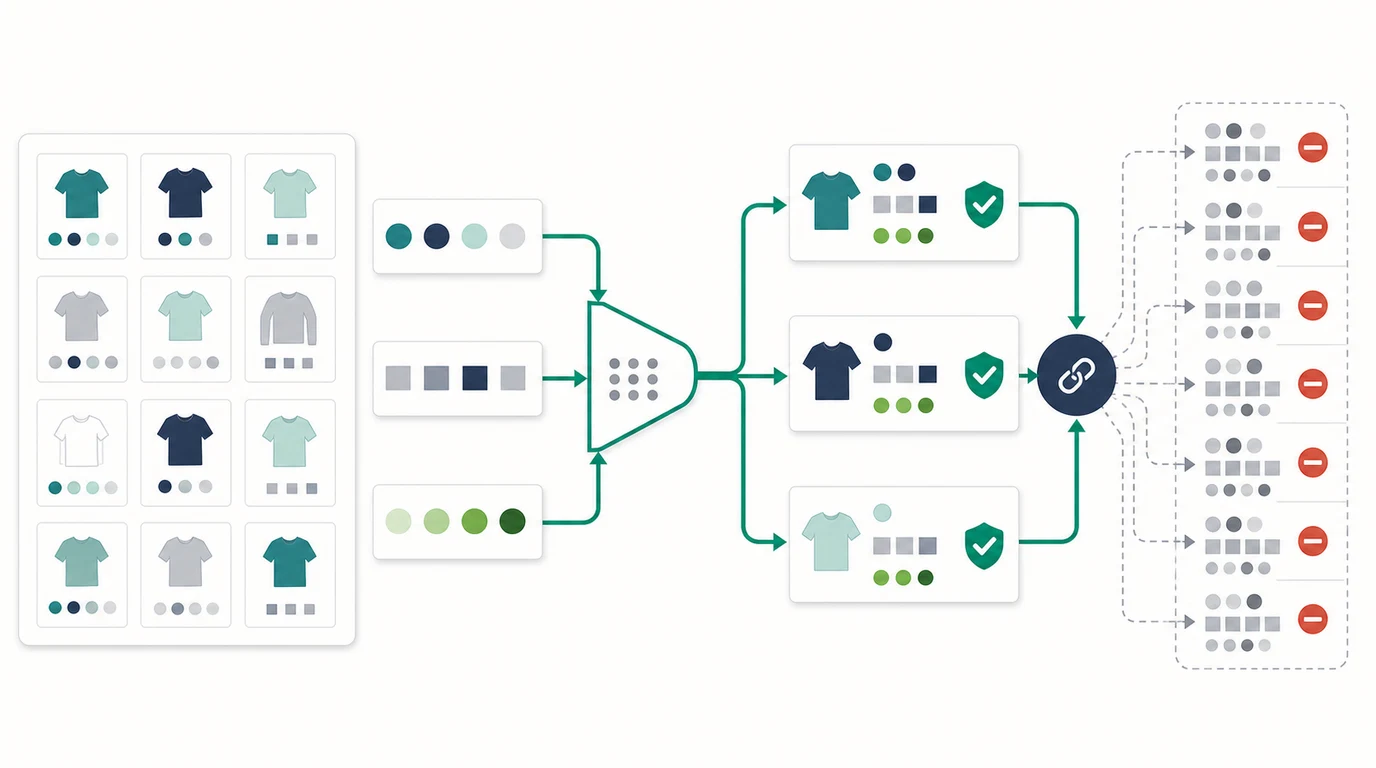
Export these fields for every important category, collection, or archive template:
| Field | Why it matters | Example decision |
|---|---|---|
| Base category URL | The parent page that should normally receive consolidated signals | /running-shoes/ stays canonical and indexable |
| Facet parameter or path segment | Shows how filters create new URLs | ?brand=nike, /blue/, ?size=10 |
| Listing count | Separates useful result sets from empty or tiny pages | 200 products may deserve access; 0 should not |
| Search demand | Proves whether a filtered page has independent organic value | "black running shoes" may deserve a landing page |
| Internal links | Shows whether crawlers can discover the state | Main nav links carry more crawl weight than JS-only filters |
| Canonical and robots state | Shows whether directives agree | Canonical to self, parent, or noindex rule |
| Sitemap inclusion | Prevents low-value variants from being submitted as canonical URLs | Include curated filter pages only |
The first pass should be descriptive, not judgmental. You want to know how many facet states exist, how they are linked, whether the rendered HTML exposes them, and which combinations can multiply into crawl traps.
Decide Which Faceted URLs Deserve Search Access
Most faceted URLs do not need to rank. Some absolutely should. The difference is not the filter itself; it is whether the URL represents a durable user job that searchers actually want.
Use this routing table before writing rules:
| Faceted URL type | Recommended SEO treatment | Reason |
|---|---|---|
| High-demand single filter with strong inventory | Indexable curated landing page | It can answer a real query better than the parent category |
| Useful but duplicate sorting or view state | Canonical to the stable parent or equivalent URL | The content does not deserve a separate search result |
| Low-value multi-filter combination | Keep out of crawl paths or noindex when crawled | The page helps users but creates weak search inventory |
| Empty or nonsensical combination | Return a true 404 when appropriate | Crawlers and users should not keep exploring impossible states |
| Internal search or infinite generated combinations | Block crawl paths where safe | The URL space can consume crawl resources without search value |
Google's current faceted navigation documentation is blunt about the risk: URL-parameter based filters can create very large URL spaces, and crawler time spent on low-value combinations can slow discovery of useful URLs. Use the official Google guidance on managing faceted navigation crawling as a source of truth before changing rules at scale.
For ecommerce sites, this decision connects directly to page-type planning. The broader ecommerce SEO workflow should decide which collections, product pages, buying guides, and faceted landing pages deserve canonical search surfaces. Faceted navigation SEO then keeps the filter layer from undermining that plan.
Control Crawl Paths Before You Tune Copy
Do not start with title rewrites for every filtered URL. Start with crawl paths. Search systems need clear signals about what they should discover, crawl, index, and revisit.
Common control options include:
| Control | Best use | Watch out for |
|---|---|---|
| Internal linking rules | Keep only valuable facet states as crawlable anchors | Every template variant must follow the same rule |
robots.txt disallow rules | Stop crawler access to parameter patterns that should never be crawled | Blocked URLs cannot show a page-level noindex because crawlers cannot fetch it |
| Canonical links | Consolidate duplicate or near-duplicate faceted states | Canonical is a hint, not a hard crawl budget switch |
Meta robots noindex | Remove crawled low-value pages from the index | Crawlers still need to fetch the page to see the directive |
| 404 for invalid states | End impossible or empty combinations cleanly | Do not redirect every empty state to the parent page |
| Sitemap curation | Submit only canonical, indexable, durable URLs | Do not include every filter combination by default |
The useful sequence is: decide the route, implement the template rule, then crawl the rendered output. If a page is not meant to be crawled, do not make it discoverable from every category link. If a page is meant to rank, give it stable content, a self-canonical, internal links, and inclusion in the right sitemap.
This is where the technical SEO workflow becomes the parent QA layer. Facets touch status codes, internal links, canonicals, robots rules, sitemaps, rendering, and metadata. Treat them as architecture, not as a metadata cleanup.
Build Template Guardrails For Ecommerce Teams
Faceted navigation breaks when every filter behaves independently. A safer system uses template guardrails that product and SEO teams can understand before a new filter launches.
Create rules for each facet family:
- Which single-filter pages may be indexable because they match demand.
- Which combinations should never be linked as crawlable URLs.
- Which filter order is canonical when path-based facets are used.
- Which values are allowed in indexable URLs.
- What happens when a filter produces no results.
- Whether paginated faceted URLs stay indexable, canonicalize, or noindex.
- Which templates may appear in XML sitemaps.
- Which analytics events prove users actually need the filter.
- Who approves new indexable facet rules.
For example, a footwear store might keep /running-shoes/black/ indexable if it has demand, inventory, content, and internal links. It might canonicalize sort orders back to the default view. It might block or noindex combinations such as brand plus discount plus size plus rating if those combinations create thin, shifting pages.
The same logic applies beyond ecommerce. A job board, course directory, real estate marketplace, or documentation archive can all create facet traps. The page type changes, but the routing test stays the same: user value, search demand, crawl cost, and validation confidence.
Validate With A Crawl Before And After Release
Faceted navigation SEO is risky because small template changes can multiply quickly. A release that changes one filter component may change thousands of URLs. Validate before and after the rule ships.
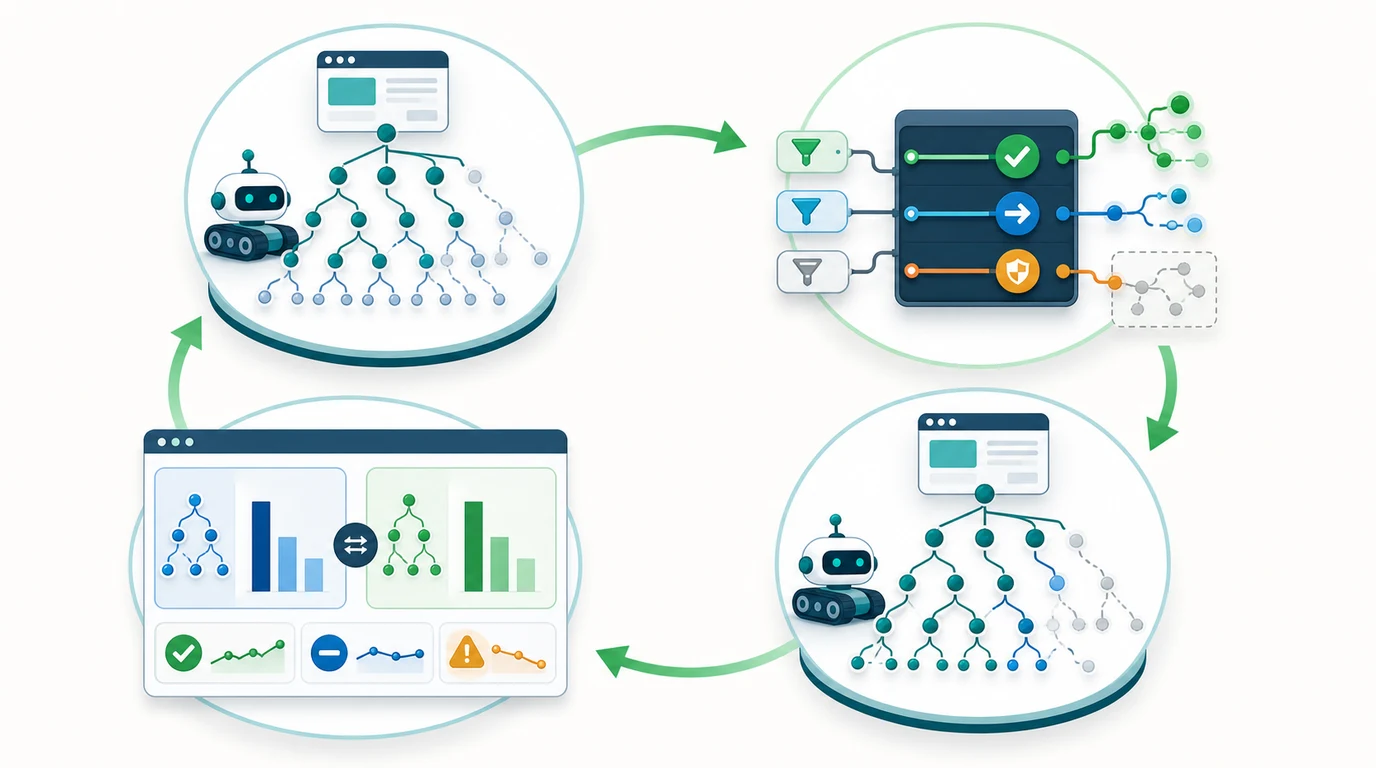
Run this validation loop:
- Baseline the affected templates with a crawl export.
- Count unique facet URLs, parameter patterns, status codes, canonicals, noindex directives, and internal links.
- Define the expected state for each facet family before engineering starts.
- Ship one rule group at a time when the site is large.
- Re-crawl the same section and compare against the baseline.
- Confirm that XML sitemaps include only intended canonical URLs.
- Check that internal links no longer expose blocked or low-value states.
- Monitor Search Console index coverage, crawl stats, and query movement after recrawl windows.
- Review AI-search and shopping-surface summaries for important curated filter pages.
The pass condition is not "the crawl has fewer URLs." A crawl can shrink because useful pages were accidentally hidden. The pass condition is that high-value pages remain discoverable and indexable while low-value combinations stop consuming links, crawl paths, and sitemap space.
Internal links matter here. If blocked or weak faceted URLs still appear across navigation, breadcrumbs, product cards, or related filters, crawlers may keep discovering them. Use the internal links for SEO workflow when you need to find source pages and clean up those paths.
Where Searvora Fits
Searvora SEO Spider Crawler fits the evidence and validation parts of faceted navigation SEO. Use it to crawl category templates, extract parameter patterns, inspect canonicals and robots directives, find internal links into filtered states, validate sitemap behavior, and group issues by template footprint.
The product fit is strongest after the policy is decided. A crawler should not decide business value by itself. It should show whether the implementation matches the policy: which URLs are linked, which are indexable, which canonicalize elsewhere, which appear in sitemaps, and which combinations keep expanding.
A Practical Faceted Navigation SEO Checklist
Use this checklist when auditing or launching a filter system:
- List every facet family, parameter, path pattern, and generated URL state.
- Crawl important category templates with JavaScript rendering if filters rely on client-side behavior.
- Separate useful search landing pages from utility filters, sort orders, and empty states.
- Decide index, canonical, noindex, block, or 404 treatment for each URL family.
- Keep indexable faceted pages stable, internally linked, self-canonical, and eligible for the right sitemap.
- Prevent low-value combinations from becoming crawlable links across navigation and product cards.
- Make empty or impossible combinations return an appropriate status instead of redirecting everything to the parent.
- Validate rendered HTML after the release, not only template code.
- Compare crawl counts, canonical targets, noindex counts, and sitemap entries against the baseline.
- Monitor search and AI visibility for curated filter pages, then adjust rules when inventory or demand changes.
Faceted navigation SEO is a control system. Filters should help people explore a large catalog, but they should not create an infinite search surface. Start with the facet inventory, route each URL family deliberately, ship template guardrails, and validate the live crawl before the next filter launch.