

Ecommerce SEO is the work of making store pages discoverable, understandable, and useful enough to earn demand before the shopper is ready to buy. It is not one checklist applied across every URL. A collection page, product page, buying guide, faceted URL, and campaign landing page each need a different search task, crawl rule, content depth, and measurement plan.
The operational workflow starts by deciding what each page type should rank for, then checking whether search systems can crawl and index the right URLs. After that, keyword research, product context, internal links, structured data, and publishing cadence become easier to manage because every page has a clear job.
Start With The Page Type
Store SEO breaks when every URL is treated like a landing page. Product pages are built for specific purchase intent. Collection pages cover broader category demand. Blog guides answer research and comparison questions. Faceted URLs can help shoppers refine choices, but they can also create crawl waste, duplicate variants, and index bloat.
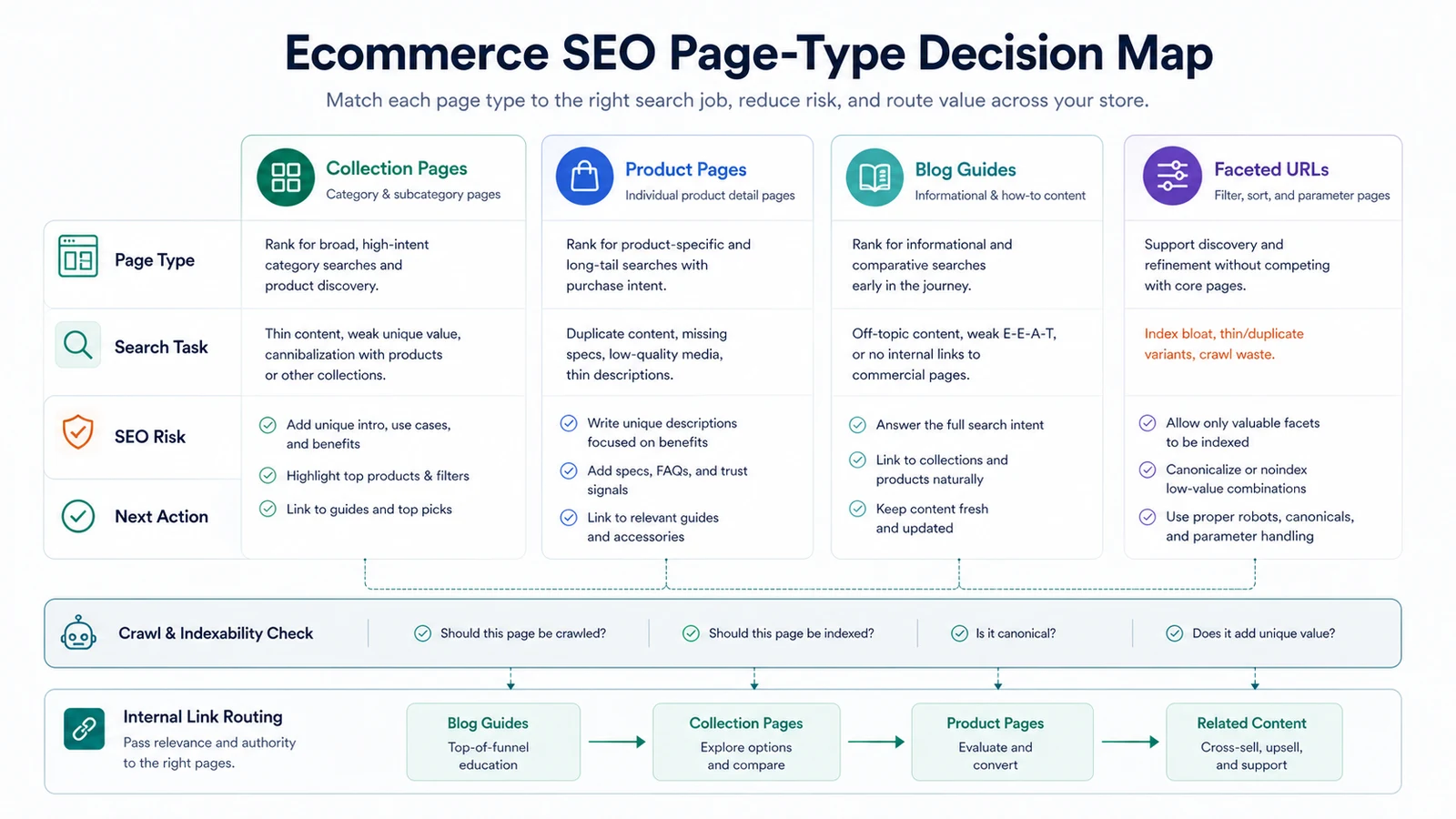
Use this map before assigning keywords:
| Page type | Search job | Content requirement | Crawl risk |
|---|---|---|---|
| Collection page | Rank for category and subcategory demand | Intro copy, useful filters, product coverage, internal links to guides | Thin category copy or weak product discovery |
| Product page | Convert product-specific demand | Unique descriptions, specs, media, FAQs, reviews, stock and shipping context | Duplicate manufacturer copy or missing structured data |
| Blog guide | Educate, compare, and route shoppers | Clear answer, examples, product context, internal links to collections | Informational traffic with no next step |
| Faceted URL | Serve valuable refinements | Only index combinations with real demand and unique value | Infinite crawl paths, duplicate pages, parameter noise |
| Campaign page | Support seasonal or promotion demand | Timely offer, canonical decision, links to durable pages | Expired pages left indexable |
The official Google ecommerce SEO best practices frame ecommerce discovery around product data, site structure, and how shoppers encounter content across Search surfaces. Searvora's information gain is the operating layer around that guidance: decide the page job first, then route crawl checks, briefs, and publishing work to the right owner.
Make The Store Crawlable Before Rewriting Copy
Content work should not begin until the important store pages can be discovered. If category pages are buried, product pages only appear through search forms, or faceted URLs create endless crawl paths, the store can lose organic reach before writers touch a brief.
Run a crawl baseline with these questions:
| Crawl question | Why it matters |
|---|---|
| Can search crawlers reach collections, subcollections, and product pages through links? | Important products should not depend only on internal search or JavaScript events |
| Are canonical URLs consistent across variants and parameters? | Consolidates signals and prevents duplicate indexing |
| Are out-of-stock, discontinued, and campaign URLs handled deliberately? | Avoids wasting crawl budget or sending shoppers to dead ends |
| Do sitemaps include canonical indexable URLs only? | Helps expose pages that navigation cannot always reach |
| Do titles, H1s, and meta descriptions reflect the page type? | Prevents template-level duplication across thousands of pages |
| Are internal links routing from guides to collections and products? | Moves informational demand toward commercial pages naturally |
Google's ecommerce site-structure documentation recommends crawl-friendly navigation and links from menus to category pages, subcategory pages, and product pages. It also warns that products reachable only through search may not be found through normal crawling. That makes crawl evidence the first quality gate, not a later technical audit.
For a deeper technical baseline, pair this workflow with the technical SEO audit process. Ecommerce sites need the same fundamentals as other sites, but template scale makes small crawl mistakes much louder.
Build Keyword Briefs Around Store Jobs
Keyword research for ecommerce SEO should separate page jobs before it separates keyword lists. A term that looks attractive in a spreadsheet may belong on a collection page, a comparison guide, a product detail page, or a support article.
Use this brief format:
| Brief field | Collection page | Product page | Blog guide |
|---|---|---|---|
| Primary intent | Browse and compare a category | Evaluate one product | Learn, compare, or solve a pre-purchase problem |
| Keyword source | Category modifiers, attributes, use cases, audience segments | Product name, model, variant, problem solved | Questions, comparisons, alternatives, seasonal needs |
| Required proof | Product range, filters, buying criteria, trust signals | Specs, images, availability, price context, FAQs | Examples, decision criteria, product fit, next step |
| Internal links | Guides, subcollections, top products | Collection, guide, accessories, support content | Relevant collections, products, and deeper guides |
| Success metric | Impressions, category clicks, product exploration | Product clicks, assisted sales, rich result eligibility | Assisted product discovery, return visits, AI-search citations |
The keyword research execution workflow is useful here because ecommerce teams often have too many plausible targets. The question is not only "which keyword has volume?" It is "which page type can satisfy this task without stealing intent from a better URL?"
Turn Content Production Into A Quality Gate
Ecommerce content fails when publishing volume outruns quality control. A store can produce dozens of buying guides and still weaken SEO if the articles do not connect to products, collections, crawlable URLs, and measurable demand.
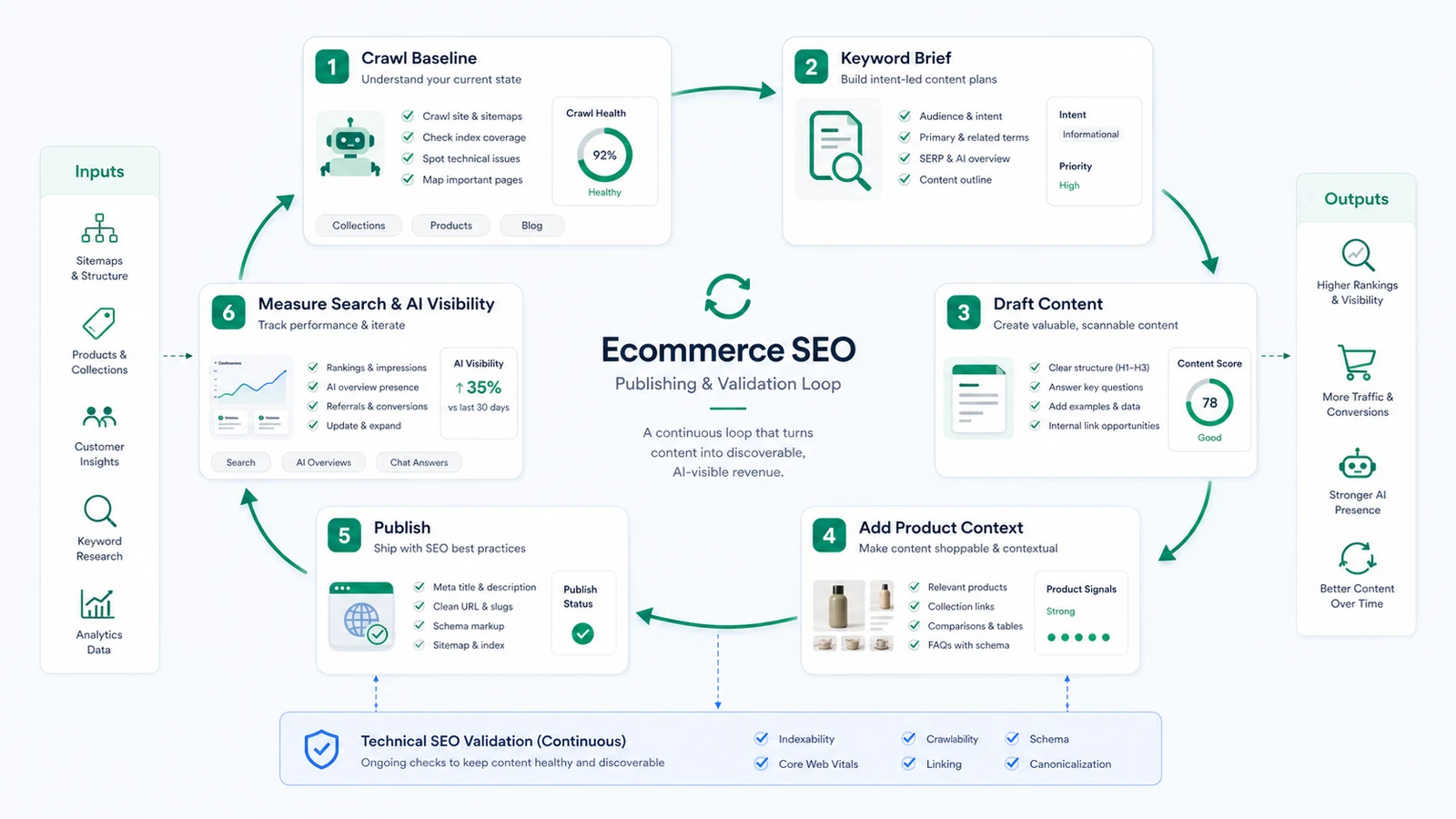
Use this publishing loop for every new article or refresh:
- Save the crawl baseline for the related collections and products.
- Pick the page type that should own the primary query.
- Write the brief with intent, product context, internal links, and metadata requirements.
- Draft content that answers the query before introducing products.
- Add product and collection links where they help the shopper continue.
- Check title, meta description, H1, headings, image alt text, and schema.
- Publish only after canonical, sitemap, and internal-link rules are clear.
- Re-measure impressions, clicks, assisted product discovery, and AI-search visibility.
Shopify's help center for store blogs notes that store blogs can support SEO, audience building, and traffic generation. It also gives store owners controls for blog search listing details such as titles, descriptions, and URL handles. For ecommerce teams, the stronger workflow is to connect those publishing controls to a repeatable brief and validation process.
This is where Searvora Blogify fits best. Blogify is built for Shopify content production: topic intake, structured SEO drafting, internal links, product context, multilingual workflows, and Shopify draft publishing. That does not replace editorial judgment, but it turns repeatable ecommerce SEO work into a controlled production system.
Handle Facets And Internal Links Deliberately
Faceted navigation is one of the most common ecommerce SEO traps. Filters help shoppers narrow a catalog, but every color, size, brand, material, price, and sort order does not deserve an indexable URL.
Use this rule set:
| Facet decision | Default action |
|---|---|
| High-demand category refinement with unique products and copy | Consider indexation if the page has real search demand and useful content |
| Low-demand combinations and sort orders | Keep crawlable only when needed for users; prevent index bloat |
| Duplicate variants with no unique intent | Canonicalize or noindex according to the store's technical policy |
| Valuable filters that expose products otherwise hard to reach | Link carefully from collection pages or guides |
| Seasonal or temporary filters | Decide expiration, redirects, and canonical treatment before launch |
Internal links should route value from educational content to commercial pages without turning every guide into a wall of product links. A guide about "how to choose a waterproof hiking backpack" can link to the backpack collection, a few relevant product pages, and a care guide. It should not link every product in the catalog.
The on-page SEO workflow is the companion when titles, headings, schema, and internal links need to be improved together. Ecommerce SEO rarely fails in only one field; it usually fails when the page promise, crawl state, and next step drift apart.
Measure Search And AI Visibility After Publishing
Publishing is not the finish line. Ecommerce SEO needs a feedback loop because inventory changes, demand shifts, product pages expire, and AI search experiences may surface different answers than traditional blue links.
Review these signals after each content cycle:
| Signal | What it tells you | Next action |
|---|---|---|
| Collection impressions and clicks | Whether category demand is growing or shrinking | Refresh collection copy, filters, internal links, or product coverage |
| Product page discovery | Whether product-specific searches can find the right page | Improve titles, descriptions, structured data, and internal links |
| Blog-assisted paths | Whether guides send qualified shoppers to commercial pages | Add stronger next steps or update weak product context |
| Crawl anomalies | Whether technical changes created access or indexation problems | Re-crawl affected templates and fix at the source |
| AI-search visibility | Whether pages are answerable, cited, or summarized accurately | Add clearer definitions, comparisons, FAQs, and evidence |
| Cannibalization patterns | Whether multiple URLs compete for the same job | Consolidate, retarget, or route internal links to the canonical owner |
Google's product structured data documentation explains that product markup can help product information appear in richer ways in Search. Structured data is not a substitute for useful pages, but it helps search systems understand product facts when the visible page already supports the same information.
The measurement question is simple: did the page become easier to discover, easier to understand, and more useful to the shopper? If not, the next action belongs in the crawl queue, content queue, product data queue, or internal-link queue.
Where Searvora Fits
Searvora helps ecommerce teams turn SEO signals into shipped work. Use the crawler and dashboard layers to spot technical and performance issues, then use Blogify when the next action is content production for Shopify.
For ecommerce SEO, Blogify is strongest when the team already knows the page job:
| Searvora workflow step | What the team gets |
|---|---|
| Topic and brief intake | Store-aware article ideas tied to collections, products, and campaign needs |
| Structured SEO drafting | Search-ready H2s, metadata direction, product context, and internal-link prompts |
| Publishing control | Shopify draft workflow instead of fragile copy-paste operations |
| Feedback loop | Content refresh ideas based on search, crawl, and visibility evidence |
Good ecommerce SEO does not ask every page to do the same job. It gives collections, products, guides, and facets their own rules, validates those rules with crawl evidence, and turns content production into a measured operating loop.
Ecommerce SEO Checklist
Use this checklist before launching or refreshing a store SEO cycle:
- Group important URLs by collection, product, guide, faceted URL, campaign page, and support page.
- Assign one primary search job to each priority page type.
- Crawl the store before assigning content work.
- Confirm important products are reachable through links, not only internal search.
- Clean up canonical, indexation, sitemap, and parameter rules.
- Build briefs that separate collection, product, and guide intent.
- Add unique product context instead of repeating manufacturer copy.
- Link guides to relevant collections and products without overloading the article.
- Use structured data only for facts visible or supported on the page.
- Publish Shopify drafts through a controlled review path.
- Re-crawl changed templates and priority URLs after publishing.
- Measure traditional search, assisted product discovery, and AI-search visibility.