

A broken link checker should do more than list 404s. The useful workflow finds the broken URL, shows every page that links to it, separates internal errors from external references, assigns the right fix, and proves the repair with a re-crawl.
That last step matters. A page can look fixed in a CMS while the live site still links through a redirect chain, sitemap entry, stale navigation component, or image anchor. Treat broken-link cleanup as a technical SEO validation loop, not a one-time spreadsheet export.
What A Broken Link Checker Should Decide
The first question is not "how many broken links did we find?" It is "which broken links can hurt discovery, user experience, trust, or search performance?"
Use this decision frame:
| Broken-link signal | What it usually means | First decision |
|---|---|---|
| Internal link points to 404 or 410 | Your own site sends users and crawlers to a dead page | Update the source link, restore the destination, or redirect to the best replacement |
| Internal link points through a chain | The destination may still work, but the path is inefficient or confusing | Link directly to the final canonical URL |
| External citation is dead | A source, tool, or reference may no longer support the claim | Replace the source, remove the claim, or link to a better official page |
| Image, PDF, or asset URL is broken | The page may look incomplete or lose supporting evidence | Restore the asset or remove the reference |
| Sitemap includes a broken URL | Search engines are being invited to crawl a dead address | Remove the URL and submit a cleaner sitemap |
| Anchor or jump link is broken | The page loads, but the link target is missing | Restore the fragment target or update the anchor |
The official Screaming Frog broken link checker tutorial focuses on crawling, filtering client errors, reviewing inlinks, and exporting the source pages behind broken URLs. That is useful tool instruction. Searvora's information gain is the operating layer around it: which errors deserve action first, which fix type fits the page job, and how to validate the live site after the repair ships.
Start With A Crawl That Captures Source Context
Broken links are hard to fix when the report only shows the dead URL. The source page matters more because that is where the link must be changed.
Collect these crawl fields before assigning work:
| Crawl field | Why it matters |
|---|---|
| Source URL | Shows where the broken link appears |
| Destination URL | Shows the broken target or final failed URL |
| Status code | Separates 404, 410, 5xx, timeout, and blocked responses |
| Link type | Distinguishes internal links, external links, image links, canonicals, hreflang, and sitemap URLs |
| Anchor text or alt text | Shows what promise the broken link made to users |
| Crawl depth and inlinks | Helps prioritize broken links on important pages |
| Final URL after redirects | Reveals chains that end in errors |
| Template or page group | Shows whether one component creates many broken links |
Google's link guidance is a good baseline here: links should be crawlable through real anchor elements and useful anchor text should help people and Google understand the destination. See Google's link best practices when diagnosing template links, JavaScript links, and vague anchors.
If the crawl exposes many source pages with the same broken destination, do not create one ticket per URL. Group by destination and source template first. One footer, navigation, product-card, or CMS block can create hundreds of identical link errors.
Classify Broken Links Before Fixing Them
Not every broken link deserves the same fix. Classify by relationship to your site, page value, and the reason the URL broke.
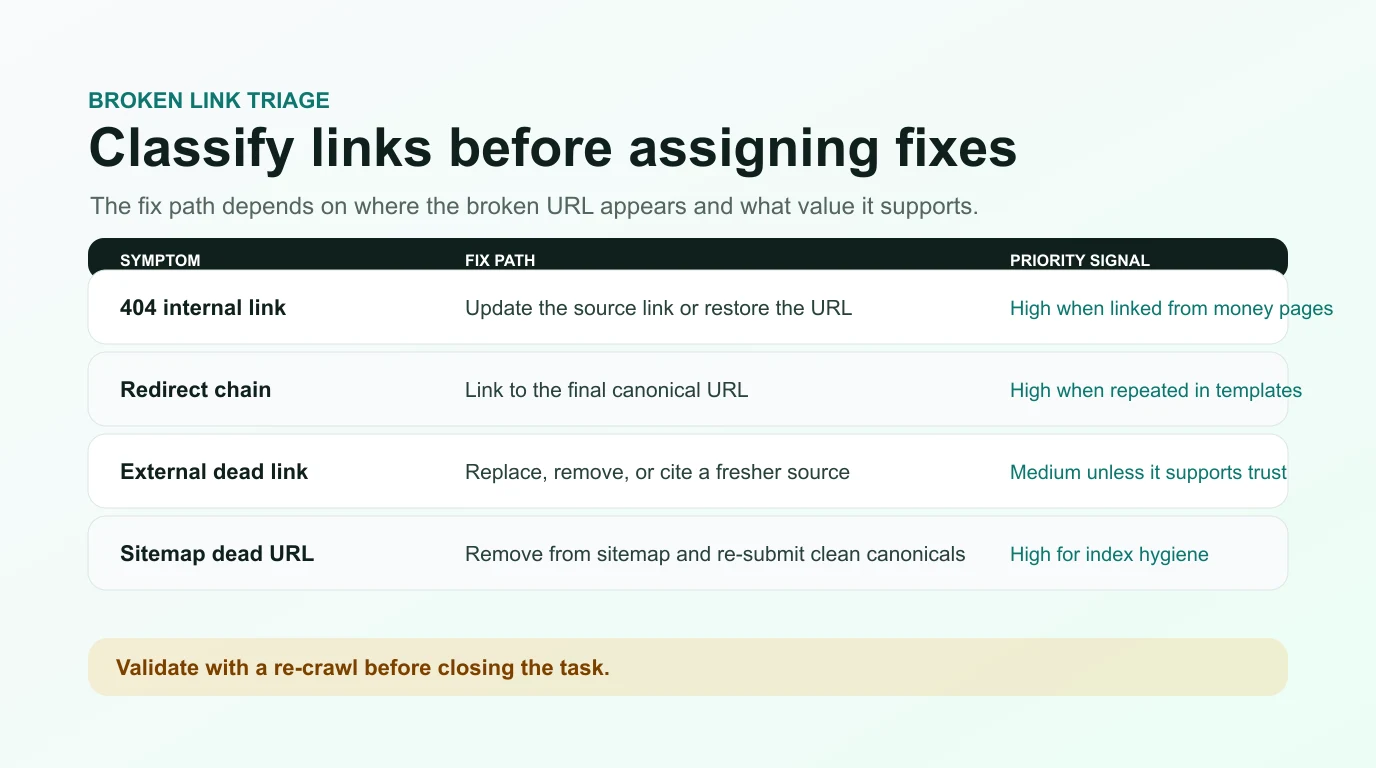
Use this triage sequence:
- Separate internal broken links from external broken links.
- Pull out sitemap, canonical, hreflang, and structured-data URLs because they affect search signals differently from body links.
- Group repeated errors by source template, destination URL, and directory.
- Mark links from revenue, signup, comparison, article hub, and high-traffic pages as higher priority.
- Check whether the destination should still exist.
- Decide whether the right action is update, redirect, restore, remove, or replace.
For internal links, the cleanest fix is usually to update the source link to the best live canonical URL. A redirect can be right when the dead page had external links, bookmarks, or search value. But if your own navigation still links to the old URL, update the navigation too.
For external links, do not automatically remove every dead reference. A dead official source may need a fresher source. A dead vendor page may need a neutral note. A dead example that no longer supports the article may need to be replaced with a clearer explanation.
This is where the internal links for SEO workflow can help. Broken links often expose a larger internal-linking problem: weak anchors, old routes, redirected paths, orphaned pages, or clusters that were never cleaned up after a migration.
Choose The Fix Path By Page Value
Broken-link reports become noisy when every issue is treated as equally urgent. Prioritize by page value, crawl impact, user risk, and fix confidence.
Use this table when assigning fixes:
| Situation | Best fix | Validate with |
|---|---|---|
| Important internal page moved permanently | Add a permanent redirect and update internal links to the new canonical URL | Re-crawl source pages and redirect report |
| Old internal article has no replacement | Remove links to it or create a useful replacement page | Re-crawl source pages and sitemap |
| Product or pricing URL changed | Update links in templates, CTAs, navigation, and content blocks | Template crawl and click-path QA |
| External citation is dead | Replace it with a current official source or remove the claim | Manual source review and link recheck |
| Broken image or downloadable asset | Restore the asset or remove the reference | Page render check and asset crawl |
| Sitemap includes dead URLs | Remove non-canonical and broken URLs from the sitemap | Sitemap crawl and Search Console submission check |
Google's redirect documentation explains why the kind of redirect matters: permanent and temporary redirects send different canonical signals. Use Google's redirect guidance when deciding whether a moved page should be treated as a permanent replacement or a temporary path.
Do not use redirects as a substitute for housekeeping. If your own content links to a URL that has been replaced, update the source link after adding the redirect. That gives users and crawlers a cleaner path and reduces future crawl noise.
Validate Repairs With A Re-Crawl
A broken-link fix is not complete when the CMS edit is saved. It is complete when the live crawl confirms that the error is gone and the replacement path is clean.
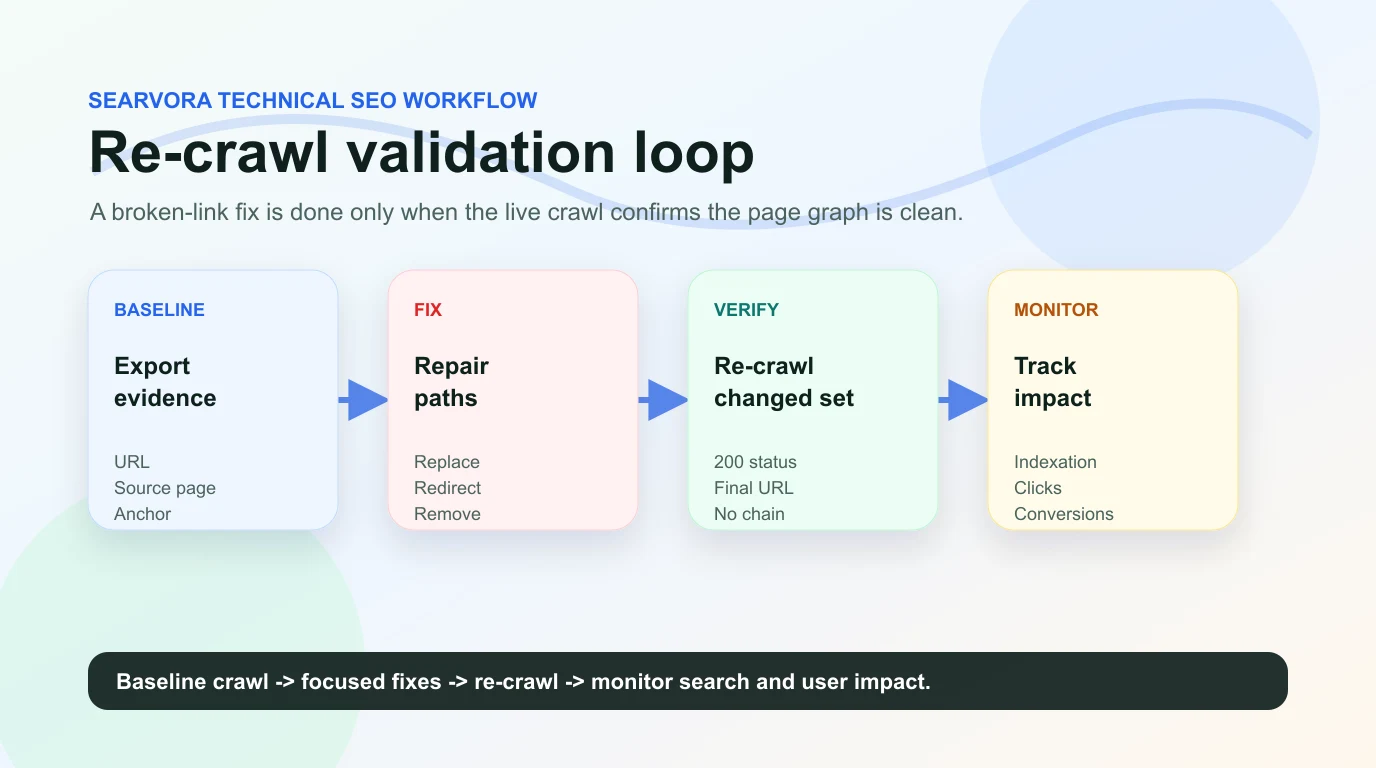
Run this validation loop:
- Save the baseline broken-link export.
- Group fixes by source template, source URL, and destination URL.
- Ship a focused batch of source-link updates, redirects, restored pages, or removed references.
- Re-crawl the changed source pages and destination URLs.
- Confirm the destination returns the intended status code.
- Check that internal links point to the final canonical URL rather than a redirect hop.
- Re-crawl sitemap URLs if the errors appeared in sitemap files.
- Monitor high-value pages for crawl, indexation, and performance changes after search engines revisit them.
For larger technical work, connect this loop to a broader technical SEO workflow. Broken links often travel with redirect chains, canonical conflicts, sitemap drift, and migration leftovers. Fixing them in isolation helps, but grouping them with the rest of the crawl evidence usually produces better engineering tickets.
Where Searvora Fits
Searvora SEO Spider Crawler is a natural fit when a broken link checker needs to become an execution queue. Use it to crawl status codes, source pages, link depth, redirects, canonicals, sitemap behavior, and metadata before deciding what should be fixed first.
Then turn the crawl into practical work:
| Searvora workflow step | What the team gets |
|---|---|
| Crawl the site like a search engine | Broken internal links, external link errors, redirects, and source-page context |
| Cluster issues by template and value | Fewer duplicate tickets and clearer ownership |
| Prioritize by impact and effort | A fix queue that starts with important pages and repeated patterns |
| Re-crawl after changes | Evidence that the live site no longer sends users or crawlers to dead URLs |
If the broken-link audit shows content promises that no longer match the page, pair the crawl with the on-page SEO workflow. The right fix might be a source-link update, but it might also be a clearer section, a better internal path, or a source replacement that makes the page more trustworthy.
Broken Link Checker Checklist
Use this checklist for a repeatable broken-link cleanup:
- Crawl the site with internal links, external links, images, canonicals, hreflang, and sitemap URLs enabled.
- Export broken URLs with their source pages, anchors, status codes, and redirect paths.
- Separate internal, external, asset, sitemap, and fragment-link errors.
- Group repeated errors by destination URL, source template, and directory.
- Prioritize links from high-value pages, navigation, hubs, product pages, and templates.
- Choose the fix path: update, redirect, restore, remove, or replace.
- Update source links when your own site still points to redirected or dead URLs.
- Remove broken URLs from XML sitemaps and submit clean canonical URLs.
- Re-crawl changed pages and affected templates.
- Save the before-and-after evidence so the next audit starts from a clean baseline.
A broken link checker is most valuable when it gives the team a cleaner site graph, not just a scary issue count. Find the broken paths, fix the source, validate the live result, and keep the evidence close enough that the next crawl can prove the site is getting healthier.