

Internal links for SEO are the links inside your own site that help users, crawlers, and AI answer systems understand which pages matter and how those pages relate to each other. Good internal linking is not just adding more links. It is choosing the right source page, the right destination, the right anchor text, and the right validation loop.
The practical workflow is simple: crawl the site, build a link graph, prioritize pages that deserve more support, improve anchors and placement, then re-crawl to prove the change actually landed.
What Internal Links Need To Prove
Internal links carry more than link equity. They also clarify page purpose, content hierarchy, and the path a crawler can take through the site. Google's official link best practices emphasize crawlable links and useful anchor text, which is a good baseline for any audit.
For SEO work, every important internal link should prove four things:
| Question | What to check | Why it matters |
|---|---|---|
| Can crawlers discover it? | The link uses a crawlable destination and is not hidden behind a broken pattern | Discovery fails before ranking signals matter |
| Does the destination deserve support? | The target page is indexable, canonical, and strategically useful | Links to blocked or duplicate pages waste crawl and editorial effort |
| Does the anchor explain the next page? | The anchor describes the destination without stuffing keywords | Clear anchors help users and search systems understand context |
| Does placement make sense? | The link appears near relevant copy, not in a random footer pile | Context improves usefulness and reduces noise |
This is why internal linking belongs in the same operating system as crawl QA, content planning, and page-type strategy.
Audit The Crawl Before Adding Links
Do not start an internal link project by opening random articles and adding links from memory. Start with a crawl and a URL inventory.
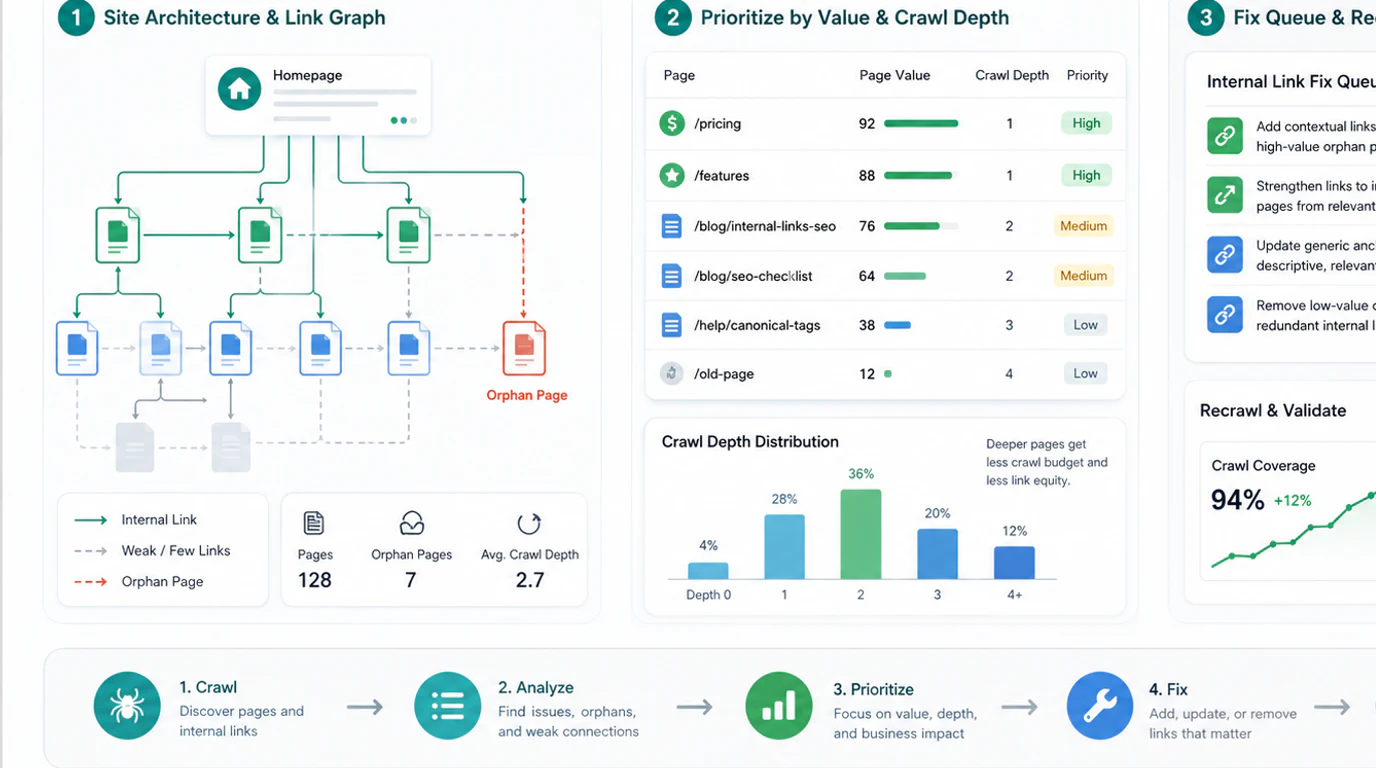
Pull at least these fields before you make decisions:
| Crawl field | Internal linking use |
|---|---|
| URL and directory | Group pages by template, product area, locale, and content cluster |
| Status code | Avoid sending new links to broken, redirected, or temporary URLs |
| Indexability | Keep noindex and blocked pages out of the priority queue unless the link is purely navigational |
| Canonical | Make sure the link supports the preferred URL, not an alternate version |
| Inlinks and outlinks | Find isolated pages, overloaded hubs, and weak cluster connections |
| Crawl depth | Identify important pages buried too far from strong entry points |
| Title and H1 | Check whether the anchor promise matches the page promise |
If the audit is part of new content planning, pair it with the keyword research workflow so each new page enters the site with a link plan instead of becoming another orphan candidate.
Prioritize Links By Page Job
Not every page needs the same internal link treatment. A product page, a glossary entry, a parent hub, and a technical support article do different jobs.
Use this prioritization model:
| Page job | Internal link priority | Useful source pages |
|---|---|---|
| Product or conversion page | High when the page is indexable and commercially important | Relevant guides, comparison pages, feature pages, and hubs |
| Parent hub | High when it organizes a cluster and routes readers to child pages | Navigation, category pages, flagship articles, and related guides |
| Fresh article | Medium to high when it fills a cluster gap | Existing articles with overlapping search tasks |
| Updating old article | Medium when performance is slipping or intent has changed | Newer pages, hub pages, and pages ranking for adjacent queries |
| Low-value utility page | Low unless users need it for navigation | Footer, support navigation, or account flows |
The key is to separate business importance from topical similarity. A page can mention the same phrase as another article without deserving the same links. If you are unsure whether two URLs are competing or complementing each other, use the same same-keyword, same-page-type, same-user-job test from the keyword cannibalization workflow.
Fix Anchors Without Creating Spam
Anchor text should help the reader predict the destination. It does not need to repeat the exact keyword every time.
| Weak anchor pattern | Why it fails | Better move |
|---|---|---|
| "Click here" | Gives no destination context | Use a short descriptive phrase |
| Exact-match anchor on every link | Looks forced and narrows the page meaning | Vary anchors around the page's real job |
| Overlong sentence link | Makes scanning harder | Link the key phrase only |
| Generic product anchor everywhere | Blurs whether the link is educational or commercial | Match the anchor to the reader's next step |
| Footer-only links to important pages | Weak context and weak discovery signal | Add contextual links from relevant body sections |
For example, a guide about title tags might naturally link to a page title audit workflow, while a crawl diagnostics article might link to a technical SEO crawler. The source context should make the link feel like the next useful step.
When you update anchors, also check page titles and headings. If the destination title is vague, even a good source-page anchor can create mixed signals. The page title SEO workflow is a useful companion when anchor clarity exposes a metadata problem.
Validate The Internal Link Change
Internal linking work should end with evidence, not a note that says "links added."
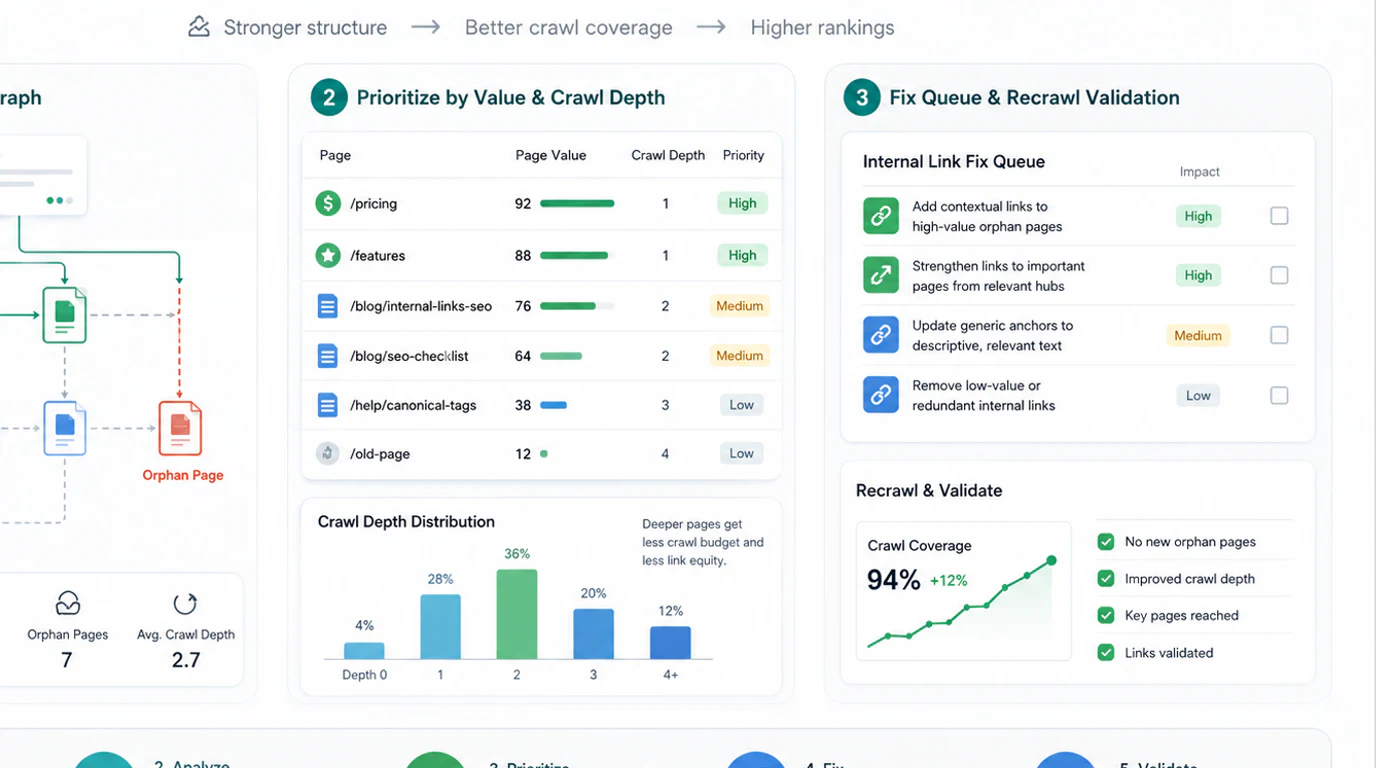
Use this validation loop after publishing internal link changes:
- Re-crawl the changed pages and confirm the links are live.
- Check that the destination URLs are indexable, canonical, and reachable at the expected crawl depth.
- Compare inlink counts and anchor text distribution before and after the change.
- Review the destination page's query mix and page-level performance after search engines recrawl it.
- Look for unintended side effects, such as a weaker page receiving stronger internal signals than the intended canonical page.
- Record the decision so future writers know why the link exists.
For large sites, treat this as a recurring QA task. Link graphs change whenever content teams publish, templates change, navigation shifts, or old URLs get redirected.
Common Internal Linking Mistakes
Most internal linking mistakes are process problems. Teams add links late, without crawl data, and then forget to validate.
| Mistake | Why it hurts | Better move |
|---|---|---|
| Adding links only during final editing | New pages launch without a cluster role | Include internal links in the brief and publish checklist |
| Linking to redirected URLs | Signals pass through unnecessary hops | Update links to the canonical final URL |
| Treating every orphan page as important | Some orphan pages should stay isolated or noindexed | Prioritize by indexability, value, and search task |
| Overloading hub pages with every related link | Readers cannot see the important route | Group links by page job and intent |
| Ignoring multilingual or regional variants | Links may send users to the wrong locale | Validate locale paths, canonicals, and hreflang alignment |
| Never re-crawling after edits | Broken patterns remain invisible | Re-crawl and compare the graph after each batch |
The healthiest internal link systems are boring in the best way: every important page has a reason to exist, a route into it, and a validation record after changes ship.
A Practical Internal Links For SEO Workflow
Use this checklist when you need to improve internal links without guessing:
- Crawl the site and export indexable canonical URLs.
- Group pages by directory, template, locale, product area, and topic cluster.
- Find orphan pages, high-value pages with weak inlinks, and pages buried too deep.
- Remove broken, redirected, noindex, or wrong-canonical destinations from the link queue.
- Label each target page by job: product, hub, guide, comparison, support, or utility.
- Choose source pages where the reader's next step naturally matches the destination.
- Write descriptive anchors that explain the destination, not just the keyword.
- Ship the changes in a controlled batch.
- Re-crawl and verify link discovery, crawl depth, anchor distribution, and destination health.
- Watch page-level search data and record what changed.
Internal links work when they make the site easier to crawl and easier to use. If you can explain why a link exists, prove that the target URL is healthy, and validate the change after publishing, internal linking becomes a repeatable SEO workflow rather than a last-minute editing habit.