

HTTPS for SEO is the work of making secure URLs the clear, crawlable, canonical version of your pages. HTTPS protects the connection between a browser and a server, but SEO success depends on the migration details around it: certificates, redirects, internal links, canonical tags, sitemaps, mixed content, and post-launch monitoring.
Do not treat HTTPS as a one-time switch. Treat it as a technical SEO validation job. A site can use HTTPS and still leak ranking signals through redirect chains, old sitemap URLs, HTTP canonicals, blocked secure assets, or templates that still reference the insecure version.
Start With What HTTPS Does For SEO
HTTPS helps SEO in three practical ways. It keeps the browser connection secure, it supports user trust, and it prevents protocol confusion from splitting signals between HTTP and HTTPS versions of the same page. Google also announced HTTPS as a ranking signal in its Search Central blog, but the larger operational value is cleaner site architecture.
Use this decision map before you touch redirects:
| HTTPS layer | SEO question | What to verify |
|---|---|---|
| Certificate | Can users and crawlers access the secure host without warnings? | Valid certificate, covered hostnames, renewal plan |
| Redirects | Does every old HTTP URL resolve to the final HTTPS canonical URL? | One-hop 301s, no loops, no mixed protocol chains |
| Canonicals | Do canonical tags point to the secure preferred URL? | Self-canonical HTTPS URLs, no HTTP canonical drift |
| Sitemaps | Are submitted URLs the final secure URLs? | XML sitemap, hreflang sitemap entries, robots references |
| Internal links | Does the site link to HTTPS by default? | Navigation, body links, image URLs, pagination, hreflang |
| Monitoring | Can the team see whether the migration is stable? | Crawl deltas, Search Console HTTPS report, indexing changes |
Google's HTTPS report announcement is useful because it treats HTTPS as a coverage problem, not just a certificate problem. A page can be indexed but still have HTTPS issues that deserve cleanup.
Build A Secure URL Inventory First
Start with an inventory of every URL pattern that can exist in both HTTP and HTTPS forms. That includes obvious public pages, but also old marketing URLs, image paths, parameter variants, localized pages, canonicalized pages, and legacy redirects from previous migrations.
Group the inventory by template and page type:
- Homepage and core product pages.
- Blog articles, category pages, and tag pages.
- Ecommerce collection, product, and faceted URLs.
- Locale variants and hreflang clusters.
- Old campaign URLs and redirected legacy paths.
- Static assets that appear in rendered HTML.
- XML sitemaps, RSS feeds, and other discovery files.
This step matters because HTTPS mistakes are often systematic. A single CMS field can keep writing HTTP canonicals across thousands of pages. A CDN rule can redirect image assets through old hosts. A sitemap generator can submit the right pages with the wrong protocol. Find the pattern before fixing individual URLs.
For broad crawl hygiene, pair this with a technical SEO audit workflow. HTTPS validation is one layer of the same crawl, indexability, and release QA loop.
Redirect HTTP To HTTPS Without Creating Drift
The redirect rule should be boring: every HTTP URL should resolve to the final HTTPS URL that you want indexed. The risky version uses several hops, changes path casing, strips parameters unintentionally, or lands on a different canonical than the page declares.
Use this redirect triage:
| Symptom | Likely cause | First fix |
|---|---|---|
| HTTP URL returns 200 | Missing redirect rule | Add a permanent redirect to the matching HTTPS URL |
| HTTP redirects through multiple hops | Old www, slash, locale, or trailing path rules stack together | Collapse rules to one final canonical target where possible |
| HTTP redirects to homepage | Generic fallback rule | Map old URLs to equivalent secure destinations |
| HTTPS page canonicalizes to HTTP | Template or CMS canonical field still uses old protocol | Update canonical generator and re-crawl affected templates |
| Sitemap submits HTTP URLs | Sitemap generator or cached sitemap is stale | Regenerate and resubmit canonical HTTPS sitemap |
Google's site move guidance is the right mental model when HTTP and HTTPS versions change at scale. Even if the domain is unchanged, search systems still need stable redirects, matching signals, and time to process the new preferred URLs.
Fix Mixed Content And Rendered Asset Problems
Mixed content happens when an HTTPS page loads insecure HTTP assets, such as images, scripts, stylesheets, iframes, or fonts. Browsers may block active mixed content, downgrade trust, or show warnings. For SEO teams, the operational risk is that rendered pages stop matching the expected page, especially when key content or links depend on blocked assets.
The quickest audit path is to crawl rendered pages and export insecure asset references. Do not limit the check to source HTML. Modern sites can inject assets through JavaScript, CMS widgets, theme files, tag managers, or third-party embeds.
Prioritize mixed-content fixes in this order:
- Scripts, stylesheets, and font files that affect rendering or navigation.
- Images and media on important indexable pages.
- Embedded content that changes the visible page or blocks conversion paths.
- Legacy assets on low-value pages and archives.
- Third-party embeds that should be removed, proxied, or replaced.
MDN's HTTPS reference is a good baseline for the security model. For a more product-team-friendly explanation, web.dev's HTTPS guide explains why secure transport matters across the user experience.
Align Canonicals, Sitemaps, Hreflang, And Links
After redirects and assets are stable, inspect the signals that tell crawlers which version of each URL should represent the page. HTTPS migrations fail quietly when one layer changes and another layer stays on HTTP.
Use this alignment checklist:
- Canonical tags point to the final HTTPS URL.
- Internal links use HTTPS URLs, not protocol-relative shortcuts or old HTTP paths.
- XML sitemaps contain only canonical HTTPS URLs.
- Robots.txt references the current HTTPS sitemap location when relevant.
- Hreflang alternates use HTTPS URLs and return links to the correct localized equivalents.
- Open Graph
og:urland social preview images use secure URLs. - Structured data references use the same secure canonical URL where page identity matters.
- Pagination, filter links, and breadcrumbs do not reintroduce HTTP variants.
The meta tags for SEO workflow is useful here because canonicals, Open Graph tags, robots directives, and rendered head output often fail through the same template layer. If you manage localized sites, use the hreflang tags workflow before assuming a market-specific indexing issue is purely content related.
Validate HTTPS Like A Release, Not A Setting
The article-shaped mistake is stopping after setup. The operational version keeps a baseline, ships a focused batch, re-crawls, and monitors whether search systems converge on the secure URLs.
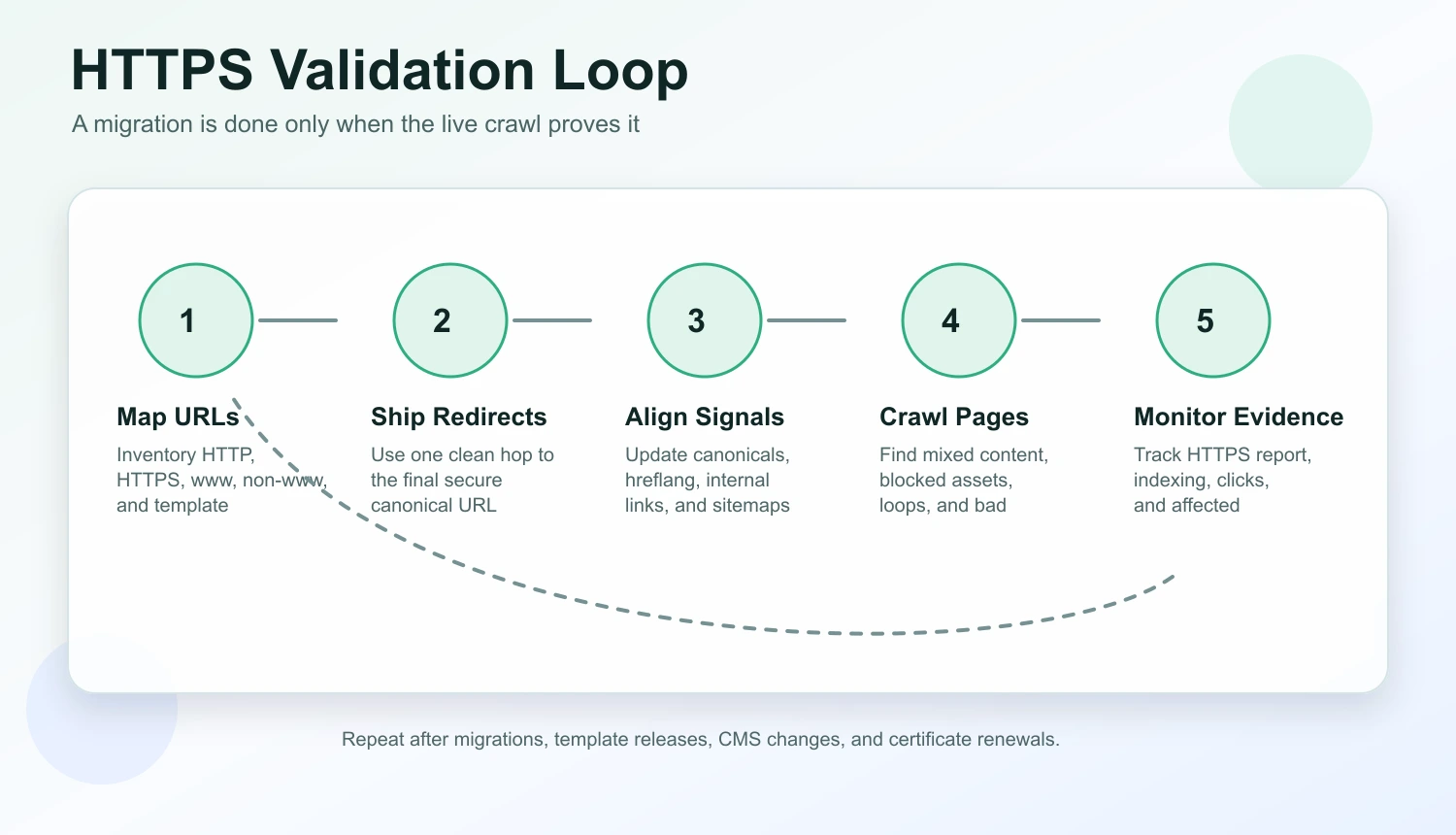
Run this loop for migrations, template releases, CMS changes, and certificate renewals:
- Save a baseline crawl with HTTP and HTTPS variants.
- Map each important HTTP URL to the intended final HTTPS URL.
- Ship redirect, canonical, sitemap, hreflang, and internal-link changes together where possible.
- Re-crawl the rendered site and compare final URLs, status codes, canonicals, and asset paths.
- Inspect a sample of important pages in Search Console.
- Monitor the HTTPS report, indexing coverage, and page-level performance.
- Record which rules changed so future releases do not reintroduce protocol drift.
Do not panic over short-term fluctuations during a migration window. Do move quickly when the evidence shows a systematic mismatch, such as HTTP canonicals on every product page or sitemap entries that contradict the redirect target.
Common HTTPS SEO Problems And Fixes
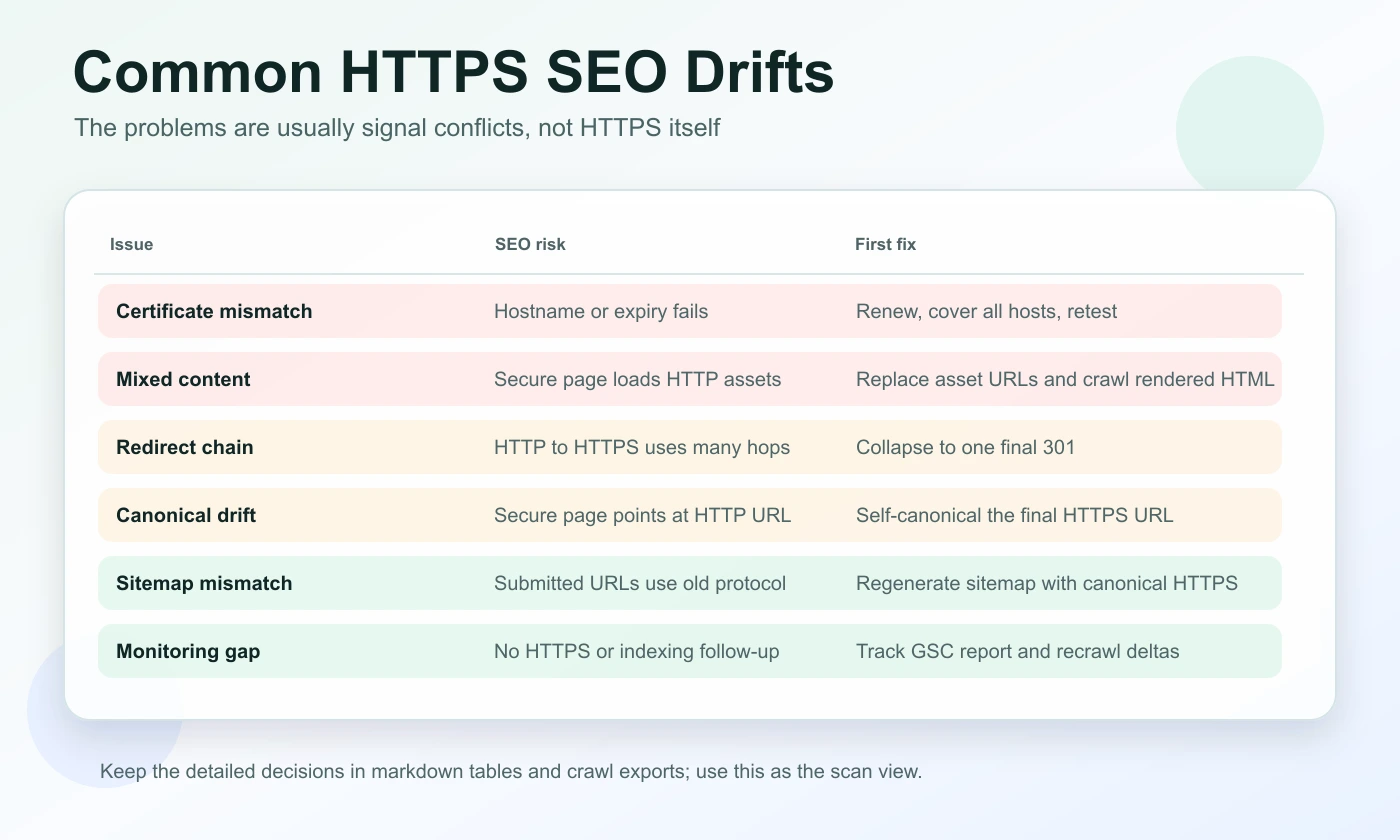
Most HTTPS SEO problems are not caused by HTTPS itself. They are caused by inconsistent signals around the secure URL.
| Problem | SEO risk | Fix path |
|---|---|---|
| Certificate mismatch or expiry | Users and crawlers may hit warnings or inaccessible pages | Renew early, cover all hostnames, and monitor expiry |
| Mixed content | Rendered pages may lose assets or trust signals | Replace HTTP asset paths and crawl rendered HTML |
| Redirect chains | Crawlers waste hops and signals become harder to audit | Collapse chains and remove legacy protocol steps |
| HTTP canonical tags | Preferred URL points at the insecure version | Update canonical logic and re-crawl templates |
| HTTP sitemap URLs | Search engines receive stale discovery signals | Regenerate sitemaps and confirm canonical URLs |
| Hreflang protocol mismatch | Locale clusters can break or point at old URLs | Update every alternate and validate return links |
| Internal links to HTTP | The site keeps rediscovering old protocol variants | Update templates, navigation, body links, and breadcrumbs |
| No monitoring after launch | Teams miss drift until traffic or indexing changes | Track HTTPS coverage, indexing, clicks, and crawl deltas |
This is also where AI-search readiness enters the workflow. AI answer systems do not need a special HTTPS trick, but they do benefit from pages that load reliably, keep canonical identity stable, and present consistent facts across snippets, metadata, and visible content.
Where Searvora Fits
Searvora SEO Spider Crawler is the right fit when HTTPS work needs to move from a checklist to an evidence-backed fix queue. Use it to crawl final URLs, status codes, redirects, canonicals, hreflang, metadata, internal links, sitemaps, image references, and rendered page output before and after the release.
The product angle is simple: HTTPS issues become easier to fix when they are grouped by template, page type, severity, and validation status. A certificate warning is an infrastructure task. A redirect chain is an engineering rule. An HTTP canonical on every article is a template fix. A stale sitemap is a publishing workflow problem.
After the crawl, connect the evidence to monitoring. Search Console can show HTTPS and indexing signals, while Searvora's broader SEO operating workflow can help route the resulting tasks into a weekly action queue.
HTTPS for SEO is not about chasing a tiny ranking factor. It is about keeping the secure version of every important page consistent, discoverable, and measurable. Get the certificate right, align the signals, crawl the rendered output, and keep monitoring after launch.