

SEO metrics are useful only when they change what the team does next. Clicks, impressions, rankings, indexed pages, links, Core Web Vitals, and AI-search visibility can all matter, but none of them should live as isolated reporting numbers.
The practical way to choose SEO metrics to track is to group them by the decision they support: demand, snippet performance, access, authority, experience, AI visibility, and revenue context. Then every metric needs an owner, a fix path, and a validation check.
Start With The Decision Each Metric Should Trigger
Most SEO dashboards get noisy because they mix health checks, growth signals, vanity numbers, and executive reporting into one table. Start by asking what decision a number should trigger.
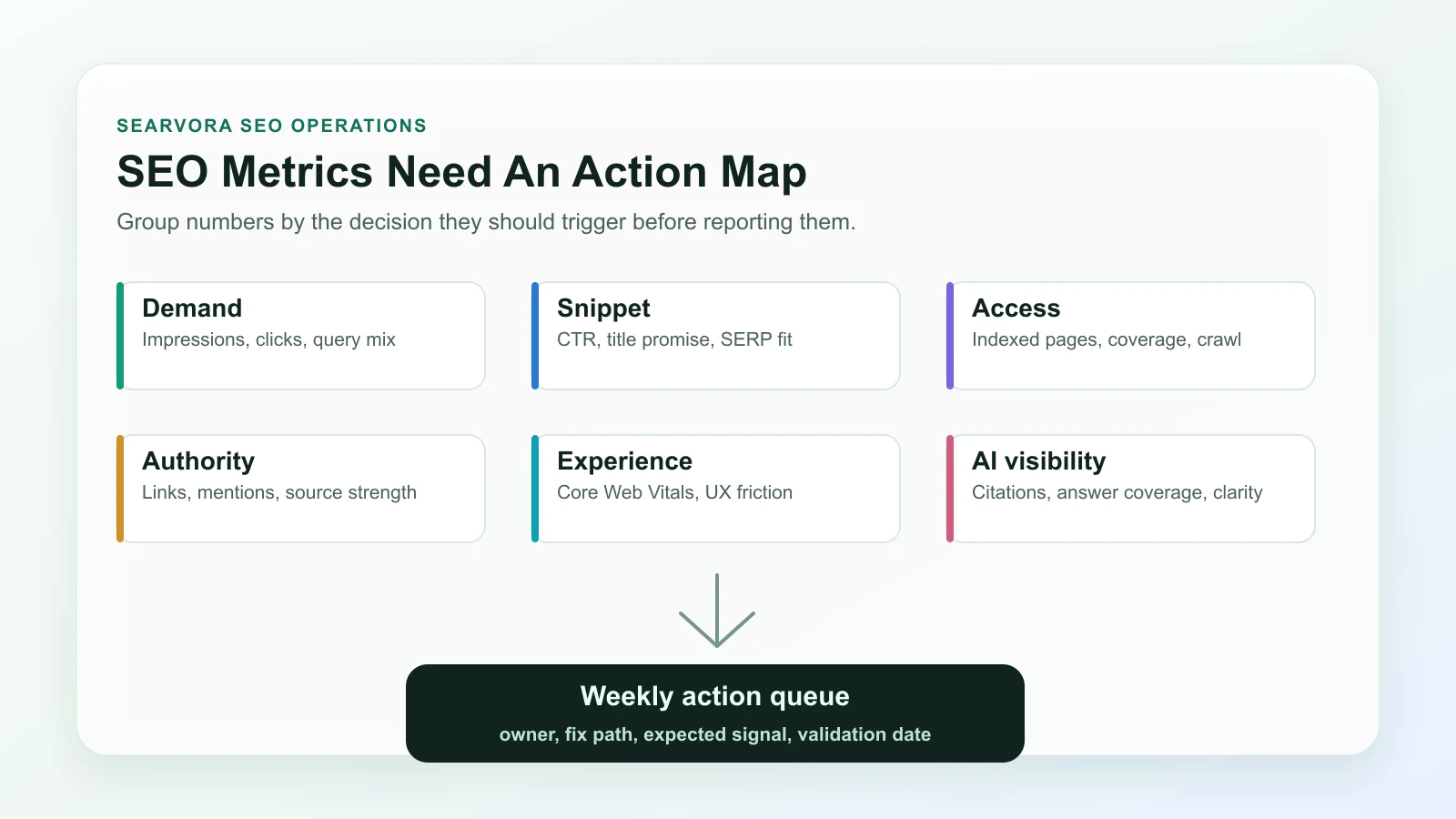
| Metric group | What it tells you | Action it should trigger |
|---|---|---|
| Demand | Whether searchers still look for the topic | Expand, refresh, consolidate, or monitor |
| Snippet performance | Whether the result promise earns clicks | Rewrite title, description, intro, or page angle |
| Access | Whether search systems can discover and index the page | Fix crawl, canonical, sitemap, robots, or internal links |
| Authority | Whether the page has enough trust and references | Improve internal links, citations, mentions, or source depth |
| Experience | Whether technical UX limits usefulness | Prioritize template, performance, or rendering fixes |
| AI visibility | Whether answer systems can understand and cite the page | Add clearer definitions, tables, examples, and evidence |
| Revenue context | Whether the page supports business outcomes | Change CTA, route intent, or prioritize the page higher |
This framing keeps reporting honest. A page with rising impressions and falling CTR has a different problem from a page with clean snippets but indexing loss. A ranking win that does not support revenue, qualified demand, or authority may still be low priority. A small technical page can deserve attention if it protects a product cluster.
Track Demand Before You Rewrite Pages
Demand metrics show whether the market still asks for the topic and whether your page is visible for the right query family.
Use these first:
| Metric | Read it as | Watch out for |
|---|---|---|
| Impressions | The query family still has exposure potential | A rise can come from broader but less relevant queries |
| Clicks | The page is receiving demand, not only visibility | Clicks can fall because of SERP layout, not only ranking |
| Query mix | The page is being matched to the right jobs | Mixed intent may mean the page type is drifting |
| Page and directory trend | The issue is isolated or template-wide | Sitewide averages can hide section-level losses |
Google's Search Console performance report is the baseline source for comparing queries, pages, countries, devices, clicks, impressions, CTR, and average position. Use it by segment instead of only looking at the whole property.
If demand is healthy but the page is underperforming, check search intent in SEO before rewriting. The page may need a different asset type, not more copy.
Separate Rankings From Snippet Performance
Rankings are useful, but they are incomplete. A page can hold a decent average position and still fail because the title is vague, the description does not match the query, or the SERP now gives more space to product, video, local, or AI results.
Track these snippet metrics together:
| Metric | Useful question | Next action |
|---|---|---|
| Average position | Is visibility improving or slipping for the target query set? | Inspect affected queries and pages before changing the page |
| CTR | Does the result promise earn the click it should? | Compare title, description, H1, and intro against the query |
| High impressions with low clicks | Is the page shown but not chosen? | Rewrite the snippet promise or route to a better page type |
| Title and description rewrites | Are search systems replacing your promise? | Align title, H1, body, anchors, and visible page evidence |
Do not optimize CTR in isolation. A punchier title that attracts the wrong visitor can make the page look better in one chart and worse in revenue or engagement context. The useful goal is query-to-page fit.
Watch Indexing And Crawl Health As Growth Metrics
Technical SEO metrics are not only engineering health checks. They explain why a page that should win never enters the race.
Track:
- Indexed canonical URLs by template or directory.
- Important pages excluded from indexing.
- Sitemap URLs that are not valid canonical destinations.
- Crawled URLs with status, redirect, canonical, or robots conflicts.
- Internal links pointing at redirected, blocked, or non-canonical pages.
- Pages with missing or mismatched title, H1, description, and schema signals.
Google's Page indexing report is useful for finding indexing state at scale, but it should be paired with a crawl. A search console report can say which URLs are affected; a crawl helps explain whether the issue came from templates, canonicals, internal links, redirects, or sitemap logic.
This is where a content audit becomes stronger. Performance data tells you where to look. Crawl data tells you whether the page is eligible, understandable, and internally supported.
Add Authority And AI-Search Visibility Signals
Classic authority metrics still matter, but AI-search visibility adds a newer layer. The question is not only whether a page has links. It is whether the page is clear, specific, and structured enough to be summarized or cited.
Track authority and AI visibility with a practical lens:
| Signal | Why it matters | Improvement path |
|---|---|---|
| Referring domains and relevant mentions | Shows whether external sources trust or reference the page | Improve source quality, examples, and link-worthy sections |
| Internal link support | Helps crawlers and readers understand page importance | Add descriptive links from related hubs and product pages |
| Entity clarity | Helps search and AI systems understand the topic and task | Define concepts early and use consistent names |
| Extractable evidence | Makes the page easier to summarize accurately | Use tables, steps, examples, and official-source links |
| AI answer coverage | Shows whether answer systems include or omit the brand/topic | Add clearer answer blocks, comparison criteria, and cited proof |
AI-search visibility should not become a vague score. Treat it as a clarity test. If a page cannot state the task, evidence, steps, and next action plainly, it is probably weaker for traditional search too.
For broader visibility systems, the GEO SEO foundations workflow is the natural companion. It connects search visibility, answer readiness, and operational validation.
Use Experience Metrics Only With Page Context
Core Web Vitals, rendering health, accessibility signals, and mobile usability can explain performance problems, but they should be read by template and page role.
The Core Web Vitals documentation defines the current user-experience metrics Google recommends tracking. For SEO operations, the important question is whether a performance issue affects pages with real search value or a template that supports many important URLs.
Use this triage:
| Situation | Priority |
|---|---|
| Product, category, article hub, or lead page has poor experience metrics | High |
| One low-demand utility page has a minor issue | Low |
| A whole template has weak mobile or rendering behavior | High if the template owns search demand |
| Experience is good but clicks are falling | Look at intent, snippet, or demand before performance |
| Experience improves but search traffic does not move | Check indexation, links, content fit, and SERP changes |
Experience metrics are useful when they explain a fix. They are less useful when they become a generic score nobody can assign.
Build A Weekly SEO Metrics Review
The goal is not to watch more numbers. The goal is to turn the right numbers into a weekly operating rhythm.
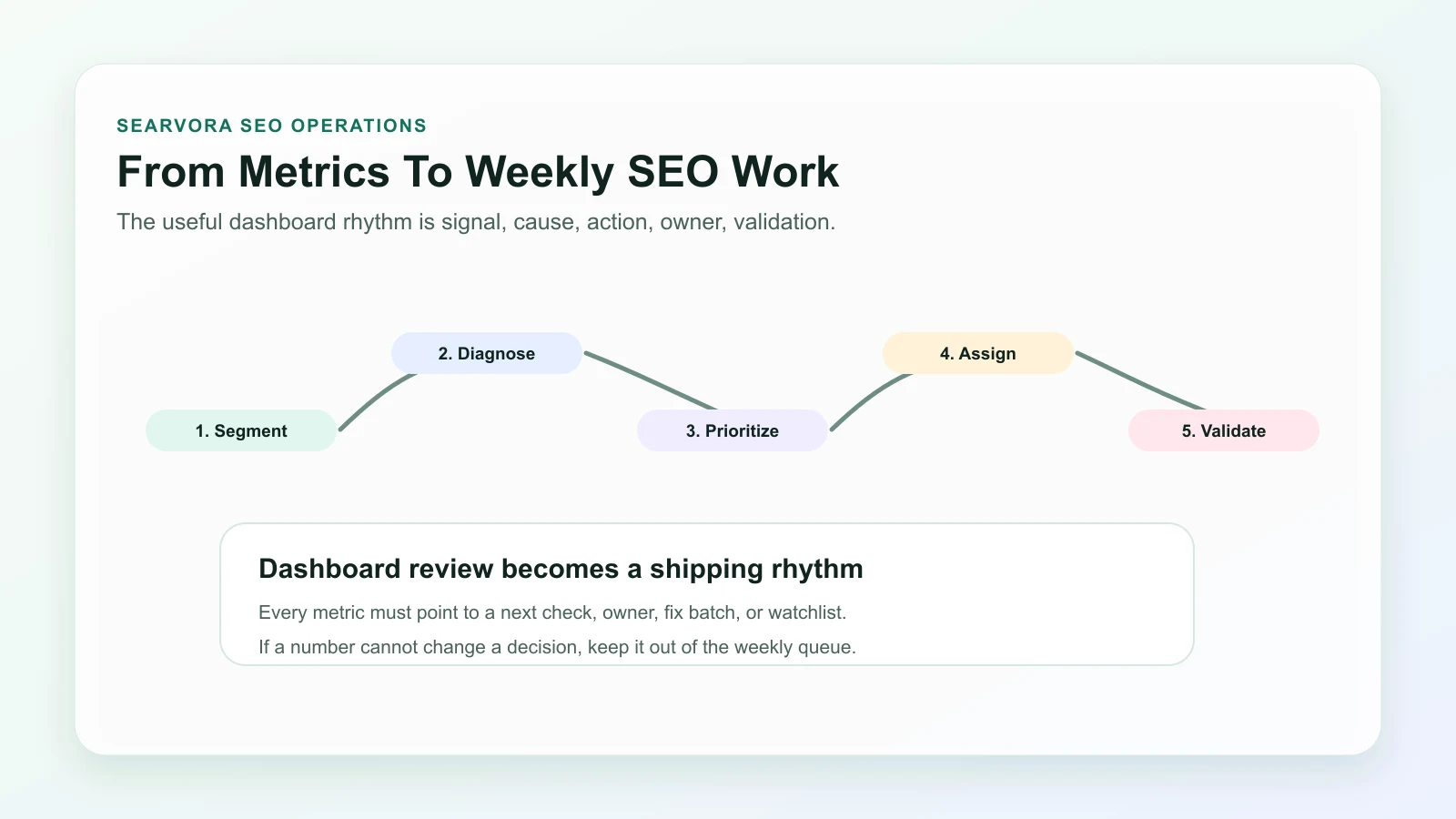
Run the review in this order:
- Segment pages by type, directory, locale, product area, and funnel role.
- Find outliers in demand, CTR, index coverage, authority, experience, and AI visibility.
- Diagnose whether the cause is content, technical, SERP, seasonality, or business context.
- Prioritize by upside, confidence, effort, risk, and owner availability.
- Assign one next action per affected URL group.
- Define the expected metric change before the work ships.
- Re-check the segment after crawl, indexing, and reporting windows have enough data.
- Record the decision so the next review does not rediscover the same issue.
| If the metric says | The next question is | Likely owner |
|---|---|---|
| Impressions up, CTR down | Did the snippet or intent fit weaken? | SEO or content |
| Indexed pages down | Which template, sitemap, canonical, or robots rule changed? | SEO or engineering |
| Rankings split across similar URLs | Are two pages serving the same job? | SEO or content |
| AI visibility missing | Is the page specific enough to summarize and cite? | Content or strategy |
| Revenue pages flat despite traffic | Is the CTA, page type, or internal route wrong? | Growth or product |
Where Searvora Fits
Searvora AI SEO Dashboard fits the review layer of this workflow. The local product page positions it around page-type and locale monitoring, anomaly detection, opportunity scoring, cross-team reporting, and action queues. That is the difference between passive reporting and an SEO operating cadence.
Use the dashboard to group pages the way the team actually works: article hubs, product pages, ecommerce pages, localized routes, technical templates, and high-value directories. Then turn metric movement into a queue that names the affected segment, likely cause, owner, expected outcome, and validation date.
SEO metrics to track should make the next decision clearer. Keep the numbers that help you diagnose, prioritize, assign, and validate. Move the rest out of the weekly review until they can change real work.