

Search intent in SEO is the job behind a query. The reader might want a definition, a comparison, a tool, a product page, a local result, or a fix. If the page type does not match that job, stronger writing will not save the page.
The practical goal is to route each query to the right asset before you write or optimize. Start with the query pattern, confirm the user job, choose the page type, check whether an existing URL already owns the same job, then validate the page with crawl and performance signals after it ships.
Start With The Job Behind The Query
Classic intent labels are useful, but they are too broad for production work. "Informational" can mean a glossary definition, a strategic guide, a troubleshooting article, a comparison table, or a parent hub. "Commercial" can mean a roundup, a product alternative, a pricing page, or a vendor support task.
Use the first pass to translate the query into a user job:
| Query signal | Likely user job | First page-type question |
|---|---|---|
| "what is", "meaning", "examples" | Understand a concept | Is this a short explainer, a parent article, or a glossary entry? |
| "how to", "check", "fix" | Complete a task | Does the reader need steps, diagnostics, or a tool? |
| "best", "tools", "software" | Compare options | Can you produce a real roundup with criteria and evidence? |
| "vs", "alternatives", "review" | Choose between products | Can you compare fairly from public facts? |
| "template", "calculator", "generator" | Get an output | Should this be a downloadable asset or tool page? |
| Brand plus pricing, login, support, or tutorial | Solve a brand-specific task | Is it your brand, a fair intercept, or irrelevant navigation? |
This is why search intent belongs upstream from drafting. It decides whether the brief should become a blog post, product page, tool, comparison, hub, update, or no page at all.
Route Intent To The Right Page Type
Once the job is clear, pick the asset type. The same keyword family can support several pages, but each page should have a distinct role.
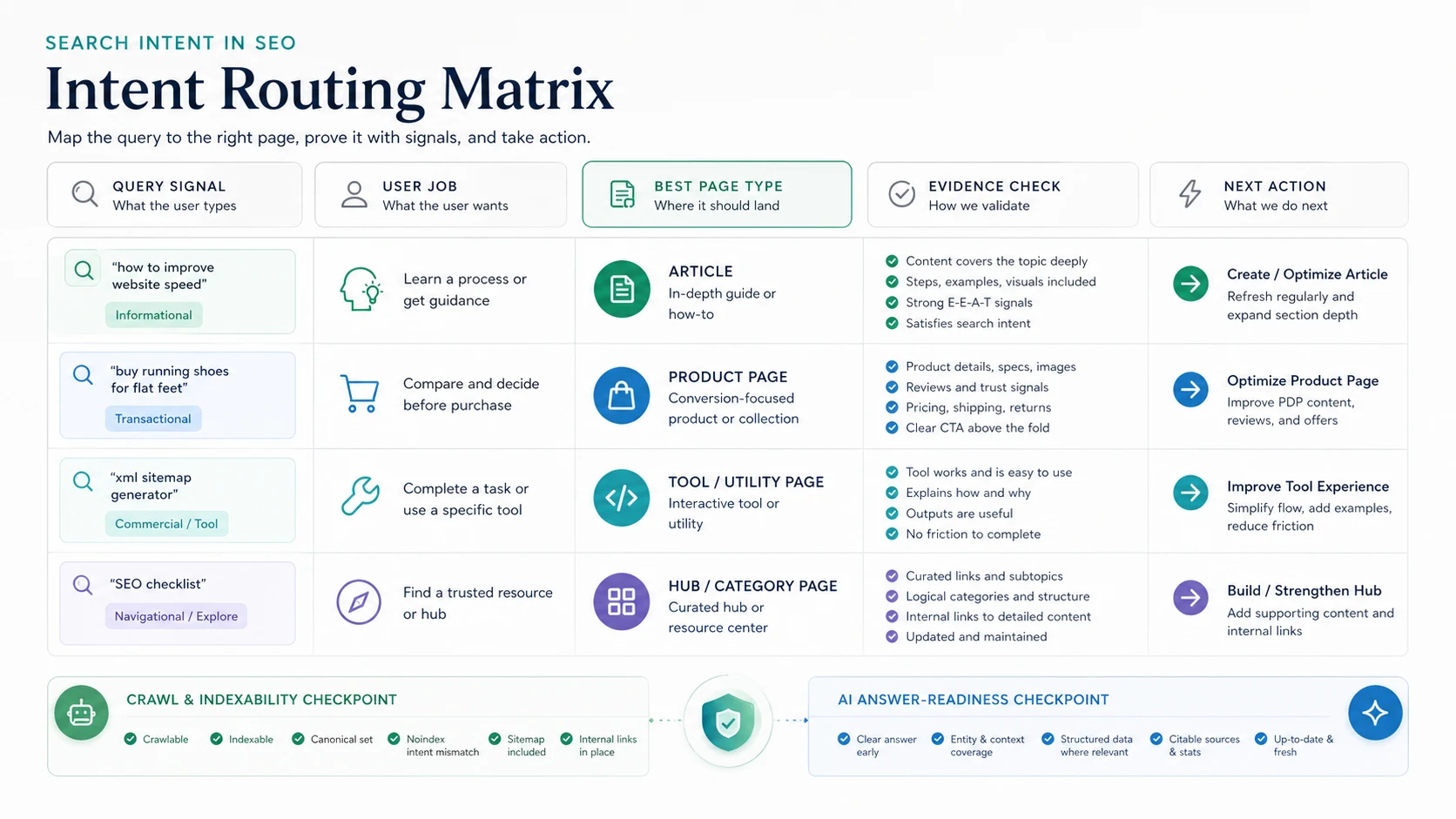
Use this routing model:
| Intent evidence | Better page type | Why it fits |
|---|---|---|
| The reader needs a definition plus examples | Explainer article | The page can answer quickly and route to deeper tasks |
| The reader needs step-by-step execution | How-to article | Steps, checks, screenshots, and validation matter |
| The reader needs to compare vendors or tools | Roundup or comparison | Criteria and tradeoffs matter more than theory |
| The reader expects an interactive output | Tool or template page | Advice alone will underserve the task |
| The topic has many child tasks | Hub article or resource hub | The parent page should organize the cluster |
| An existing URL already serves the same job | Refresh existing page | Protects authority and avoids needless overlap |
Google's SEO starter guide is a useful baseline here because it frames SEO as helping search engines understand content and helping users decide whether to visit. Intent routing turns that baseline into a production decision.
Separate Similar Topics From True Cannibalization
Search intent work often gets stuck because every related page looks risky. The stricter test is better: a new page is cannibalizing only when it targets the same core keyword, same page type, and same user job as an existing URL.
A keyword research workflow can mention intent because intent helps route ideas. A search intent article can go deeper on page-type choice, overlap rules, and validation. Those are adjacent jobs, not the same job.
Use this overlap test before writing:
| Question | Duplicate risk rises when | It is probably safe when |
|---|---|---|
| Core keyword | Both URLs target the same primary phrase | One page targets a child or adjacent concept |
| Page type | Both are the same asset format | One is a product page, hub, article, or tool |
| User job | Both solve the same reader task | One educates, one compares, one executes, or one supports |
| Information gain | The new page adds no sharper framework | The new page adds a better workflow, table, evidence, or validation step |
For difficult overlap calls, pair this article with the keyword cannibalization workflow. The useful question is not "are these topics related?" The useful question is "would the same searcher need both pages for different reasons?"
Build The Evidence Layer Before Drafting
Intent should be inferred from more than a phrase. A query gives the first hypothesis. The competitor page, SERP shape, existing URL inventory, and crawl data should confirm whether that hypothesis is safe.
Use this evidence stack:
| Evidence source | What it confirms | Planning mistake it prevents |
|---|---|---|
| Query modifier | The first likely user job | Treating every keyword as a blog post |
| Competitor URL and title | The page shape already attracting traffic | Copying a page without understanding why it ranks |
| Existing Searvora URLs | Whether you should create, refresh, merge, or link | Same-job cannibalization |
| Crawl and indexability data | Whether the intended URL can be discovered and measured | Optimizing a blocked or non-canonical page |
| Search Console data | Which queries and pages already have traction | Missing refresh opportunities |
| AI-search clarity | Whether the answer can be summarized, cited, and trusted | Publishing vague content that is hard to extract |
The Search Console performance report can help validate existing queries, pages, countries, devices, and search appearances before you decide whether to refresh or create. Google's guidance on helpful, reliable, people-first content is also a useful quality check because it pushes the page toward original value instead of a rewrite of what already ranks.
Validate Intent Before You Publish
Intent matching is not finished when the outline looks right. Validate the live page path, the crawl state, and the content evidence before the page becomes part of the indexable site.
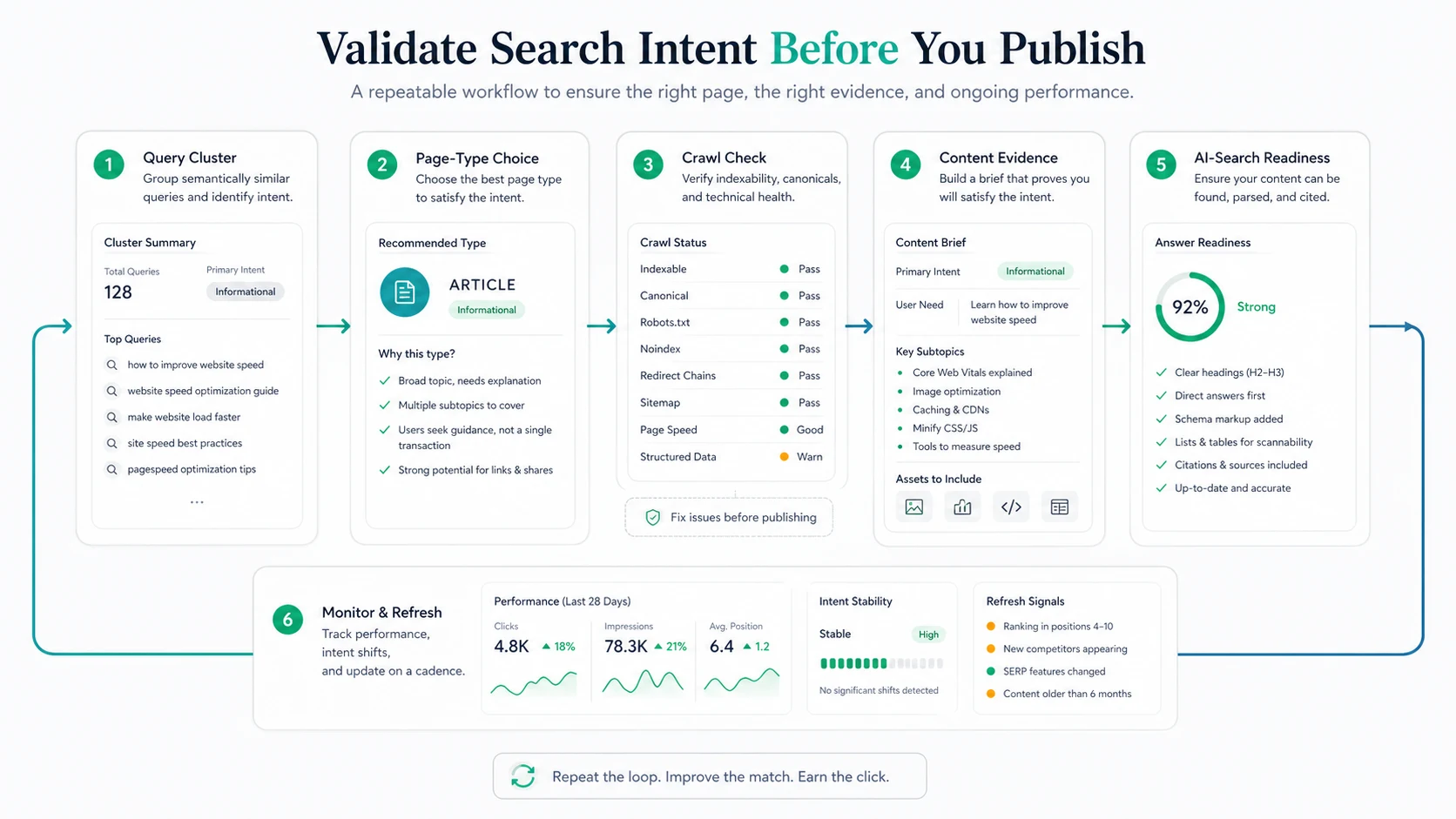
Run this validation sequence:
- Group the target query with close variations and remove unrelated meanings.
- Write the user job in one sentence.
- Choose the page type and explain why a different type would be weaker.
- Check existing URLs for same-keyword, same-type, same-job overlap.
- Confirm the target page can be crawled, indexed, canonicalized correctly, and internally linked.
- Build the brief around evidence the reader needs, not just sections competitors used.
- Make the first section answer the query directly.
- Add a table, checklist, examples, or screenshots where the decision needs proof.
- Re-check performance and query mix after the page has enough data.
This keeps search intent from becoming a one-time label in a content brief. It becomes a quality gate that protects page architecture, SEO measurement, and reader trust.
Make The Page Ready For AI Search Too
AI answer systems make intent clarity more important, not less. A page that wanders between definition, sales pitch, checklist, and unrelated subtopics is harder to summarize and cite.
Use this AI-search readiness check:
| Check | What good looks like |
|---|---|
| Direct answer | The intro defines the topic and the practical next step |
| Entity clarity | The page names the concept, page types, tools, and sources plainly |
| Extractable structure | Tables and lists carry the decision logic in text, not only in images |
| Evidence | Claims are grounded in public sources, product pages, or observable page signals |
| Internal links | Related pages support the reader's next job without repeating the same job |
| Refresh path | The page can be monitored for query drift, SERP changes, and stale examples |
This is also where Geo SEO foundations become practical. AI visibility is not won by adding a few buzzwords. It improves when the page is clear enough for humans, crawlers, and answer systems to understand the same promise.
Where Searvora Fits
Searvora fits when search intent decisions need to become assigned work. The AI SEO consultant is the natural product layer for this topic because it is positioned around diagnosis, prioritization, fix-ready guidance, and execution alignment.
Use it to turn mixed signals into a queue:
- Classify related queries by user job and likely page type.
- Flag pages that should be created, refreshed, merged, or left alone.
- Connect crawl and dashboard evidence to the content decision.
- Give writers and SEO owners a short brief with the information gain, internal links, visual needs, and validation plan.
For page-level improvements after the intent decision is made, the on-page SEO workflow is the next companion. It turns the chosen page job into title, H1, content, links, schema, media, and recrawl checks.
A Practical Search Intent Checklist
Use this checklist before creating or refreshing a page:
- Name the primary query and close variants.
- Write the user job in one sentence.
- Identify the expected page type from the query, competitor page, and existing inventory.
- Check whether the job is already covered by a same-keyword, same-type, same-job URL.
- Decide whether the work is create, refresh, merge, support, or ignore.
- Define the information gain before outlining.
- Confirm crawlability, canonical, sitemap, and internal-link support.
- Add the evidence the reader needs to trust the answer.
- Make the intro answer the query quickly.
- Include structured tables or lists that make the decision extractable.
- Monitor query mix and performance after publishing.
- Refresh the page when the SERP, product context, or reader task changes.
Search intent in SEO is not a label you add after keyword research. It is the routing decision that determines what page should exist, what evidence it needs, and how the team will know whether it worked.