

Low competition keywords are search queries that look realistic for your site to win sooner than harder head terms. The mistake is treating "low competition" as a score you can trust by itself. A keyword is only useful when the SERP shape, page type, existing site coverage, crawl readiness, and post-publish validation all line up.
The Ahrefs article that surfaced this opportunity explains how to find easier keyword targets with difficulty filters. Searvora's information gain is the approval workflow around that idea: use difficulty as a starting signal, then decide whether the keyword deserves a new page, a refresh, a supporting section, or no work at all.
Start With The Search Job
Before filtering by score, write the job behind the keyword in plain English. "Low competition" is not the job. The job may be finding a checklist, choosing a tool, learning a definition, fixing a crawl issue, comparing products, or locating a template.
Use this first pass:
| Keyword pattern | Likely reader job | First approval question |
|---|---|---|
| "how to..." | Complete a workflow | Can we show steps and validation checks? |
| "best", "tools", "software" | Compare options | Can we verify enough options for a real roundup? |
| "what is..." | Understand a concept | Can we add examples and operational next steps? |
| "template", "generator", "checker" | Get an output | Should this be a tool or downloadable asset instead of a post? |
| Brand or pricing terms | Evaluate a product | Can we answer fairly without pretending to be the brand? |
This keeps your keyword research workflow from approving easy-looking phrases that need the wrong asset. A keyword can be low competition and still be a poor fit if the searcher wants a calculator, a directory, or a product page.
Build A Low Competition Keyword Filter
A useful filter combines demand, ranking feasibility, page-type fit, and execution readiness. Start broad enough to find opportunities, then narrow the list only when each filter adds evidence.
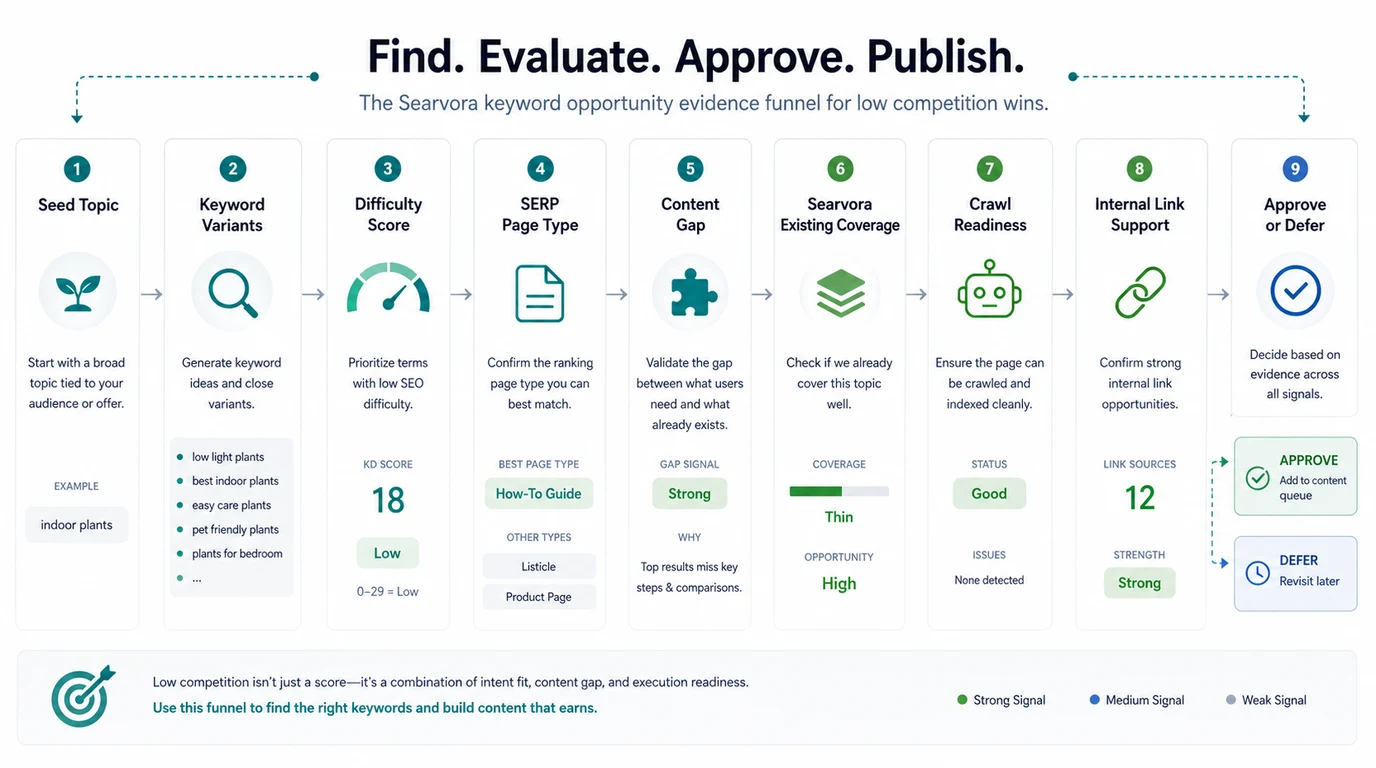
Use this sequence:
- Start with seed topics tied to your audience, product, or support demand.
- Expand the phrase family with keyword tools, competitor URLs, Search Console queries, and related searches.
- Filter for lower difficulty or weaker competing pages.
- Check whether the SERP rewards articles, tools, product pages, forums, directories, or local results.
- Compare the opportunity against existing Searvora coverage.
- Confirm the page can be crawled, indexed, internally linked, and measured.
- Approve the brief only if the information gain is better than the current winners.
Difficulty matters, but it is only one lane in the filter. A keyword with modest volume and clear intent can be better than a bigger phrase where every result already satisfies the same user task.
Treat Difficulty As A Risk Signal
Keyword difficulty scores are useful because they compress backlink and ranking signals into something planners can scan. They are dangerous when the number becomes the strategy.
Read the score this way:
| Difficulty signal | What it may mean | What to check next |
|---|---|---|
| Low score | Fewer strong competitors or weaker link profiles | Whether the SERP page type matches your planned asset |
| Low score with forum-heavy SERP | Users may want candid examples or troubleshooting | Whether Searvora can add evidence, not just a polished answer |
| Low score with tool results | The query may want an output | Whether a tool, template, or landing page is the better page |
| Medium score with weak content | There may be room for a stronger workflow | Whether your page can add a better framework and internal support |
| High score with a narrow child query | The parent may be hard, but the child job is reachable | Whether the child page avoids same-job cannibalization |
For a deeper scoring model, use keyword difficulty as a warning label, not as a pass/fail gate. The useful decision is not "KD is 18." It is "this query deserves a how-to article because the SERP is instructional, our existing pages do not own the same job, and we can validate the page after launch."
Use SERP Fit Before You Write
Low competition keywords often fail because the planned content format does not match the SERP. If the top results are tools, a blog post has a weaker path. If the results are beginner guides, a narrow product page may not answer enough. If the results are forums, the article needs practical examples and clearer tradeoffs.
Check these SERP signals before assigning the brief:
| SERP signal | Safer interpretation | Planning action |
|---|---|---|
| Multiple how-to articles | The query likely supports a workflow post | Put steps and validation early |
| Product or tool pages dominate | The user wants an output or purchase decision | Consider landing, tool, or comparison page |
| Forums and Q&A results rank high | The user wants lived details or unresolved edge cases | Add concrete examples, caveats, and decision rules |
| The top pages are all broad guides | A child angle may be stronger | Narrow the keyword or build a supporting section |
| AI answer or featured snippet summarizes the basics | Generic definitions are not enough | Add tables, process evidence, and implementation detail |
For this approved topic, the US/en SERP check showed independent how-to intent around finding low-competition keywords, not merely a generic keyword difficulty definition. That is why this article is safe as a new child page instead of a refresh of the existing difficulty guide.
Check Existing Coverage For Same-Job Overlap
A keyword can be easy and still create cannibalization if your site already has the same page for the same task. The test should be strict: same core keyword, same page type, and same user job.
Parent-child overlap is not enough to reject a good keyword. A broad keyword research article can link to a low competition keyword workflow. A difficulty article can explain the score. A page about low competition keywords can focus on the approval filter that decides whether an easy-looking term deserves work.
Use this table before approving the page:
| Existing Searvora page | Relationship | Action |
|---|---|---|
| Same keyword, same how-to task | True duplicate | Refresh or merge the existing URL |
| Same cluster, broader parent job | Helpful parent | Create the child page and link both ways |
| Same cluster, different decision point | Adjacent support | Link naturally without rewriting the same section |
| Product page owns commercial intent | Different page type | Add support content or route to the product page |
| No close URL exists | New opportunity | Approve only if information gain and validation are ready |
For this topic, keyword mapping helps assign query groups to owner URLs, while this page focuses on finding and validating lower-competition opportunities before the mapping decision is final.
Score The Opportunity Before Assigning A Brief
Once the keyword passes the basic filter, score it as work. This prevents low competition keywords from becoming a pile of easy but thin articles.
| Lane | Pass condition | Warning sign |
|---|---|---|
| Intent confidence | The keyword points to one primary job | Mixed tutorial, tool, local, and product intent |
| SERP fit | The planned page type matches the winning results | The brief says article while the SERP wants a tool |
| Business fit | The topic supports SEO, GEO, content ops, crawl validation, or reporting | Traffic would not help Searvora's audience |
| Information gain | The page adds a better workflow, table, example, or validation loop | The page only rewrites the current winners |
| Site support | Related pages can link naturally to the new URL | The page would launch orphaned |
| Technical readiness | The page can be indexed, rendered, and measured | The template or route creates crawl friction |
This is where "low competition" becomes operational. A weak score in one lane does not always mean reject. It may mean narrow the query, update an existing URL, build a tool page, or wait for better product support.
Validate The Page After Publishing
The best low competition keyword process does not end when the article is published. It ends when the team can see whether the page was crawled, indexed, linked, cited, and improved.
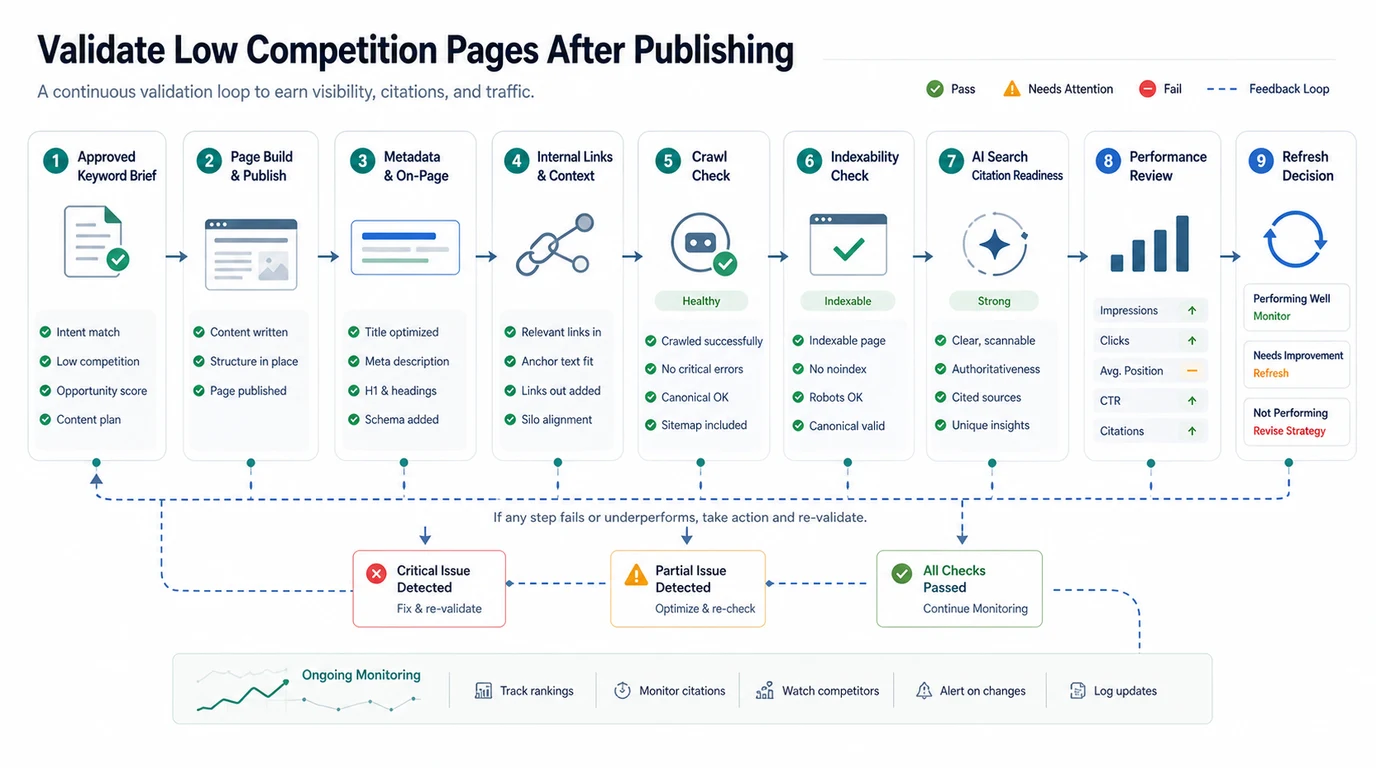
Use this validation loop:
- Confirm the final URL, title, H1, description, canonical, and schema are aligned with the approved job.
- Add internal links from the parent article, related child pages, and the most relevant product page.
- Crawl the URL to check indexability, canonical behavior, image paths, metadata, and broken links.
- Submit or refresh sitemap discovery when needed.
- Monitor impressions, clicks, ranking movement, and AI-search citation signals.
- Revisit the page after the first data window and decide whether to strengthen, link, refresh, merge, or stop.
This is the difference between an easy keyword and a shipped SEO asset. Easy keywords still need technical hygiene, internal support, and a review cadence.
Where Searvora Fits
Searvora fits after the keyword list exists, when the team needs to decide what deserves work.
Use the AI SEO consultant to turn difficulty scores, SERP evidence, page-type fit, existing coverage, crawl readiness, and business value into a prioritized action queue. The useful output is a decision your team can ship: create this child article, refresh that parent page, add internal links first, build a tool, or leave the keyword alone.
That matters because low competition keywords are tempting. They make content velocity feel safe. The safer move is to approve fewer pages with clearer jobs, stronger internal support, and a validation plan your team will actually run.
Use This Approval Checklist
Before a low competition keyword becomes a brief, confirm:
- The keyword has one clear user job.
- The SERP supports the page type you plan to build.
- Existing Searvora pages were checked for same-keyword, same-type, same-job overlap.
- The information gain is stronger than a generic keyword difficulty explanation.
- The page can earn at least one natural internal link from a parent or related workflow.
- The URL can be crawled, indexed, rendered, and included in the sitemap.
- The article can be measured after launch with performance and AI-search evidence.
- The final action is create, refresh, merge, tool, landing page, hub, or no action.
Low competition keywords are worth chasing when they lead to better page decisions. Use the score to find possible openings, then let intent, page type, coverage, technical readiness, and validation decide what your team should publish.