

Content briefs are short production specs that tell a writer what job a page must do, what evidence it needs, where it should fit in the site, and how the team will judge whether the draft is ready. A useful brief is not a giant outline. It is the decision layer before the outline.
The Ahrefs content briefs article frames the task around giving writers enough context without drowning them in SEO jargon. Searvora's information gain is the operating workflow around that idea: decide search intent, source evidence, internal links, visuals, product fit, and validation before a draft moves into production.
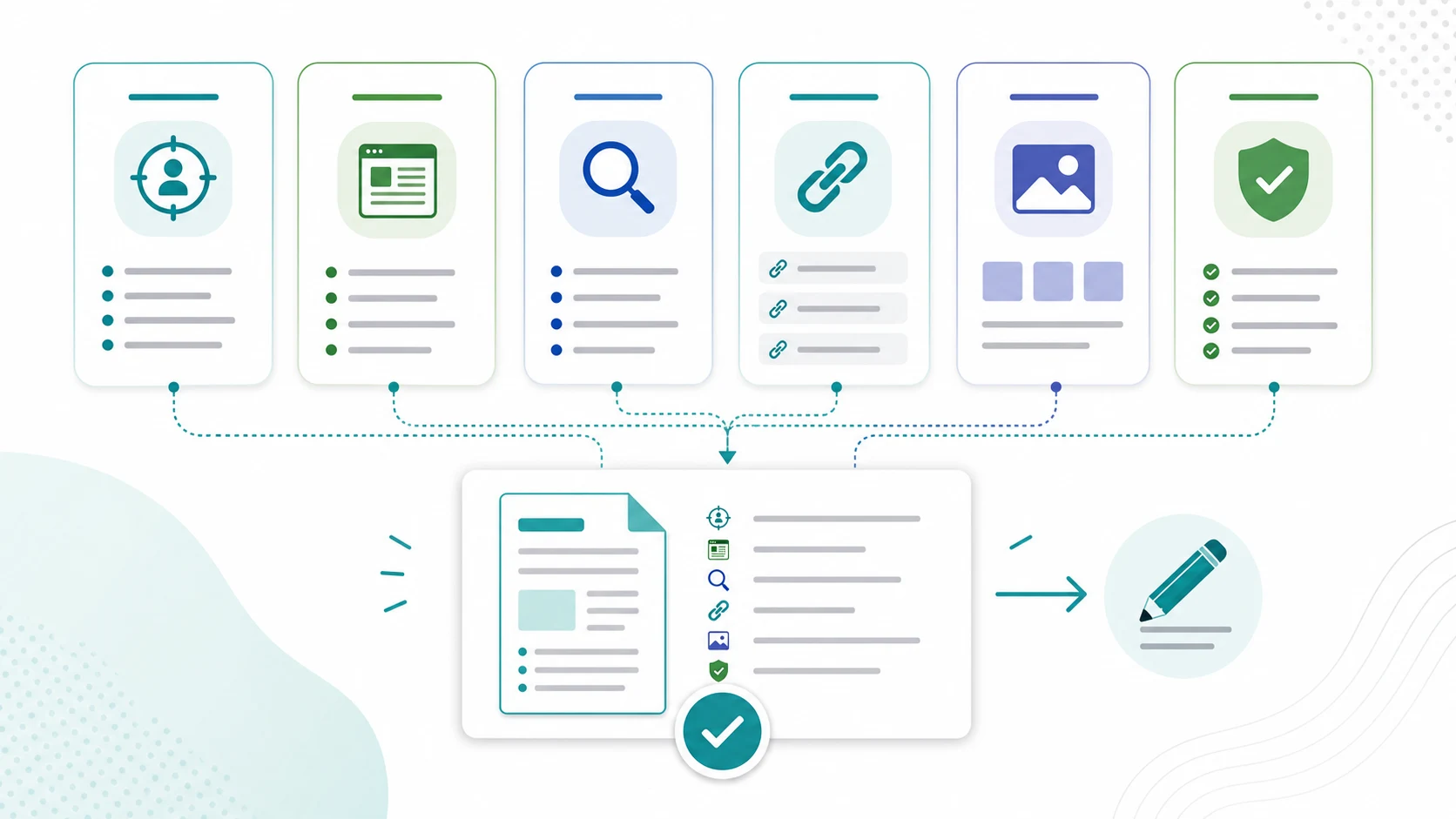
What A Content Brief Should Decide
A content brief should help the team make decisions before writing starts. If it only repeats the keyword and a list of competitor headings, it has not protected the draft from becoming generic.
Use the brief to answer these questions:
| Brief decision | What the writer needs | Why it matters |
|---|---|---|
| Search intent | The reader job, not just the keyword | Keeps the introduction and H2s aligned with the task |
| Page type | Article, hub, landing page, tool, comparison, or refresh | Prevents blog posts from taking work that belongs elsewhere |
| Information gain | The angle Searvora can add | Stops the article from copying a competitor structure |
| Source evidence | Official pages, docs, screenshots, or examples to verify | Keeps claims current and defensible |
| Internal links | One product page and one to three supporting articles | Builds a useful path without anchor stuffing |
| Visual needs | Cover, workflow image, product screenshot, or comparison aid | Makes visual work part of the plan, not a late substitute |
| Validation | Metadata, canonical, links, images, and render checks | Defines what publish-ready means |
Keep The Brief Shorter Than The Outline
The brief should make the outline easier to write, but it should not become the outline itself. A writer still needs room to choose phrasing, examples, transitions, and section flow.
Separate the two documents this way:
| Item | Belongs in the brief | Belongs in the outline or draft |
|---|---|---|
| Primary keyword | Yes | Yes |
| Reader job | Yes | Reflected in the intro and headings |
| Page type | Yes | Reflected in the structure |
| Competitor lesson | One sentence on what to beat | Detailed section planning only when useful |
| Source requirements | Yes | Final citations and screenshots |
| Internal link targets | Yes | Natural anchor placement |
| Visual plan | Yes | Final captions and alt text |
| Section copy | No | Yes |
This is where many content teams slow themselves down. They try to solve strategy, outline, copy, design, links, metadata, and QA in one sprawling document. The better move is to make the brief a clean handoff, then let the draft do the writing work.
For the parent workflow, connect this with the content marketing workflow. The content marketing system decides which topics deserve production. The content brief turns one approved topic into a draftable page.
Build The Brief From Intent And Existing Coverage
Start with search intent, then check whether a new page is actually needed. This is the gate that prevents duplicate articles from entering the queue.
Before approving the brief, record:
- The core keyword and close variants.
- The searcher's task in one plain sentence.
- The expected page type.
- The closest existing Searvora URL.
- Why that existing URL is not enough, or why it should be updated instead.
- The information gain that makes the new page worth writing.
If the answer is vague, the brief is not ready. "Write about content operations" is not a brief. "Create a how-to article for content briefs that helps Shopify and SEO teams turn intent, sources, links, visuals, and validation into a Blogify-ready handoff" is much closer.
The search intent workflow is useful here because it forces the page-type decision upstream. A brief should not ask a writer to discover halfway through drafting that the best answer should have been a product page, a template, or a hub.
Add Sources, Links, And Visuals Before Writing Starts
The brief should list the evidence the draft must use. That does not mean pasting research notes into the article. It means naming the sources that keep the writer from inventing facts.
For SEO and content operations articles, include:
| Evidence type | What to specify |
|---|---|
| Official guidance | Google, Shopify, platform docs, or product help pages that must be checked |
| Competitor source | The page that revealed the opportunity and what it does well |
| Searvora product page | The exact product route that supports the reader's next action |
| Existing articles | Supporting internal links and pages that should not be duplicated |
| Visual evidence | Screenshots or generated workflow visuals needed by section |
| Claims to avoid | Any metric, feature, integration, pricing, or policy that cannot be verified |
Google's guidance on helpful, reliable content is a good baseline for source discipline: the page should be useful for people first, and claims should be grounded enough that a reader can trust the answer. For Shopify teams, the official Shopify blog help page is also worth checking when a brief will become store content.
Visuals belong in the brief too. If the article needs a product screenshot, comparison table, workflow diagram, or source-page image, say that before the draft is assigned. Otherwise visuals arrive late and become decorative instead of useful.
The blog post templates workflow can help when teams keep writing the same article types. Templates are useful only when the brief still states the unique intent, evidence, and information gain for the specific page.
Turn The Brief Into A Blogify Handoff
Blogify fits after the brief has already made the page decision. The product page positions Blogify around Shopify blog drafting, SEO structure, product context, multilingual output, and a draft workflow. That is strongest when the input brief is specific enough for production.
Use this handoff format before sending a brief into Blogify:
| Handoff field | Example instruction |
|---|---|
| Page job | Help SEO operators create content briefs that writers can execute |
| Product context | Blogify supports structured Shopify blog drafting and publishing workflow |
| Required internal links | Link to the product page once and supporting articles only where useful |
| Source constraints | Use official public sources; do not invent hands-on product claims |
| Visual plan | Generated cover, brief anatomy visual, validation loop, and Blogify screenshot |
| Metadata | SEO title, meta description, canonical, keyword, and source type |
| Acceptance criteria | Brief includes intent, page type, evidence, links, visuals, CTA, and validation |
This keeps Blogify from becoming a blank AI prompt. The brief gives the system and the editor a page job, proof boundaries, and quality gates.
Validate The Brief Before Drafting
A good brief has a QA loop before writing begins. That loop is cheaper than fixing a draft that started with the wrong page type, wrong source, or weak angle.
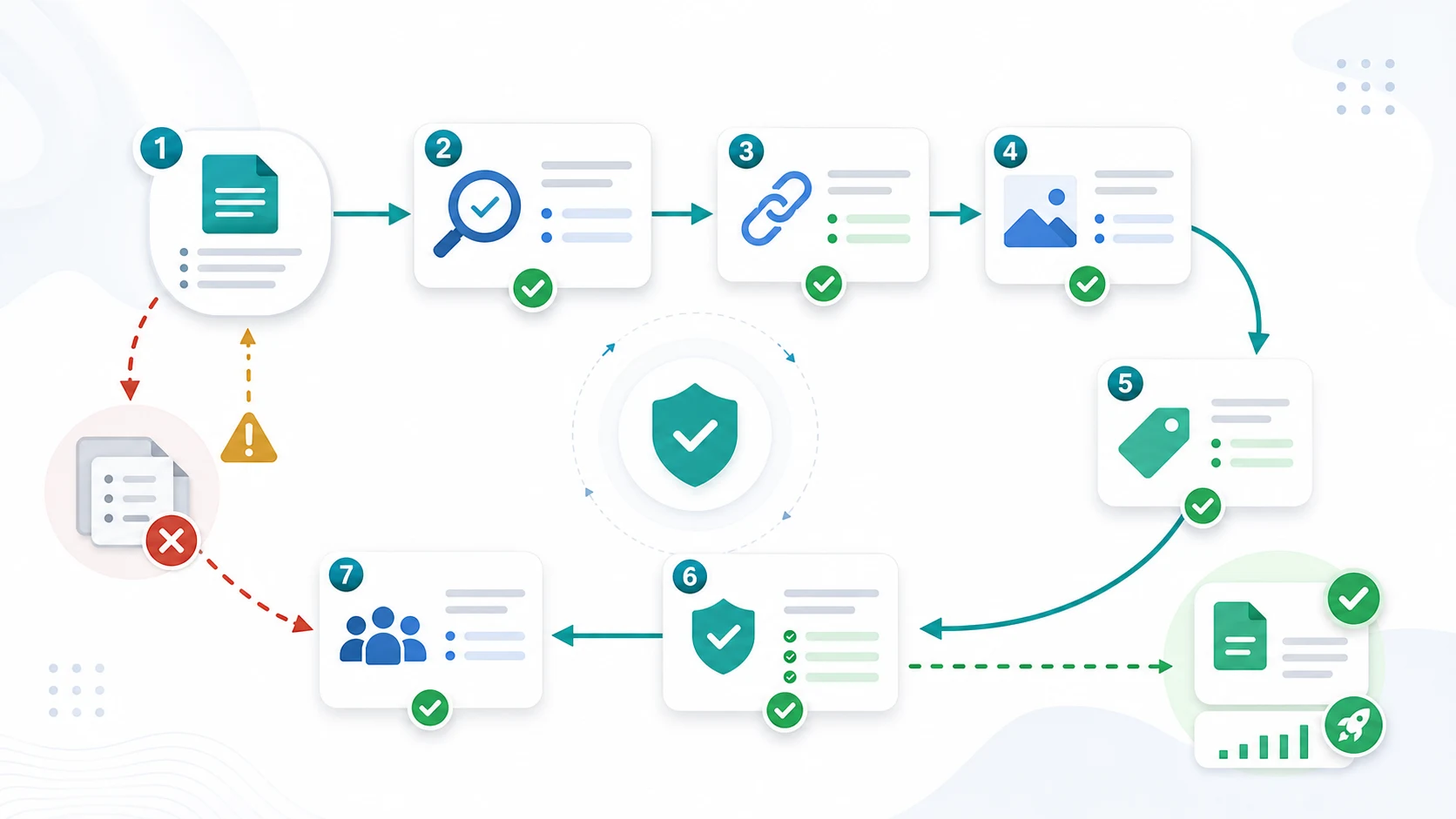
Run this checklist before assigning the draft:
- The primary keyword and reader job are clear.
- The page type matches the search task.
- Existing Searvora pages were checked for the same keyword, page type, and user job.
- The information gain is specific enough to change the article.
- Official sources and screenshot needs are named.
- The brief chooses one primary product CTA.
- Supporting internal links are limited to pages that help the reader.
- The visual plan includes a cover and section-relevant body visuals.
- The meta title, description, canonical, and noindex expectation are known.
- The validation step says how the finished article will be checked.
If a brief fails this list, do not ask the writer to compensate with more words. Fix the brief first. Draft quality starts upstream, and the best content briefs make that upstream decision visible enough for the whole team to trust.