

Ecommerce category page SEO is the work of making a collection or category URL useful enough to rank for broad browse intent without turning the store into a crawl trap. The page needs enough copy to explain the category, enough products to satisfy shoppers, enough links to continue the journey, and enough technical control to keep filtered variants from competing with the canonical page.
The opportunity came from Ahrefs' article on improving ecommerce category pages for SEO. Searvora's angle is the operating workflow around the same task: decide whether the category page should own the query, brief the page like a search asset, control facets and internal links, then validate the result with crawl and performance evidence.
Decide If The Category Page Should Own The Query
Category pages work best for browse intent: shoppers know the product type, but they still need to compare options, filters, subcategories, or use cases. If the search task is product-specific, a product page should usually own it. If the task is educational, a buying guide may be the better URL.
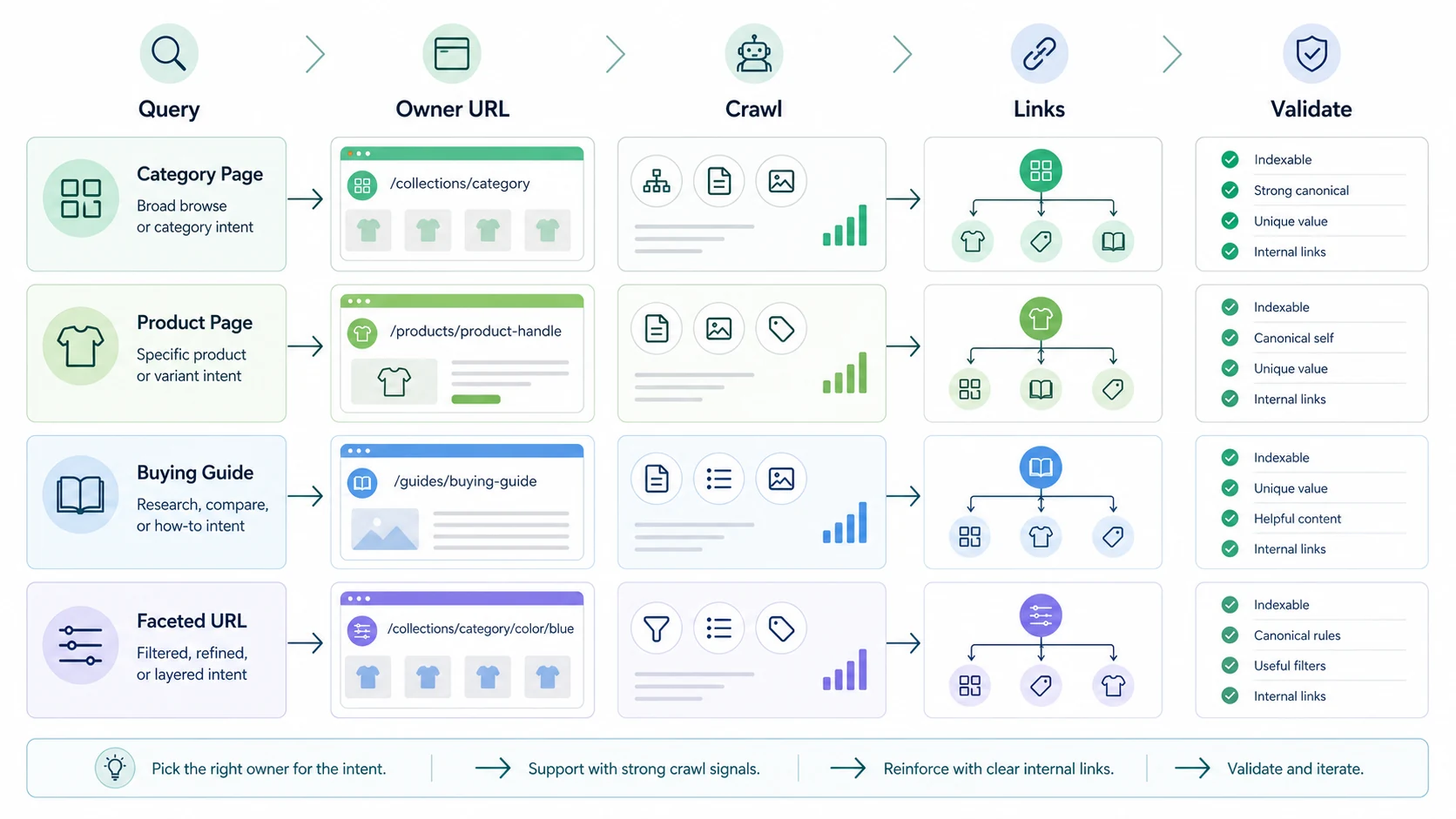
Use this routing table before rewriting copy:
| Query pattern | Best owner URL | Category page risk |
|---|---|---|
| Broad category term | Category or collection page | Thin intro copy or weak product coverage |
| Attribute plus category | Subcategory or indexable filter only when demand is real | Faceted URL creates duplicate inventory |
| Product name, SKU, or model | Product page | Category page steals product-specific intent |
| Comparison or pre-purchase question | Buying guide or collection guide | Informational article does not route shoppers back |
| Seasonal category demand | Campaign collection with an expiration plan | Temporary pages stay indexable after demand fades |
This is a child workflow of ecommerce SEO, not a duplicate of it. Ecommerce SEO sets the store model. Ecommerce category page SEO narrows the job to the URLs that carry category demand.
Write Category Copy For Decisions, Not Decoration
Good category copy does not need to become a long essay. It needs to explain what the category includes, who it is for, how shoppers should choose, and which filters or subcategories matter. The useful middle ground is copy that helps search systems understand the page and helps shoppers move faster.
Build the brief with these fields:
| Brief field | What to define | Example question |
|---|---|---|
| Primary shopper job | The browse task the page must satisfy | Is the shopper comparing types, materials, prices, sizes, or use cases? |
| Product coverage | The range needed to make the page credible | Does the page show enough relevant products to deserve the query? |
| Selection criteria | The decision help copy should provide | Which attributes change the best choice? |
| Supporting sections | FAQs, buying notes, fit guidance, or care notes | What would reduce pogo-sticking before the product click? |
| Internal links | Guides, subcategories, products, and related collections | Where should the shopper go next? |
| Validation signal | Crawl, search, and revenue evidence | How will the team know the page improved? |
Google's ecommerce guidance on helping Google understand ecommerce site structure emphasizes crawlable links to category, subcategory, and product pages. That matters because category copy alone cannot rescue a page that search systems cannot discover or follow.
For Shopify stores, the same logic applies to collections. The official Shopify help page for collections frames them as grouped products shoppers can browse. The SEO brief should make that browse path clearer, not bury it under generic paragraph volume.
Control Facets Before They Become Search Inventory
Facets are useful for shoppers and dangerous for crawlers. Size, color, brand, price, material, rating, availability, and sort order can create thousands of URL states. Some refinements deserve indexation. Most should remain usability controls, not standalone search pages.
Use this policy:
| Facet state | Default SEO treatment | Validation check |
|---|---|---|
| High-demand refinement with unique products and useful copy | Consider a crawlable, indexable subcategory or curated landing URL | Search demand, product coverage, canonical, internal links |
| Low-demand filter combination | Keep usable for shoppers but avoid index bloat | Noindex, canonical, robots, or parameter policy matches site rules |
| Sort order, view mode, or pagination-only state | Do not treat as a new search page | Canonical and internal links point to the intended owner |
| Empty or near-empty product result | Keep out of the index and improve discovery paths | Status, canonical, and internal links do not waste crawl budget |
| Seasonal refinement | Create a refresh, redirect, or expiration rule before launch | Page does not linger as stale indexable inventory |
Google's faceted navigation guidance for managing crawling of faceted navigation URLs is a useful baseline: faceted systems can generate very large numbers of URLs, so teams need a deliberate crawl and indexation policy.
If the store already has messy filter paths, use faceted navigation SEO as the companion technical workflow. The category page should be the canonical owner for broad demand unless a refinement has enough unique value to stand on its own.
Build Internal Links Around The Shopping Path
Internal links should make the category page easier to discover and easier to use. The mistake is treating links as generic PageRank pipes. For category pages, the best links clarify the path between education, browsing, product evaluation, and support.
Use four link types:
| Link type | Purpose | Example |
|---|---|---|
| Guide to category | Move research intent toward browse intent | A buying guide links to the category it explains |
| Category to guide | Help shoppers who need decision support | A collection page links to a sizing, material, or comparison guide |
| Category to subcategory | Split broad demand into useful refinements | A shoes category links to running shoes, trail shoes, and walking shoes |
| Category to product | Feature representative products without flattening the catalog | A curated section links to top sellers or best-fit examples |
The Shopify SEO workflow is useful when the same rules must live inside collection templates, product pages, blogs, filters, and theme navigation. For non-Shopify stores, the principle is identical: the category page should help shoppers continue the same decision, not send them to every possible URL.
Validate The Page After It Ships
Publishing a category page update is only useful if the team checks whether search systems and shoppers respond. That means saving a baseline, shipping one clear set of changes, and recrawling the affected templates before declaring the work complete.
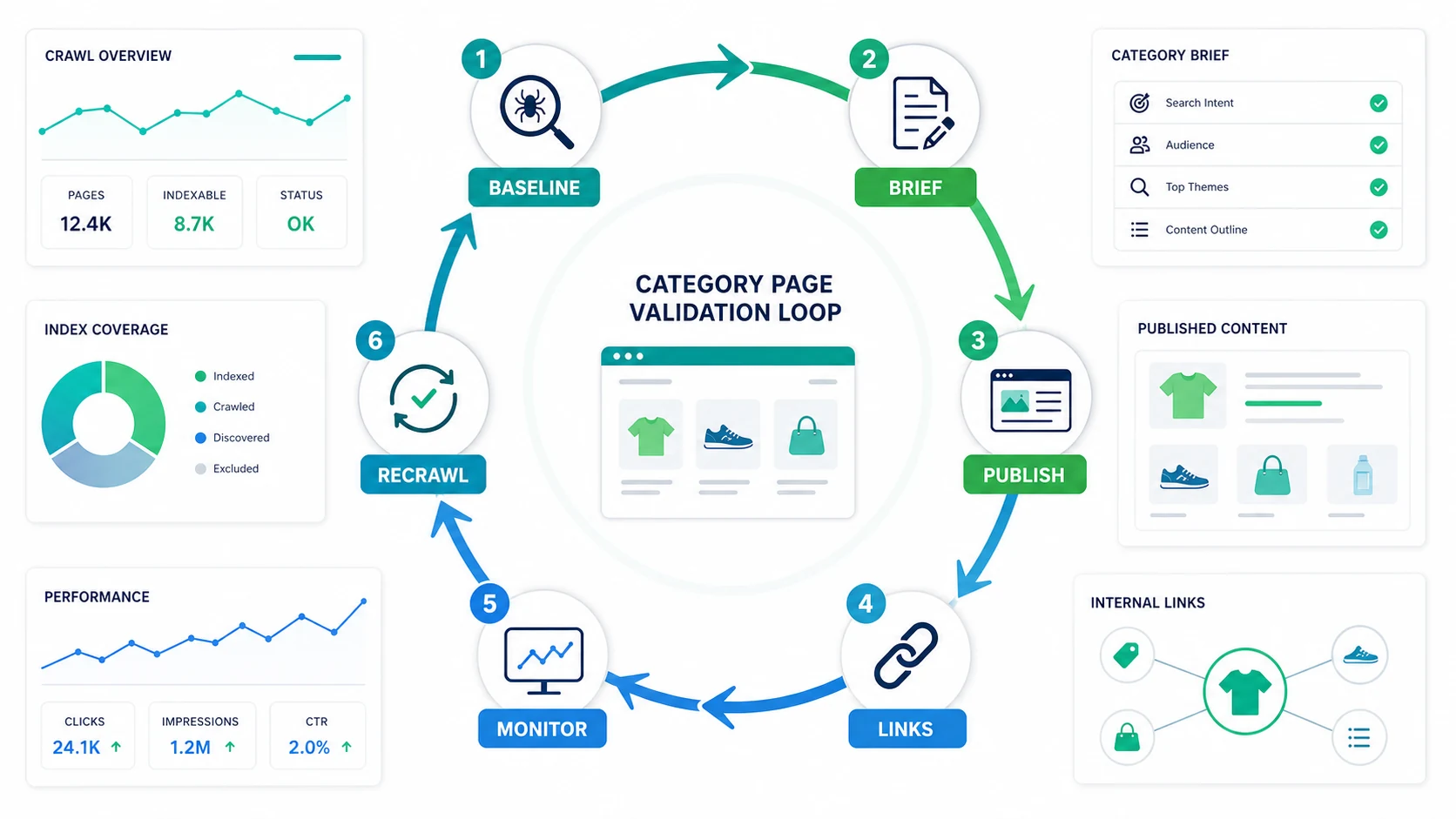
Use this validation loop:
- Save the baseline crawl for the category page, subcategories, product samples, and important facets.
- Confirm the owner URL, canonical URL, title, H1, meta description, and indexability.
- Publish category copy that helps shoppers choose without pushing products below the fold unnecessarily.
- Add internal links from guides to the category and from the category to useful support pages.
- Check product structured data only where the visible page supports those facts.
- Review Search Console queries, impressions, clicks, and page paths after the page has time to be recrawled.
- Re-crawl the page and related templates to confirm canonicals, links, sitemap coverage, and blocked URLs still match the policy.
Google's product structured data documentation is relevant when category pages expose product facts. Do not add markup as a shortcut around weak page content. Use it when the visible page and product data support the same information.
Where Searvora Fits
Searvora fits when ecommerce category page SEO needs to move from advice into repeatable production. Blogify is the primary product fit because it helps Shopify teams turn approved topics into structured drafts with product context, metadata, internal links, multilingual workflow, and review controls.
Use the broader Searvora stack around that content layer:
| Workflow stage | Searvora fit | Output |
|---|---|---|
| Page decision | AI SEO Consultant | Owner URL, information gain, and priority decision |
| Technical eligibility | SEO Spider Crawler | Crawl, canonical, sitemap, internal-link, and indexability checks |
| Content production | Blogify | Category support content, buying guides, and Shopify-ready drafts |
| Performance review | AI SEO Dashboard | Query movement, page-type visibility, and refresh signals |
For this article, keep the primary handoff on Blogify. The reader needs a practical way to turn category-page opportunities into reviewed Shopify content without losing product context or internal-link discipline.
Category Page SEO Checklist
Use this checklist before approving a category page update:
- Confirm the category page should own the primary query.
- Separate broad category demand from product, guide, and faceted intent.
- Check that the page is crawlable, indexable, canonical, and internally linked.
- Make sure product coverage is strong enough to satisfy browse intent.
- Write copy that explains selection criteria, not generic category fluff.
- Decide which filters deserve crawlable URLs and which should stay out of the index.
- Link from supporting guides to the category page where the shopper should browse next.
- Link from the category page to useful guides, subcategories, and representative products.
- Add structured data only when visible page facts support it.
- Re-crawl after publishing and check Search Console by query and page.
- Refresh, consolidate, or retarget if the page begins competing with a guide or product page.
Ecommerce category page SEO works when the category page has a clear job. Pick the owner URL first, write for the shopping decision, control crawl waste, link the path, and validate the page as part of the store's operating loop.