

Knowing how to crawl large websites starts with deciding which URL groups matter, what the crawler should ignore, and how the output will become fixes. A full crawl is useful only when it preserves page type, template, directory, locale, and indexability context.
The mistake is treating a large crawl as a bigger version of a small-site audit. Large sites have faceted paths, parameter noise, old migrations, localized sections, rendering cost, duplicate templates, and teams that own different parts of the site. The crawl plan needs segments, guardrails, and a validation loop before anyone opens the first export.
The Screaming Frog tutorial that surfaced this competitor opportunity focuses on crawler storage, memory, and configuration. Searvora's information gain is the operating layer around that setup: choose crawl segments, avoid traps, route issues to owners, and prove the fix after release.
Define The Crawl Job Before Crawling Everything
A large-site crawl needs a job statement. Without one, the crawler collects every URL it can reach and the team spends the next week arguing about which warnings matter.
Use this first-pass scope table:
| Crawl job | Include first | Exclude or sample | Success signal |
|---|---|---|---|
| Launch or migration QA | New templates, redirect maps, sitemap URLs, high-value old URLs, canonical targets | Low-value archive paths and unchanged utility pages | Critical URLs resolve, canonicalize, and link correctly |
| Technical SEO audit | Money templates, category paths, articles, localized pages, paginated sets, faceted examples | Infinite parameters, internal search, session URLs, sort variants | Issues are grouped by template and owner |
| Crawl budget cleanup | Sitemaps, internal-link paths, parameter families, duplicate variants, blocked paths | Stable low-risk sections | Crawl waste can be reduced without hiding important pages |
| International QA | Locale directories, hreflang clusters, self-canonicals, translated templates | Markets outside the release | Alternate sets validate and point to indexable canonicals |
| AI-search readiness | Source pages, entity hubs, comparison pages, documentation, high-authority articles | Thin utility URLs | Crawlable pages contain clear claims, definitions, and internal paths |
Google's crawl budget guidance is aimed at very large or frequently updated sites. That is the right mental model: if the site is huge enough for crawl budget to matter, the crawl plan should protect the pages that search systems actually need to discover, recrawl, and trust.
Segment URLs Before You Configure The Crawler
The best crawl settings depend on the segment. Product pages, blog posts, faceted category pages, localized URLs, and documentation templates create different risks.
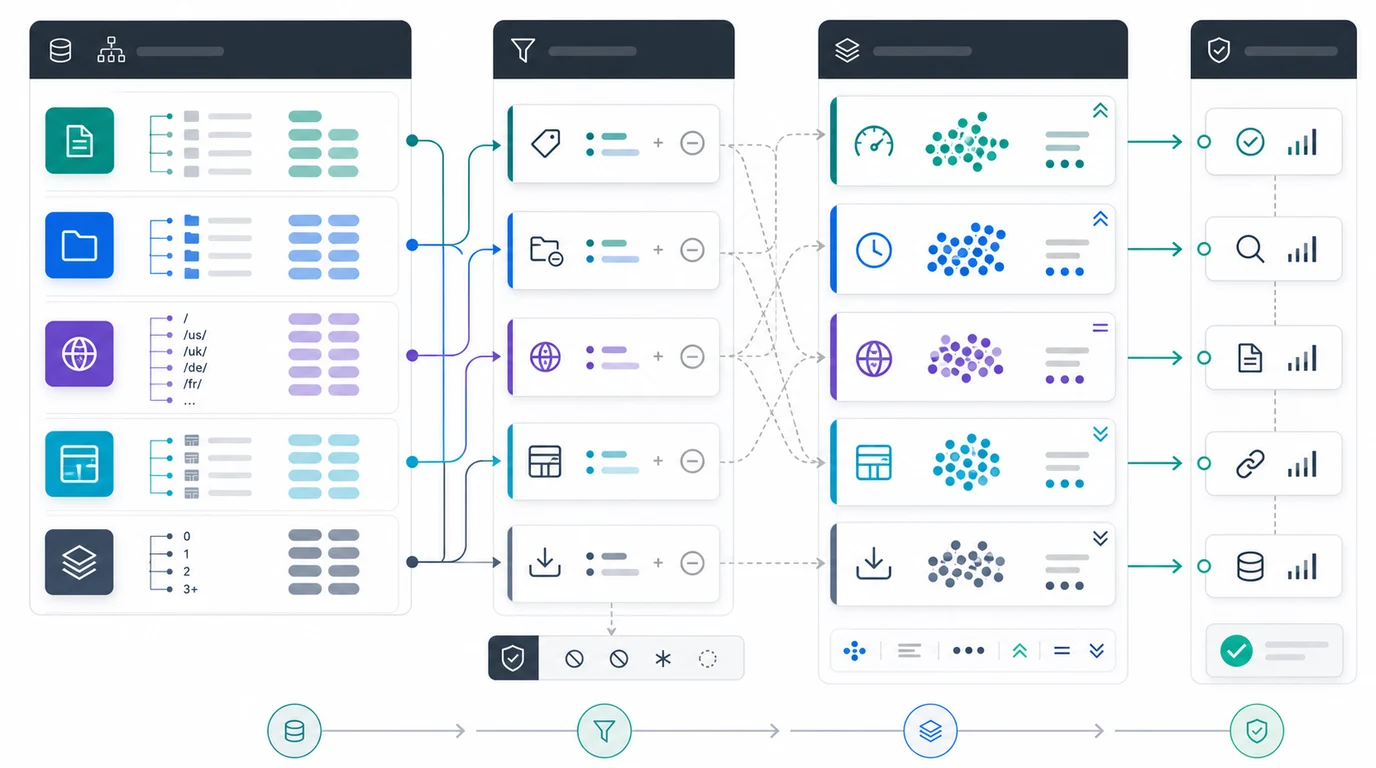
Build the segmentation layer before crawling:
| Segment | What to capture | Why it matters |
|---|---|---|
| Page type | Product, category, article, support, location, tool, documentation, or hub | Issue priority changes by page job |
| Template | Shared layout, CMS model, component set, or rendering path | One fix can affect thousands of URLs |
| Directory | /blog/, /products/, /collections/, /docs/, locale folders, app sections | Directories usually map to teams and rules |
| Crawl depth | How many clicks from known entry points | Important deep pages may need stronger internal links |
| Indexability state | Indexable, noindex, blocked, canonicalized, redirected, erroring | Different states need different fixes |
| Sitemap state | Included, excluded, stale, wrong canonical, split by type | Sitemaps show preferred inventory, not every URL discovered |
| Performance role | Traffic, impressions, conversions, backlinks, AI citations, strategic pages | High-value pages deserve stricter validation |
This is different from a generic technical SEO site audit. A site audit can inspect a broad surface. A large-site crawl must preserve enough structure that the team can decide what to crawl deeply, what to sample, and what to block from the crawl entirely.
Control Crawl Traps And Resource Cost
Large websites often fail crawler planning because the crawler finds too much. That does not mean the crawler is wrong. It means the scope is not ready.
Watch for these traps:
| Trap | Signal | Control |
|---|---|---|
| Faceted navigation | Endless combinations of filters, sort orders, colors, sizes, locations, or price ranges | Crawl representative examples, then set parameter rules |
| Internal search pages | URL patterns generated by user queries | Exclude unless those pages are intentionally indexable |
| Session and tracking parameters | Duplicate pages with utm, session IDs, or campaign variants | Normalize, ignore, or strip parameters in crawl configuration |
| Calendar and pagination loops | Infinite next links or date archives | Limit depth and inspect canonical/indexability rules |
| Media or asset-heavy paths | Large downloads, image variants, or scripts dominate crawl time | Crawl HTML first, then sample assets by issue type |
| JavaScript rendering cost | Rendered HTML differs from source HTML or loads too slowly | Sample important templates before rendering everything |
| Soft error pages | Pages return 200 but behave like empty, expired, or unavailable pages | Compare templates, content length, title patterns, and internal links |
If JavaScript is a known risk, use the JavaScript SEO workflow before turning on expensive rendering at full scale. Render the templates where it changes the answer: navigation, metadata, canonical output, internal links, structured data, and user-facing content.
For sitemaps, Google's sitemap documentation reinforces the key large-site rule: list the canonical URLs you want search engines to consider, and split large sitemap sets when needed. A sitemap crawl should validate preferred inventory, not become another path to every duplicate URL.
Prioritize What The Crawl Finds
The first crawl output should become a triage table, not a giant export. Group every issue by segment, search value, owner, and validation path.
Use this priority model:
| Finding | Large-site priority question | First action |
|---|---|---|
| 5xx or timeout clusters | Do important templates fail under crawl load or release pressure? | Confirm persistence, owner, and affected template set |
| Wrong canonical targets | Are valuable pages canonicalized to unrelated, stale, or parameterized URLs? | Align canonical, internal links, redirects, and sitemap targets |
| Noindex on important pages | Is noindex intentional by page type or accidental from a template rule? | Validate rules against business-critical URL groups |
| Blocked paths | Is robots.txt hiding duplicates, or hiding pages that need indexability? | Compare robots rules, sitemaps, and internal links |
| Duplicate titles or H1s | Is the duplication template noise or a real page-intent conflict? | Fix template logic before editing individual URLs |
| Deep important pages | Are valuable pages discoverable only after too many clicks? | Add links from hubs, categories, and related high-authority pages |
| Hreflang breaks | Are alternates incomplete, non-canonical, or non-200? | Fix clusters before judging regional content quality |
The goal is not to make every warning disappear. The goal is to find the repeated patterns that block discovery, indexability, ranking confidence, or AI-search citation quality. A warning on an indexable product template is different from the same warning on a filtered duplicate that should not be indexed.
Turn Findings Into Owner-Ready Work
A large crawl becomes useful when every high-priority finding has an owner and an acceptance test. Otherwise the report is just a backlog-shaped spreadsheet.
Create one work item per repeated pattern:
| Handoff field | What to write |
|---|---|
| Segment | Template, directory, locale, page type, or URL pattern |
| Evidence | Crawl sample, affected count, sitemap state, canonical state, internal-link path, and search value |
| Risk | What search systems or users cannot do because of the issue |
| Owner | SEO, engineering, product, content, localization, analytics, or platform |
| Fix path | Redirect, canonical, noindex, robots, sitemap, template, internal-link, rendering, schema, or content update |
| Acceptance criteria | The exact live output expected after release |
| Validation date | When the team will recrawl and check search or AI visibility signals |
This is where Searvora's SEO spider crawler fits the workflow. Use it to inspect status codes, redirects, canonicals, metadata, internal links, sitemap behavior, image signals, and indexability before assigning fixes. The useful output is not the longest issue list. It is the smallest set of crawl-backed actions the team can ship and verify.
Validate With A Recrawl Loop
Large-site SEO work is not done when a ticket ships. It is done when the live site proves the expected output.
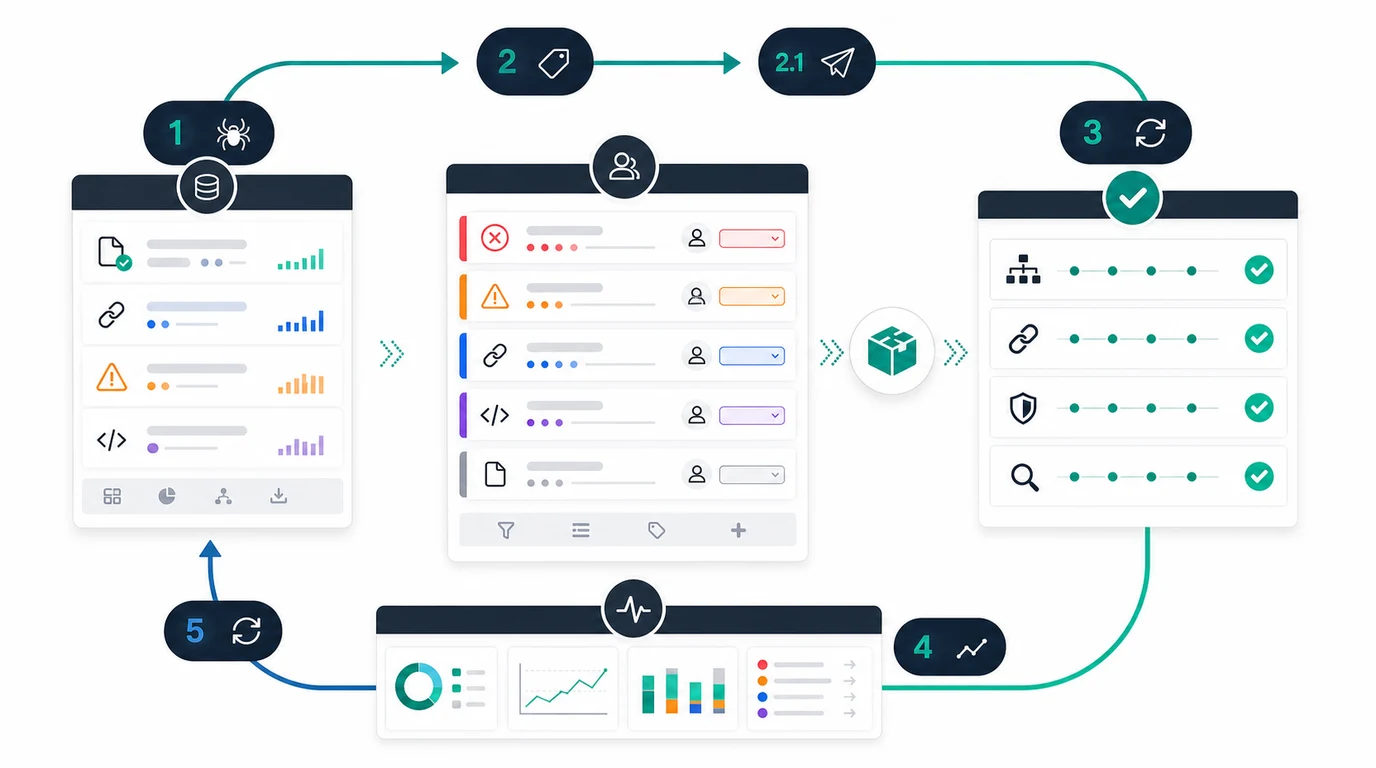
Run this validation loop:
- Save the baseline crawl and affected URL sample.
- Write the expected live output before the fix ships.
- Release the smallest useful batch.
- Re-crawl the changed URLs and template peers.
- Confirm status codes, redirects, canonicals, metadata, internal links, sitemap inclusion, hreflang, and indexability.
- Check rendered HTML when JavaScript can change important signals.
- Compare Search Console crawl stats, coverage, and performance after the next meaningful crawl window.
- Record the outcome so the next crawl starts from evidence.
The site architecture crawl visualization workflow is useful when validation depends on internal paths, depth, and hub relationships. Large crawls often reveal that the technical issue is really a structure issue: important pages exist, but the site does not route enough authority, context, or discovery support to them.
Large Website Crawl Checklist
Use this checklist before crawling a large site:
- Name the crawl job and decision the output must support.
- Segment URLs by page type, template, directory, locale, crawl depth, and indexability state.
- Confirm which sitemap sets represent preferred canonical inventory.
- Exclude or sample known crawl traps before starting the full run.
- Decide whether JavaScript rendering is needed for all URLs or only priority templates.
- Capture search value, owner, and business context for priority segments.
- Group findings by repeated pattern, not only issue label.
- Separate eligibility blockers from cleanup warnings.
- Write owner-ready work items with acceptance criteria.
- Re-crawl changed templates after release.
- Compare crawl evidence with search and AI-visibility signals after the recrawl window.
- Keep the crawl scope and decisions so the next audit does not start from memory.
Knowing how to crawl large websites is less about pushing a crawler harder and more about making the crawl answer the right operating question. Segment the site, control the traps, preserve ownership context, and validate the result. That is how a large crawl turns into shipped SEO work instead of another export.