

Duplicate content occurs when identical or substantially similar content is available at multiple URLs. An audit identifies which versions serve users and which URL should represent them in search. Thin content is a separate quality question; it is not automatically duplicate content.
The useful response is not panic, and it is not pasting a canonical tag everywhere. A duplicate content SEO audit should find the affected URL clusters, separate harmless similarity from real same-job duplication, choose the smallest fix that matches the page job, and prove the live site changed after release.
Start With the Duplicate URL Cluster
Most duplicate content audits fail because they start with one suspicious URL. Start with the cluster instead.
Google's canonicalization documentation explains that search systems select a representative URL when duplicate pages exist. That means your audit needs enough evidence to see the whole set of variants before choosing the representative page.
Collect the cluster signals first:
| Evidence | Why it matters | What to capture |
|---|---|---|
| Final URL | Parameters, case, slash, protocol, and tracking variants can split the same page | Requested URL, final URL, status code, redirect chain |
| Page promise | Two pages can look similar but serve different jobs | Title, H1, template, body intro, primary CTA |
| Canonical target | A declared canonical can disagree with links, redirects, or sitemaps | Source canonical, rendered canonical, HTTP canonical when present |
| Indexability | Some duplicates should not be index candidates at all | Robots rules, noindex, blocked state, sitemap inclusion |
| Internal links | Links often reveal which URL the site actually promotes | Inlinks, anchor text, breadcrumbs, related modules |
| Content similarity | Similar templates are normal; same-task duplication is the issue | Main body similarity, unique sections, product or category overlap |
This is where crawl data beats a manual spot check. A crawler can show whether the issue is one odd URL, a template rule, an ecommerce filter pattern, an old archive path, or a publishing workflow that creates near-identical pages.
Work Through One Duplicate Cluster
Imagine this synthetic inventory for an article. The first three URLs have the same main content; the fourth answers a different question.
| URL | Page relationship | Intended handling |
|---|---|---|
/guides/audit | Preferred explanatory article | Keep a 200 response and self-canonical |
/guides/audit?campaign=email | Same article with an acquisition parameter | Preserve attribution when required; nominate the clean article as representative |
/print/audit | Printable view retained for users | Keep only if useful, with a canonical relationship to the article |
/guides/audit-template | Download instructions, column definitions, and a worked fixture | Keep a separate self-canonical when it serves this independent task |
The shared word “audit” does not make the template page a duplicate. Compare the answer and the reader's next action before consolidation. Conversely, a different title on the parameter URL would not make identical body content a new search task.
The release check depends on the chosen policy. If the print view stays, check its declared canonical and verify that the target is accessible. If it is retired, check the permanent redirect and the final destination. Update internal links and sitemap entries to express the same preference. Google still makes its own canonical selection; aligned declarations do not guarantee it will choose your nominated page.
Record a content comparison, source response, target response, chosen policy, and validation date for the cluster. A body hash can group exact copies for review, but it cannot decide whether two near-identical pages serve different purposes. The synthetic repair lab includes a canonical-relationship review category for that reason: a difference needs interpretation rather than an automatic redirect.
Classify the Type Before Choosing a Fix
Duplicate content is not one condition. A product URL with tracking parameters, a printer-friendly page, a filtered collection, two articles about the same query, and a thin tag archive should not get the same fix.
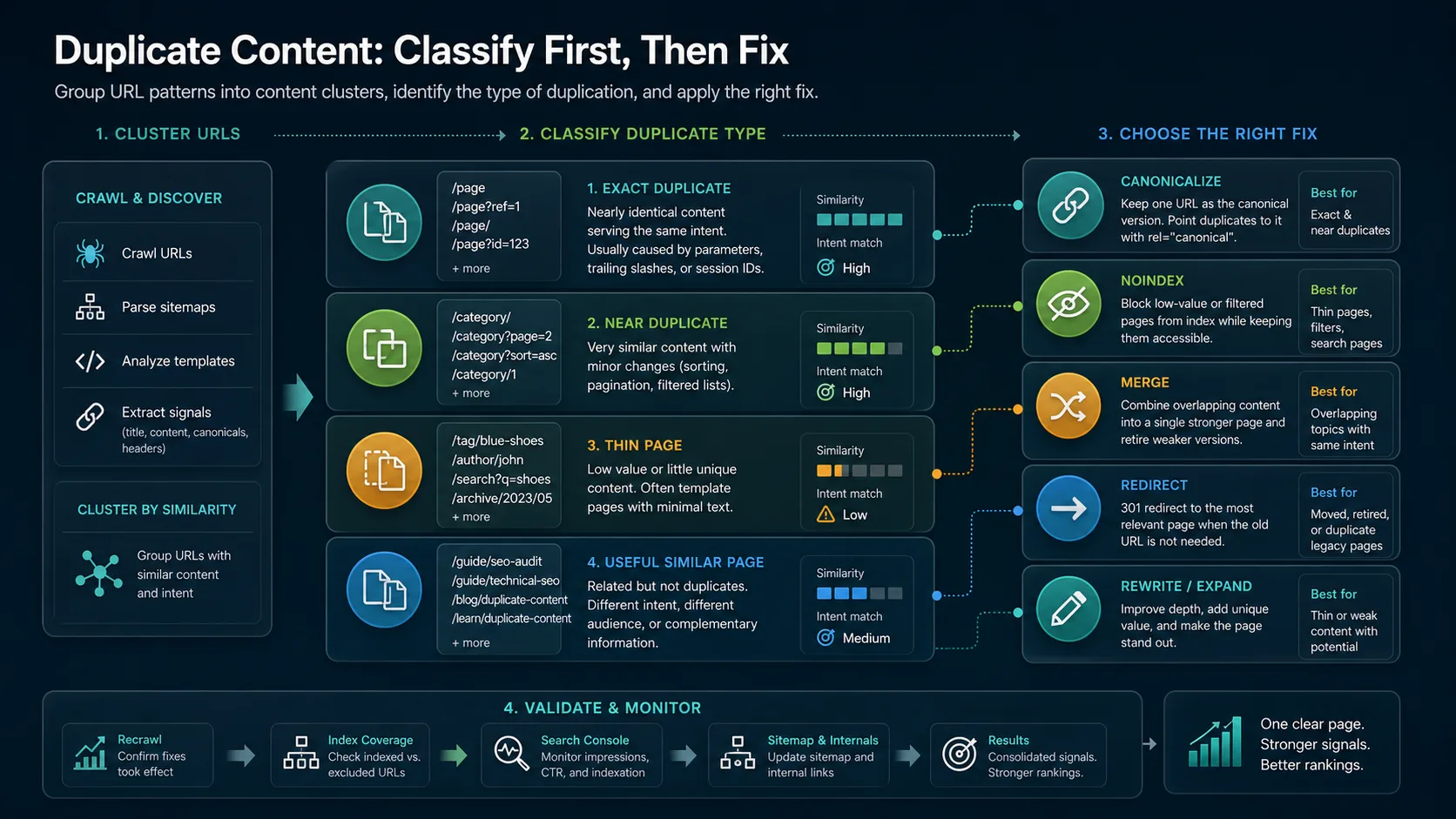
Use this first-pass classification:
| Cluster type | Common cause | Better default response |
|---|---|---|
| Exact duplicate | Parameters, session IDs, HTTP/HTTPS variants, trailing slash drift | Redirect or canonicalize to the preferred URL |
| Near duplicate | Sort orders, pagination, filtered lists, similar regional pages | Decide whether each URL has a useful independent job |
| Thin page | Low-value tag pages, search pages, empty categories, weak auto-generated pages | Noindex, consolidate, rewrite, or remove from discovery paths |
| Same-job article overlap | Two posts answer the same core keyword and user task | Merge, redirect, or differentiate the page jobs |
| Useful similar page | Related pages serve different intents, products, markets, or funnel stages | Keep both and strengthen internal links |
That stricter test keeps you from deleting useful child pages. A broad ecommerce SEO article and a faceted navigation article may share vocabulary, but they do different work. A canonical tags article and a duplicate content article overlap, but one explains a signal while the other audits the full cluster and fix decision.
Choose the Fix That Matches the Page Job
Google's guide to consolidating duplicate URLs describes several ways to signal a preferred URL, including redirects, rel="canonical", and sitemap consistency. The important operator move is choosing the fix that matches what users and crawlers should experience.
Use this routing table before editing templates:
| Situation | Use this fix | Avoid this mistake |
|---|---|---|
| The duplicate URL should disappear for users | Permanent redirect to the best URL | Canonicalizing a page that no user should keep seeing |
| The alternate URL must remain accessible | rel="canonical" or HTTP canonical to the preferred URL | Pointing canonicals at blocked, redirected, or irrelevant pages |
| The page has no search role but still helps users | Noindex while keeping it crawlable when needed | Blocking it in robots.txt before search systems see the noindex |
| Two articles answer the same task | Merge the stronger material and redirect the weaker URL | Publishing a third article that repeats both pages |
| The page is thin but valuable in the right form | Rewrite or expand with unique information gain | Treating every thin page as a technical-only issue |
| Similar pages serve different markets or intents | Keep both and clarify internal links, titles, and copy | Calling parent-child coverage cannibalization by default |
If parameters and faceted URLs are the source, pair this with the faceted navigation SEO workflow. If the conflict is mostly canonical choice, the canonical tags audit is the sharper companion. If the duplicate is editorial, bring it into a content audit so the decision includes usefulness, demand, owner, and production effort.
Validate the Fix After It Ships
A duplicate content fix is not done when the ticket closes. It is done when the site sends consistent live signals and the cluster behaves the way you intended.
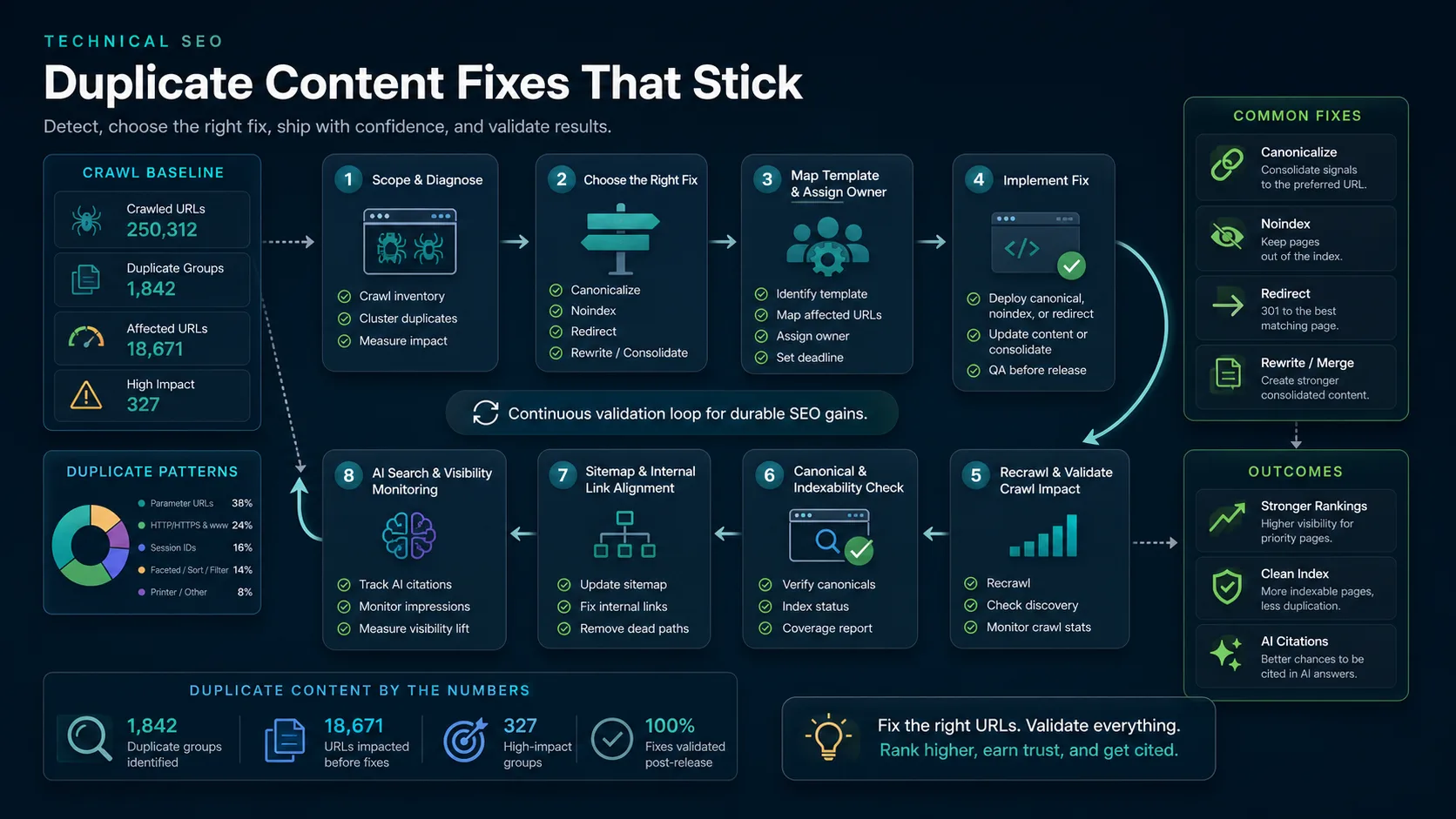
Run the validation loop in the same order every time:
- Save the baseline crawl for the affected URL cluster.
- Record the chosen representative URL and the reason it owns the job.
- Ship the fix in the smallest template or URL batch that can be verified.
- Re-crawl the same URL set after release.
- Confirm redirects, canonicals, noindex rules, sitemaps, and internal links agree.
- Remove duplicate, noindexed, redirected, or canonicalized-away URLs from sitemaps when they no longer belong there.
- Check priority URLs in Search Console after recrawl time.
- Watch query, impression, and click movement for the preferred page.
- Review AI-search and answer-engine citations when the page is part of a brand, category, or knowledge cluster.
The last step matters more than it used to. Duplicate pages can dilute not only classic ranking signals, but also the clarity of which page should be cited, summarized, or used as the source of truth in AI answer systems. A clean cluster gives search and answer systems one better page to understand.
Where Searvora Fits
Searvora SEO Spider Crawler fits duplicate content work because the problem spans crawl discovery, content similarity, canonicals, indexability, sitemaps, internal links, and owner handoff. The product page positions the crawler around online technical site audits, indexability and architecture checks, on-page QA, issue clustering, and fix-ready action queues.
Use Searvora in three layers:
| Layer | What to inspect | Output |
|---|---|---|
| Crawl evidence | URLs, status codes, redirects, canonicals, noindex, sitemap state | A duplicate cluster inventory instead of isolated examples |
| Fix routing | Template pattern, content job, internal links, business value | Canonical, noindex, merge, redirect, rewrite, or keep decision |
| Recrawl gate | Live HTML, rendered signals, sitemap alignment, link updates | Proof that the fix changed the site, not only the ticket |
This is also where AI SEO Consultant and the dashboard can support the crawler. The crawler proves the technical state. The dashboard shows whether the affected segment has impressions, clicks, or AI visibility worth protecting. The consultant layer can turn the evidence into owner-ready work when a cluster needs engineering, content, or CMS changes.
Run This Duplicate Content Checklist
Use this checklist before a migration, CMS cleanup, ecommerce filter change, archive rebuild, or content refresh sprint:
- Crawl the affected section with final URLs, status codes, canonicals, indexability, sitemap state, and internal links.
- Group URLs by template, normalized path, content similarity, product/category relationship, locale, or page job.
- Separate exact duplicates, near duplicates, thin pages, same-job article overlap, and useful similar pages.
- Pick the representative URL only after confirming it is indexable, internally linked, useful, and aligned with the search task.
- Choose the fix: redirect, canonicalize, noindex, merge, rewrite, retire, or keep.
- Keep sitemaps, internal links, hreflang, canonicals, and redirects pointed at the same preferred page.
- Do not use robots.txt as a shortcut for pages that need canonical or noindex processing.
- Re-crawl after release and compare the cluster against the baseline.
- Check Search Console for declared canonical, selected canonical, indexing state, and query movement on priority pages.
- Record the template rule so the same duplicate pattern does not return in the next release.
Duplicate content is clean when every URL has a job. Some variants should consolidate. Some should disappear. Some should stay because they serve a different search task. The audit earns its keep when it makes that decision visible, assigns the fix to the right owner, and proves the live site now points search systems toward one stronger page.