

An XML sitemap generator should do more than export every URL it can find. The useful workflow starts with a crawl, filters for canonical indexable pages, removes noise, submits a clean file, and validates whether search systems can keep trusting it.
That matters because a sitemap is a signal about what you want discovered. If it includes redirects, duplicate URLs, noindex pages, old parameters, broken assets, or canonicalized variants, it can turn a simple discovery aid into another technical SEO cleanup queue.
What An XML Sitemap Generator Should Decide
The first decision is not which button creates the file. It is which URLs deserve to be in the file.
The official Screaming Frog XML sitemap generator tutorial is useful because it shows the crawl-to-export path inside a crawler. Searvora's information gain is the operating layer around that task: use crawl evidence to decide inclusion rules, then validate the live sitemap after the file is submitted.
Use this decision table before exporting:
| Sitemap question | Strong answer | Remove or review when |
|---|---|---|
| Should this URL be indexed? | The page is useful, canonical, and meant for search | The page is noindex, blocked, duplicate, thin, or internal-only |
| Is the URL crawlable? | It returns a clean 200 status and can be reached through links | It redirects, errors, times out, or only appears through search/filter states |
| Is this the preferred canonical? | Internal links, canonical tags, and sitemap URL agree | The sitemap lists a variant while canonical points elsewhere |
| Is the page materially updated? | The content, structured data, or links changed meaningfully | The only change is boilerplate, footer text, or a build timestamp |
| Does this belong in a separate sitemap? | Large sections can be monitored by type or directory | One mixed file hides template-specific crawl or indexing issues |
Google's sitemap documentation explains that XML is the most versatile sitemap format, but versatility is not the same as quality. The file should make the preferred URL set easier to discover, not expose every URL your site can technically produce.
Start With A Crawl Instead Of A CMS Export
Most CMS sitemap plugins know which pages exist. They may not know which pages are redirected, canonicalized away, noindexed, orphaned, duplicated, or broken after a deployment. A crawler gives the sitemap generator a better evidence layer.
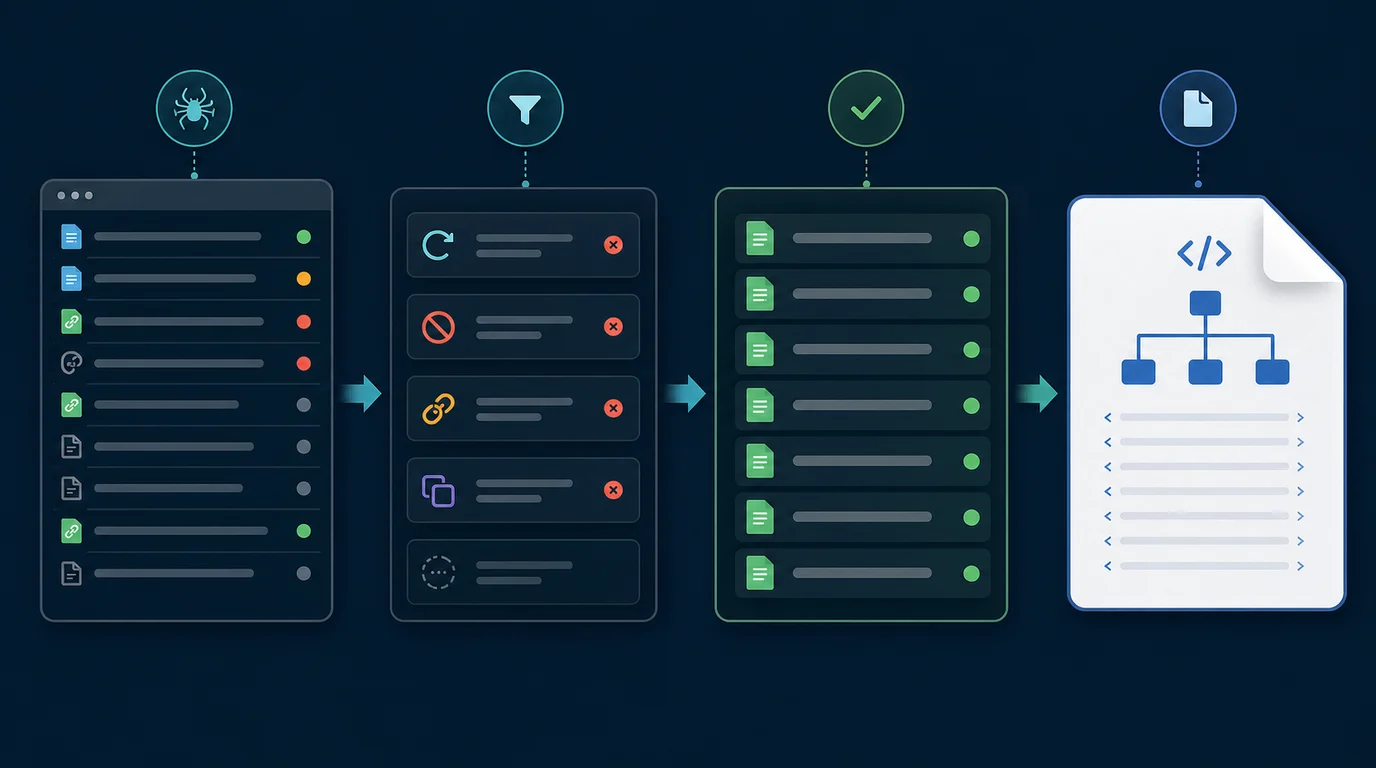
Run the crawl first and export these fields:
- Final URL and status code.
- Indexability and meta robots state.
- Canonical URL and canonical match status.
- Crawl depth, inlinks, and source templates.
- Sitemap inclusion from the current live sitemap.
- Hreflang, pagination, and alternate URL signals when relevant.
- Page type, directory, and business priority.
For larger technical work, pair this with the technical SEO workflow. Sitemap cleanup often travels with crawl access, canonical rules, redirects, metadata, and internal linking. Fixing only the XML file can hide the system that produced the wrong URLs.
Keep Only Canonical Indexable URLs
The clean sitemap set is usually smaller than the crawled URL set. That is good. Search engines can discover the rest of the site through links, but your sitemap should emphasize the canonical pages you actually want evaluated.
Use this filter sequence:
| Crawl finding | Sitemap action | Validation check |
|---|---|---|
| 200 status and self-canonical | Keep if the page is useful and indexable | Confirm internal links point to the same URL |
| Redirecting URL | Remove the old URL | Add the final canonical URL only if it deserves indexing |
| 404, 410, or 5xx URL | Remove | Fix source links or restore the page if it should exist |
noindex page | Remove unless the rule is wrong | Confirm the noindex decision before changing it |
| Canonicalized variant | Remove the variant | Keep the target canonical when it is indexable |
| Parameter or faceted URL | Usually remove | Keep only high-value combinations with unique demand and clear canonical logic |
| Duplicate template page | Remove or consolidate | Decide whether content, canonical, or internal links need the real fix |
Google's sitemap build guidance says to use fully qualified absolute URLs and include the URLs you want to see in search results. That is why canonical agreement matters. If the page says one URL is preferred and the sitemap says another, the sitemap is not helping the crawler make a clearer decision.
If the same cleanup exposes broken internal paths, use the broken link checker workflow before submitting the new file. A clean sitemap should not be the only place where the preferred URLs exist.
Generate The File By Page Type
One sitemap can work for a small site, but page-type segmentation makes the file easier to monitor. Blog posts, product pages, category pages, localized routes, support docs, and media-heavy URLs often change for different reasons.
Segment when it helps answer these questions:
| Segment | Why it helps |
|---|---|
/blog/ posts | Shows whether new editorial URLs are submitted and indexed cleanly |
| Product or app pages | Keeps revenue pages visible during releases and redirects |
| Ecommerce collections | Separates category coverage from product-detail churn |
| Locale folders | Makes hreflang and canonical mistakes easier to isolate |
| Image or video sitemap extensions | Supports media discovery when media is a meaningful search asset |
Google's size limits are also practical quality gates: a single sitemap is limited to 50 MB uncompressed or 50,000 URLs. If the site is larger, use sitemap indexes and keep the groups meaningful enough that Search Console data can still explain where problems live.
Do not overuse <lastmod>. Google says it uses that value only when it is consistently and verifiably accurate. Use it for meaningful page changes, not automated date churn.
Submit And Validate The New Sitemap
Publishing the XML file is not the finish line. The useful finish line is a validation loop that confirms the sitemap file, the crawl, and the indexability signals agree.

Run this sequence after submission:
- Place the sitemap where it can cover the intended URL scope, often at the site root.
- Submit the sitemap or sitemap index in Search Console when you need explicit monitoring.
- Check whether the submitted file can be fetched and parsed.
- Compare submitted URLs against your crawl's canonical indexable URL set.
- Re-crawl priority templates after fixes, releases, migrations, or CMS changes.
- Watch for recurring patterns: redirected submitted URLs, noindex submitted URLs, canonical mismatches, and missing important URLs.
- Update internal links and templates when the sitemap exposes a deeper routing problem.
The Search Console Sitemaps report is useful for monitoring submitted files, but do not treat it as your only QA surface. A crawler can explain why the sitemap became noisy in the first place.
Where Searvora Fits
Searvora SEO Spider Crawler fits when sitemap generation needs to become a repeatable technical SEO workflow. Use it to crawl status codes, canonical signals, noindex rules, hreflang sets, internal links, sitemap discovery, and template groups before deciding which URLs belong in the XML file.
Then turn the crawl into a cleaner handoff:
| Searvora workflow step | What the team gets |
|---|---|
| Crawl the live site | A URL inventory with status, indexability, canonical, and link evidence |
| Filter sitemap candidates | A cleaner list of canonical pages worth submitting |
| Group by page type | Blog, product, locale, category, and support patterns become easier to monitor |
| Re-crawl after changes | Proof that submitted URLs still match live technical signals |
If sitemap issues are part of a broader metadata cleanup, the meta tags for SEO workflow is the next companion. Robots directives, canonicals, Open Graph tags, and sitemap URLs all need to reinforce the same page job.
XML Sitemap Generator Checklist
Use this checklist before submitting a new or refreshed XML sitemap:
- Crawl the live site and save a baseline export.
- Remove redirects, errors, blocked URLs, noindex pages, and canonicalized variants.
- Keep only absolute canonical URLs that should appear in search results.
- Split large or high-change sections into useful sitemap groups.
- Confirm internal links point to the same canonical URLs listed in the sitemap.
- Use
<lastmod>only for meaningful page updates you can verify. - Submit the sitemap or sitemap index through Search Console when monitoring matters.
- Re-crawl priority sections after submission.
- Investigate repeated mismatch patterns at the template or routing layer.
- Save the before-and-after crawl evidence so the next sitemap refresh starts cleaner.
An XML sitemap generator is most valuable when it makes the preferred URL set obvious. Crawl first, filter hard, submit deliberately, and validate the file against the live site instead of assuming the export is clean.