
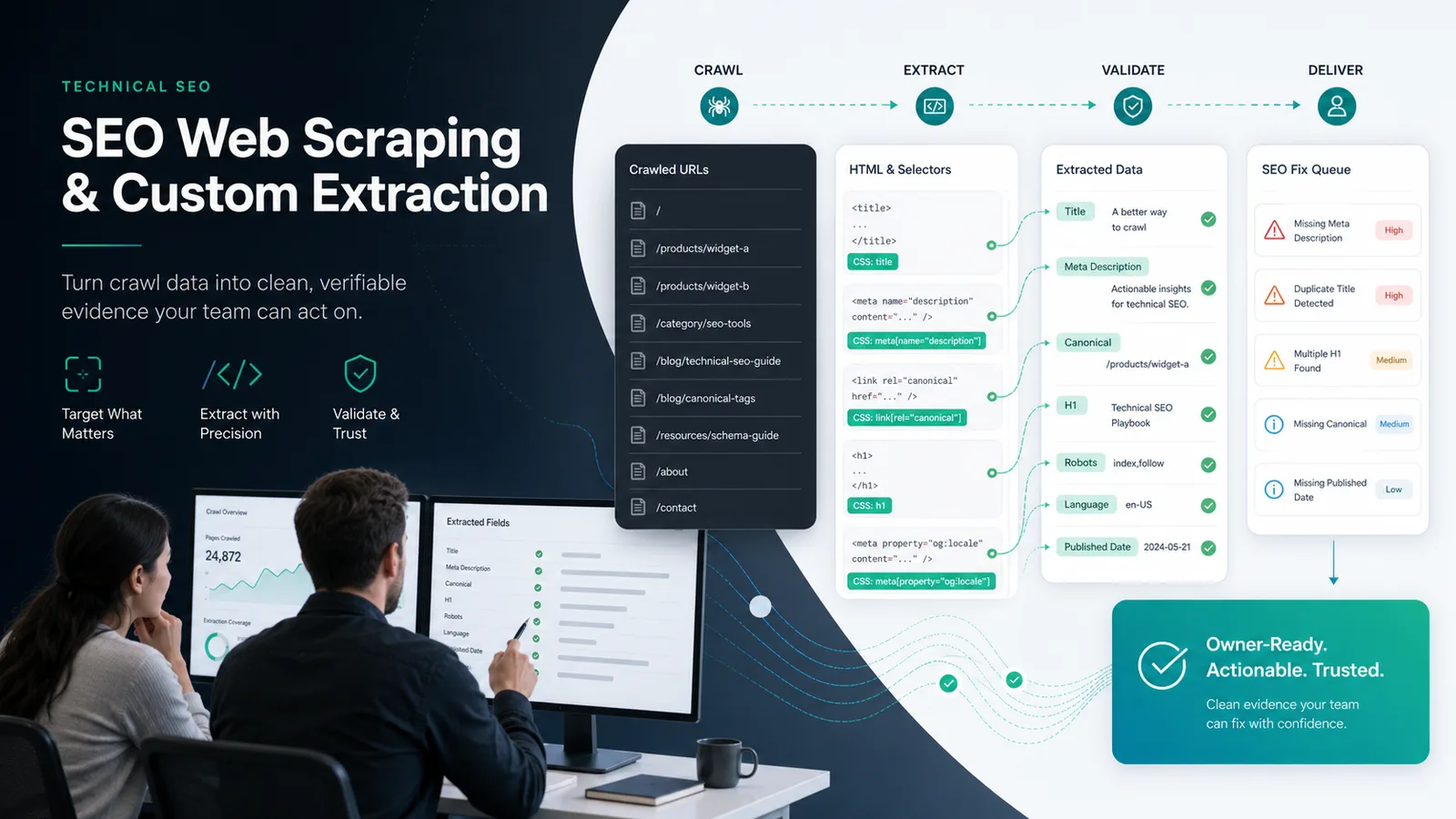
SEO web scraping is useful when a normal crawl does not capture the field your team needs to judge a page. You might need a product availability value, author name, publish date, schema field, rendered heading, price pattern, review count, or CMS flag that only appears in the HTML.
The goal is not to scrape everything. The useful workflow is to define the field, crawl a representative sample, validate the selector, classify the extracted values, and turn the result into a fix queue your SEO, content, or engineering team can actually close.
Start With The Field, Not The Selector
The public Screaming Frog web scraping tutorial shows the classic crawler workflow: add a custom extractor, enter an XPath, CSS selector, or regex pattern, crawl URLs, then review the extracted data.
That is a useful feature path, but the SEO decision starts one step earlier. Before anyone writes a selector, name the page decision the extracted field will support.
Use this field brief before opening a crawler:
| Field to extract | SEO decision it supports | Bad extraction outcome |
|---|---|---|
| Product availability | Decide whether out-of-stock product pages should stay indexable, redirect, or get refreshed | Empty values are treated as unavailable products |
| Publish date or updated date | Find stale articles and validate refresh claims | Template dates are mistaken for content dates |
| Author or reviewer | Check editorial trust signals across article templates | Sidebar names override article bylines |
| Schema field | Confirm structured data matches visible content | JSON-LD values drift from the page body |
| Canonical or alternate URL text | Compare rendered HTML with crawl signals | The selector grabs boilerplate instead of the active tag |
| Pricing or plan label | Audit comparison and product pages | Currency symbols or discounts are parsed inconsistently |
Build A Safe Extraction Spec
A good extraction spec is small enough to test and explicit enough to survive template variation.
Start with five parts:
- Field name, written in plain language.
- Source location, such as raw HTML, rendered HTML, JSON-LD, body copy, or a known template block.
- Selector method, such as XPath, CSS selector, or regex when structure is not stable.
- Expected value shape, such as date, URL, number, text, boolean, enum, or empty allowed.
- Decision rule, meaning what the team should do when the value is missing, invalid, duplicated, or inconsistent.
This matters because SEO web scraping can create a false sense of precision. A selector that works on one sample page may fail on another template, grab hidden boilerplate, or miss content loaded after rendering. Treat the extraction spec as a QA object, not just a crawler setting.
Crawl A Representative Sample First
Do not run custom extraction across the whole site first. Run it on a sample that includes the templates and edge cases most likely to break the selector.
For a content site, sample:
- Fresh articles.
- Old evergreen articles.
- Author pages or profile-linked articles.
- Category pages.
- Localized or translated URLs.
- Pages with missing or unusual metadata.
For ecommerce or SaaS, sample:
- Product detail pages.
- Collection or category pages.
- Out-of-stock or archived pages.
- Pricing or plan pages.
- Help or documentation pages.
- JavaScript-heavy pages if rendered content matters.
The sample should prove whether the selector understands the site, not whether it can return one impressive column.
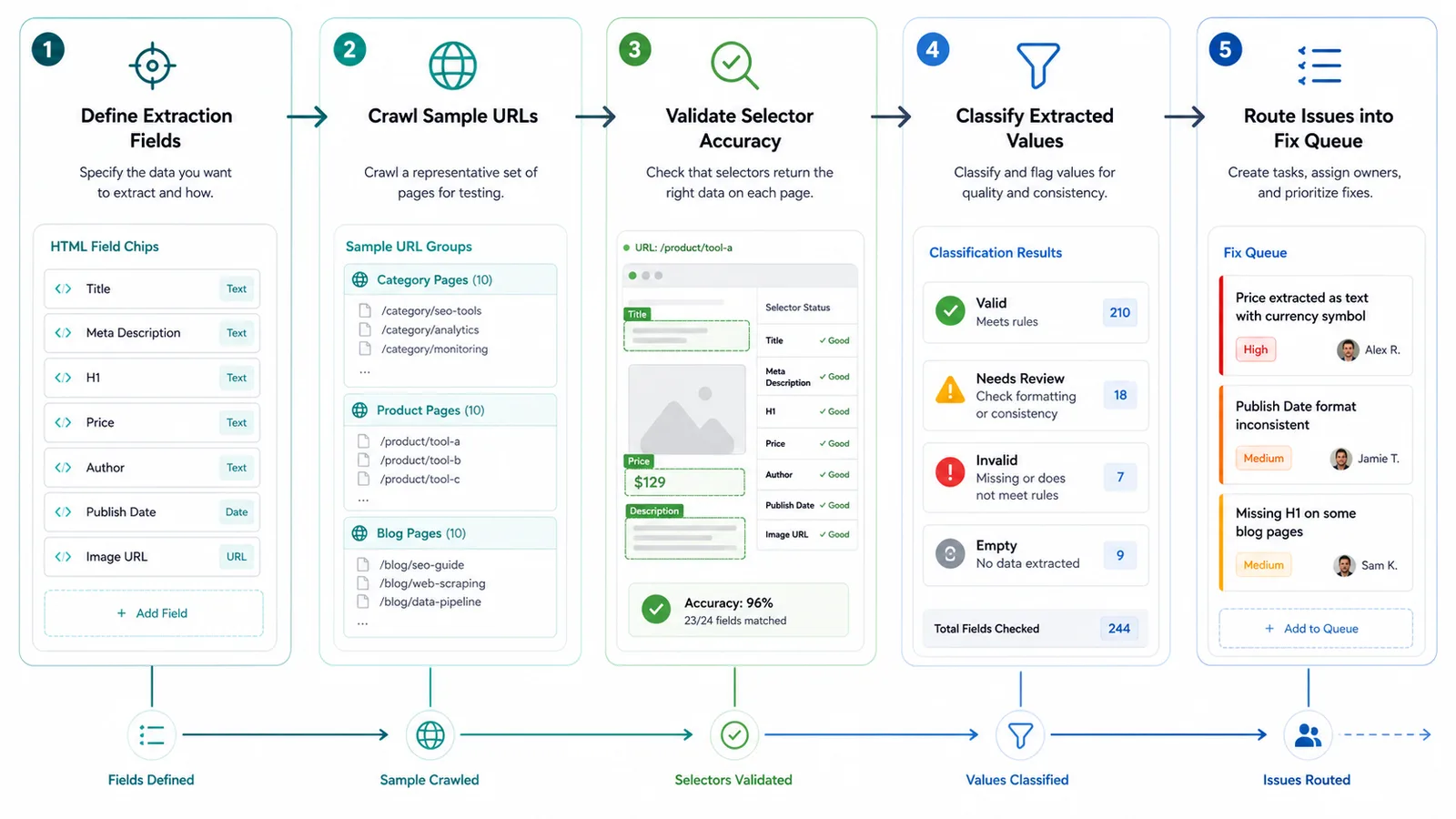
Validate Selector Accuracy Before Acting
The most expensive mistake is to route bad extracted data into real work. Validate the selector before you turn the export into tickets.
Use this QA pass:
| Check | What to verify | Why it matters |
|---|---|---|
| Coverage | Does every expected template return a value or a known empty state? | Missing data may be a selector problem, not a page problem |
| Specificity | Does the selector target the field, not a nearby repeated element? | Boilerplate values create false duplicates |
| Rendering mode | Does the value exist in raw HTML, rendered HTML, or both? | JavaScript SEO issues may change the extraction source |
| Format | Does the value match the expected date, URL, number, or enum pattern? | Teams need comparable values, not messy text |
| Sample review | Did a human inspect a small set of URLs against the page? | It catches silent errors before bulk action |
| Re-crawl stability | Does the same selector produce similar results after a second crawl? | Unstable values can point to dynamic content or crawl timing |
If the extracted field affects indexation, pair the result with crawl evidence. For example, a stale publish date is more important when the URL is indexable, internally linked, and still receives impressions. A missing author field is more urgent when it appears across a high-value article template. A malformed price field matters more when it appears on product pages that drive search demand.
The technical SEO site audit workflow is a useful companion when custom extraction exposes a template-level defect rather than a single-page edit.
Turn Extracted Values Into Decisions
Custom extraction is not finished when the crawl export exists. It is finished when each extracted pattern maps to a decision.
Use this classification model:
| Extracted result | Likely meaning | Next action |
|---|---|---|
| Valid value on every sampled page | The template is probably healthy | Monitor during future crawls |
| Empty value on one URL | Page-level content gap or unusual template state | Review the page before assigning a fix |
| Empty value across one template | Template or CMS field is missing | Assign to engineering or CMS owner |
| Duplicated value across many pages | Boilerplate, wrong selector, or weak page differentiation | Validate selector, then decide whether content differs enough |
| Invalid format | Field exists but cannot support reporting or structured data | Normalize the field or update the template |
| Value conflicts with crawl signals | The page says one thing while metadata or schema says another | Route to technical SEO plus content owner |
This is where SEO web scraping becomes more than a data trick. The export should explain which owner needs to act, which pages are affected, and how the team will prove the fix worked.
Where Searvora Fits
Searvora SEO Spider Crawler fits when custom extraction needs to become part of a repeatable technical SEO workflow. The local product copy verifies support for custom extraction via XPath and CSS selectors, along with crawl discovery, indexability checks, metadata QA, link analysis, and issue handoff.
Use Searvora when the extraction result needs to travel into a broader crawl decision:
| Workflow layer | Searvora role | Output |
|---|---|---|
| Crawl setup | Define scope, rendering mode, robots policy, and inclusion rules | A controlled URL set for extraction |
| Signal extraction | Collect metadata, canonicals, structured attributes, link graph data, and custom fields | Evidence columns that can be compared by template |
| Issue clustering | Group extracted values by severity, template footprint, and organic impact | A prioritized queue instead of a raw spreadsheet |
| Action handoff | Export fixes for SEO, content, and engineering owners | Tasks with validation criteria |
If the question is whether Screaming Frog SEO Spider is the right desktop tool for your team, the Screaming Frog SEO Spider review is the better comparison page. If the question is how to use extracted page fields to fix a site, keep the workflow focused on fields, validation, and handoff.
Run This SEO Web Scraping Checklist
Use this checklist before you trust a custom extraction crawl:
- Name the field and the SEO decision it supports.
- Decide whether the value should come from raw HTML, rendered HTML, JSON-LD, or visible body copy.
- Write the smallest selector that can target the field across templates.
- Crawl a representative sample before crawling the full site.
- Review sample URLs manually against the extracted values.
- Classify valid, empty, duplicated, invalid, and conflicting values.
- Join the extracted field to crawl signals such as status, indexability, canonical, title, H1, internal links, and template group.
- Assign fixes by owner and page type instead of dumping the export into a spreadsheet.
- Re-crawl after fixes and compare the extracted field again.
- Save the extraction spec so the next audit can run the same check.
SEO web scraping works best when it stays boring and testable. Define the field, prove the selector, classify the values, and only then let the crawl data become work.