

Types of keywords are useful only when they change the next SEO decision. A seed keyword starts research. A primary keyword names the page job. A secondary keyword shapes sections. A long-tail keyword may deserve a focused child page. A branded, competitor, local, or question keyword may need a different page type entirely.
The mistake is treating keyword types as vocabulary. The useful workflow is to classify the keyword, identify the user job, check existing Searvora coverage, choose the page action, and validate the result after publishing.
The Ahrefs article that surfaced this opportunity frames the main keyword categories for SEO research. Searvora's information gain is the operating layer around those categories: turn each type into create, expand, refresh, merge, monitor, or internal-link work instead of another raw keyword list.
Start With The Job Each Keyword Type Does
Keyword types are not equally close to production. Some help you explore the market. Some define the owner URL. Some belong inside an existing article. Some warn you that a blog post is the wrong asset.
Use this first pass before a keyword becomes a brief:
| Keyword type | What it usually tells you | First SEO action |
|---|---|---|
| Seed keyword | A broad topic area worth exploring | Expand into clusters before approving a page |
| Primary keyword | The main job a page should own | Choose page type and canonical URL |
| Secondary keyword | Supporting questions, examples, or sections | Add structure to the owner page |
| Long-tail keyword | A narrow task, audience, or use case | Decide between child article and parent-section update |
| Branded keyword | A navigation, pricing, support, or comparison job | Route to owned page, fair intercept, or no page |
| Competitor keyword | A buyer or workflow comparison | Verify public facts and define a fair angle |
| Local or commercial keyword | A location, service, product, or purchase task | Consider landing page, product page, or local page |
| Question keyword | A concrete answer need | Add FAQ, H2 answer, support article, or tool output |
That table is the difference between research and planning. A keyword type should tell the team what to do next, not only what to call the phrase.
Route Types Of Keywords To Page Actions
The same keyword list can produce very different work. "Keyword research" may be a parent article. "Free keyword research tools" may be a roundup. "Google Keyword Planner for SEO" may be a specific tool workflow. "Secondary keywords" may be a child explainer. Treating them as one content idea creates overlap fast.
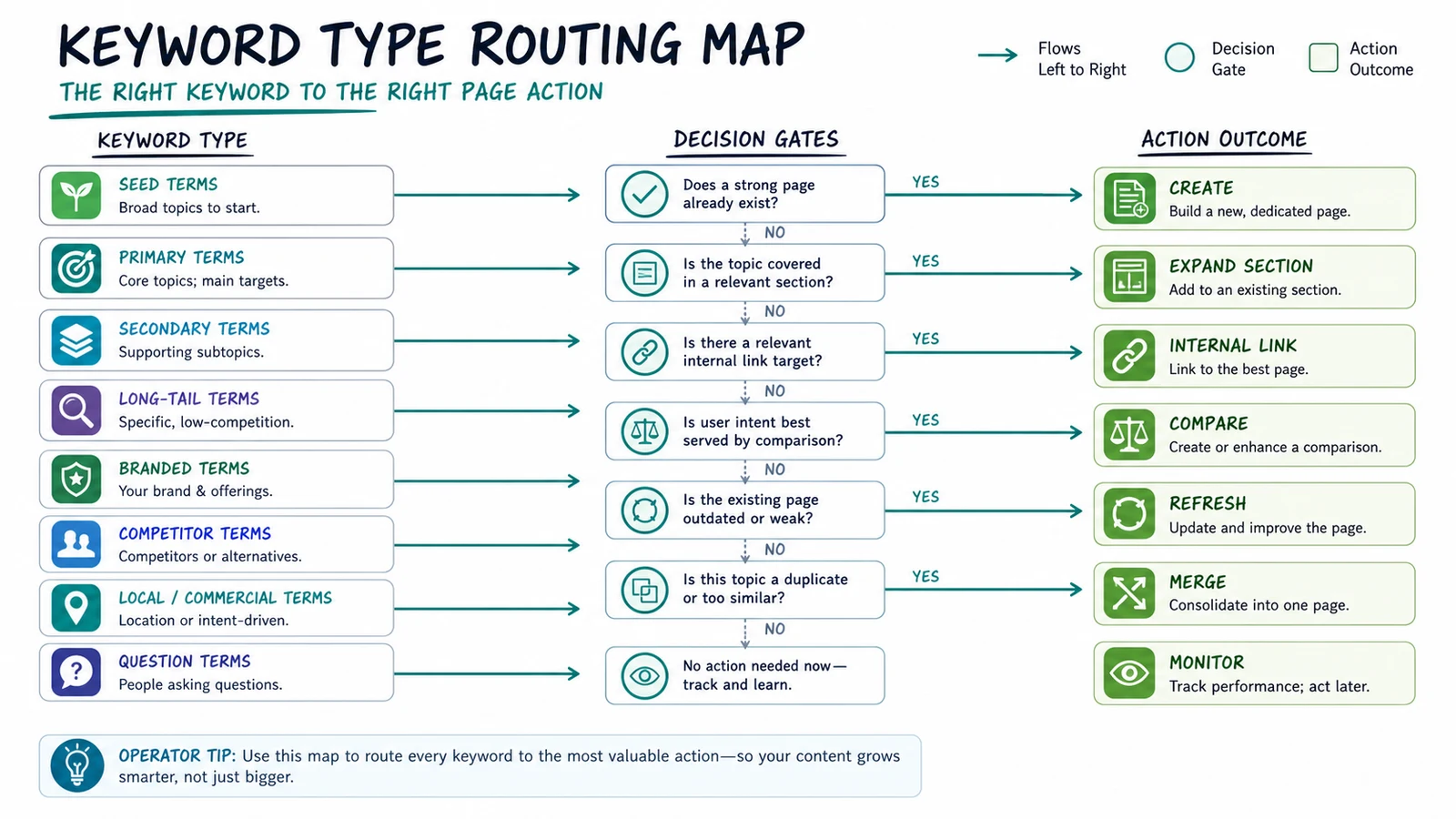
Use this routing model when a keyword type enters the queue:
| Signal | Better action | Why |
|---|---|---|
| Broad seed term with many child jobs | Build a cluster map | The term is too wide for a single useful page |
| Primary keyword with no same-job owner URL | Create a new page | The site lacks a canonical answer for that job |
| Secondary keyword that supports an existing page | Expand a section | The phrase strengthens the owner URL without splitting authority |
| Long-tail task with distinct intent | Create a child article | The reader needs a focused workflow or decision |
| Long-tail variation with same page job | Refresh the current page | The owner URL can satisfy it with better structure |
| Branded or competitor comparison | Verify public facts first | Fair sourcing matters more than clever positioning |
| Tool, template, or calculator language | Plan a tool or asset | Advice alone may underserve the searcher |
| Same core keyword, same page type, same user job | Merge or monitor | Another article would create real cannibalization |
This is where the stricter duplicate rule matters. Do not block a topic because it sits in the same cluster. Block it only when another URL already owns the same core keyword, same page type, and same user job.
For example, a keyword research workflow can coexist with keyword mapping and secondary keywords. One finds and qualifies demand, one assigns query groups to owner URLs, and one decides how supporting phrases shape a page. They are adjacent, not duplicates.
Use The Right Type Before You Draft
A lot of keyword waste happens because the phrase is right but the asset is wrong. A tool-intent keyword becomes a blog post. A support query becomes a generic guide. A secondary keyword becomes a thin standalone article. A competitor term becomes a one-sided sales page without public evidence.
Before drafting, write one sentence for each approved keyword:
- This keyword type is...
- The reader wants to...
- The best page type is...
- The closest existing Searvora URL is...
- The new information gain is...
- The validation check after publishing is...
Here is what that looks like in practice:
| Candidate keyword | Type | Best action | Why |
|---|---|---|---|
| keyword types | Primary explainer | Create this article | No current Searvora URL owns the taxonomy-to-action job |
| keyword research process | Parent workflow | Refresh or link to existing keyword research | The owner page already covers the process |
| primary vs secondary keywords | Comparison subtask | Add table or child section | It supports keyword planning more than it needs a new URL |
| best keyword tracking tools | Roundup | Use a true list article | The reader is comparing software options |
| Google Keyword Planner for SEO | Tool workflow | Use a specific how-to | The reader needs one tool translated into SEO decisions |
| competitor keyword analysis | Strategic workflow | Create or refresh based on overlap | The job depends on whether the current competitor article already owns it |
Google's SEO starter guide is a useful baseline here: pages should help search engines understand content and help people decide what to do. Keyword typing should serve that goal. If the type does not improve the page decision, it is decoration.
Separate Primary Keywords From Secondary Keywords
Primary and secondary keywords are easy to mix up because they often share the same words. The difference is ownership.
A primary keyword names the page promise. It belongs in the title, H1, intro, canonical topic, and measurement plan. A secondary keyword supports that promise. It may become a section, table row, example, FAQ, or internal link, but it should not pull the article away from the main job.
Use this split:
| Role | Good use | Bad use |
|---|---|---|
| Primary keyword | Defines the page job and canonical owner URL | Gets swapped mid-draft because another phrase has volume |
| Secondary keyword | Adds supporting coverage, examples, and internal links | Becomes forced repetition in every section |
| Adjacent keyword | Points to another useful article or future child page | Gets stuffed into the same article until the page loses focus |
| Duplicate keyword | Reveals a same-job overlap with an existing URL | Gets approved as a "new angle" without a real difference |
The useful test is simple: would a reader search the secondary term and still be satisfied by the primary page? If yes, improve the current page. If no, check whether the secondary term is actually a distinct primary keyword.
Treat Long-tail Keywords As Page-Type Signals
Long-tail keywords are not automatically easy wins. They are specific signals. Some deserve a new article because they name a narrow task. Others should be folded into a parent page because they share the same job.
Use long-tail keywords to ask:
- Does the phrase name a different audience, platform, tool, problem, or comparison?
- Would the searcher need different steps or evidence than the parent page provides?
- Is the best result likely to be an article, product page, tool, template, or support answer?
- Can Searvora add a sharper workflow than the competitor page?
- Can the page be validated after publishing?
For example, "long-tail keywords" can be a parent explainer. "long-tail vs short-tail keywords" is a comparison job. "how to find long-tail keywords for ecommerce" may be an applied content-operations workflow. Those are different decisions even though they share the same root term.
This is why keyword classification should happen before the content calendar is filled. It keeps the team from shipping several similar articles when one parent page plus one focused child would be cleaner.
Check Branded And Competitor Keywords Carefully
Branded and competitor keywords can be useful organic growth opportunities, but they need stricter handling. The goal is to answer the searcher's task fairly, not to pretend the page is the searched brand or to invent product experience.
Use this framework:
| Branded or competitor pattern | Likely intent | Safe action |
|---|---|---|
| Brand plus login, pricing, support, refund, or status | Navigate or solve a brand-specific task | Usually no article unless there is a fair support/intercept angle |
| Brand plus review, alternative, or comparison | Evaluate a product | Verify official public pages and use a balanced comparison |
| Competitor plus tutorial | Learn a workflow inside that tool | Explain public workflow facts and show where Searvora fits different jobs |
| Competitor category page | Browse options or features | Consider roundup, hub, or landing page only if the intent is not purely navigational |
This run used the same logic in planning. The Ahrefs affiliate-program page stayed rejected because it is a brand-specific "we do not have one" statement with weak Searvora information gain. The Ahrefs types-of-keywords page was approved because it is an article-shaped SEO taxonomy query where Searvora can add operational routing, validation, and action-queue detail.
Validate Keyword Decisions After Publishing
Keyword typing is not done when the article goes live. The page still has to prove that the chosen type, page action, internal links, and technical signals work together.
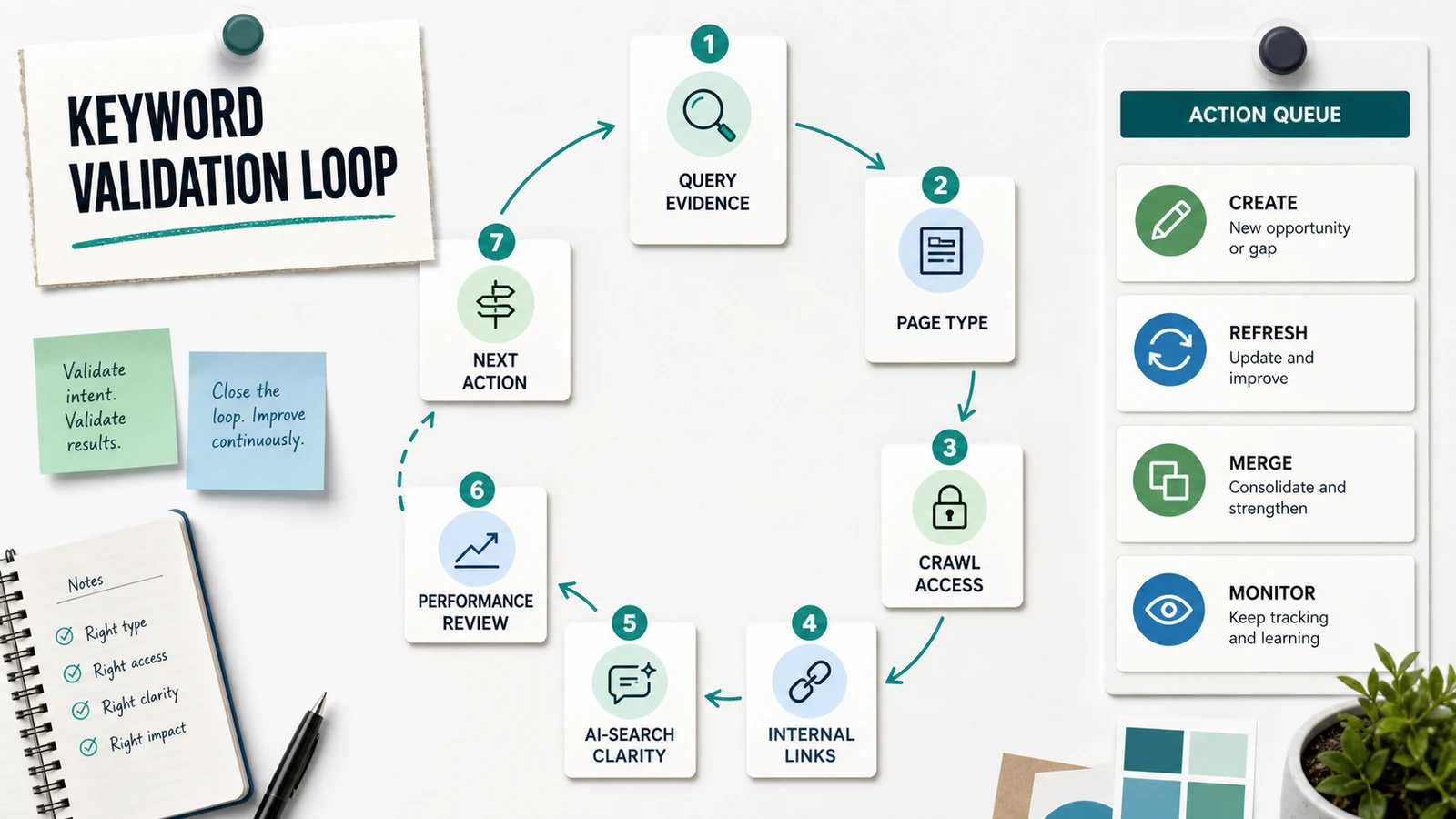
Use this validation loop:
- Crawl the published URL and confirm it is indexable, canonical, internally linked, and included in the sitemap.
- Check whether the title, H1, intro, headings, and body visuals support the approved keyword type.
- Review internal links so parent, child, and adjacent pages reinforce each other instead of competing.
- Check whether the page answers the primary query clearly enough for classic search and AI answer systems.
- Use the Search Console performance report after the page has data to compare queries and landing pages.
- Decide the next action: create a child page, refresh a section, merge overlap, add internal links, or monitor.
The loop protects the site from keyword drift. If a page starts earning impressions for a different job, the answer is not always a new article. Sometimes the title needs tightening. Sometimes a section should become its own page. Sometimes two pages should be merged because the same user job is splitting signals.
Where Searvora Fits
Searvora fits when keyword types need to become assigned work. The AI SEO consultant is positioned around pattern-based diagnosis, priority scoring, fix-ready guidance, and execution alignment. That matches the point where a keyword list turns into decisions.
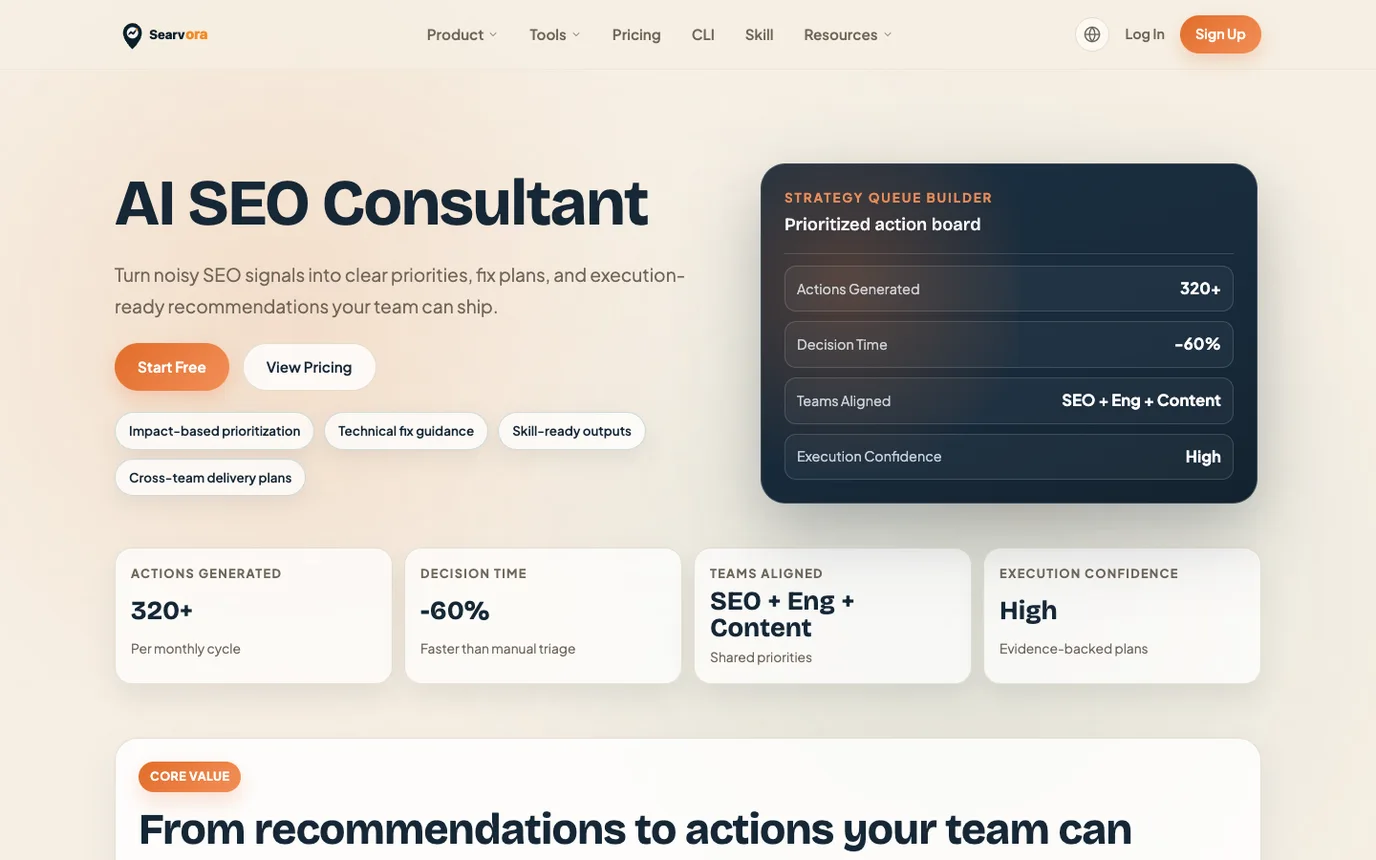
Use Searvora when the question is no longer "what type of keyword is this?" and becomes "what should the team do with it?"
| Input | Decision Searvora can help structure | Output |
|---|---|---|
| Keyword cluster | Which page should own the job | Create, refresh, merge, monitor, or defer |
| Existing article inventory | Whether overlap is real | Internal links, page updates, or no new page |
| Crawl and sitemap evidence | Whether the owner URL can compete | Technical checks before publication |
| AI-search clarity needs | Whether the answer is extractable | Definitions, tables, examples, and source evidence |
| Team capacity | What should ship first | Prioritized action queue |
A Practical Keyword Type Checklist
Use this checklist before a keyword moves from research into production:
- Name the keyword type and the likely user job.
- Choose the page type before writing the title.
- Search the current Searvora inventory for the closest owner URL.
- Apply the same-keyword, same-page-type, same-user-job duplicate test.
- Decide whether the action is create, expand, refresh, merge, monitor, tool, landing page, or no page.
- Define the information gain in one sentence.
- Pick one primary product CTA and one to three supporting internal links.
- Plan visuals, tables, screenshots, or examples that support the decision.
- Validate crawlability, canonical, sitemap, internal links, and rendered content after publishing.
- Recheck query mix and AI-search clarity before approving another adjacent page.
Types of keywords are most useful when they make the content system calmer. They help teams stop writing one page per phrase and start routing search demand into the few actions that actually improve the site.