

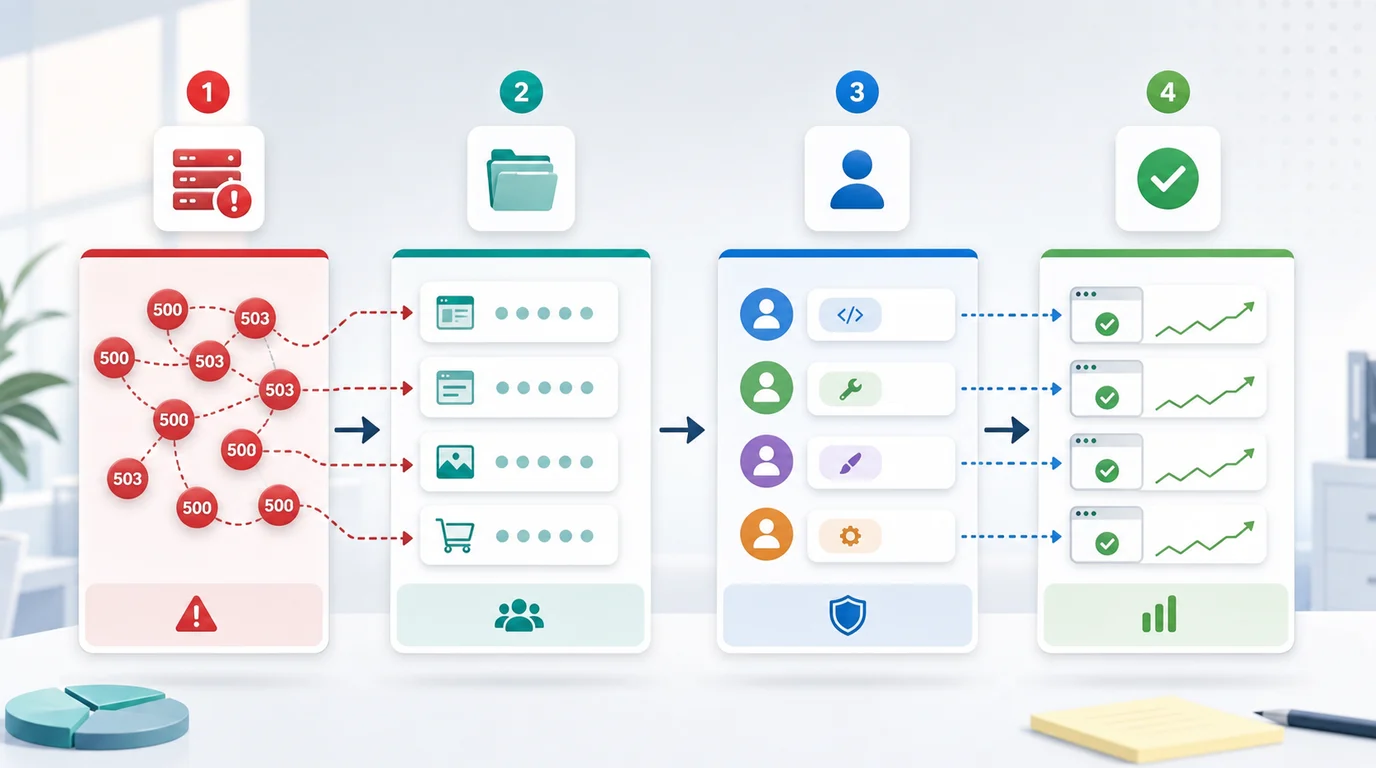
5xx server errors SEO starts with one practical question: which important URLs did crawlers fail to fetch, and how fast can the team prove recovery? First confirm the affected URL group, route the failure to the right owner, restore the underlying service, then recrawl until status codes, canonicals, sitemap entries, and internal links agree. A 5xx response is not a content optimization problem. It is crawl access risk.
The Screaming Frog issue page that surfaced this opportunity defines the crawler symptom: internal URLs where the server could not fulfill a valid request. Searvora's information gain is the operating layer around that symptom: separate one-off failures from crawl-critical incidents, route the fix to the right owner, and prove recovery with a focused recrawl.
Start With Crawl Impact
Do not start by asking whether a single 500 response is "bad for rankings." Start by asking which page group failed, how often it failed, and whether the failed URLs matter for discovery, indexing, revenue, or trust.
Google's HTTP status code guidance treats 5xx and 429 responses as server-side problems that can slow crawling when they persist. For SEO teams, that means the first job is impact classification.
| Crawl finding | Why it matters | First decision |
|---|---|---|
| One low-value URL returns 500 once | Could be transient deploy or monitoring noise | Recheck before assigning work |
| Important templates return repeated 500 or 503 | Search systems may fail to fetch pages that should stay eligible | Escalate to engineering or platform owner |
| Sitemap URLs return 5xx | You are asking crawlers to fetch unavailable pages | Restore access or remove bad sitemap entries |
| Canonical targets return 5xx | Duplicate URLs may have no healthy representative | Restore the canonical target first |
| APIs or rendering paths fail | The HTML may be incomplete even when the route loads later | Check rendered output and server logs |
Separate Temporary Noise From SEO Incidents
A 5xx status means the server failed the request. It does not automatically mean the page is gone, low quality, or permanently broken. The danger comes from recurrence, scope, and where the failure sits in the site architecture.
Use this split:
| Pattern | Likely cause | SEO response |
|---|---|---|
| Short spike during deploy | Release restart, cache warmup, or brief origin instability | Monitor and recrawl affected samples |
| Repeated 500 on one template | Route handler, CMS field, database query, or rendering bug | Assign template owner and test representative URLs |
| 502 or 504 at the edge | CDN, proxy, origin timeout, or upstream service failure | Escalate with request timing and affected paths |
| 503 during maintenance | Intentional downtime or overload protection | Confirm retry behavior and keep duration short |
| 5xx on sitemap or feed endpoints | Generator timeout, bad batch, or storage failure | Fix endpoint first, then re-fetch the submitted file |
This keeps the article distinct from the broader HTTP status codes for SEO workflow. That parent article explains how different status classes affect crawl work. This page handles the narrow server-error fix path after the crawler has already found 5xx failures.
Build A 5xx Fix Queue
A raw export of failed URLs is rarely enough for engineering. The handoff should group errors by the system that can actually fix them.
Use this fix-queue format:
| Queue field | What to include |
|---|---|
| URL group | Directory, template, locale, sitemap, route, API, or page type |
| Status evidence | Status code, crawl timestamp, final URL, redirect path, and recurrence |
| Search role | Whether the URL is a canonical page, sitemap URL, product page, article, asset, or utility path |
| Owner | Platform, backend, frontend, CMS, CDN, DevOps, content, or SEO |
| Probable cause | Timeout, route crash, overload, deploy, stale cache, bad dependency, blocked upstream, or generator failure |
| Fix path | Restore service, patch route, reduce timeout, repair data, warm cache, update links, or remove invalid submissions |
| Validation | Focused recrawl, rendered HTML check, sitemap re-fetch, canonical check, and monitoring window |
For larger audits, pair this with a technical SEO site audit. The audit gives the full crawl inventory. The 5xx queue isolates the server-failure slice so it does not get buried under metadata, content, and redirect issues.
Check The Signals Around Failed URLs
Server errors become more urgent when other SEO signals still tell crawlers the URL is important. Check the surrounding system before deciding priority.
| Signal pair | High-risk pattern | Better action |
|---|---|---|
| 5xx and sitemap | Submitted URLs fail repeatedly | Restore the URLs or remove them from the sitemap until they are healthy |
| 5xx and canonical | Canonical target is unavailable | Fix the target before touching duplicate variants |
| 5xx and internal links | Navigation, hubs, or product grids point to failed URLs | Repair the route and keep source links focused on healthy canonical URLs |
| 5xx and redirects | Old URLs redirect into a failing destination | Fix destination health before judging the redirect map |
| 5xx and hreflang | Alternate URLs fail in one locale | Repair the locale route and validate reciprocal alternates |
| 5xx and rendering | Initial HTML loads but critical rendered content fails | Test source HTML, rendered HTML, and dependent APIs separately |
This is why a 5xx cleanup often travels with redirect validation. A redirect can be technically configured, but if the final destination returns 500, the migration still fails the crawler's job.
Validate Recovery With A Focused Recrawl
A 5xx fix is not finished when the incident closes. It is finished when the live crawl proves that important URLs are fetchable again and the surrounding signals agree.
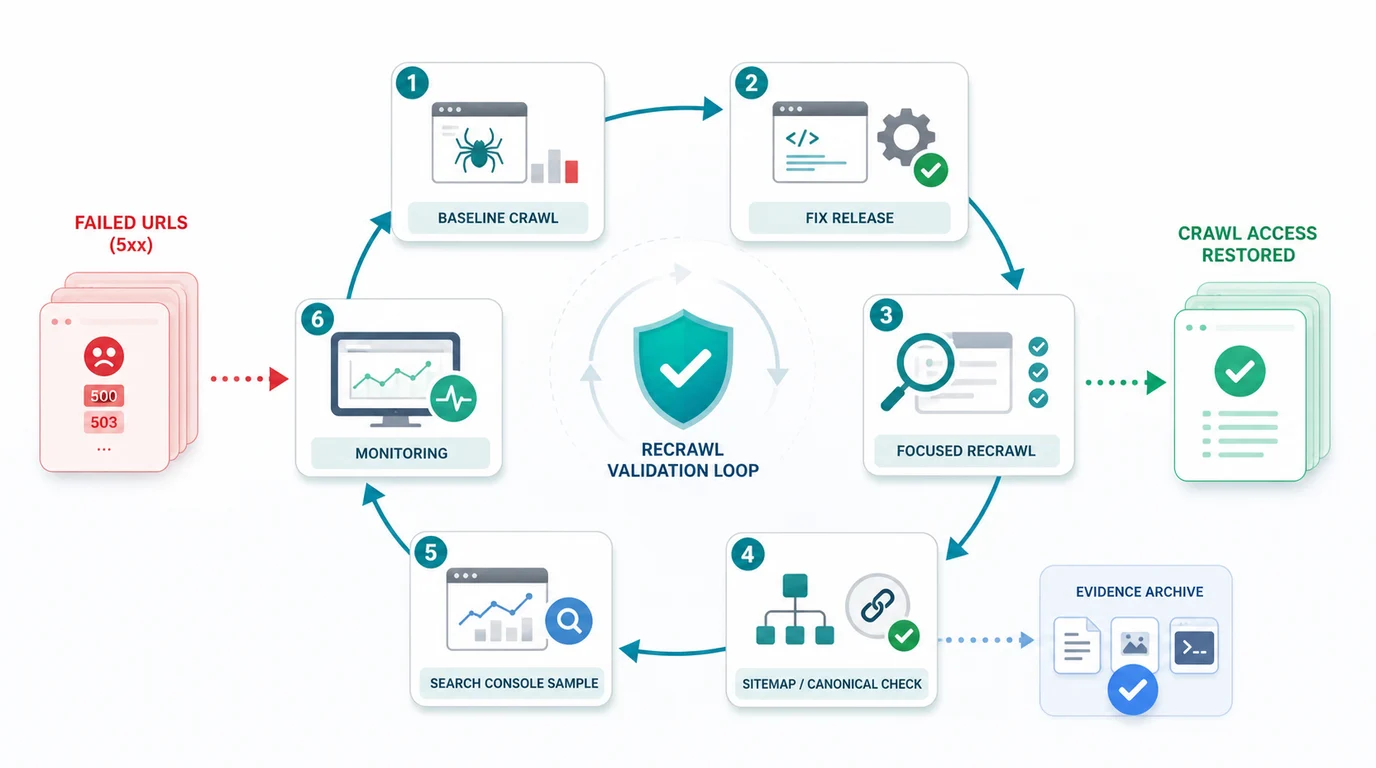
Run this validation loop:
- Save the baseline crawl export for the failed URL group.
- Confirm the affected page type, owner, and expected healthy response.
- Ship the server, route, CDN, CMS, cache, or dependency fix.
- Re-crawl the failed URLs and the source pages that link to them.
- Confirm the final response is the intended
2xxor redirect target. - Check canonical, robots, sitemap, hreflang, and internal-link signals.
- Sample high-value pages in Search Console when indexing or crawl stats were affected.
- Monitor the same URL group through the next scheduled crawl.
Do not validate only the homepage. A 5xx incident can affect one API route, one product template, one locale folder, or one sitemap generator while the rest of the site looks healthy.
Where Searvora Fits
Searvora SEO Spider Crawler is the product fit when server-error diagnosis needs to become a fix queue. The local product page positions the crawler around technical site audits, crawl discovery, indexability, redirects, sitemap behavior, JavaScript rendering, issue grouping, owner-ready handoff, and recrawl criteria.
Use the technical SEO crawler to move from issue export to validated repair:
| Searvora step | What the team gets |
|---|---|
| Crawl failed paths | Status codes, source links, depth, canonical state, and sitemap inclusion |
| Group by template and owner | Fewer duplicate tickets and clearer engineering handoff |
| Prioritize by search role | Important pages, submitted URLs, and canonical targets rise above noise |
| Recrawl after release | Evidence that crawl access, links, and sitemap signals recovered |
5xx Server Errors SEO Checklist
Use this checklist when a crawl surfaces server-side failures:
- Export failed URL, source URL, status code, final URL, timestamp, sitemap state, canonical, inlinks, and crawl depth.
- Group errors by page type, template, route, locale, endpoint, and owner.
- Separate one-time deploy noise from repeated crawl failures.
- Prioritize canonical pages, product/service pages, article hubs, sitemap URLs, and high-inlink templates.
- Check whether the failure is origin, CDN, route handler, CMS data, rendering, cache, or dependency related.
- Remove bad sitemap submissions only when the URL should not be indexed or cannot be restored quickly.
- Update source links if the site points crawlers into a broken or replaced path.
- Re-crawl the failed URLs and the pages linking to them after the fix.
- Confirm status, canonical, robots, sitemap, hreflang, and rendered HTML agree.
- Keep monitoring the same URL group until the next scheduled crawl stays clean.
5xx server errors matter for SEO because they interrupt access to pages that may still deserve to rank. Find the affected group, restore the underlying service, prove the recovery with crawl evidence, and keep the validation window long enough to catch recurrence.