

HTTP status codes for SEO tell you what happened when a crawler requested a URL. They do not decide rankings by themselves, but they control whether search systems can fetch content, follow redirects, ignore broken pages, or slow crawling because a server looks unstable.
The useful workflow is not memorizing every code. Classify URLs by status class, decide which responses need action, assign the owner, then recrawl the affected pages until crawl access, canonicals, links, and sitemap signals agree.
Read Status Codes As Crawl Evidence
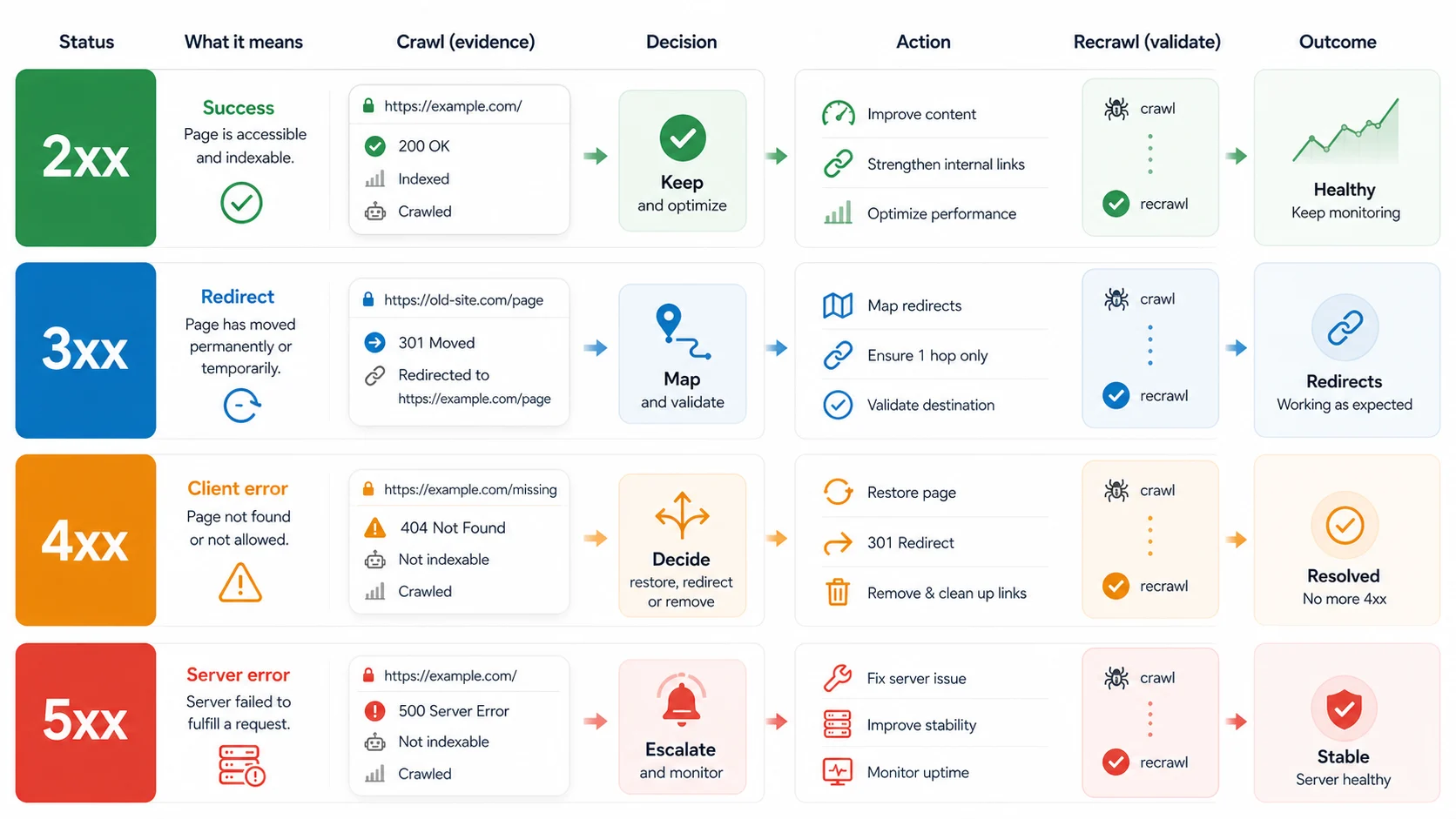
Google's HTTP status code guidance explains how its crawlers handle common responses. A 2xx response lets Google process the content, but does not guarantee indexing. A 3xx response sends crawlers to the final target. Most 4xx responses tell crawlers the content is not available. 5xx and 429 responses can make crawlers slow down and eventually drop persistent failures.
That means status codes should be treated as crawl evidence, not as a standalone score. One 404 from an old deleted PDF may be fine. A template that creates thousands of 404 internal links is work. A temporary 302 during a campaign may be fine. A migration that still uses temporary redirects months later needs review.
Use this first-pass triage:
| Status class | SEO meaning | First action |
|---|---|---|
2xx success | Crawlers reached a response that can be processed | Confirm the page is canonical, indexable, useful, and linked intentionally |
3xx redirect | Crawlers must follow another URL before seeing content | Check final target, redirect type, chains, loops, canonicals, and internal links |
4xx client error | The requested URL is unavailable, forbidden, gone, or rate-limited | Decide whether to restore, redirect, remove links, or keep the error intentionally |
5xx server error | The server failed the request or was unavailable | Escalate quickly, monitor recurrence, and recrawl once stability returns |
Decide Which Codes Need Work
Most status-code audits get noisy because every response is treated as equally urgent. Start by matching the response to the page job.
2xx pages still need QA. A 200 response can be a healthy canonical page, a thin page, a soft 404, a duplicate URL, or a page that should have been redirected. Check whether it appears in sitemaps, self-canonicalizes, has a real search task, and receives internal links from the right cluster.
3xx pages need destination QA. Google's redirect documentation separates permanent and temporary redirects because they send different consolidation signals. For SEO work, the practical question is whether the final URL answers the same user task and returns a clean, indexable page.
4xx pages need intent judgment. A deleted page with no replacement can return 404 or 410 cleanly. A revenue page, article hub, product collection, image asset, canonical URL, hreflang URL, or sitemap URL returning 4xx needs a fix path.
5xx pages need reliability attention. Persistent server errors are different from intentional removals. Treat them as production risk, especially when important templates, APIs, rendered pages, or crawl-critical assets fail repeatedly.
| Finding | Better decision | Why |
|---|---|---|
| A retired campaign URL returns 404 and no live page links to it | Keep the 404 or use 410 if removal is deliberate | The URL no longer has a search job |
| A blog article links to a 404 source URL | Update the source link or replace the reference | The source page still affects user trust |
| Old product URLs redirect through two hops | Point old URLs and internal links directly to the final page | Chains create crawl waste and validation noise |
| A category template returns 200 but has empty content | Treat it as a soft-failure candidate | The status code says success, but the page job failed |
| Important pages return intermittent 503 | Escalate to engineering and recrawl after the fix | Crawl access and reliability are at risk |
Connect Codes To Other SEO Signals
Status codes matter most when they conflict with canonicals, internal links, sitemaps, robots rules, hreflang tags, or structured data. The crawler response is the first signal, but the surrounding signals decide what the team should do.
Check these pairs before assigning work:
| Signal pair | Healthy state | Failure pattern |
|---|---|---|
| Status and canonical | A 200 page self-canonicalizes or points to the intended representative URL | A 200 duplicate points elsewhere while internal links still promote the duplicate |
| Redirect and canonical | Redirect target returns 200 and canonicalizes to itself | Redirect target canonicalizes to a third URL |
| Status and sitemap | Sitemap lists only canonical, indexable 200 URLs | Sitemap includes redirected, 404, blocked, or noindex URLs |
| Status and internal links | Internal links point to final canonical URLs | Navigation or content links to redirects, dead URLs, or temporary paths |
| Status and hreflang | Alternate URLs return 200 and agree with canonicals | Alternates point to redirected, blocked, or missing pages |
This is where status-code work connects to the redirects for SEO workflow, the broken link checker workflow, and a broader technical SEO site audit. A status-code export tells you what happened. The surrounding signals tell you whether the response is acceptable.
Turn The Audit Into A Fix Queue
Do not hand engineering a raw export with thousands of rows. Group status-code issues by page type, template, directory, owner, and validation rule.
Use this fix-queue format:
| Queue field | What to capture |
|---|---|
| URL group | Directory, template, page type, locale, sitemap, or source component |
| Status evidence | Current code, final URL, redirect chain, and crawl timestamp |
| Search role | Whether the URL should be indexed, consolidated, removed, or ignored |
| Related signals | Canonical, robots, sitemap, internal links, hreflang, and inlinks |
| Owner | SEO, engineering, CMS, content, localization, platform, or analytics |
| Fix path | Restore, redirect, update links, remove sitemap entry, repair server issue, or keep intentional response |
| Validation | Focused recrawl, rendered HTML check, sitemap recrawl, URL inspection, or monitoring |
Prioritize by impact footprint. A single 404 on an old tag page may wait. A template producing 4xx links from every product page should move quickly. A server error on a checkout, pricing, documentation, or article hub path deserves immediate escalation.
Validate With A Recrawl Loop
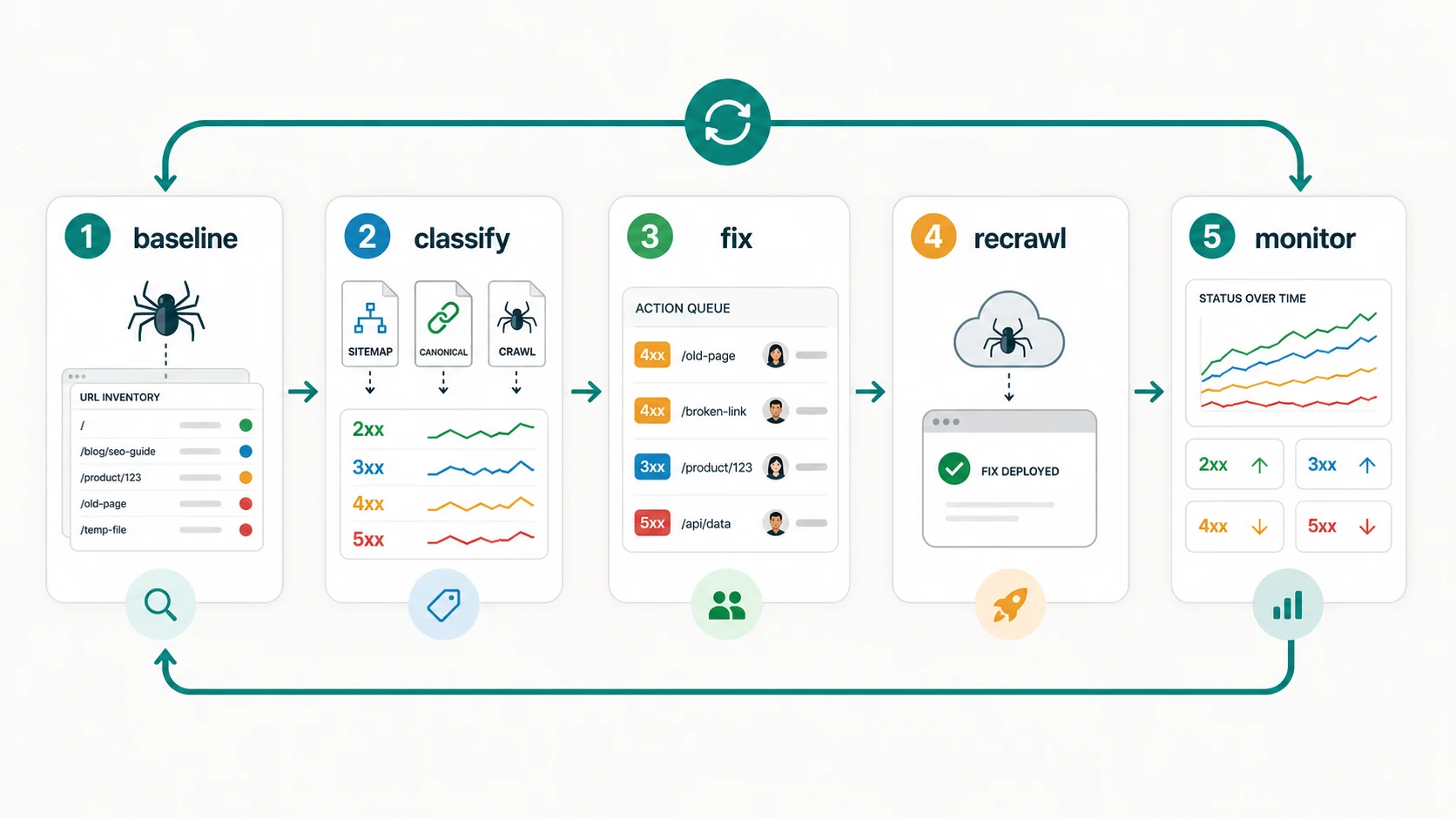
A status-code fix is not finished when a ticket closes. It is finished when the live site returns the intended response and the related signals agree.
Run this validation loop:
- Save the baseline crawl export for the affected URL group.
- Classify each URL as keep, redirect, restore, remove, or escalate.
- Update source links, redirects, sitemap entries, canonicals, or server behavior.
- Re-crawl the changed source URLs and final destination URLs.
- Confirm the intended status code, canonical, indexability, sitemap state, and internal-link path.
- Recheck high-value samples in Search Console when the issue affected indexing.
- Monitor recurring 4xx, 5xx, redirect-chain, and soft-404 patterns by template.
The recrawl step prevents a common failure: the destination is fixed, but the site still links through the old path. For search and users, cleaner source links usually beat relying on redirects forever.
Where Searvora Fits
Searvora SEO Spider Crawler is the product fit when HTTP status code work needs to become a crawl-backed fix queue. The local product page positions it around technical site audits, crawl discovery, indexability, redirects, sitemap behavior, JavaScript rendering, issue clustering, and owner-ready handoff.
Use the technical SEO crawler when you need to:
| Workflow layer | Searvora role | Output |
|---|---|---|
| Baseline crawl | Collect status codes, redirects, canonicals, internal links, and sitemap state | A clean URL inventory |
| Issue grouping | Cluster repeated status-code problems by template, directory, and page value | Fewer duplicate tickets |
| Fix prioritization | Separate harmless removals from crawl blockers and server failures | A ranked action queue |
| Validation | Recrawl affected pages after fixes ship | Evidence that the live site changed |
HTTP Status Codes For SEO Checklist
Use this checklist whenever a crawl report surfaces status-code noise:
- Export final URL, original URL, status code, redirect chain, canonical, indexability, sitemap inclusion, inlinks, and crawl depth.
- Separate intentional removals from accidental crawl failures.
- Group repeated issues by template, component, directory, and owner.
- Check whether important
2xxpages are also canonical, indexable, linked, and useful. - Validate every
3xxchain against the final target, redirect type, canonical, and source links. - Decide whether each
4xxURL should be restored, redirected, removed from links, removed from sitemaps, or left alone. - Escalate recurring
5xxand429patterns before they slow crawling or hide important content. - Update internal links so they point to final canonical URLs instead of old paths.
- Recrawl after fixes and save the before-and-after evidence.
- Monitor recurring patterns by URL group, not only by individual URL.
HTTP status codes for SEO are useful because they make crawl access concrete. Read the code, check the surrounding signals, choose the fix path, and keep recrawling until the site proves the problem is gone.