

Redirects for SEO are the rules that send users and crawlers from an old URL to the right new URL without turning a site change into a crawl, canonical, or reporting mess. They matter during migrations, slug changes, product removals, consolidation projects, HTTPS moves, and any cleanup where old URLs still have links, rankings, or demand.
The useful workflow is not "add a 301 and hope." Build a redirect map, decide when a URL should redirect versus return 404 or 410, update internal links and sitemaps, crawl the result, then monitor the live site until chains, loops, and canonical conflicts are gone.
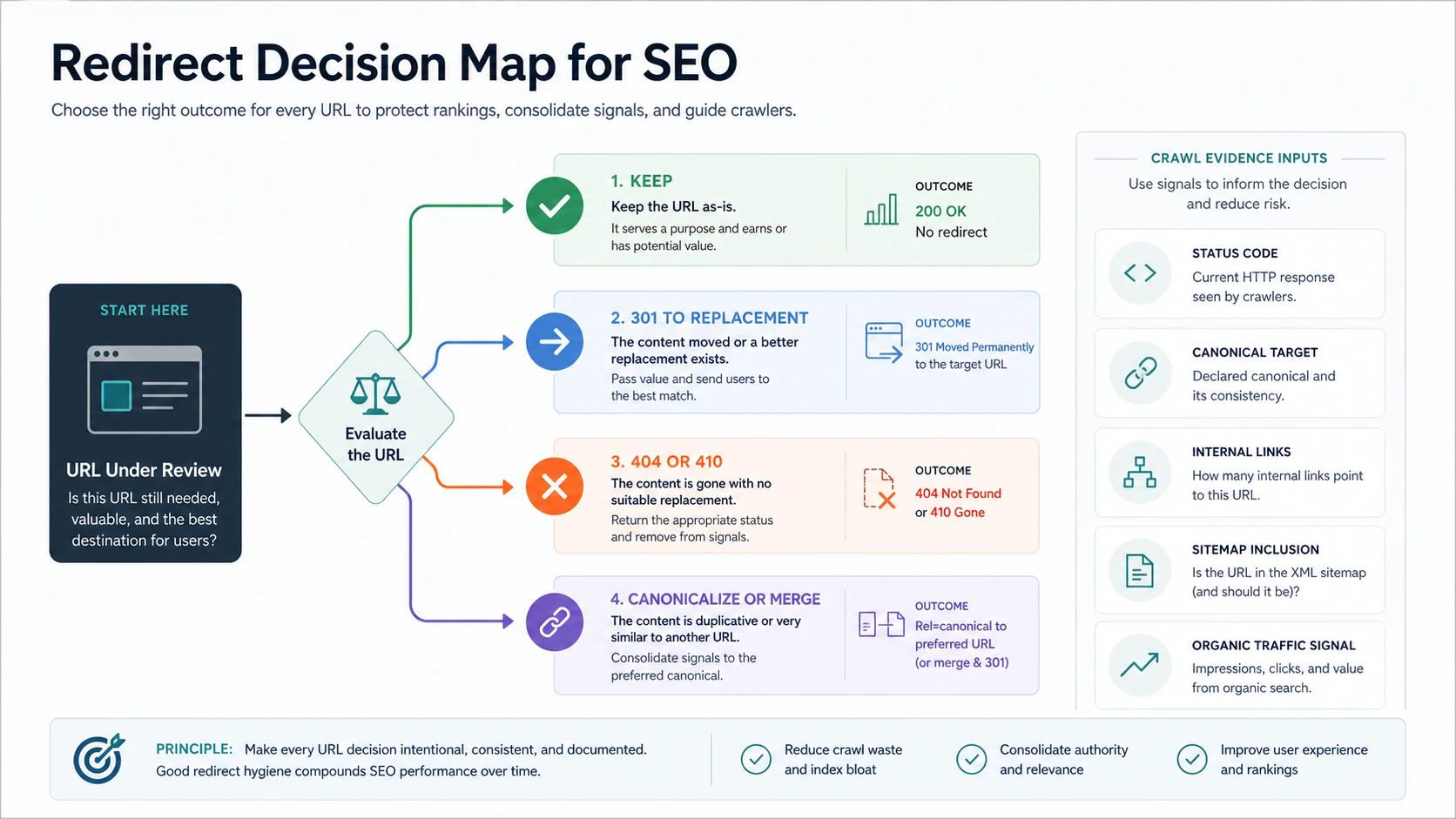
Start With The URL Decision
Google's redirect guidance separates permanent and temporary redirects and treats them as signals for where the canonical page should live. That is the baseline, but the SEO decision starts before implementation.
For every URL under review, answer one question first: does this old URL still have a useful destination for the same user task?
| Old URL situation | Best default | Why it matters |
|---|---|---|
| Page moved and has a close replacement | 301 redirect to the replacement | Preserves the user path and gives search systems a consolidation signal |
| Page moved temporarily | Temporary redirect only while the original should remain canonical | Prevents accidental long-term consolidation to a temporary page |
| Product, article, or service is gone with no equivalent | 404 or 410 | A weak redirect to a generic page can confuse users and search systems |
| Two pages serve the same job | Merge content, redirect the weaker URL, and update links | Consolidates signals instead of keeping duplicate intent alive |
| Duplicate URL variant should stay accessible | Use canonical rules, internal-link cleanup, or parameter control before redirecting | Avoids unnecessary redirect rules for URL noise |
The competitor snapshot from Ahrefs frames redirects around many redirect types and SEO impact. Searvora's information gain is the operating layer: make each URL decision intentional, join it to crawl evidence, and validate that every signal points to the same destination.
Build The Redirect Map Before Launch
A redirect map should be more than two columns copied into an implementation ticket. It should explain the source, destination, status code, owner, and validation rule for each URL family.
Include these fields before engineering ships anything:
| Redirect map field | What to capture | Validation question |
|---|---|---|
| Source URL | The exact old URL, including protocol, host, path, trailing slash, and parameter pattern | Does this match the URL people and crawlers actually request? |
| Destination URL | The canonical replacement URL | Does it serve the same task and return 200? |
| Redirect type | 301, 308, temporary redirect, or no redirect | Is the rule permanent or temporary by intent? |
| Reason | Migration, slug cleanup, duplicate consolidation, deleted content, protocol move, or template change | Can future operators understand the rule? |
| Internal-link update | Where old internal links still point to the source URL | Can the site link directly to the destination instead of relying on redirects? |
| Sitemap state | Whether the source and destination appear in XML sitemaps | Is only the canonical, indexable destination listed? |
| Owner and release | Engineering, CMS, content, localization, or platform owner | Who fixes failures after the launch crawl? |
This is where URL Structure SEO connects naturally. If the new URL pattern is unstable, redirects become a patch for a naming problem that will return in the next release.
Keep Canonicals, Links, And Sitemaps Aligned
Redirects are strongest when the surrounding signals agree. A redirect from old URL to new URL is weaker when the canonical tag points somewhere else, the sitemap lists the old URL, internal links keep using the redirect, or localized alternates point to non-canonical pages.
Google's canonicalization documentation describes redirects and rel="canonical" as consolidation signals, while sitemaps can help indicate preferred URLs. The practical lesson is simple: do not make search systems reconcile contradictory hints.
Check these signal pairs after any redirect work:
| Signal pair | Healthy state | Failure pattern |
|---|---|---|
| Redirect and canonical | Source redirects to a destination that self-canonicalizes | Source redirects to a URL that canonicalizes elsewhere |
| Redirect and internal links | Internal links point directly to the final URL | Navigation, related links, or templates still link to the old URL |
| Redirect and sitemap | Sitemap lists the final canonical URL only | Sitemap includes redirected, noindex, or parameter URLs |
| Redirect and hreflang | Each alternate points to its own canonical locale URL | Alternates point to redirected or missing URLs |
| Redirect and analytics | Reporting annotations explain the migration date and URL family | Traffic looks like a drop because old and new URL groups are not joined |
The canonical tags audit workflow is the right companion when redirects are being used to consolidate duplicate pages. Redirects move requests; canonicals explain preferred indexing. They should not argue with each other.
Crawl For Chains, Loops, And Soft Failures
After implementation, crawl the source URLs and destination URLs. Do not only test a few browser clicks. Redirect problems often hide in templates, old navigation, localized paths, uppercase variants, HTTP to HTTPS hops, and parameter patterns.
Export these checks:
- Source URL status and redirect type.
- Full redirect chain and final destination.
- Final destination status, canonical, robots directives, and H1.
- Source inlinks that still point to the old URL.
- Sitemap inclusion for source and destination.
- Hreflang alternates when localized pages exist.
- 4xx, 5xx, soft 404, or redirect-loop failures.
- Organic landing-page signals for URLs that should be watched after launch.
Google's HTTP status and network error guidance is useful for separating real errors from intentional removals. A retired URL can return 404 or 410 cleanly. A migration URL that should consolidate to a new page should not drift into a broken, blocked, or irrelevant destination.
Validate After The Migration Goes Live
Redirect validation needs a loop because launch-day checks only prove the first implementation. Templates, CMS publishing, internal links, sitemap generators, and edge rules can reintroduce old paths.
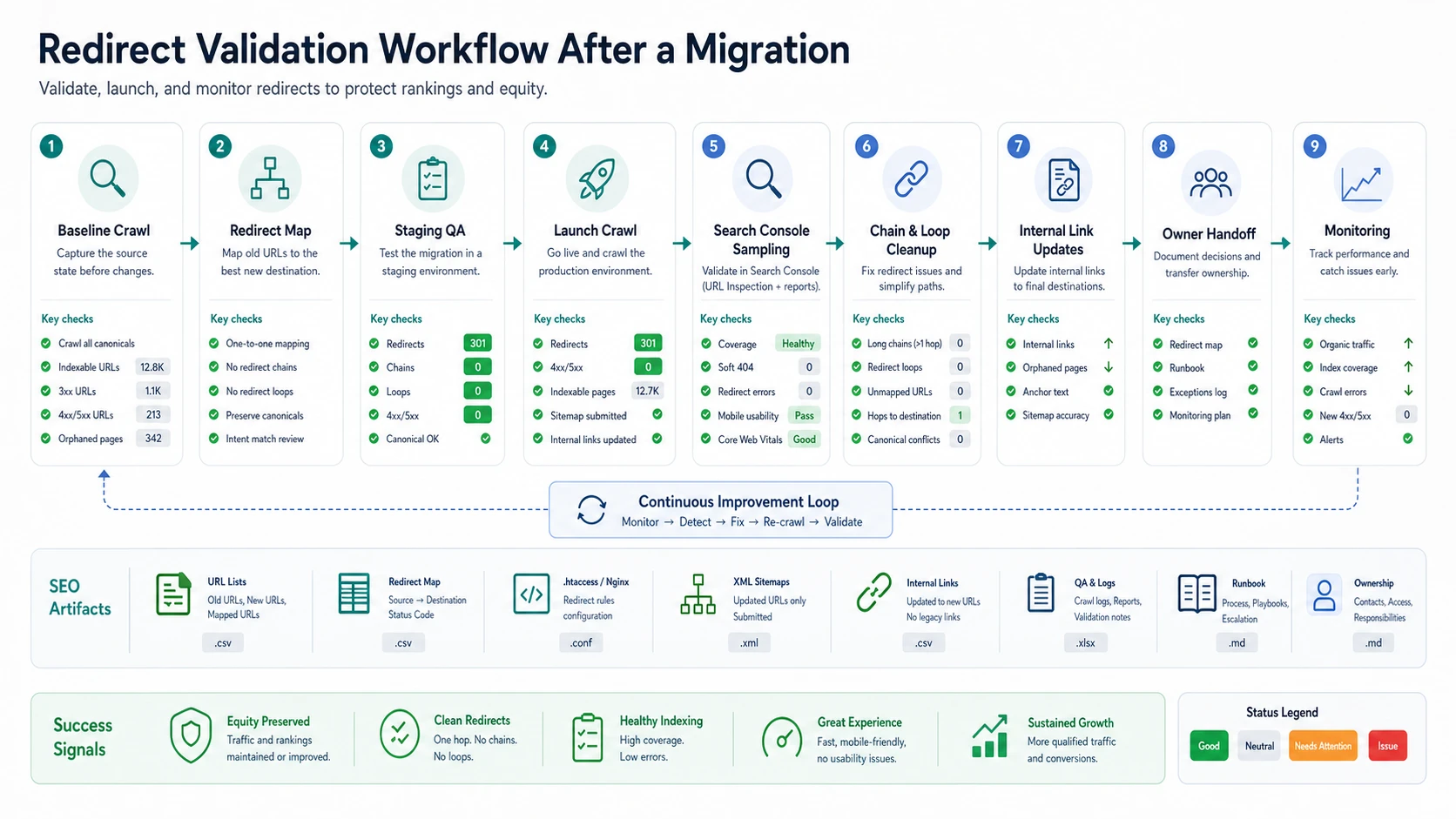
Run this sequence for migrations and large cleanup batches:
- Save a baseline crawl of the old canonical URL set.
- Build a source-to-destination redirect map.
- Crawl staging rules if the environment can reproduce redirects safely.
- Launch and crawl both source and destination URL samples.
- Update internal links so the site stops sending crawlers through old paths.
- Submit only final canonical URLs in XML sitemaps.
- Sample priority URLs in Search Console's URL inspection and indexing reports.
- Re-crawl after fixes to confirm chains, loops, 4xx/5xx errors, and canonical conflicts are gone.
- Monitor organic traffic, impressions, indexed pages, and crawl errors by URL family.
One-hop redirects are easier to maintain than chains. If old URL A redirects to B and B redirects to C, update A to point to C. If internal links still point to A, update those links to C. The cleaner the path, the less work search systems and users need to do.
Where Searvora Fits
Searvora SEO Spider Crawler is the right product surface when redirect work has to become an evidence-backed fix queue. The local product page verifies support for broken links and redirects, canonical and hreflang validation, sitemap checks, JavaScript rendering, URL inventory, issue clustering, exports, and recurring crawls.
Use the technical SEO crawler to group redirect issues by page type, owner, and risk:
| Workflow layer | Searvora role | Output |
|---|---|---|
| Baseline crawl | Collect status, canonical, internal-link, sitemap, and indexability signals | A source-of-truth URL inventory before change |
| Redirect QA | Find chains, loops, 4xx/5xx destinations, temporary redirects, and non-canonical targets | A prioritized issue queue |
| Signal alignment | Compare redirects with canonicals, hreflang, XML sitemaps, and internal links | Clear owner handoff for engineering, content, and localization |
| Post-release monitoring | Re-crawl URL families and watch recurring failures | Evidence that the migration stayed clean |
For cleanup work that starts with broken URLs, pair this with the broken link checker workflow. Broken links tell you where requests fail. Redirects decide where still-useful requests should go.
Redirects For SEO Checklist
Use this checklist before shipping redirect changes:
- Inventory old URLs from crawls, sitemaps, internal links, analytics, backlinks, and migration notes.
- Decide whether each URL should stay live, redirect, return 404 or 410, merge, or canonicalize.
- Map each redirect to the closest destination that serves the same user task.
- Avoid redirecting every retired URL to the homepage or a generic category.
- Choose permanent redirects only when the move is truly permanent.
- Remove chains by pointing old URLs directly to final destinations.
- Fix redirect loops before launch.
- Update internal links so they use the final canonical URLs.
- Keep XML sitemaps limited to canonical, indexable destination URLs.
- Check canonical tags, hreflang sets, robots directives, and status codes after release.
- Sample important URLs in Search Console and monitor errors by URL family.
- Save the redirect map and validation notes for the next migration.
Redirects for SEO hold up when they are treated as a system, not a rule pasted into a server file. Decide the destination, align the surrounding signals, crawl the result, and keep validating until the old paths stop creating work.