

An image alt text checker is useful only when it turns crawl findings into better pages. Start by crawling the site, extract the images that appear on important URLs, separate missing alt attributes from weak or decorative alt text, prioritize the fixes by page template, then recrawl after the edits are live.
The Screaming Frog tutorial that surfaced this opportunity shows the direct crawler task: find images with missing alt text or alt attributes. Searvora's information gain is the operating layer around that task: decide which image issues matter, who owns the fix, and how to prove the update improved accessibility and search understanding without turning every image into keyword stuffing.
Start With The Image Job
Do not treat every empty alt attribute as the same problem. Some images are decorative. Some explain a product, chart, step, or page promise. Some repeat nearby text. The first decision is what job the image performs on the page.
Use this triage table before assigning fixes:
| Image role | What the checker should flag | Better next action |
|---|---|---|
| Product, service, or category image | Missing, vague, or repeated alt text | Add concise descriptive alt text tied to the visible item |
| Diagram, screenshot, or workflow visual | Empty alt text or generic labels such as "image" | Describe the information the visual adds |
| Decorative divider or background | Alt text that repeats page copy or adds noise | Keep it empty when the image has no content job |
| Linked image | Missing context for the destination | Describe the action or target, not only the graphic |
| Template-level image module | Same bad pattern repeated across many URLs | Fix the CMS component or template rule |
Google's image SEO guidance connects useful image context with surrounding page content, filenames, and alt text. The W3C alt text decision tree is the practical companion when the SEO and accessibility jobs need to agree.
Crawl For Alt Text Gaps
The crawl should collect enough context to make the fix assignable. A raw list of image URLs is not enough because the same asset can appear on many pages, and the same template can create hundreds of weak alt text instances.
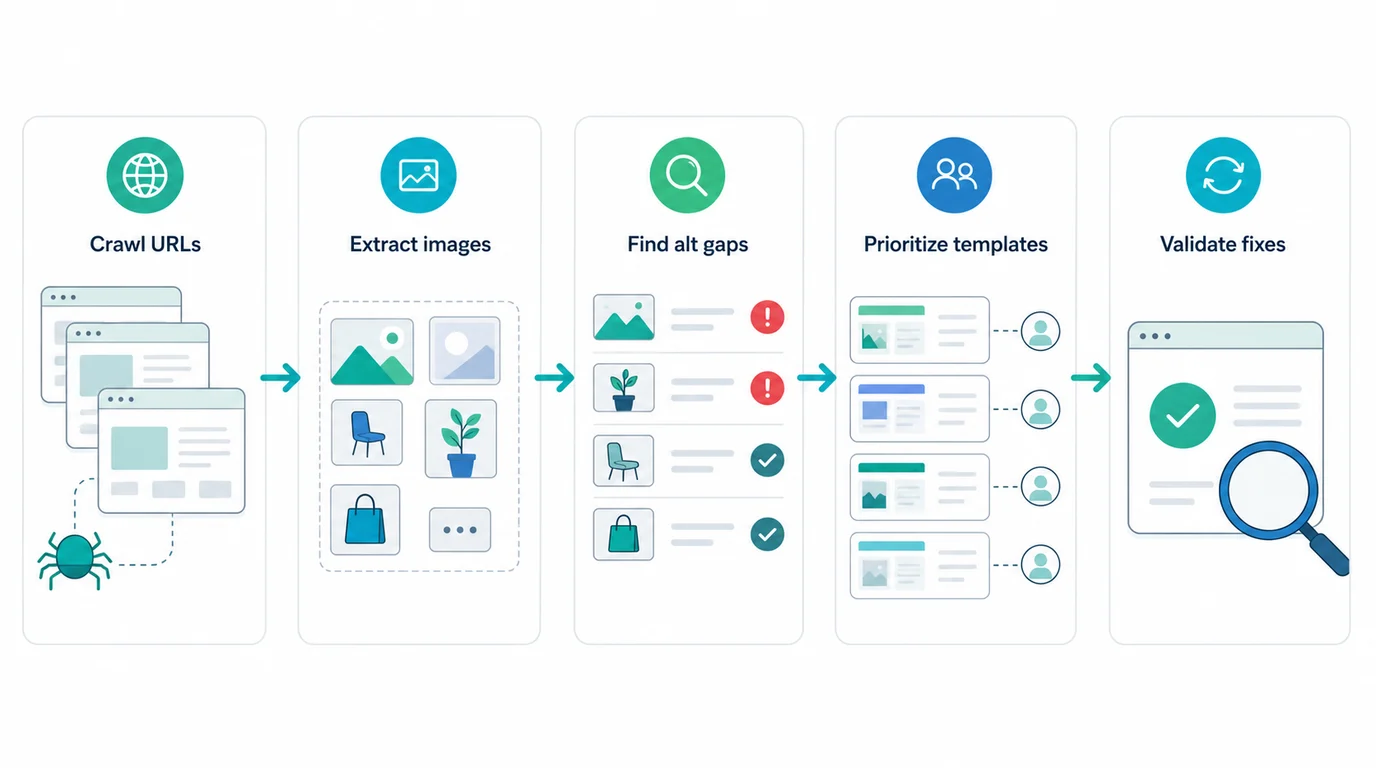
Pull these fields into the export:
| Crawl field | Why it matters |
|---|---|
| Page URL and canonical URL | Confirms the page that will be fixed and measured |
| Image source | Shows whether the issue is asset-level, CMS-level, or page-level |
| Current alt text | Separates missing, duplicated, empty, and weak descriptions |
| Image placement | Tells whether the image is hero, product, content, icon, nav, or decorative |
| Page title and H1 | Helps write alt text that supports the page job without repeating it |
| Template or directory | Reveals whether one component fix can improve many URLs |
| Inlinks and page role | Helps prioritize images on important pages before low-value inventory |
For ecommerce and CMS-heavy sites, connect this to a broader technical SEO site audit. The crawl gives the inventory; the alt text workflow decides which image defects become content work, template work, or no action.
Prioritize The Fix Queue
An image alt text checker can produce a long list, but the first sprint should focus on images that change comprehension, conversion, accessibility, or search eligibility.
Prioritize in this order:
- Images on pages that already receive search impressions, revenue, leads, or important internal links.
- Product, category, service, comparison, tutorial, and editorial images that explain the page.
- Repeated template gaps where one CMS or component change fixes many URLs.
- Images used as links, buttons, or navigation elements.
- Visuals that support AI-search and snippet extraction because they clarify entities, steps, products, or evidence.
- Low-value decorative images only when they create accessibility noise or bad generated alt text.
This keeps the article distinct from generic on-page SEO. On-page SEO covers the whole page promise. This workflow focuses on the media layer: which images help search systems and users understand the page, and how to fix them without creating noisy descriptions.
| Priority signal | High-priority pattern | Low-priority pattern |
|---|---|---|
| Page value | Product, service, collection, comparison, or high-traffic article | Utility page with no search role |
| Image role | Explains a product, chart, workflow, interface, or decision | Decorative background or repeated icon |
| Template footprint | One module affects many live URLs | One-off image on a stale page |
| Accessibility impact | Screen reader users need the image context to understand the page | The image repeats nearby text exactly |
| Validation path | The team can recrawl and confirm the fix | The asset is outside the owned CMS workflow |
Write Alt Text That Matches The Page
Good alt text is specific, useful, and proportional. It should describe what the image contributes to the page, not squeeze in every keyword the page targets.
Use these rules:
| Situation | Better alt text behavior | Avoid |
|---|---|---|
| Product image | Name the visible product type, variant, or distinguishing detail | Repeating the exact product title five times |
| Workflow visual | Summarize the process shown in the image | "SEO infographic" |
| Chart or screenshot | Describe the insight or interface state the reader needs | Tiny labels copied into a long sentence |
| Decorative image | Use empty alt text when it adds no information | Inventing meaning to pass a checker |
| Linked image | Describe the destination or action | Only describing the icon shape |
When the image supports search intent, the surrounding copy should also do work. Alt text is not a replacement for a clear H2, caption, paragraph, or table. If the important idea only appears inside the image, add searchable text nearby.
Validate After The Edit
The fix is not finished when a writer updates the CMS field. It is finished when the live page renders the intended alt text and the crawler can see it in the right context.
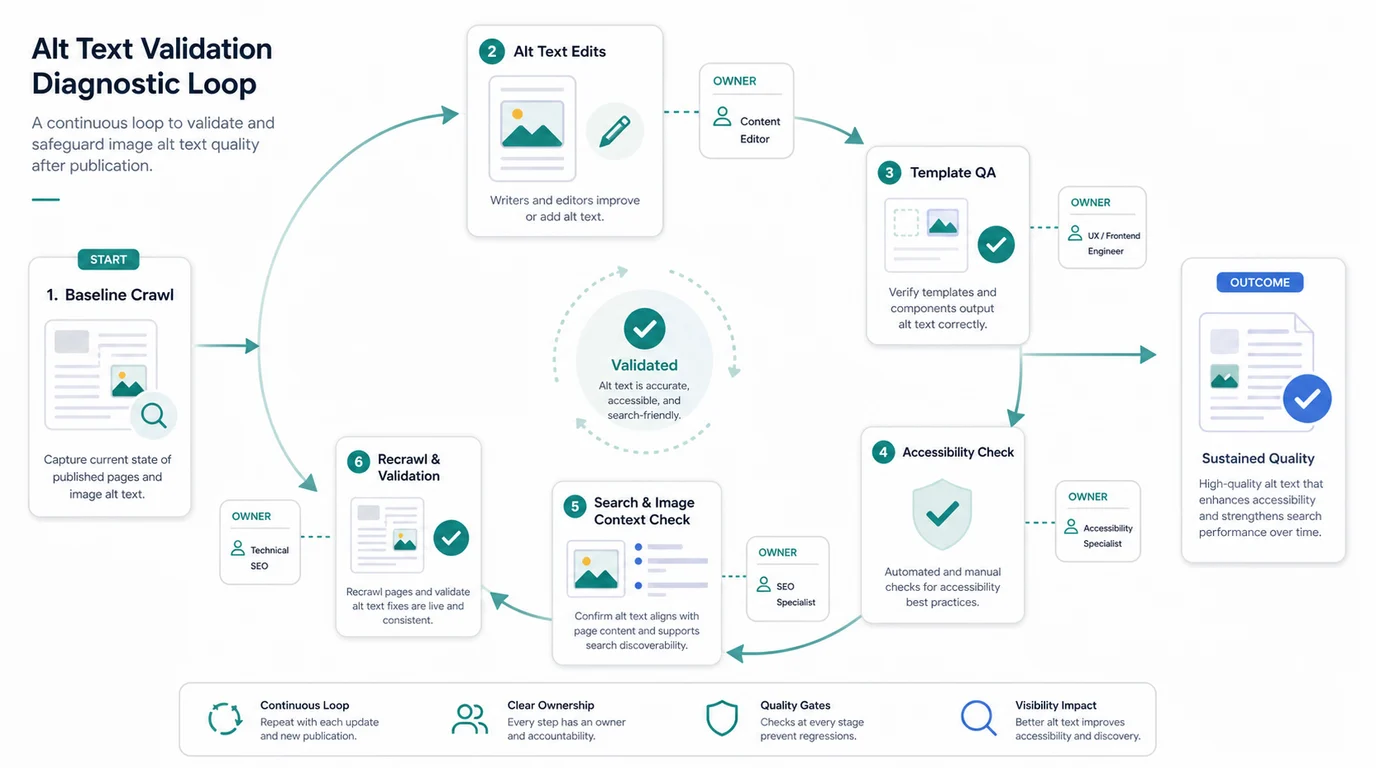
Run this validation loop:
- Save the baseline crawl export for the affected URL group.
- Decide whether the fix is page-level, asset-level, component-level, or CMS-template work.
- Update alt text only for images that carry meaning.
- Check the rendered page, not only the CMS field.
- Sample screen-reader and keyboard context when the image affects accessibility.
- Re-crawl the page group and confirm the image alt text appears as intended.
- Verify the page still has a clean title, H1, canonical, internal links, and local image paths.
- Monitor search and image visibility after recrawl windows when the page has meaningful demand.
This matters because alt text defects often come from templates. If the fix lives in a React component, Shopify theme, CMS block, or markdown renderer, one local edit may not repair the output across the live site.
Where Searvora Fits
Searvora SEO Spider Crawler fits the moment when image alt text checks need to become assigned work. The product page positions the crawler around technical site audits, crawl discovery, metadata checks, image checks, issue grouping, prioritized action queues, owner-ready handoffs, and recrawl validation.
Use it to keep the fix queue practical:
| Searvora step | What the team gets |
|---|---|
| Crawl image coverage | A page-level inventory of images, metadata, links, and crawl context |
| Group by template | A shorter list of component or CMS patterns instead of scattered one-off fixes |
| Prioritize by page role | Important pages and repeated modules rise above decorative noise |
| Hand off fixes | Writers, designers, engineers, and CMS owners receive different tasks |
| Re-crawl after release | Evidence that the live page now exposes the intended alt text |
Image Alt Text Checker Checklist
Use this sequence when a crawl surfaces image alt text gaps:
- Crawl the target pages and export page URL, canonical, image source, current alt text, image placement, title, H1, template, and inlinks.
- Remove decorative images from the fix queue unless they have misleading alt text.
- Group issues by template, CMS block, directory, and page type.
- Prioritize search-critical and conversion-critical pages before long-tail inventory.
- Write alt text that describes the image's contribution to the page.
- Keep surrounding captions, headings, and body copy clear enough that the image is not the only source of meaning.
- Assign page-level fixes to content owners and template-level fixes to engineering or CMS owners.
- Re-crawl the edited pages after publishing.
- Confirm rendered alt text, local image loading, canonical, indexability, internal links, and sitemap state.
- Record the decision rule so future image uploads do not recreate the same issue.
Image alt text checker work is not about chasing a perfect audit score. It is about making meaningful images understandable, fixing repeated template gaps, and validating that the live page gives users and search systems the context they need.