

If you need to know how to compare mom organic traffic in GA4, start with one clean question: which organic landing-page segment changed from the previous month, and does Search Console confirm that the search demand changed too?
GA4 can show the month-over-month movement in sessions, users, engagement, and conversions. It should not be the only evidence behind an SEO decision. A useful comparison connects GA4 landing pages with Search Console clicks, impressions, CTR, and page eligibility before anyone rewrites content or escalates a technical issue.
Start With A Clean Month Window
Month-over-month comparison gets messy when the current month is incomplete, the previous month had a campaign spike, or the channel definition changed. Before reading the chart, decide what period you are comparing and whether that period is fair.
Use this setup:
| Setup choice | Better default | Why it matters |
|---|---|---|
| Date range | Last complete month vs the month before | Avoids partial-month panic |
| Segment | Organic search landing pages | Keeps the review tied to SEO-owned pages |
| Page group | Blog, product, tools, locale, directory, or template | Shows where the change started |
| Metric | Sessions plus engaged sessions or conversions | Separates volume from useful traffic |
| Validation source | Search Console page and query data | Shows whether search demand agrees |
If you are still finding the right report, start with how to find organic search traffic in Google Analytics, then come back to the comparison after the source and landing-page views are clean.
Compare Landing Pages Before Totals
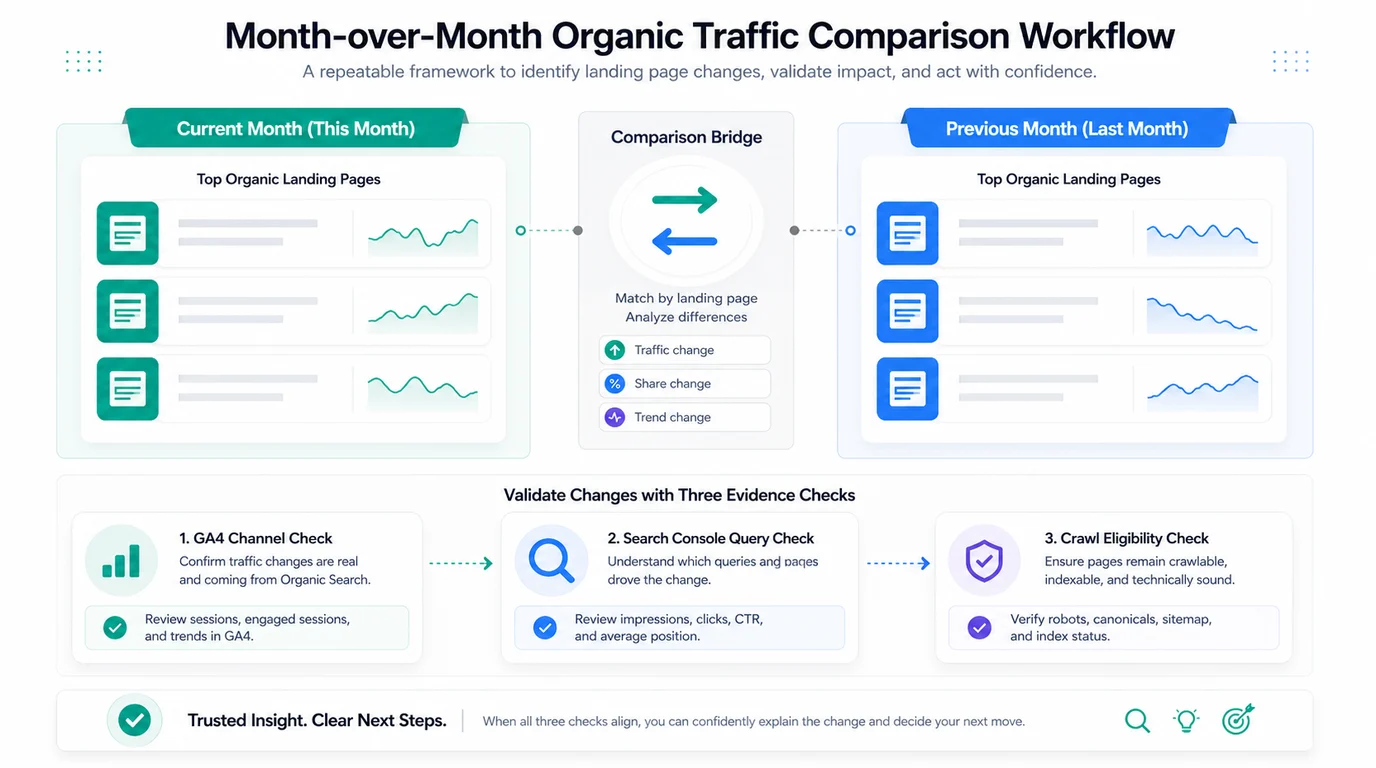
A sitewide organic total is useful for context, but it hides the page group that needs work. Compare landing pages first, then roll the finding up into a summary.
Build a small review set:
| Review field | What to capture | Good follow-up question |
|---|---|---|
| Landing page or cohort | URL, page type, locale, and directory | Did one template move or only one URL? |
| Current month organic sessions | Sessions and engaged sessions | Did useful visits move or only low-quality visits? |
| Previous month organic sessions | Same metric and same page group | Is the change outside normal movement? |
| Conversion or event behavior | Signup, lead, purchase, scroll, or key event | Did traffic quality improve or fall? |
| First interpretation | Growth, loss, mix shift, noise, or tracking issue | What evidence would prove the cause? |
Do not overreact to one landing page unless it is commercially important. A pattern across a template, collection, directory, or locale is usually more actionable than a single page moving in isolation.
Validate The Delta With Search Console
GA4 tells you what happened after a searcher landed. Search Console tells you whether search visibility changed before the visit. Use both before calling the movement an SEO win or loss.
The Search Console Performance report gives clicks, impressions, CTR, average position, pages, and queries. Compare the same month windows there, then match the affected pages back to your GA4 segment.
Use this decision table:
| GA4 MoM pattern | Search Console pattern | Likely interpretation |
|---|---|---|
| Organic sessions rose | Clicks and impressions rose | Demand or ranking improved for that page group |
| Organic sessions fell | Clicks and impressions fell | Search demand, eligibility, or rank may have moved |
| Organic sessions fell | Clicks held steady | Analytics, consent, channel grouping, or landing behavior may be the issue |
| Sessions rose but conversions fell | Query mix shifted broader | The page may be attracting lower-intent searches |
| Sessions flat, impressions rose | CTR or snippet promise weakened | Review title, meta description, SERP features, and intent fit |
This is where MoM comparison becomes useful. The point is not to prove the chart moved. The point is to decide whether the next action belongs to content, technical SEO, analytics, or no one yet.
Decide What Changed Before Assigning Work
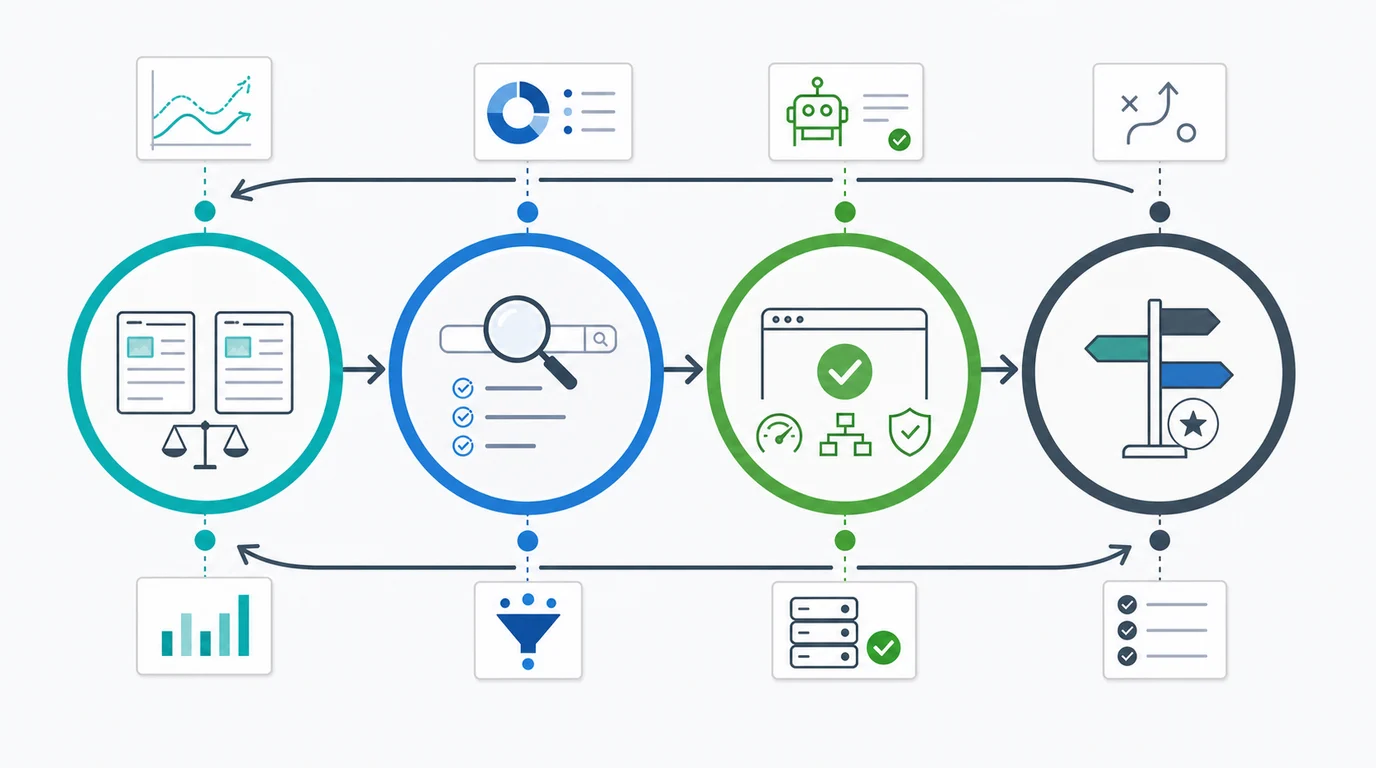
After GA4 and Search Console agree on the affected page group, classify the movement before assigning a fix.
| Movement type | First check | Next action |
|---|---|---|
| Demand changed | Impressions by query group | Watch, update forecast, or adjust expectations |
| CTR changed | Search appearance and title promise | Rewrite title/meta or adjust the intro promise |
| Ranking changed | Average position and competing SERPs | Refresh the page or improve internal support |
| Eligibility changed | Crawl, canonical, noindex, sitemap, redirects | Run a technical fix and revalidate |
| Traffic quality changed | Key events, conversions, and query intent | Rework CTA fit or page targeting |
| Reporting changed | Source / medium, consent, tags, property links | Fix measurement before changing pages |
If the drop is large or sudden, pair the MoM view with the organic traffic drop triage path. If the movement is recurring, turn it into an alert workflow with significant organic traffic change alerts.
Where Searvora Fits
Searvora's AI SEO dashboard fits after the raw GA4 and Search Console comparison. The product page positions the dashboard around page-type cohorts, locale drill-down, anomaly detection, opportunity queues, and cross-team reporting. Those are the layers that make month-over-month movement easier to act on.
Use the dashboard to keep the comparison from becoming spreadsheet drift:
| Work layer | Source tool | Searvora role |
|---|---|---|
| Traffic evidence | GA4 | Group landing-page movement by page type and cohort |
| Search evidence | Search Console | Connect clicks, impressions, CTR, and queries to the same pages |
| Eligibility evidence | Crawl checks | Confirm whether technical blockers explain the movement |
| Execution | SEO workflow | Rank the next actions and assign owners |
MoM Organic Traffic Checklist
Use this checklist before you share the comparison:
- Compare a complete month against the complete previous month.
- Confirm the organic search channel definition before trusting totals.
- Review landing pages or page groups before the sitewide number.
- Add engaged sessions, key events, or conversions so volume is not the only signal.
- Match affected pages to Search Console clicks, impressions, CTR, and average position.
- Separate demand changes from CTR, ranking, technical, and reporting changes.
- Check crawl eligibility when a whole template or directory moved.
- Assign one next action, one owner, and one validation window.
That is the practical way to compare MoM organic traffic in GA4: treat GA4 as traffic evidence, use Search Console to explain the search-side movement, and turn the combined signal into one decision your team can validate.