

Heading tags SEO is the work of using H1-H6 elements to make a page structure clear. A good heading hierarchy helps readers scan the page, helps assistive technology navigate sections, and gives search systems a cleaner view of what each part of the page is trying to answer.
The useful version is not "put keywords in headings." It is a workflow: crawl the headings that already exist, classify structural problems, rewrite sections around the user task, and validate the live page after the update.
What Heading Tags SEO Actually Checks
Heading tags are HTML elements from H1 to H6. The MDN reference for heading elements describes them as a way to create a document outline. In SEO work, that outline matters because a page often has to satisfy three audiences at once: readers, crawlers, and systems that summarize content into answer blocks.
Start with the page job before changing the copy:
| Page situation | Heading job | Common failure |
|---|---|---|
| Product page | Explain the product, use case, proof, and next step | H2 sections describe features but not buyer questions |
| Blog guide | Move the reader through a method | H2 sections repeat keywords instead of decisions |
| Comparison page | Separate evaluation criteria | Each section praises a tool without helping the choice |
| Hub page | Organize child topics and internal links | Headings become a long keyword list with no route forward |
| Support page | Answer the task quickly | The H1 is generic and the fix steps are buried |
The H1 should usually state the visible promise of the page. H2 sections should break that promise into useful decisions. H3 sections should support the H2, not restart the article under another keyword.
Start With A Crawl Instead Of A Rewrite
Manual heading review works for one page. It breaks down when the problem is a template, CMS field, product collection, old blog archive, or multilingual layout.
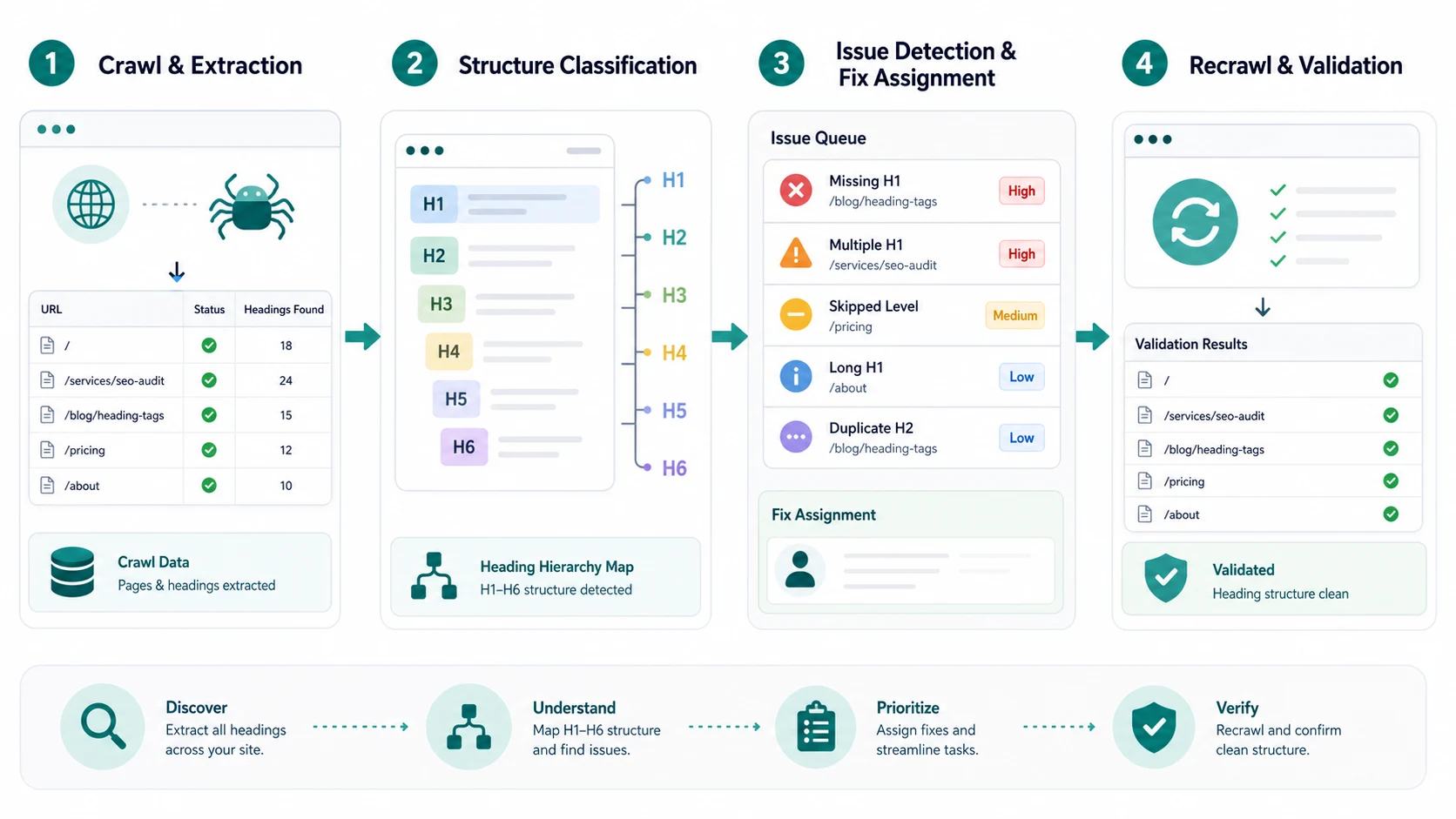
Before rewriting, crawl the site or at least the template group and export:
| Crawl field | Why it matters for heading tags SEO |
|---|---|
| URL and page type | Groups heading issues by template, section, locale, or owner |
| Status and indexability | Keeps noindex, redirected, or broken URLs out of the content queue |
| Title tag and H1 | Shows whether the search promise and visible promise align |
| H1 count | Finds missing H1s, multiple competing H1s, and template injection |
| H2-H6 sequence | Surfaces skipped levels, shallow sections, or over-nested content |
| Internal links | Shows whether headings support useful next-step routes |
| Organic or business signal | Helps prioritize fixes that can matter |
This is where heading work connects to a broader technical SEO workflow. The crawl separates page-structure fixes from access problems, canonical conflicts, and old template debt.
Classify Heading Problems By User Task
A heading can be technically valid and still unhelpful. Classify issues by the job they block, not only by the tag name.
| Issue | What it usually means | Fix path |
|---|---|---|
| Missing H1 | The page has no clear visible promise | Add one H1 that matches the page job and title intent |
| Multiple competing H1s | Template, hero, and article fields are all claiming priority | Keep one primary H1 and demote supporting labels |
| Skipped levels everywhere | Design components are controlling semantics | Fix the component pattern before editing individual pages |
| Keyword-stuffed H2s | Sections are chasing variants instead of answering steps | Rewrite sections around decisions, examples, or checks |
| Vague headings | Readers cannot scan the method | Replace generic labels with outcome-specific section names |
| Long decorative headings | Design tone is overpowering clarity | Shorten the heading and move context into body copy |
The goal is not a perfectly symmetrical outline. The goal is a page that a reader can scan and a crawler can interpret without guessing which section owns which idea.
For title/H1 alignment specifically, use the page title SEO workflow as the stricter companion. Title tags earn the click; heading tags confirm and organize the promise after the click.
Fix The Hierarchy Without Keyword Stuffing
Heading rewrites should make the page easier to use. Start with the reader's path through the page, then add keyword language only where it naturally clarifies the section.
Use this sequence:
- Confirm the primary search task and page type.
- Rewrite the H1 so it describes the page promise in plain language.
- List the decisions a reader must make to finish the task.
- Turn those decisions into H2 sections.
- Use H3 sections only when a section needs substeps, criteria, examples, or warnings.
- Remove headings that exist only to hold a related keyword.
- Check whether internal links sit under headings that explain why the next page matters.
- Re-crawl the page after publishing to confirm the rendered HTML changed.
Google's SEO starter guide is a useful baseline here because it connects descriptive text, links, page structure, and user usefulness. For teams, the missing layer is the operating queue that decides which page should be rewritten first.
Validate Accessibility And AI Answer Readiness
Headings are not only SEO cues. The W3C WAI headings tutorial frames headings as page structure for navigation and accessibility. That makes heading QA a quality gate, not a cosmetic copy pass.
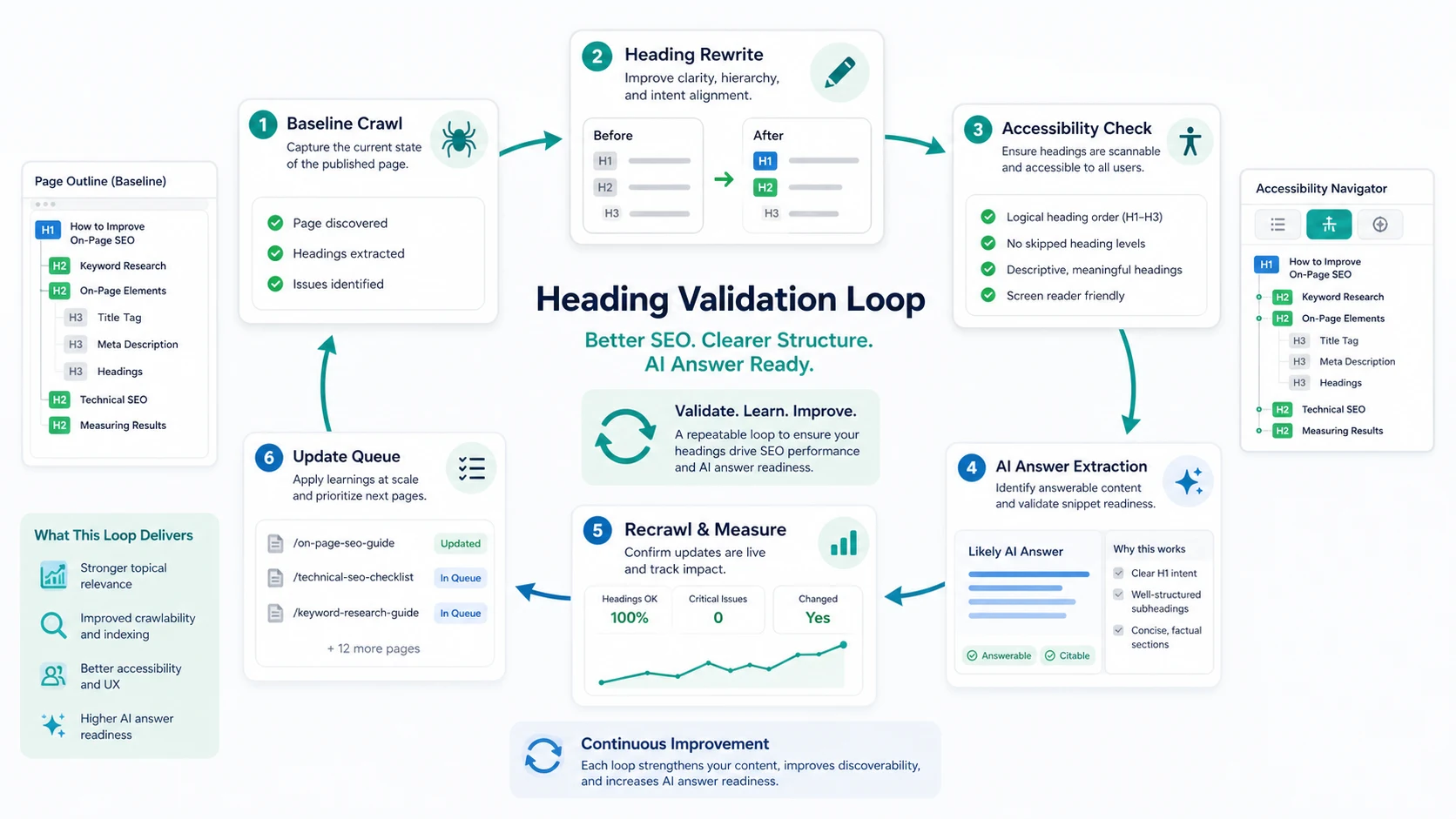
After a heading rewrite ships, validate these checks:
| Validation check | What good looks like |
|---|---|
| H1 and title alignment | The search result promise and visible page promise support the same task |
| H2 section order | The page moves from definition or diagnosis into steps, criteria, proof, and next action |
| Accessibility scan | Heading order is navigable and no design component creates fake hierarchy |
| AI-answer extraction | The page has concise sections that can be summarized without losing context |
| Internal links | Links appear under headings that explain the next useful page |
| Recrawl result | The live rendered HTML contains the intended heading structure |
For AI search visibility, headings are not a magic ranking switch. They are one part of making the page extractable. A clear H2 section with a direct answer, a useful table, and supporting evidence is easier to cite than a page where every section is called "Overview."
Where Searvora Fits
Searvora SEO Spider Crawler fits when heading tags SEO needs to become a queue instead of a manual page-by-page review. Use it to crawl page titles, H1s, heading sequences, metadata, links, canonicals, indexability, and sitemap behavior before assigning content or template fixes.
For content teams, the handoff is simple:
| Searvora step | Output |
|---|---|
| Crawl the template group | A list of URLs with heading, metadata, and indexability evidence |
| Classify the issue | Missing H1, duplicate H1, skipped levels, vague sections, or template defect |
| Assign the owner | Engineering for template problems, content for page-specific rewrites |
| Validate after release | A recrawl that proves the live rendered page is cleaner |
If the heading rewrite becomes part of a larger page refresh, pair the crawl evidence with the on-page SEO workflow so titles, intros, headings, links, schema, and media all support the same page job.
Heading Tags SEO Checklist
Use this checklist before publishing or refreshing a priority page:
- Confirm the page has one primary job.
- Check that the title tag and H1 support the same promise.
- Crawl the rendered page, not only the CMS draft.
- Identify missing H1s, multiple H1s, skipped levels, and duplicated section labels.
- Rewrite H2 sections around reader decisions, not keyword variants.
- Use H3s for substeps, criteria, examples, and warnings.
- Remove headings that do not introduce a real section.
- Make sure key sections include searchable text, not only image text.
- Confirm internal links sit near the section where the reader needs them.
- Validate heading order for accessibility.
- Re-crawl after release and keep the evidence with the ticket.
- Monitor pages where clearer headings should improve snippets, AI answer extraction, or conversion paths.
The final test is practical: if a busy teammate can scan the H2s and understand the page's promise, sequence, and next action, the heading structure is doing real SEO work.