

WordPress SEO is the work of making a WordPress site crawlable, indexable, useful, and easy to maintain after each publish. The CMS helps with many basics, but it does not decide which page owns a search task, whether templates output clean signals, or whether a fix is live after release.
The Ahrefs WordPress SEO guide that surfaced this opportunity is a broad tips article. Searvora's information gain is the operating layer: turn WordPress settings, templates, content production, crawl evidence, and AI-search readiness into one repeatable workflow.
Treat WordPress SEO as a CMS workflow
Start with the site model. A WordPress blog, documentation site, ecommerce content hub, service business, and media archive all expose different crawl and content risks.
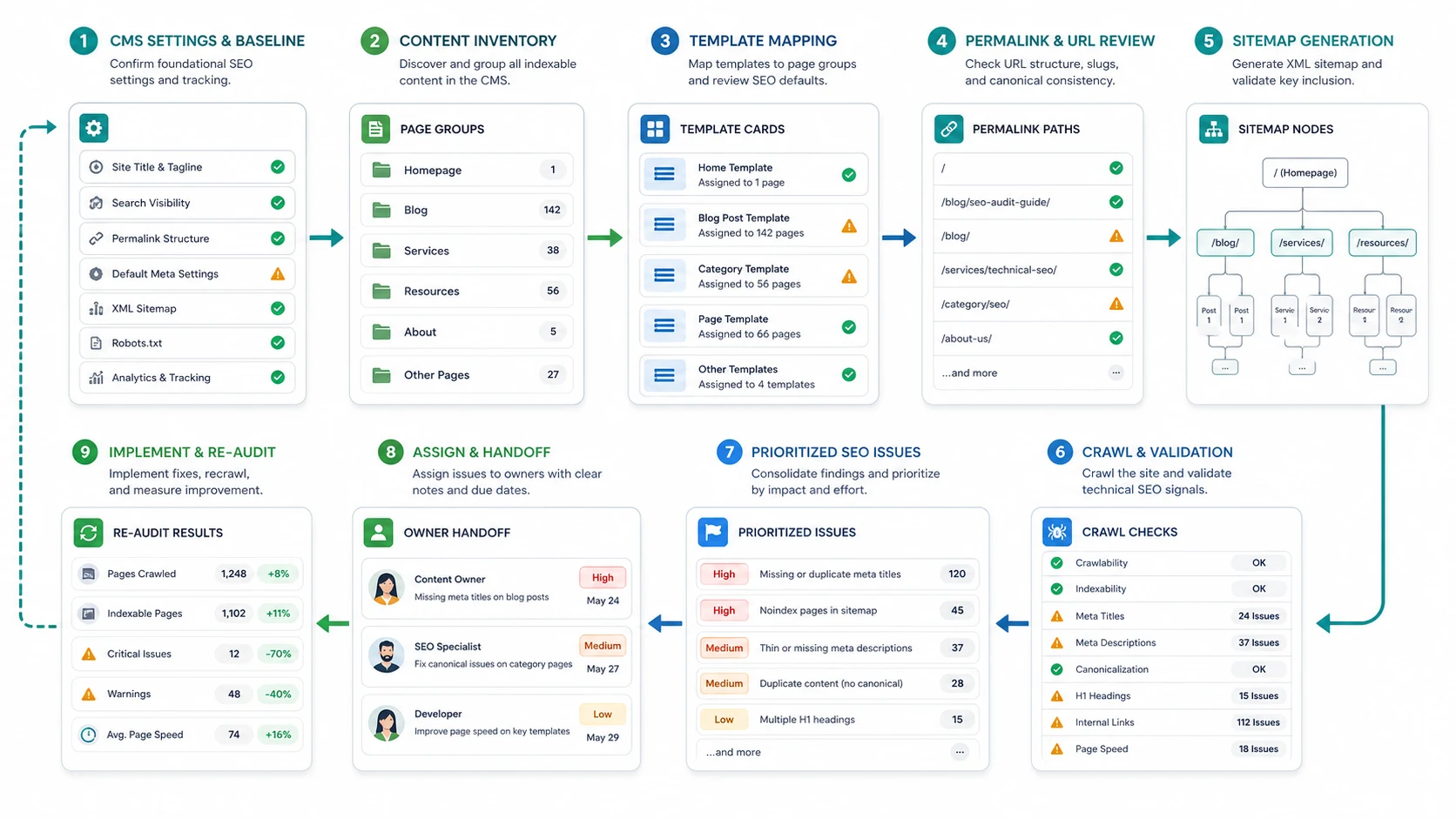
Use this first-pass routing table before rewriting pages:
| WordPress area | SEO job | First risk to check |
|---|---|---|
| Reading settings | Confirm the site can be indexed | Search visibility accidentally discourages indexing |
| Permalinks | Keep URLs stable and descriptive | Slug changes without redirect and canonical checks |
| Theme templates | Output consistent page structure | Repeated titles, weak H1s, missing schema, or heavy layout scripts |
| Categories and tags | Help discovery without duplication | Thin archives, indexable tag sprawl, or weak internal links |
| Posts and pages | Satisfy one search job per URL | Similar articles targeting the same task |
| Media library | Support accessibility and image search | Missing alt text, oversized assets, or reused generic filenames |
| Sitemap and robots | Submit clean crawl paths | Noindexed, redirected, or duplicate URLs entering the sitemap |
Verify the WordPress controls before strategy work
Use official documentation for platform behavior, then turn each control into a check on the live site.
| Control | What to verify | Official source |
|---|---|---|
| Reading settings | The search engine visibility setting is not discouraging indexing on production | WordPress Reading Settings documentation |
| Permalinks | The chosen URL structure supports stable, readable posts and pages | WordPress Permalinks Settings documentation |
| XML sitemaps | Core sitemap behavior or plugin sitemap output matches indexable canonical URLs | WordPress core XML sitemap announcement |
| Search basics | Search engines can crawl, index, and understand useful pages | Google SEO Starter Guide |
The practical question is not "which plugin should we install?" It is "which page group is affected, what does the rendered page send to search systems, and how will we prove the fix?"
Crawl the site before editing WordPress content
WordPress SEO often starts as content work, but the first evidence should be a crawl baseline. A post can have a strong outline and still struggle because the URL is noindexed, the canonical points elsewhere, the category archive competes with it, or internal links never expose it.
Run the baseline this way:
- Export or collect priority WordPress URLs by post, page, category, tag, landing page, and media-heavy template.
- Crawl the public site, not only the WordPress admin inventory.
- Group findings by template or content type.
- Check status codes, redirects, canonicals, robots directives, sitemap inclusion, titles, H1s, descriptions, internal links, and image alt text.
- Compare crawl findings against Search Console impressions and clicks.
- Assign each finding to content, SEO, engineering, theme, plugin, or site-owner work.
- Re-crawl after the fix ships.
This is where the technical SEO site audit workflow helps. It keeps WordPress SEO from becoming a long advice list and turns it into URL groups, owners, fixes, and validation checks.
Protect WordPress templates from repeated SEO debt
WordPress sites usually scale through templates. That is useful until the same weak pattern spreads across hundreds of URLs.
Audit templates by page job:
| Template or page group | Check this first | Why it matters |
|---|---|---|
| Blog posts | Title pattern, H1, author/date visibility, internal links, image alt text | Posts often carry informational demand and AI-search citation potential |
| Service pages | Unique value proposition, local/entity signals, contact path, schema fit | Service pages should not look like generic articles |
| Category archives | Indexability, intro copy, pagination, canonical behavior | Archives can support hubs or create thin duplicate paths |
| Tag archives | Whether each tag deserves search exposure | Tag pages often become crawl noise |
| Product or offer pages | Structured facts, canonical ownership, support content links | Commercial pages need clearer evidence than blog posts |
| Media attachment pages | Indexability and redirect behavior | Attachment URLs can create accidental thin pages |
If a template creates a repeated issue, fix the template before editing individual posts. If one article has weak information gain, rewrite the article. Mixing those work types slows every WordPress SEO sprint.
Turn WordPress topics into page jobs
A WordPress content calendar should not become a list of keywords. It should become a list of page jobs.
Use this brief gate before publishing or refreshing a WordPress post:
| Brief field | What the editor should decide |
|---|---|
| Search job | The one task this URL should own |
| Page type | Blog post, service page, comparison, landing page, category hub, or support article |
| Existing owner | The current URL that might already satisfy the same job |
| Template risk | Metadata, schema, links, media, or indexability behavior to check |
| Internal links | One to three useful next pages, not a bulk link dump |
| Refresh trigger | Ranking loss, AI-search citation gap, content age, product change, or crawl issue |
| Validation | Recrawl, Search Console review, rendered HTML check, or dashboard monitoring |
This is a close cousin of content audit work. The difference is that WordPress SEO keeps the CMS controls visible: editor fields, theme output, plugin behavior, archive rules, media handling, and publish validation.
Make WordPress pages ready for AI search
WordPress SEO now has to serve search engines and answer systems. That does not mean adding generic AI copy. It means making source pages clear enough to extract, cite, and validate.
Add these checks to the normal WordPress publishing path:
| AI-search readiness check | What to do in WordPress |
|---|---|
| Direct answer | Put the definition, step, or decision near the top |
| Entity clarity | Use consistent names for products, services, authors, locations, and categories |
| Evidence blocks | Add examples, tables, checklists, and source-backed claims |
| Crawl access | Make sure the page is linked, indexable, canonical, and in the right sitemap path |
| Update trail | Keep dates, changed sections, and owner review visible when the topic changes |
| Follow-up path | Link to the next useful page instead of trapping the reader on one post |
Pair this with the AI Overview ranking workflow when the query needs source-ready answer blocks. WordPress makes publishing easy, but the page still needs a clear job and evidence that search systems can reuse.
Validate after publishing
The WordPress editor only proves that a draft was saved. It does not prove that search systems can use the live page.
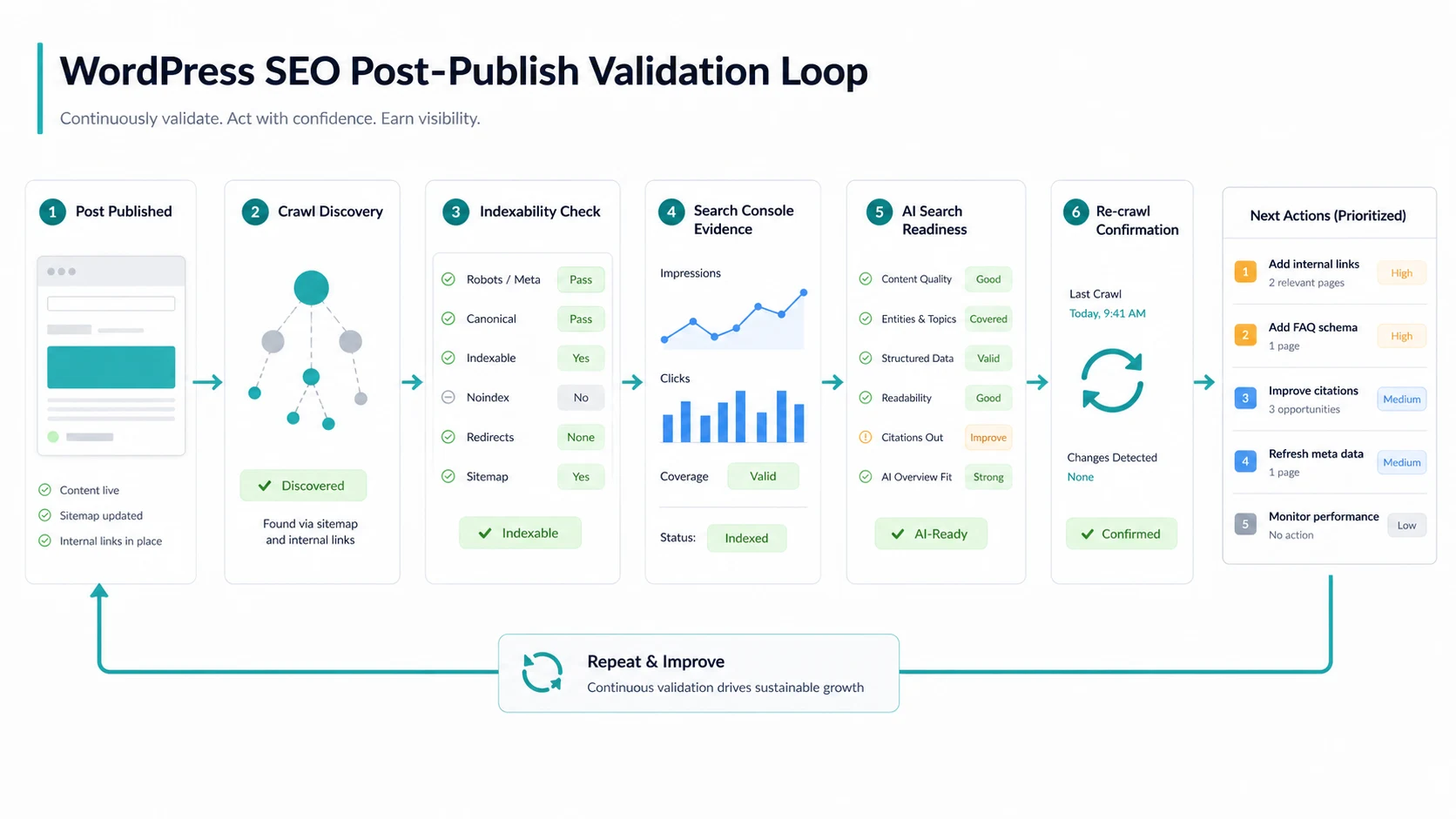
Use this post-publish loop:
- Confirm the live URL returns the expected status code.
- Check the rendered title, meta description, H1, canonical, robots meta, and structured data.
- Confirm the page is linked from a crawlable path.
- Check whether the sitemap includes only the canonical indexable version.
- Review Search Console after the page has enough data.
- Look for competing WordPress URLs serving the same query job.
- Add or adjust internal links from related posts and category hubs.
- Re-crawl the page group after fixes.
If the site uses many plugins or a custom theme, keep a release note. A plugin update, theme change, cache rule, or template edit can change the rendered output without changing the editor copy.
Where Searvora fits
Searvora fits the evidence and prioritization layer of a WordPress SEO workflow. It does not need to replace WordPress. It should show what the public site outputs, what changed, which issue matters, and how the team should validate the next fix.
| Workflow stage | Searvora fit | Output |
|---|---|---|
| Crawl and validation | SEO Spider Crawler | Rendered-page crawl, indexability checks, sitemap evidence, metadata issues, internal-link gaps, and fix validation |
| Prioritization | AI SEO Consultant | Impact, effort, confidence, owner, and next-action scoring |
| Monitoring | AI SEO Dashboard | Page-group movement, anomaly detection, and weekly action queues |
| Content production | Blogify when the workflow is Shopify-based | Structured drafts and metadata for ecommerce content teams |
For most WordPress SEO work, the primary handoff is the SEO spider crawler. Crawl the site, group issues by template and page job, then assign the fix that can be rechecked.
WordPress SEO checklist
Use this checklist before approving a WordPress SEO sprint:
- Group URLs by posts, pages, categories, tags, landing pages, and template families.
- Confirm production search visibility is not discouraging indexing.
- Check permalink structure before changing live slugs.
- Crawl the public site before editing content.
- Verify canonicals, robots directives, sitemap inclusion, titles, H1s, descriptions, and internal links.
- Decide whether each query needs a post, page, category hub, product page, or no new URL.
- Fix template-level issues before individual page edits.
- Keep one primary search job per URL.
- Add answer-ready sections, tables, and checklists when AI-search visibility matters.
- Re-crawl after publishing and record the validation result.
WordPress SEO works when the CMS, content plan, and crawl evidence agree. The useful outcome is not another plugin list. It is a site where important pages are discoverable, specific, internally supported, and easy to validate after every publish.