

Orphan pages are URLs that exist on your site but have no internal links pointing to them from crawlable pages. They may still appear in a sitemap, analytics report, backlink export, server log, or CMS inventory, but they are weakly connected to the site architecture that search engines and users follow.
The useful workflow is not "add a link to every orphan URL." First prove which pages are truly isolated, then decide whether each one deserves internal links, consolidation, a redirect, a noindex rule, sitemap cleanup, or no action.
The Ahrefs orphan pages article that surfaced this opportunity explains the core issue well: orphan pages are hard for search engines to discover because they have no internal links. Searvora's information gain is the operating layer around that task: turn orphan-page discovery into a crawl-backed fix queue that can be validated after release.
What Orphan Pages Are and Why They Matter
An orphan page is disconnected from the site's internal link graph. That does not always mean Google has never seen it. Search engines can discover URLs through XML sitemaps, external links, redirects, historical crawl data, feeds, or direct submissions. The problem is weaker: the page is not supported by the normal paths that explain where it belongs.
That weakness creates several SEO risks:
| Risk | Why it matters | First evidence to check |
|---|---|---|
| Weak discovery | Crawlers may not reach the page through normal site navigation | Crawl export and internal inlink count |
| Poor context | Search systems and users get fewer clues about topic, hierarchy, and relevance | Parent pages, hubs, breadcrumbs, and anchors |
| Wasted crawl budget | Low-value orphan URLs can keep appearing in sitemaps or logs | Sitemap inventory, logs, status codes, and canonical state |
| Split content ownership | A useful page may compete with a stronger canonical destination | Search intent, duplicate content, and existing rankings |
| Hidden decay | Old pages keep receiving visits or backlinks without a maintenance path | Analytics, backlinks, and content freshness |
Google's crawlable links guidance is the practical baseline: links need to be discoverable in the rendered page. If important URLs are only listed in a spreadsheet, a sitemap, or a CMS backend, the internal architecture is not doing its job.
Find Orphan Pages From Multiple Evidence Sources
A crawler alone can tell you which URLs it discovered through links. It cannot prove which URLs exist outside that crawl path. To find orphan pages reliably, compare the crawl inventory against every source that can reveal URLs.
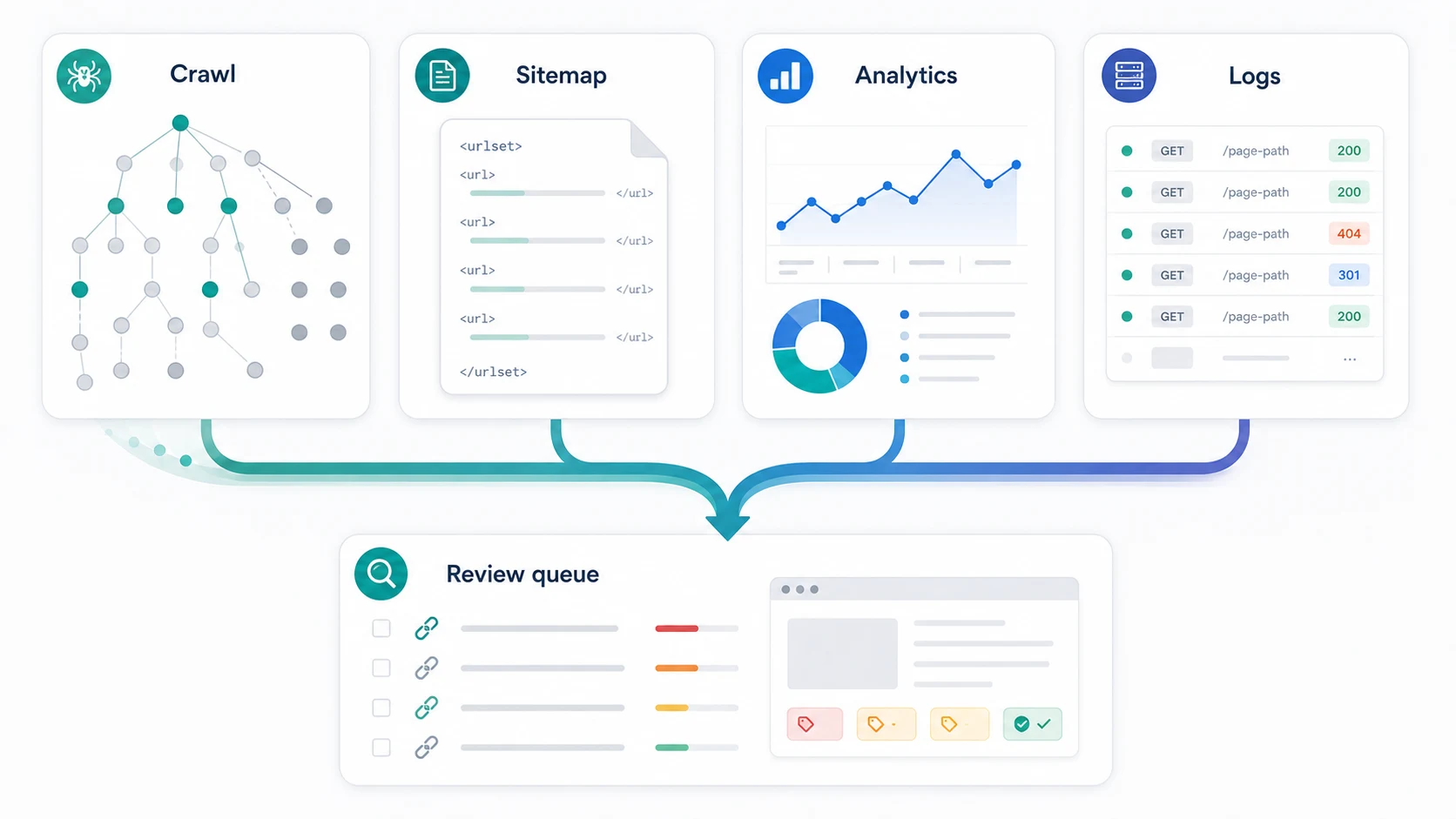
Use these sources together:
| Source | What it reveals | Orphan-page signal |
|---|---|---|
| Site crawl | URLs discovered through internal links | Important URL is missing or has zero internal inlinks |
| XML sitemap | URLs the site asks crawlers to discover | Sitemap URL is absent from the crawl or has no inlinks |
| Analytics and Search Console | URLs that received visits, impressions, or clicks | Page has search or user activity but no internal path |
| Server logs | URLs crawlers and users actually request | Crawlers hit a URL that the site crawl cannot reach |
| Backlink export | URLs cited by other sites | Linked page has external value but no internal support |
| CMS inventory | Pages that can be published or routed | CMS page exists but is not linked, indexed, or maintained |
The fastest check is a set difference:
- Crawl the site and export every indexable, final URL plus inlink count.
- Export sitemap URLs, analytics landing pages, Search Console pages, log URLs, and important backlink targets.
- Normalize final URLs so protocol, trailing slash, redirects, and canonical variants do not create fake gaps.
- Compare every external inventory against the crawl export.
- Send URLs missing from the crawl or showing zero internal inlinks into an orphan review queue.
The sitemap step should be treated carefully. Google's sitemap documentation frames sitemaps as a discovery signal, not a replacement for useful internal links. If the sitemap contains a URL that the crawl cannot reach, that URL needs review before you assume it should stay indexable.
For large sites, this is also where the XML sitemap generator workflow helps. A clean sitemap inventory makes it easier to compare canonical, indexable URLs against the crawl path you want search engines to follow.
Triage Whether Each Orphan URL Deserves a Fix
After discovery, do not treat every orphan candidate as an equal problem. Some pages are valuable and isolated. Some are obsolete. Some are deliberately not linked because they serve a short-term campaign, an internal utility, or a duplicate path.
Score each candidate before assigning work:
| Triage question | Keep in the fix queue when | Remove, merge, or monitor when |
|---|---|---|
| Is the page meant for search? | It serves a distinct query, page type, or business job | It is an internal page, expired campaign, tag page, or thin archive |
| Does it have evidence of value? | It has impressions, clicks, backlinks, conversions, or strategic importance | It has no demand, no links, no owner, and no clear user job |
| Is it technically eligible? | Final URL returns 200, is indexable, and has a clean canonical | It redirects, noindexes, canonicalizes elsewhere, or returns errors |
| Is the content still useful? | The page is current, unique, and better than alternatives | It is outdated, duplicated, or weaker than another page |
| Can the site explain where it belongs? | There is a natural hub, category, product page, or article cluster | No page on the site should reasonably link to it |
This protects the team from two common mistakes. The first is over-linking: adding footer, sidebar, or auto-generated links to pages that should have been retired. The second is over-cleaning: deleting or noindexing pages that had hidden demand or external citations.
If the orphan URL overlaps with another page, use the keyword cannibalization workflow before deciding. A page is not a duplicate just because it belongs to the same topic cluster. It becomes a duplicate when it serves the same keyword, page type, and user job as a stronger URL.
Choose the Right Fix Path
The fix depends on what the page is supposed to do. A valuable orphan page usually needs contextual internal links. A weak orphan page may need consolidation. A broken or obsolete one may need a redirect or cleanup.
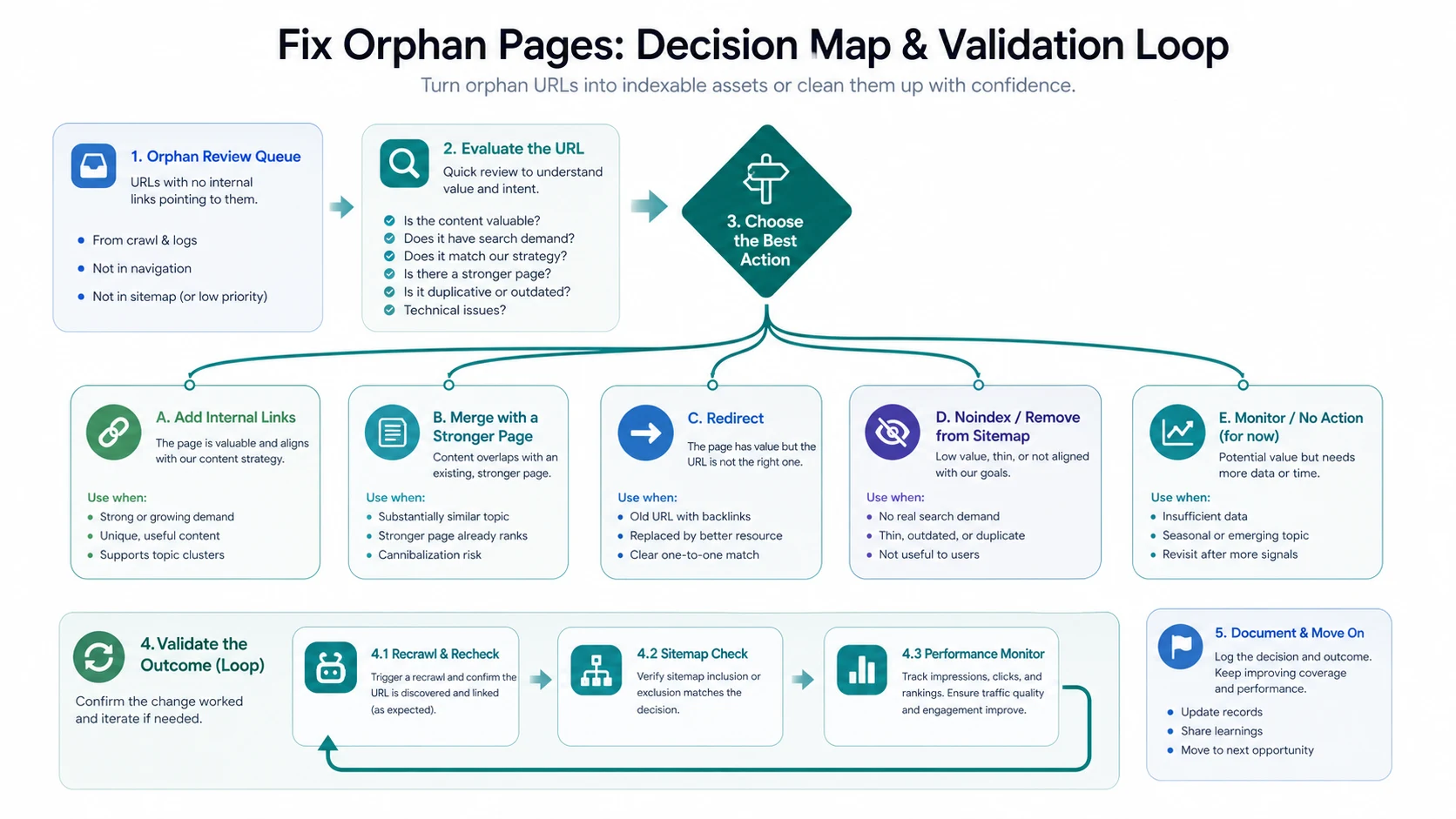
Use this decision table:
| Candidate state | Best fix | Validation check |
|---|---|---|
| Valuable page with search demand and no internal support | Add contextual links from relevant hubs, articles, navigation, or category pages | Re-crawl and confirm inlinks, crawl depth, and anchor relevance |
| Useful page that belongs under a stronger parent guide | Add it to a hub or supporting article path | Confirm the cluster links both ways where useful |
| Page overlaps heavily with a stronger URL | Merge content and redirect or canonicalize only when the relationship is clear | Confirm canonical, redirect, and sitemap consistency |
| Old URL has backlinks but no current page job | Redirect to the closest useful destination | Check status code, final URL, and internal links to the replacement |
| Thin, expired, or internal-only page | Noindex, remove from sitemap, or return a deliberate status | Confirm it is not still receiving valuable visits or citations |
| Emerging page with limited evidence | Monitor and revisit after more data | Record owner, review date, and evidence needed |
Internal links should be editorially useful. A link from a related guide, comparison, category page, or feature page helps both crawlers and readers understand why the orphan page exists. A sitewide link added only to inflate inlink counts usually creates noise.
For link placement, the internal links for SEO workflow is the natural companion. It explains how to prioritize anchors, crawl depth, page importance, and validation after the links ship.
Validate the Repair After It Ships
An orphan-page fix is not done when someone adds a link or changes a sitemap. It is done when the live site sends consistent signals and the next crawl proves the URL is connected the way you intended.
Use this validation sequence:
- Re-crawl the affected section and confirm the URL is discovered through internal links.
- Check internal inlink count, source pages, anchor text, and crawl depth.
- Confirm the final URL returns a healthy status code.
- Check canonical, robots, noindex, and redirect behavior.
- Confirm the sitemap either includes the canonical indexable URL or excludes the page deliberately.
- Compare Search Console and analytics after the next crawl window.
- Record the decision so the same URL pattern does not become orphaned again.
Google's canonicalization guidance is useful when the orphan page overlaps with another URL. Canonical tags can consolidate duplicate signals, but they should not be used to hide a bad internal-link structure. If the page deserves to rank, it needs a crawlable path. If it does not, the sitemap and indexability rules should agree with that decision.
For broader indexing symptoms, use the Google indexing workflow. Orphan pages often surface inside indexing investigations because they are technically live but poorly discovered, weakly supported, or disconnected from the page group that should explain them.
Where Searvora Fits
Searvora SEO Spider Crawler fits the evidence layer of orphan-page work. Use it to build the crawl inventory, inspect inlinks and crawl depth, group technical signals, and validate the repair after links, redirects, canonicals, or sitemap changes ship.
The practical handoff looks like this:
| Workflow step | Searvora role | Output |
|---|---|---|
| Crawl the site | Collect URL status, internal links, depth, metadata, canonicals, and sitemap signals | Baseline crawl inventory |
| Compare inventories | Match crawl results against sitemap, analytics, Search Console, logs, and backlink targets | Orphan candidate queue |
| Prioritize fixes | Group candidates by value, page type, risk, and owner | Technical and content fix queue |
| Validate changes | Re-crawl after links, redirects, noindex rules, or sitemap cleanup ship | Evidence that the URL state changed |
AI SEO Dashboard can add performance context when orphan candidates have impressions, clicks, or visible declines. AI SEO Consultant can help turn ambiguous cases into owner-ready work: add links, consolidate, redirect, noindex, refresh, or monitor.
Orphan Pages Checklist
Use this checklist when orphan pages appear in a crawl audit:
- Crawl the site and export final indexable URLs with inlink counts.
- Export sitemap URLs, analytics landing pages, Search Console pages, log URLs, backlink targets, and important CMS URLs.
- Normalize URLs before comparing inventories.
- Flag URLs missing from the crawl or showing zero internal inlinks.
- Remove false positives caused by redirects, canonicals, parameters, or excluded sections.
- Score each candidate by search value, technical eligibility, content quality, and business relevance.
- Add contextual internal links for valuable pages that deserve to stay.
- Merge, redirect, noindex, or remove weak pages that should not remain standalone.
- Clean the sitemap so it reflects canonical, indexable URLs only.
- Re-crawl and monitor performance after the fix ships.
The best orphan-page cleanup does not make every hidden URL visible. It makes the right URLs easier to discover, removes the ones that do not belong in search, and gives the team proof that the site architecture is cleaner than it was before.