

If you are asking how to promote your products on marketplaces, start with the listing and the supporting assets before choosing another channel. Marketplace promotion works when buyers can find the product, trust the listing, compare it clearly, and continue to a next step without losing confidence.
The practical workflow is this: prove the marketplace listing is ready, create content that answers the buyer questions the listing cannot fully answer, route promotion toward the right asset, then measure whether the traffic improves product discovery or purchase intent. That is quieter than a tactic list, but it prevents a common mistake: spending more on distribution while the product page still cannot carry the demand.
Start With Marketplace Search Intent
Marketplace buyers often search differently than general web searchers. They may already know the product category, compare features quickly, filter by price or shipping, and scan proof signals before reading a full description. Your promotion plan should respect that behavior.
Use this first split:
| Buyer job | Primary asset | Promotion mistake to avoid |
|---|---|---|
| Find a product type | Marketplace listing or category placement | Sending traffic before the listing title and attributes match the search |
| Compare similar options | Buying guide, comparison content, or collection page | Making every product sound the same |
| Understand fit | How-to article, use-case page, or FAQ | Hiding compatibility, materials, sizing, or constraints |
| Trust the seller | Review support, proof content, policy explanation, or brand page | Treating vague claims as proof |
| Act on urgency | Campaign page or offer-specific content | Promoting an expiring offer without a refresh or redirect plan |
This is also where the existing broader product-promotion work should connect. If the question is general online promotion, use the search-led product promotion workflow. If the question is specifically marketplace-led, keep the plan focused on listing readiness, marketplace search behavior, and support content.
Make The Listing Promotion-Ready
A marketplace listing is promotion-ready when the buyer can understand the product without leaving the platform, and when the signals around the listing match the demand you plan to create.
Before sending more traffic, check:
- The title uses the buyer's product language without keyword stuffing.
- Product attributes, variants, dimensions, materials, compatibility, and shipping details are complete.
- Images answer the first comparison questions.
- The description explains use cases, objections, and fit.
- Pricing, stock state, and delivery promises are stable enough for promotion.
- Reviews, FAQs, and support routes are visible where the platform allows them.
- The external content you control points to the right product or collection, not a generic homepage.
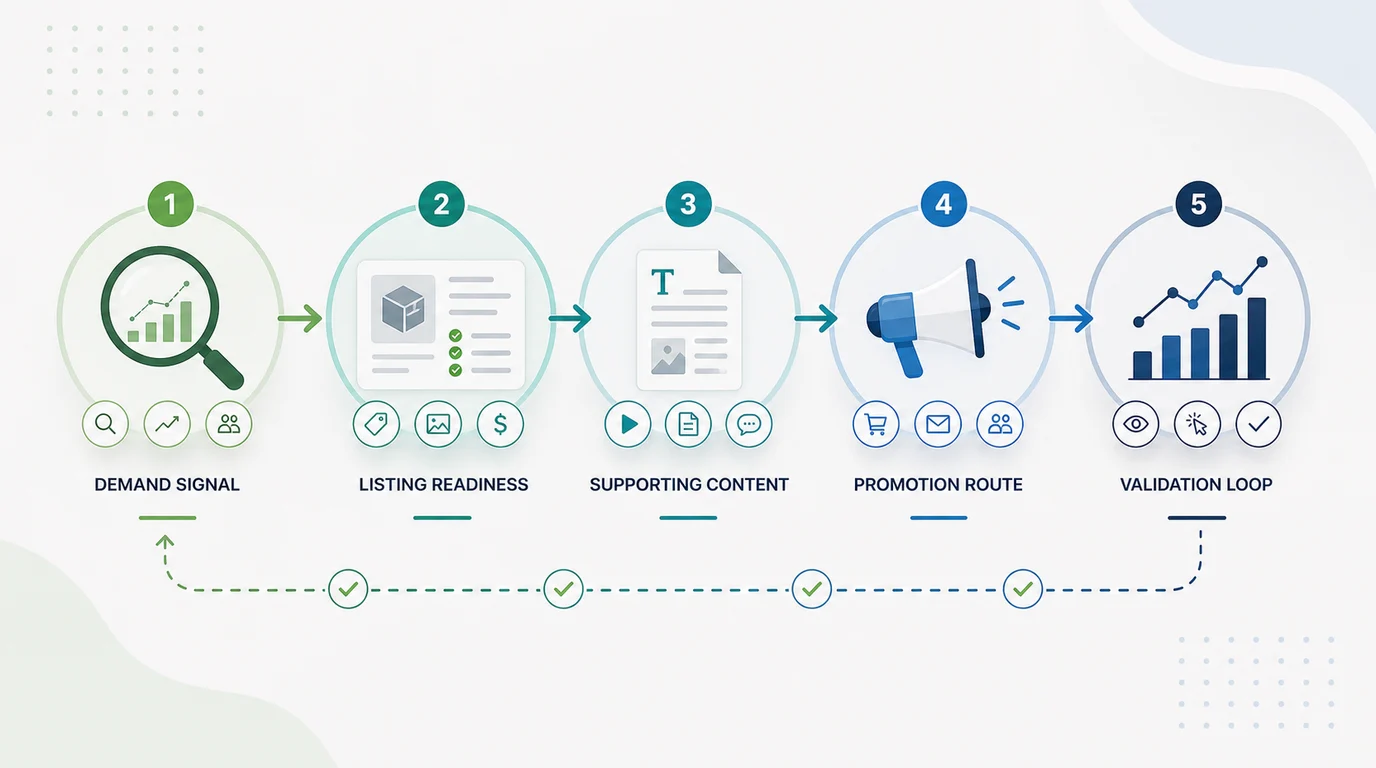
The point is not to over-optimize a listing for every phrase. The point is to decide which phrases and buyer jobs the listing can satisfy on its own, and which questions need a supporting article, guide, landing page, or email before the buyer reaches the marketplace.
Build Supporting Content Around The Listing
Marketplace listings usually have limited space and platform rules. Supporting content lets you explain the product more clearly without making the listing carry every job.
Use this content map:
| Need around the product | Best supporting content | What it should prove |
|---|---|---|
| Category education | Buying guide or comparison guide | Which product type fits which use case |
| Product use | How-to article or setup guide | The product solves a real task, not just a catalog slot |
| Objection handling | FAQ, policy page, or support article | Shipping, returns, compatibility, warranty, and care are clear |
| Seasonal demand | Campaign article or gift/use-case guide | Why this product matters now |
| Brand trust | Brand story, sourcing page, or proof page | The seller is credible beyond the marketplace listing |
Keep the content honest. A guide should help the buyer make a decision before it points to the marketplace. A comparison should use real criteria. A campaign page should have an expiry plan. When the supporting content is thin, promotion simply moves more people toward the same uncertainty.
For ecommerce teams, the ecommerce SEO workflow is the broader page-type model. Marketplace promotion adds one more constraint: some conversion activity happens on a platform you do not fully control, so the owned content must carry the proof and education the listing cannot.
Route Channels To The Right Asset
Once the listing and supporting content are ready, choose channels by the job they perform. Do not push every channel to the same URL.
| Channel | Best destination | Why it works |
|---|---|---|
| Marketplace ads | Marketplace listing or promoted placement | The buyer is already in shopping mode |
| Organic search | Buying guide, comparison, use-case content, or collection page | The buyer may need education before the marketplace click |
| Product guide, launch page, or marketplace listing | The audience can be segmented by prior interest | |
| Social content | Visual product story, short guide, or campaign page | The buyer needs context before acting |
| Partners or affiliates | Review brief, comparison page, or trackable product route | The partner needs a clean asset to reference |
| Retargeting | Product listing or objection-handling page | The buyer already showed intent and needs reassurance |
This keeps the campaign from becoming channel-first. A channel is useful only when it sends the buyer to the asset that answers the next question. If the buyer is already comparing products, send them to the listing or comparison. If the buyer is still learning, send them to content that builds confidence before the listing.
Use Search Evidence To Choose What To Write
Search evidence helps you avoid writing content that sounds useful but has no demand. Pull search queries, marketplace autocomplete patterns, customer-support questions, product reviews, internal site search, and campaign questions into one brief.
Then decide:
| Signal | Content decision |
|---|---|
| Many buyers search the product category | Build or refresh a buying guide |
| Buyers compare materials, sizes, integrations, or compatibility | Add a comparison section or FAQ |
| Buyers ask "how to use" questions | Create a how-to article with product context |
| Buyers search the brand plus marketplace | Clarify where to buy, what is official, and what support exists |
| Buyers search discounts or seasonal terms | Create a campaign page with a lifecycle plan |
The search intent workflow is useful when the query group is messy. For marketplace promotion, the key question is not just "what does the buyer want?" It is "does the marketplace listing answer that job, or does owned content need to prepare the buyer first?"
Turn Marketplace Promotion Into A Publishing Queue
Promotion becomes repeatable when each approved product idea turns into a brief, draft, review item, and validation check. That is where Searvora Blogify fits. Blogify is positioned around Shopify-aware topic intelligence, structured SEO drafting, product references, metadata, multilingual workflow, and draft publishing.
Use Blogify for the owned-content layer around marketplace promotion. It should not replace marketplace listing tools, marketplace ads, or platform-specific merchandising. It helps when the team needs supporting articles, campaign content, buying guides, product-led SEO drafts, internal links, and review-ready content that can point readers toward the right product route.
Measure The Marketplace Promotion Loop
Marketplace promotion should be measured by the job each asset is supposed to do. A supporting article, marketplace listing, campaign email, and social post should not all be judged by the same metric.
Use this ledger:
| Asset | Useful signal | Next decision |
|---|---|---|
| Marketplace listing | Listing views, conversion rate, product clicks, sales, return reasons | Improve title, attributes, images, proof, price, or support answers |
| Buying guide | Assisted marketplace clicks and engaged sessions | Add clearer criteria, product examples, or internal routes |
| How-to content | Query impressions, engagement, and product route clicks | Add examples, visuals, or stronger fit explanation |
| Email or social campaign | Qualified clicks and downstream product activity | Segment, revise offer, or change destination |
| Brand or proof page | Trust-path clicks and support question reduction | Add missing policies, proof, or comparison context |
The validation loop matters because marketplace data can be noisy. A listing may get more visits after promotion but weaker conversion if the channel sent the wrong audience. A guide may look slow in direct conversions but assist high-intent marketplace clicks. Track the asset, destination, query or segment, and next action together.
Marketplace Product Promotion Checklist
Use this checklist before approving another campaign:
- Name the marketplace buyer job behind the promotion.
- Confirm the listing title, attributes, images, description, and proof are ready.
- Decide whether the listing or an owned content asset should receive the traffic.
- Check whether an existing article or product page already owns the same job.
- Write a brief with product context, search intent, destination URL, proof, and validation.
- Choose the channel only after the destination is clear.
- Link supporting content naturally to the relevant product, collection, or marketplace route.
- Measure listing behavior and owned-content behavior separately.
- Refresh, consolidate, or stop content when the product, platform, or campaign changes.
That is how to promote products on marketplaces without turning every campaign into a channel experiment. Make the listing ready, build the supporting content, route each channel to the right asset, and validate the loop before spending more attention.