

Robots.txt is a plain text file that tells compliant crawlers which URL paths they should not crawl. It sits at the root of a site, usually at /robots.txt, and it can protect crawl budget by keeping low-value search pages, filters, staging paths, and duplicate URL patterns away from crawler queues.
The risk is that robots.txt looks simple enough to edit casually. One broad rule can block a product section, hide rendering assets, prevent a crawler from seeing canonical tags, or make an indexation problem harder to diagnose. Treat robots.txt as a technical SEO control that needs the same workflow as canonicals, sitemaps, redirects, and noindex rules.
Start With The Crawl Job
The first decision is not which syntax to type. It is which page jobs should stay crawlable.
The Screaming Frog robots.txt guide is useful because it covers why the file exists, common use cases, setup rules, and testing. Searvora's information gain is the operating layer around that task: map rules to page types, test the crawl impact, and keep the validation evidence attached to the fix queue.
Use this decision table before changing the file:
| Path type | Default robots.txt decision | Why |
|---|---|---|
| Product, service, or pricing pages | Allow | These pages usually need discovery, rendering, and canonical evaluation |
| Blog posts and evergreen resources | Allow | Content pages need crawl access for indexing, refreshes, and internal links |
| Internal search results | Usually disallow | Search result pages can create crawl traps and thin duplicate states |
| Faceted filters and sort parameters | Usually disallow or control carefully | Low-value combinations can multiply crawl paths quickly |
| Account, cart, admin, and staging paths | Disallow | These paths rarely have a search job and may expose private or unstable states |
| JavaScript, CSS, image, and rendering assets | Usually allow | Blocking assets can prevent search systems from evaluating the rendered page |
Know What Robots.txt Does Not Do
Robots.txt controls crawling. It is not a security layer, a canonicalization tool, or a guaranteed indexing removal method.
Google's robots.txt overview explains that the file tells crawlers which URLs they can request. That is different from telling search systems whether a URL can appear in results. If a blocked URL is discovered through external links, it may still be known without the crawler seeing the page content.
Use the right control for the job:
| Goal | Better control | Avoid |
|---|---|---|
| Stop crawling low-value URL patterns | Robots.txt disallow rules | Blocking important pages without measuring impact |
| Remove a page from search results | noindex on a crawlable page or removal workflows | Blocking the page before search can see the noindex |
| Consolidate duplicate URLs | Canonical tags, redirects, and internal-link cleanup | Using robots.txt as a duplicate-content hiding place |
| Protect private data | Authentication and access control | Treating robots.txt as a privacy boundary |
| Reduce parameter crawl waste | Facet rules, canonical logic, and crawl testing | Disallowing all parameters before checking useful variants |
The official robots.txt syntax documentation is the source of truth for matching behavior. For SEO work, the practical lesson is simpler: choose the narrowest rule that solves the crawl problem and then test the affected URLs.
Map Rules To Page Types Before Launch
Robots.txt mistakes often happen because teams review rules as isolated strings instead of connecting them to templates. A rule like Disallow: /search/ is easy to approve when it maps to internal search pages. A rule like Disallow: /*? might also block valuable filtered pages, campaign URLs, or canonical pages that still need crawled signals.
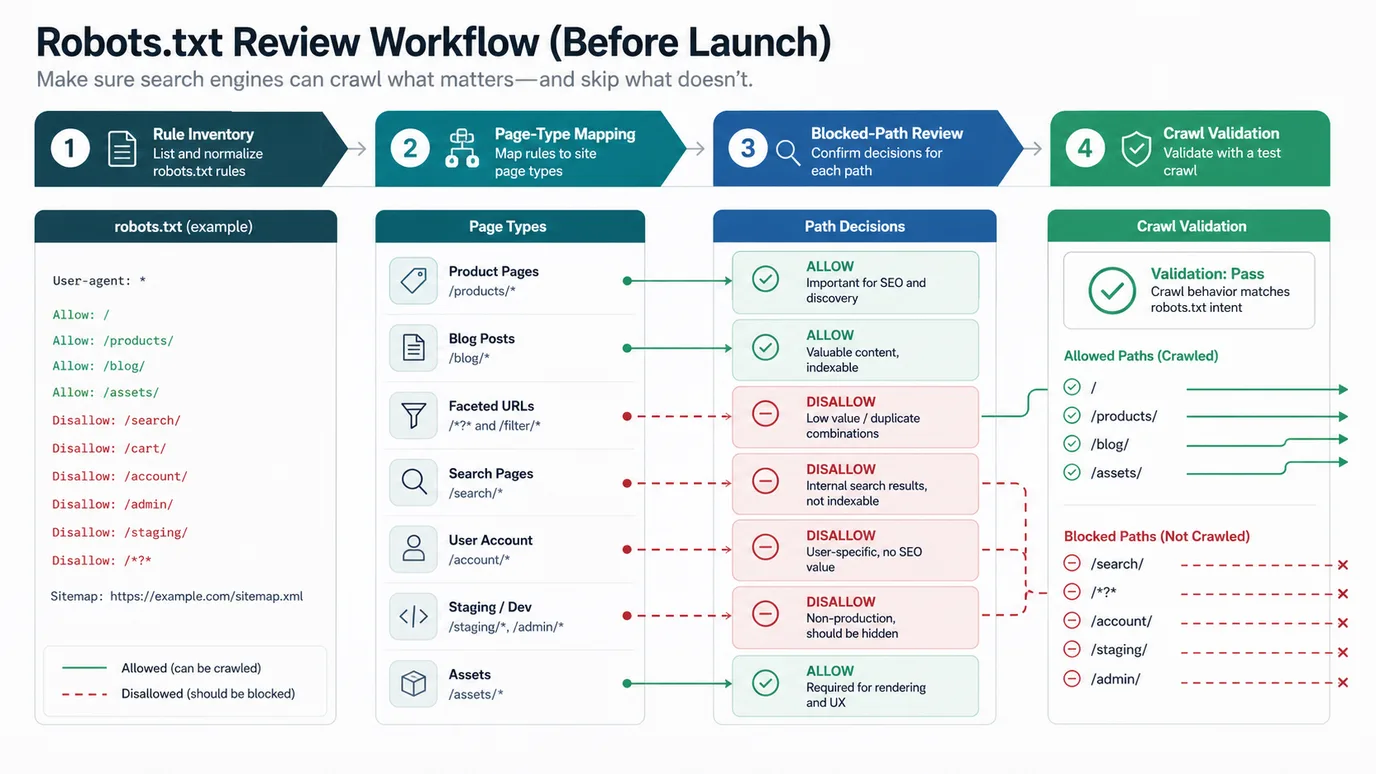
Run this review before launch, migration, CMS cleanup, or ecommerce filter changes:
- Export the current robots.txt file and note who owns each rule.
- Crawl priority sections with the current rules respected.
- Group discovered URLs by page type, template, directory, and parameter pattern.
- Mark which groups must remain crawlable for search.
- Identify low-value crawl traps such as internal search, session URLs, duplicate filters, and staging paths.
- Rewrite broad rules into narrower path controls when important pages could be caught.
- Test sample URLs before deploying the file.
For broader access work, pair this with the technical SEO workflow. Robots rules should agree with status codes, canonicals, sitemaps, internal links, rendered content, and indexability signals.
Avoid The Common Robots.txt Failure Modes
Most robots.txt failures are not exotic. They come from broad patterns, stale migration rules, or confusion between crawling and indexing.
Use this troubleshooting table:
| Failure mode | What it looks like | Better fix |
|---|---|---|
| Blocking assets | Important pages render differently for crawlers | Allow required CSS, JavaScript, image, and API assets |
| Blocking canonical targets | The preferred URL cannot be crawled | Allow canonical pages and remove them from disallow patterns |
| Blocking noindex pages | Search cannot see the noindex directive | Let the page be crawled until the noindex is processed |
| Overbroad wildcard rules | Whole page groups disappear from crawl reports | Replace broad patterns with specific directories or parameters |
| Old staging rules | A launch carries Disallow: / or old beta paths into production | Add robots.txt checks to release QA |
| Sitemap drift | The sitemap lists URLs that robots.txt blocks | Align sitemap candidates with crawlable canonical URLs |
Google's robots meta tag documentation is the companion here. If the goal is index control, a crawlable noindex directive is usually the safer tool. If the goal is crawl control, robots.txt can help as long as it does not hide the very signals you need search systems to see.
Validate The File After Every Meaningful Change
Robots.txt should not be edited and forgotten. The useful finish line is a validation loop that proves important URLs remain crawlable, blocked paths stay blocked, sitemaps agree, and any issue becomes owner-ready work.
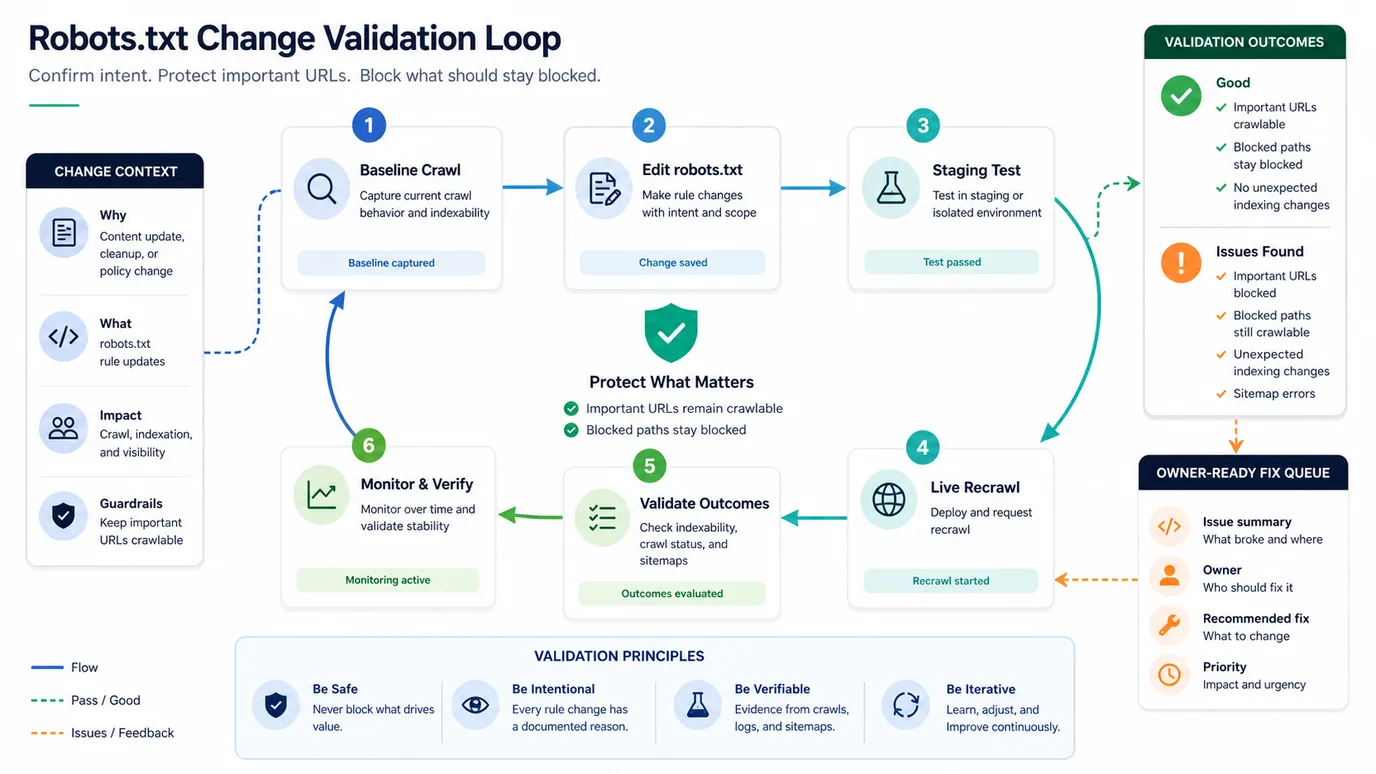
Use this validation loop:
- Save a baseline crawl before changing rules.
- Define the intended crawl behavior for each affected page type.
- Test the robots.txt file in staging or an isolated crawl when possible.
- Deploy the smallest rule change that solves the crawl problem.
- Re-crawl priority URL samples with robots rules respected.
- Compare blocked, allowed, indexable, canonical, and sitemap states.
- Monitor Search Console crawl and indexing signals after search systems revisit the site.
- Record the rule reason so the next migration does not treat it as mystery legacy code.
For sitemap cleanup, use the XML sitemap generator workflow as the next check. A sitemap that submits blocked URLs is not just noisy; it is evidence that your discovery signals disagree.
Where Searvora Fits
Searvora fits when robots.txt needs to move from a text-file edit into repeatable technical SEO validation. Use the robots.txt generator for a clean starting file, then use the SEO Spider Crawler to confirm whether the live site behaves the way the rules intend.
| Workflow layer | Searvora role | Output |
|---|---|---|
| Rule draft | Generate a baseline robots.txt file with sitemap and path controls | A readable starting file for review |
| URL testing | Check sample URLs against crawl and indexability signals | Evidence that priority paths remain accessible |
| Site crawl | Respect robots rules during a broader crawl | Blocked, allowed, canonical, sitemap, and internal-link patterns |
| Fix queue | Group failures by template, owner, and risk | SEO, engineering, or CMS actions with recrawl criteria |
For single-page checks, the indexability checker helps spot whether a URL is reachable and eligible. For site-wide work, the SEO Spider Crawler is the stronger fit because robots.txt risks usually appear as template and directory patterns, not isolated one-page problems.
If robots rules are part of a duplicate URL cleanup, the canonical tags workflow is the next companion. Robots.txt can reduce crawl waste, but canonical signals still decide which crawlable URL should represent a duplicate cluster.
Run This Robots.txt Checklist
Use this checklist before publishing a new robots.txt file or changing an existing one:
- Confirm the file lives at the correct root path for the host.
- List every user-agent group and rule that currently affects crawl behavior.
- Map rules to page types, not only raw paths.
- Keep important product, service, blog, category, and localized pages crawlable.
- Block low-value search, cart, account, admin, staging, and duplicate filter paths only when the rule is specific enough.
- Allow assets required for rendered page evaluation.
- Do not use robots.txt as a security control.
- Do not block a page when search must see its noindex directive.
- Compare the robots.txt file against XML sitemap URLs.
- Test representative allowed and disallowed URLs before deployment.
- Re-crawl priority sections after deployment.
- Save the reason, owner, and validation result for each meaningful rule.
Robots.txt is a small file with a large blast radius. It works best when every rule has a clear page-type purpose, a narrow path pattern, and a crawl validation step that proves important pages can still be discovered.