

The search task "submit website to search engines" sounds like a one-click indexing job, but submission is only useful after the page can be discovered, crawled, rendered, selected as canonical, and understood as worth showing. If those signals are weak, submission only asks search engines to revisit a problem.
The practical workflow is simple: crawl the site first, clean the URL set, submit the right sitemap or priority URLs, then validate whether search engines can actually process the live page.
Start With Crawl Readiness
Before submitting anything, prove that the URL is ready for search. A new page, refreshed article, migrated landing page, or changed product collection should pass the same preflight.

Use this preflight table before opening Search Console or Bing Webmaster Tools:
| Check | What a clean URL shows | Fix before submission when |
|---|---|---|
| Status code | Final URL returns 200 | It redirects unexpectedly, errors, or times out |
| Robots access | Crawlers can request the page and critical assets | Robots.txt blocks the path or rendered resources |
| Meta robots | The page is indexable when it should be | A stray noindex or X-Robots-Tag is present |
| Canonical | Canonical points to the final preferred URL | Canonical points to an old, duplicate, or alternate URL |
| Internal links | Important pages link to the URL naturally | The page is orphaned or buried behind filters |
| Sitemap | The URL appears in the right sitemap when useful | The sitemap lists redirects, noindex pages, or variants |
Google's recrawl documentation frames submission as a request after pages change, not a guarantee of instant inclusion. That distinction matters. Your crawl evidence should show that the submitted URL deserves the next crawl.
Choose The Right Submission Path
Different search engines expose different submission surfaces. The right path depends on how many URLs changed, how often they change, and whether the site is already verified in the relevant webmaster tool.
Use this decision table:
| Situation | Better submission path | Why |
|---|---|---|
| One priority URL changed | Google URL Inspection and Bing manual submission | Fast enough for launch pages, critical fixes, or one-off updates |
| Many canonical URLs changed | Submit or refresh the XML sitemap | Keeps the discovery signal tied to a clean canonical URL set |
| A CMS publishes frequent updates | Bing URL Submission API or IndexNow | Works better than manual entry for recurring publish events |
| A migration shipped | Submit clean sitemaps and inspect representative URLs | Lets you monitor sections instead of repeatedly submitting every redirect |
| A page is still blocked or duplicated | Do not submit yet | Submission cannot repair the signal that makes the page ineligible |
For Google, use the URL Inspection tool for priority URLs and the Sitemaps report when a file needs monitoring. For Bing, the official URL submission documentation explains manual submission, API submission, and the current push toward IndexNow.
Submit Sitemaps When The URL Set Is Clean
A sitemap is the best submission surface when many URLs are new, updated, or moved. It should not be a CMS dump. It should list canonical, useful, indexable URLs that search engines can fetch and evaluate.
Google's sitemap guidance emphasizes submitting the URLs you want in search. Turn that into an operating rule:
- Crawl the live site.
- Remove redirects, errors, blocked URLs, noindex pages, and canonicalized variants.
- Keep absolute final canonical URLs.
- Split high-change sections into useful sitemap groups.
- Submit the sitemap or sitemap index in the webmaster tool.
- Watch fetch status, parse errors, discovered URL counts, and recurring mismatch patterns.
If the sitemap is noisy, use an XML sitemap generator workflow before resubmitting. If the issue is a missing page in Google, the Google indexing workflow helps separate discovery, crawl access, canonical selection, and content value.
Use URL Inspection For Priority Pages
URL inspection is best for priority URLs, not bulk noise. Use it when a specific page needs launch validation, a fix shipped, or the team needs to compare what Google reports against the current crawl.
Use this sequence:
- Inspect the live URL in Search Console.
- Compare the reported canonical, crawlability, index eligibility, and last crawl details against your crawl export.
- Fix blockers before requesting indexing.
- Request indexing only for clean priority URLs.
- Recheck after a reasonable crawl window.
- Save the decision with the page group so the same template does not regress.
The URL Inspection API automation workflow is useful when this becomes a recurring sample-based process. For a launch or migration, inspect a representative set rather than every low-value URL.
Use Bing Submission And IndexNow Deliberately
Bing offers more direct URL submission options than Google, and its current documentation recommends IndexNow for automated change notification. That does not mean every site needs a complex integration on day one.
Use this split:
| Site pattern | Bing path | Validation |
|---|---|---|
| Small static site | Manual URL submission for important changes | Confirm submitted URLs appear in history and recrawl samples |
| Custom CMS | URL Submission API or IndexNow | Log submitted URLs, status, and publish event source |
| Ecommerce or news-like changes | IndexNow | Compare submission logs with crawled canonical pages |
| Migration cleanup | Sitemap plus priority URL submission | Re-crawl old and new URL samples after launch |
The official IndexNow setup guide is the practical starting point for automated notifications. Keep the implementation boring: submit only canonical URLs that changed, store the submission event, and monitor whether the same URLs are crawlable and useful.
Validate After Submission
The finish line is not the click that submits a URL. The finish line is evidence that the page was crawlable, eligible, and monitored after the request.
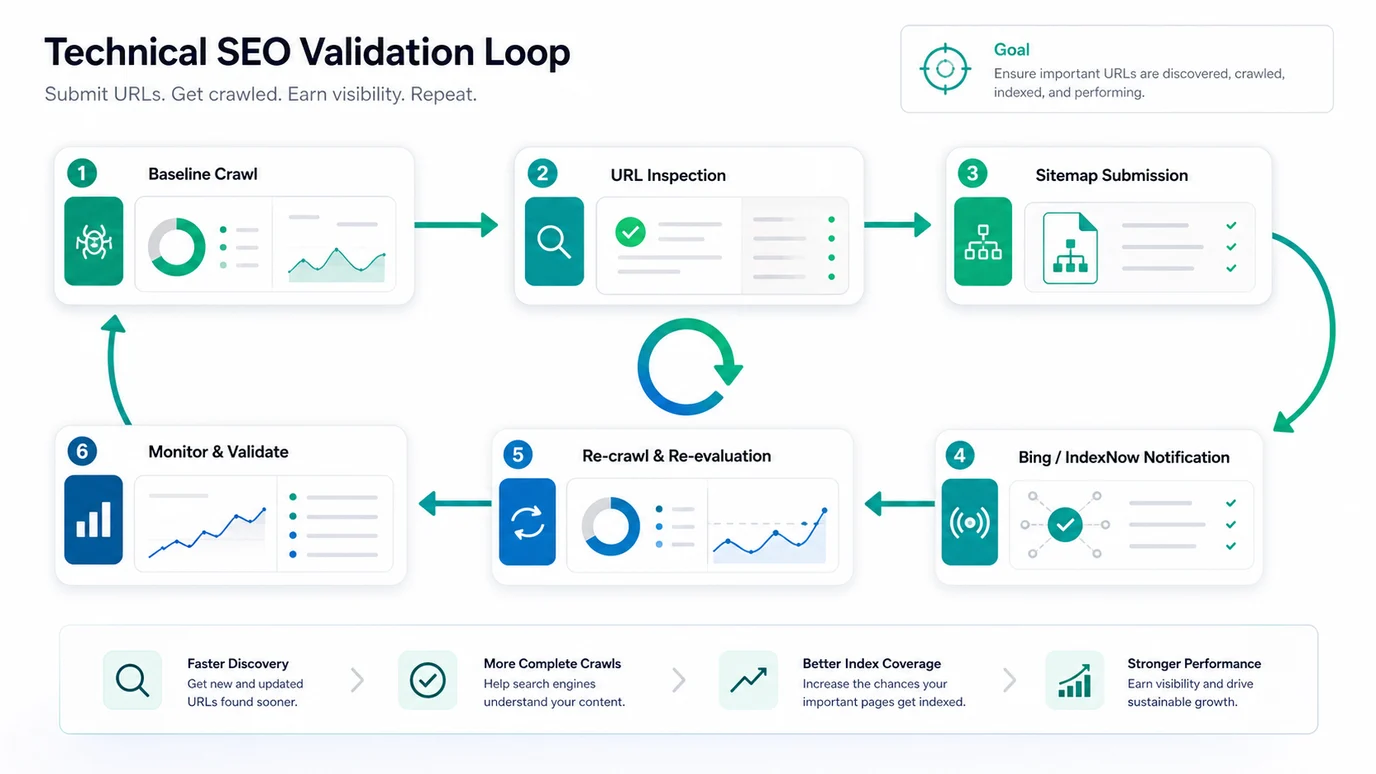
Use this validation loop:
- Save the baseline crawl before submission.
- Submit the clean sitemap or priority URLs.
- Re-crawl the affected URL group after the change ships.
- Compare status, robots, canonical, internal links, sitemap inclusion, and rendered content.
- Check webmaster tool reports for fetch, inspection, and indexing signals.
- Watch impressions, clicks, and crawl changes after search engines revisit the pages.
- Record the result and owner if the same template needs a fix.
This is where submission becomes a workflow instead of a ritual. If a page was not indexed, the question becomes specific: was it undiscovered, blocked, canonicalized away, low value, duplicated, or simply not recrawled yet?
Where Searvora Fits
Searvora SEO Spider Crawler fits the work before and after submission. Use it to crawl the site, parse robots rules, discover sitemaps, inspect status codes, group canonicals, find orphan pages, and turn indexability issues into owner-ready fix queues.
| Workflow step | Searvora role | Output |
|---|---|---|
| Preflight crawl | Check status, robots, canonical, sitemap, and internal-link signals | A clean list of URLs worth submitting |
| URL grouping | Separate launches, migrations, blog updates, and template issues | Better sampling for Search Console and Bing checks |
| Post-submit recrawl | Compare live signals after submission | Proof that the technical state changed |
| Fix handoff | Group blockers by template, owner, and severity | A smaller queue for SEO, engineering, or content teams |
Search Engine Submission Checklist
Use this checklist whenever a new page, migration, or content refresh needs to be discoverable:
- Confirm the page is meant to appear in search.
- Crawl the URL and its template peers.
- Fix status, robots, noindex, canonical, and rendering blockers.
- Add useful internal links to the canonical URL.
- Keep the URL in a clean XML sitemap when it belongs there.
- Submit the sitemap for larger URL sets.
- Use URL Inspection for priority Google URLs.
- Use Bing manual submission, URL Submission API, or IndexNow when the site workflow needs it.
- Re-crawl and compare the submitted URL group.
- Monitor indexing, impressions, and crawl behavior after search engines revisit the pages.
Submitting a website to search engines works best when the page is already ready to be found. Crawl first, submit deliberately, then validate the result with the same evidence your team can use to fix the next page.