
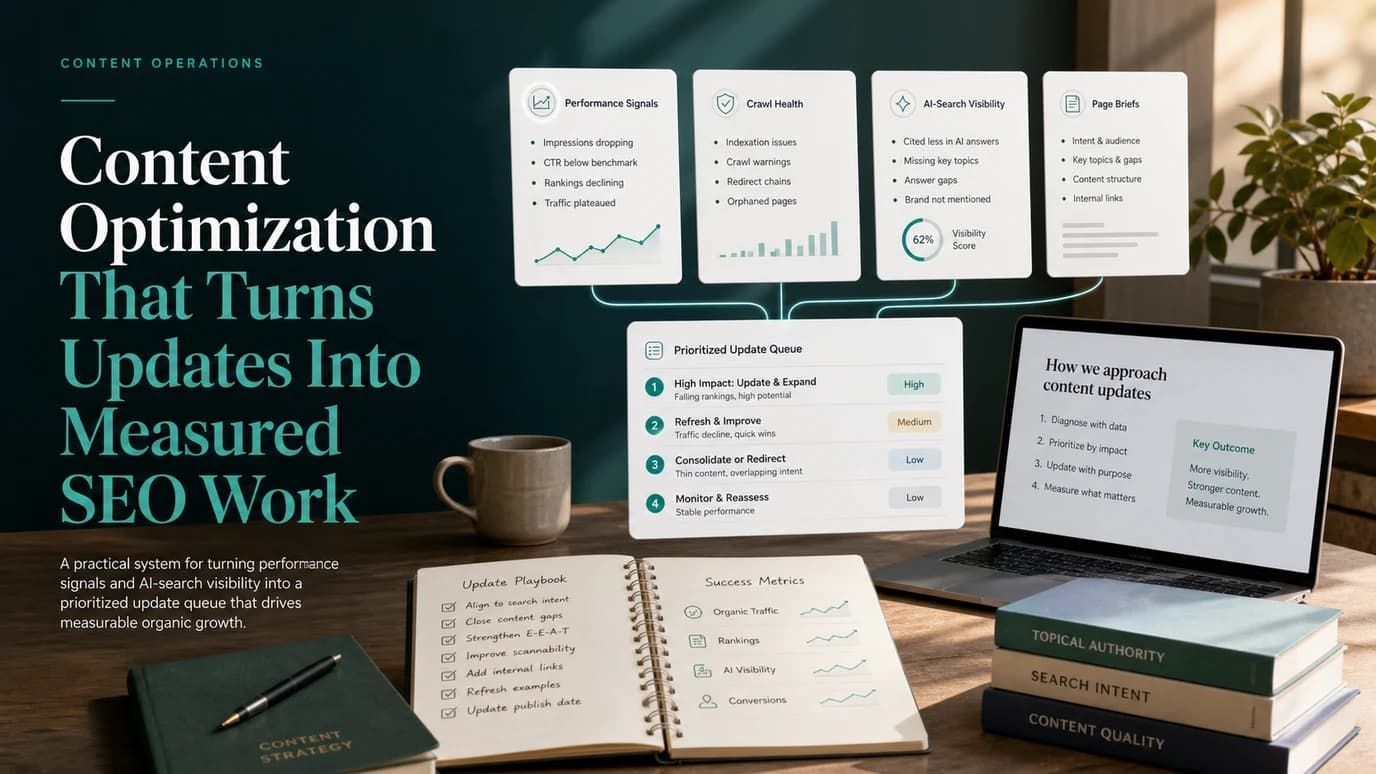
Content optimization is the work of improving an existing page so it satisfies the current search task better, supports the right internal paths, and earns measurable visibility after the update ships. It is not simply adding keywords to old copy.
The useful version starts with evidence: performance movement, crawl health, internal links, query fit, and AI-search visibility. Then it chooses the right action for the page. Some URLs need a light refresh. Some need a full rewrite. Some should be consolidated. Some should be left alone and monitored.
What Content Optimization Should Decide
Weak content optimization starts with a vague instruction: "make this page better." Strong content optimization starts with a decision. Before editing, decide what problem the page has and which action is most likely to improve it.
| Signal | What it can mean | Better action |
|---|---|---|
| High impressions, low clicks | The page is visible but the search promise is weak | Improve title, meta description, intro, and section framing |
| Rankings fell after intent shifted | The page no longer matches what searchers expect | Rewrite around the new user job or change page type |
| Multiple URLs answer the same job | Authority and relevance are split | Consolidate content and redirect or differentiate the weaker URL |
| Crawl warnings or indexability issues | The page may not be eligible to perform | Fix technical access before assigning copy work |
| AI answers cite competitors instead | The page may lack clear definitions, steps, or source-worthy structure | Add concise answers, tables, examples, and entity clarity |
| No demand, no strategic role, no links | The page is not worth another production cycle | Monitor, noindex, retire, or leave out of the queue |
The Search Console performance report is useful for spotting candidates, but it does not decide the fix by itself. Pair it with crawl data, page-type judgment, and the actual user task.
Find Pages Worth Optimizing
The best candidates are rarely just the pages with the biggest traffic decline. A page with modest traffic can be worth work if it supports a valuable product path, owns a durable topic, or sits inside an authority cluster. A high-traffic page can be the wrong target if the decline is seasonal, the intent moved to another page type, or the page has no business role.
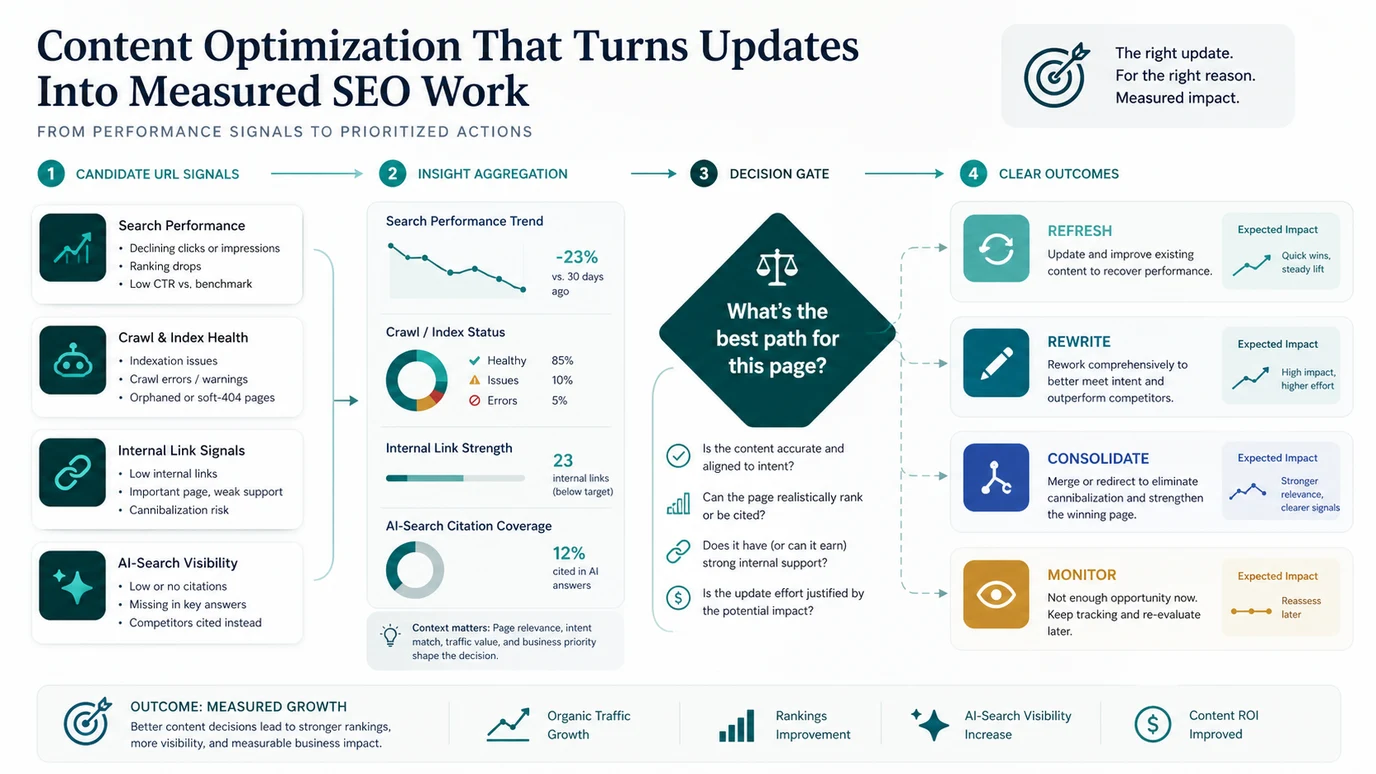
Start by joining five evidence layers:
- Search performance: clicks, impressions, CTR, position, query mix, country, device, and search appearance.
- Crawl and index state: status code, canonical, noindex, sitemap state, rendered content, and crawl depth.
- Content promise: title, H1, intro, H2 structure, examples, media, and whether the first section answers the task.
- Internal support: source pages, anchor text, topic cluster, and whether important pages are orphaned.
- AI-search readiness: concise definitions, extractable steps, entity clarity, tables, and whether competitors are cited where your page should be.
For a larger cleanup project, use the content audit workflow first. It helps you build the URL inventory and decide which pages deserve optimization work instead of turning every stale article into an editing task.
Separate Refresh, Rewrite, Consolidate, And Monitor
Content teams waste time when every page is treated as a refresh. Use a smaller action vocabulary so editors, SEOs, and engineers know what kind of work they are accepting.
| Action | Use when | What changes |
|---|---|---|
| Refresh | The page still owns the right job but needs stronger examples, metadata, links, visuals, or recent details | Update targeted sections and validate the live page |
| Rewrite | The page topic is still valuable but the current structure no longer satisfies intent | Rebuild the outline, intro, decision support, and evidence |
| Expand | The page is strong but missing important subtopics or AI-search clarity | Add sections, tables, examples, FAQs only when useful, and supporting links |
| Consolidate | Another URL already serves the same core keyword, page type, and user job | Merge useful material into the stronger URL and redirect or differentiate |
| Monitor | The signal is real but the confidence or upside is too low | Keep tracking and wait for more evidence before editing |
Do not label every nearby topic as cannibalization. A parent article, child how-to, product page, and glossary-style answer can coexist when they serve different jobs. Use the stricter same-keyword, same-page-type, same-user-job test from the keyword cannibalization workflow before merging pages.
Build An Optimization Brief
An optimization brief should be shorter than a net-new article brief because the URL already exists. The brief is there to prevent random edits and to make validation possible.
Use this structure:
| Brief field | What to write |
|---|---|
| URL | The canonical page that will be updated or consolidated |
| Current job | What the page appears to answer now |
| Target job | What the page should answer after the update |
| Evidence | Performance, query, crawl, link, overlap, and AI-search signals |
| Action | Refresh, rewrite, expand, consolidate, or monitor |
| Required edits | Sections, examples, tables, metadata, internal links, visuals, schema, or redirects |
| Owner | Content, SEO, engineering, design, or product |
| Validation | Re-crawl, index check, query segment, AI-search check, and review date |
The brief should also say what not to change. If the page has a section that still earns relevant queries, do not rewrite it just to make the article feel new. If the title is doing its job, leave it alone and spend the effort on missing examples, internal links, or clearer decision support.
Add Crawl And AI-Search Checks Before Editing
Content optimization sits between editorial work and technical SEO. A copy update can fail if the page is canonicalized away, linked poorly, blocked from indexing, buried too deep, or missing the supporting pages that prove the cluster.
Before assigning the update, check:
- The target URL returns a clean indexable status.
- The canonical points to the URL you intend to measure.
- The title, H1, meta description, and intro describe the same task.
- Internal links point from relevant source pages with useful anchors.
- The page does not duplicate another URL with the same core job.
- Tables, examples, and visuals make the advice easier to extract.
- Product or tool claims are visible on your own site and not invented for the article.
The on-page SEO workflow is the deeper companion when a page needs titles, headings, schema, links, and content structure reviewed together. Google's people-first content guidance is also a useful guardrail: optimize to make the page more useful, not only more keyword-dense.
Validate The Update After It Ships
An optimized page is not done when the CMS draft is published. It is done when the live URL has been checked and the team can compare results against the baseline.
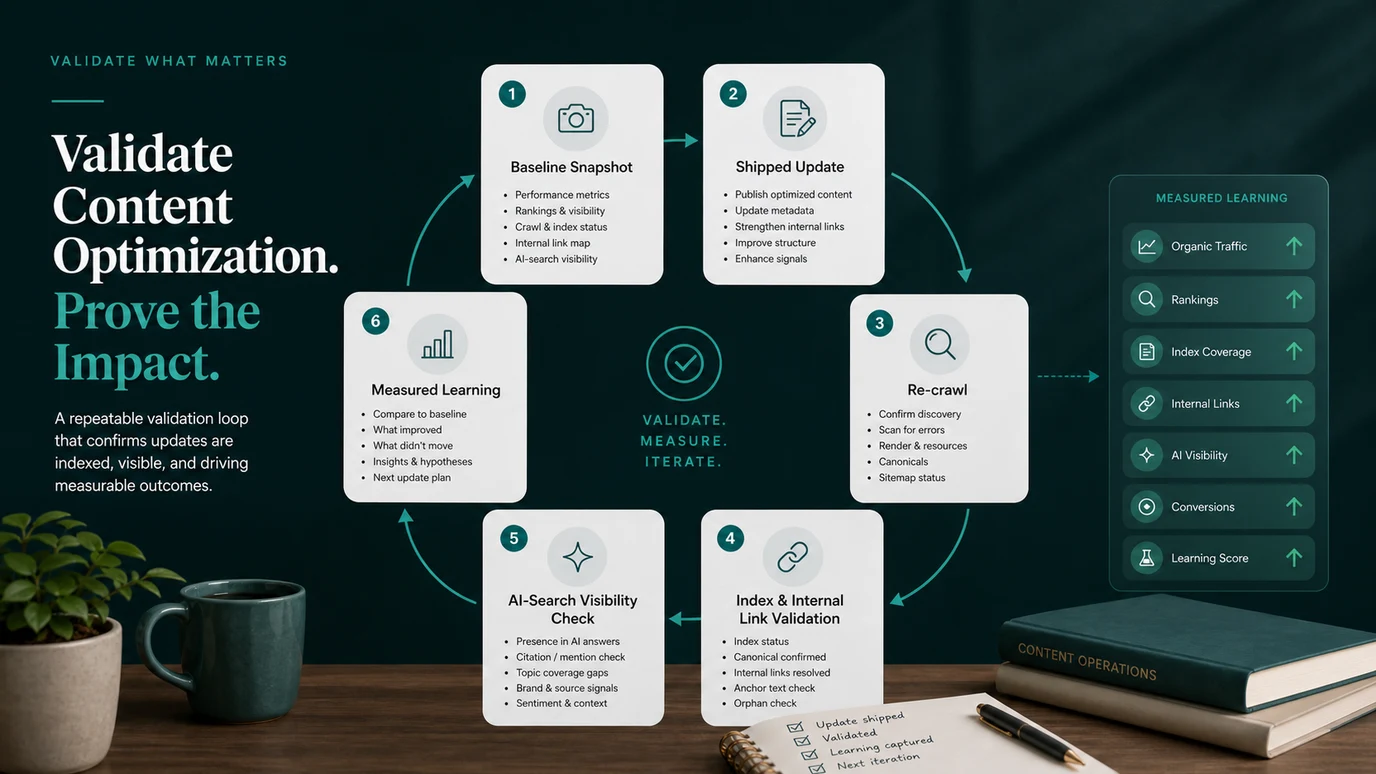
Run this validation loop:
- Save the baseline title, H1, canonical, indexability, internal links, query mix, and performance window.
- Ship a focused update instead of changing every visible element at once.
- Re-crawl the URL and affected template peers.
- Confirm the rendered page includes the intended copy, links, images, and metadata.
- Check sitemap, canonical, noindex, redirects, and internal links.
- Review whether the page is clearer for AI answer extraction: direct answer, definitions, table, examples, and source-worthy steps.
- Compare impressions, clicks, CTR, ranking movement, and assisted conversion after a meaningful data window.
- Record what improved, what did not move, and what the next action should be.
The measured learning matters because content optimization is cumulative. If a title rewrite improves CTR but does not recover rankings, the next action may be deeper intent coverage or internal links. If a rewrite improves rankings but not conversions, the page may need a better product path instead of more copy.
Where Searvora Fits
Searvora fits best when optimization decisions need to move from mixed signals into assigned work. Use the dashboard layer to spot pages, templates, or locales that changed. Use crawl evidence to avoid editing pages with technical blockers. Then use AI SEO Consultant to convert the evidence into a prioritized action queue with owners, rationale, and next steps.
This is especially useful for teams with many existing pages. The goal is not to refresh every article on a calendar. The goal is to protect pages that still work, improve pages with real upside, consolidate pages that confuse search systems, and make each optimization cycle easier to measure.
A Practical Content Optimization Checklist
Use this checklist when a page enters the optimization queue:
- Confirm the page is indexable, canonical, and reachable from internal links.
- Compare current queries with the page's visible promise.
- Decide whether the action is refresh, rewrite, expand, consolidate, or monitor.
- Check same-keyword, same-page-type, same-user-job overlap before creating or merging content.
- Write a brief that includes evidence, required edits, owner, and validation plan.
- Update title, meta description, intro, H2s, examples, visuals, and links only where the evidence supports it.
- Keep core advice in searchable text and tables, not only inside images.
- Re-crawl the live page after publishing.
- Confirm canonical, sitemap, internal links, image paths, and metadata did not regress.
- Review classic search performance and AI-search visibility after enough data has accumulated.
- Record the result so the next optimization cycle starts from evidence instead of memory.
Content optimization works when every update has a reason, a scope, and a measurement plan. That is how old pages become useful assets again instead of another pile of rewritten copy.