

Ecommerce product page SEO is the work of making one purchasable item easy to discover, understand, compare, and maintain in search. The page needs a crawlable URL, a clear product identity, useful facts, accurate availability, deliberate variant handling, and internal links that connect it to the rest of the catalog.
The difficult part is scale. A strong product page is not enough if the same template creates thousands of duplicate titles, inaccessible variants, conflicting canonicals, stale stock states, or structured data that disagrees with the visible offer. The practical workflow is to set product-page rules once, audit them by template, and validate the rendered catalog after every meaningful release.
The opportunity came from Ahrefs' article on improving ecommerce product pages for SEO. Searvora's information gain is the catalog operating layer around those recommendations: page ownership, crawl discovery, variant control, lifecycle decisions, owner handoff, and recrawl evidence.
Decide Whether a Product Page Should Own the Query
A product page should own demand for one identifiable item, model, SKU, or variant when the searcher is evaluating that item. A category page should own browse intent across several products. A guide should answer an informational or comparison task that cannot be satisfied by one offer.
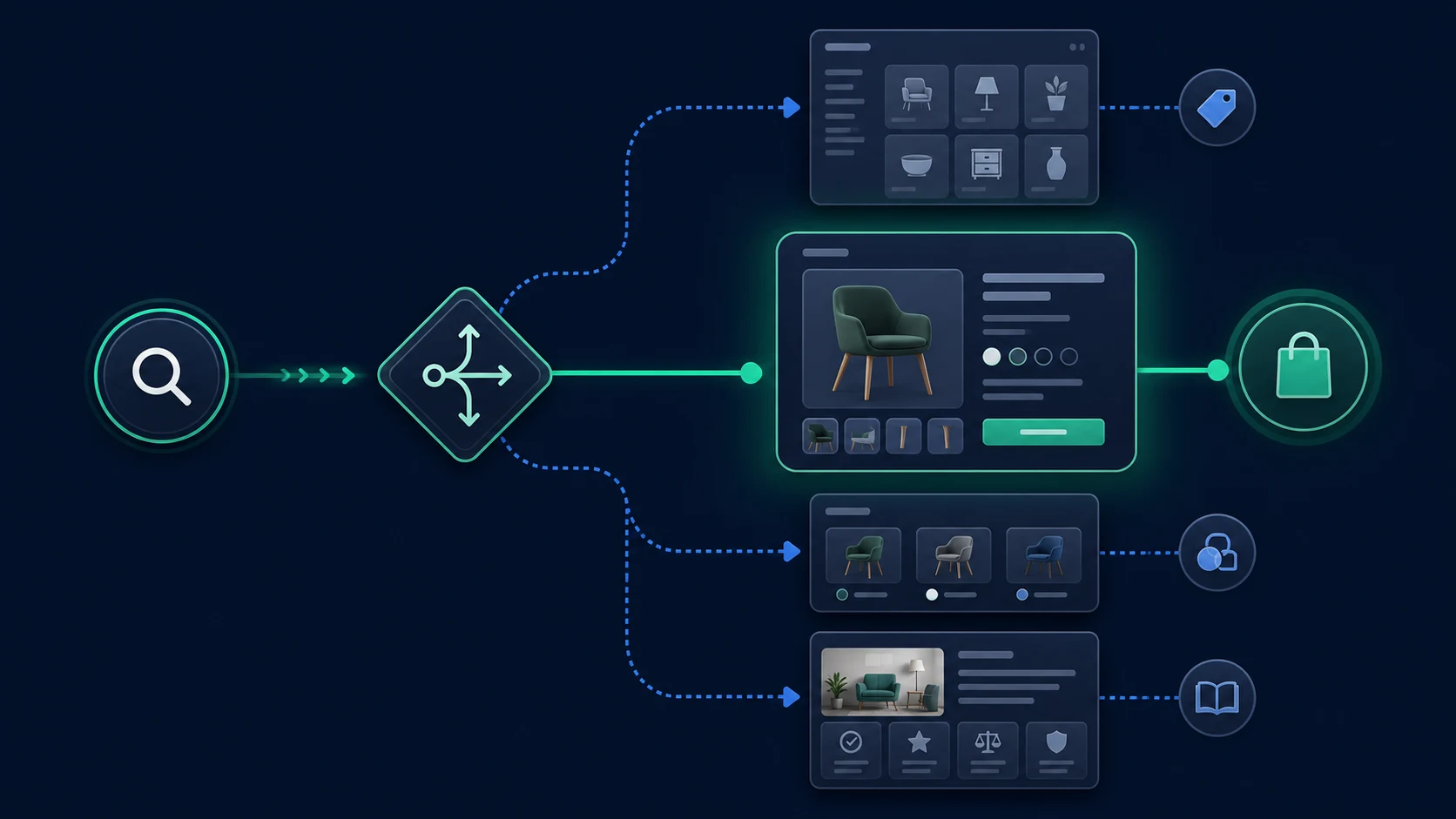
Use this routing table before changing copy or metadata:
| Search task | Best owner URL | Common mistake |
|---|---|---|
| Exact product, model, or SKU | Product page | Sending the query to a broad collection |
| Product type with several choices | Category or collection page | Making one product page compete with the catalog |
| Attribute that creates a materially different offer | Variant URL when it has distinct demand and stable facts | Creating indexable URLs for every cosmetic option |
| Comparison, sizing, setup, or buying question | Guide or support article | Stuffing educational copy into a purchase page |
This distinction keeps the article separate from ecommerce category page SEO. Category pages serve browse intent; product pages serve evaluation of a specific offer. The broader ecommerce SEO workflow connects both page types to guides, facets, and catalog-wide controls.
Make Every Important Product Reachable
Product pages cannot earn search visibility if crawlers only find them after submitting an internal search form or clicking an interaction with no crawlable link. Important products should be reachable through ordinary links from the homepage, categories, subcategories, related products, or editorial pages.
Google's ecommerce site-structure guidance recommends linking from menus to categories, from categories to subcategories, and from those pages to products. It also notes that Googlebot generally does not submit search boxes to discover products. A sitemap or Merchant Center feed can support discovery, but neither repairs a catalog whose important URLs are isolated from normal navigation.
Audit discovery by product template and commercial importance:
| Crawl check | Evidence to collect | Fix owner |
|---|---|---|
| Reachability | Inlinks, crawl depth, parent category, sitemap presence | SEO and merchandising |
| Indexability | Status, robots directives, canonical, rendered content | Engineering |
| URL stability | Parameters, session IDs, filters, variant selectors | Engineering and platform owner |
| Internal context | Link anchor, related-product logic, guide links | Content and merchandising |
Do not count a URL merely because it appears in a feed. The stronger state is consistent discovery: links, sitemap, canonical, rendered content, and product data all point to the same intended page.
Give the Page Concrete Product Facts
Product descriptions should help a shopper identify the item, understand who it is for, and decide whether it fits. Manufacturer copy copied across several retailers rarely does that job. Thin adjective-heavy text is not improved by repeating the category keyword.
Build the visible page around facts that can remain accurate:
- product name, brand, model, SKU, or GTIN when applicable;
- dimensions, materials, compatibility, care, or technical specifications;
- the problem the product solves and the conditions where it fits;
- accurate price, availability, shipping, and return information;
- original images that show the item and meaningful variations;
- useful questions, comparisons, or usage details that reduce uncertainty.
Shopify's product-description guidance recommends concrete specifications, use cases, benefits supported by facts, and differentiators. The same rule applies outside Shopify: write for the decision, then make the title, H1, description, images, and structured data agree with the visible offer.
For product images, Google's image SEO documentation recommends accessible image markup, descriptive context, and useful alt text. Do not hide the only important product image in a CSS background. Keep alt text concise and descriptive, and treat decorative images differently from images that carry product information.
Control Product Variants Without Creating Duplicate Inventory
Variants are where clean product templates often become messy search inventory. Color, size, storage, material, and bundle choices can create many URLs even when the underlying page job barely changes.
Choose the model deliberately:
| Variant situation | URL and canonical approach | Page requirement |
|---|---|---|
| Options share one search task | One canonical base product page | Selector updates the visible image, price, availability, and cart state |
| A variant has distinct, durable demand | Direct variant URL may be indexable | Unique identifier, matching facts, self-contained markup, stable internal links |
| Tracking or session parameter | Keep outside the indexable inventory | Canonical and internal links point to the clean product URL |
Fragment such as #blue | Do not treat as a separately indexable page | Google treats fragments as the same document |
Google's product variant documentation recommends direct URLs that preselect a variant and show the matching image, price, availability, and add-to-cart state. It also distinguishes a single-page product group from separately addressable variants.
The validation step matters more than the CMS setting. Load the clean URL and each intended variant URL, then inspect the rendered canonical, product name, selected option, image, price, availability, identifier, and structured data. If those signals disagree, the store has created a product-data problem, not only a canonical problem.
Align Structured Data With the Visible Offer
Product structured data can help Google understand price, availability, reviews, shipping, and other offer details. It does not guarantee a rich result, and it should never describe facts that the shopper cannot verify on the page.
Google's Product structured data guidance distinguishes merchant listing pages, where a shopper can purchase a product, from product snippets used in broader editorial contexts. Google also recommends combining on-page structured data with Merchant Center product data when both are available because the sources can improve understanding and consistency.
Use a field-level QA table rather than a single pass/fail badge:
| Field | Compare against | Failure pattern |
|---|---|---|
| Name and identifier | Visible product heading and catalog record | Variant inherits the wrong SKU or product name |
| Price and currency | Visible offer and checkout state | Cached markup differs from the page |
| Availability | Visible stock state and Merchant Center feed | Page says unavailable while markup says in stock |
| Image | Selected product or variant image | Generic category image is supplied |
| Canonical and URL | Intended product owner | Markup describes a different URL or variant |
Use the schema markup workflow when the catalog needs a broader process for choosing types, tying JSON-LD to visible content, validating eligibility, and monitoring drift.
Plan Stock and Product Lifecycle States Before They Break
Inventory changes are normal. The SEO failure is treating every stock event as the same state.
Use these default decisions:
| Catalog state | Recommended page behavior | Validation |
|---|---|---|
| Temporarily out of stock | Keep the useful page live and show accurate availability | Page, structured data, feed, and checkout agree |
| Preorder or backorder | Keep the offer explicit and accurate | Dates and availability are visible and supported |
| Permanently removed with a close replacement | Redirect only when the replacement satisfies the same task | Destination is genuinely equivalent |
| Permanently removed with no replacement | Return 404 or 410 and remove from feeds and internal links | No soft 404, stale sitemap entry, or broken campaign link |
Google's temporary business and inventory guidance advises keeping temporarily unavailable products online rather than removing them from Search. For permanent removal, Google's crawl error guidance supports 404 or 410 when content is truly gone. A permanent redirect belongs only where a real replacement exists.
Define these rules before a product is discontinued. Otherwise merchandising, engineering, feeds, sitemaps, and support teams will each make a different decision for the same URL.
Validate Product Page SEO at Template Scale
The useful unit of work is not one manually inspected product. It is a product template plus its exceptions. Segment the catalog, sample representative URLs, fix the shared cause, then recrawl the affected group.
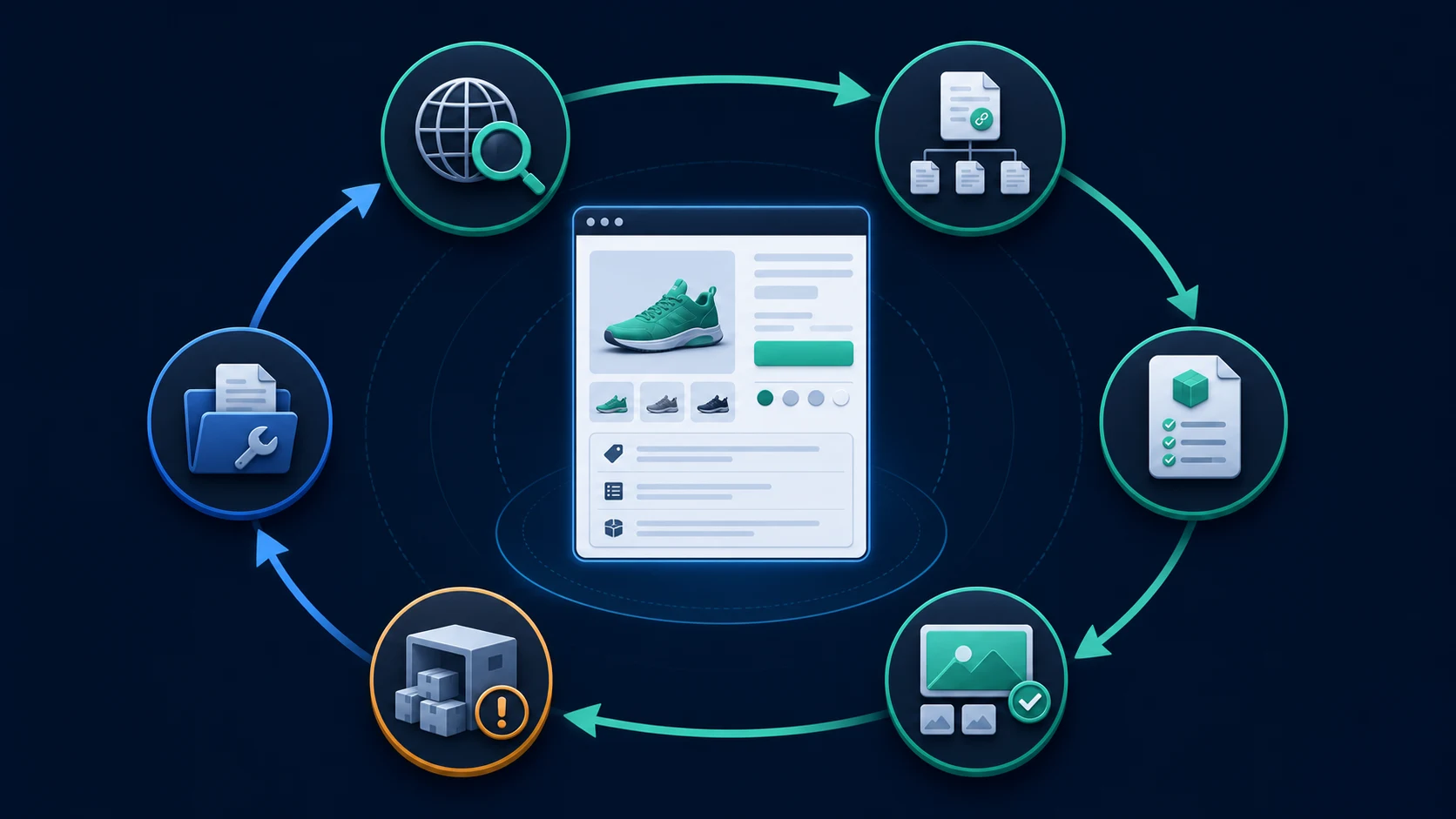
Run the validation loop in this order:
- Export indexable product URLs from navigation, sitemaps, feeds, and the platform database.
- Crawl the rendered pages and group them by template, category, stock state, and variant model.
- Check status, canonical, indexability, depth, title, H1, images, internal links, and structured data.
- Compare visible product facts with the selected variant, feed, and JSON-LD.
- Separate shared template defects from product-record defects.
- Assign the template fix to engineering and catalog facts to merchandising or content owners.
- Release the smallest safe change and recrawl the affected segment.
- Monitor impressions, product queries, rich-result eligibility, and catalog drift without assuming that markup guarantees visibility.
Where Searvora Fits
Searvora SEO Spider Crawler fits the catalog inventory and validation layer. Its product page supports rendered crawling, sitemap discovery, robots parsing, indexability and canonical grouping, metadata and image checks, template-level issue clustering, prioritized fix queues, owner-ready handoffs, and recurring recrawls.
Use it to answer operational questions:
- Which important products cannot be reached through normal links?
- Which variants disagree on canonical, product facts, or indexability?
- Which title, H1, image, or metadata defect repeats across a template?
- Which lifecycle change created broken paths, stale sitemap entries, or conflicting signals?
- Did the released fix change the rendered catalog as intended?
Ecommerce Product Page SEO Checklist
Use this checklist before launching or refreshing a product template:
- Assign one clear product, model, or variant job to the canonical URL.
- Confirm every important product is reachable through ordinary internal links.
- Keep clean product URLs in internal links, sitemaps, and feeds.
- Make the product name, identifiers, specs, images, price, and availability accurate and visible.
- Separate base products from variants with a documented URL and canonical policy.
- Ensure direct variant URLs load the matching selection and facts.
- Keep Product and Offer markup consistent with the rendered page.
- Use temporary out-of-stock, replacement, redirect, 404, and 410 states deliberately.
- Group crawl defects by template before editing products one by one.
- Assign each defect to engineering, merchandising, content, or platform ownership.
- Recrawl the affected catalog segment after release.
- Monitor search demand and catalog drift without treating rich-result eligibility as a ranking guarantee.
Product page SEO scales when the catalog behaves like one controlled system. Give each product a clear owner URL, expose it through crawlable paths, keep the visible offer and machine-readable facts aligned, and validate every template change against the rendered store.