

Schema markup is structured data added to a page so search systems can understand visible facts in a more explicit format. For SEO teams, the useful question is not "Can we add more schema?" It is "Which facts on this page deserve machine-readable markup, and can we keep that markup accurate after the next release?"
Good schema markup starts with the page job, not with a rich-result wish list. The page should already show the facts you plan to mark up. Then the markup, validation report, rendered HTML, canonical URL, and crawl evidence should all agree.
Start With the Page Job
Before choosing a schema type, decide what the URL is supposed to be. A product page, article, local landing page, FAQ section, event page, video page, and organization profile can all contain similar words, but they are not the same search task.

Use this decision map before implementation:
| Decision layer | Question to answer | What to inspect |
|---|---|---|
| Page job | What should this URL help the searcher do? | Query intent, page type, H1, intro, visible sections, CTA |
| Visible facts | Which facts are actually present? | Author, price, availability, date, rating source, FAQ answers, business details |
| Schema type | Which vocabulary describes those facts most precisely? | Schema.org type, Google feature eligibility, required properties |
| Output method | Where should the markup live? | Template JSON-LD, CMS field, rendered HTML, canonical page |
| Validation | Can the live output be trusted? | Syntax checks, rich-result eligibility, warnings, re-crawl evidence |
This is why schema belongs inside a broader technical SEO workflow. Markup cannot rescue a page that is blocked, canonicalized away, thin, or mismatched to search intent.
Choose the Narrowest Schema Type That Fits
Start from the official vocabulary, then narrow it to the page. The Schema.org schema list is the broad vocabulary source, while Google's structured data introduction explains how Google uses structured data for Search features.
Use the narrowest type that your content can support:
| Page or section | Likely schema candidate | Common mistake |
|---|---|---|
| Editorial article | Article, BlogPosting, or a more specific article subtype | Marking every blog post as a product or FAQ page |
| Product page | Product with visible price, availability, review, or offer details when available | Adding offers or ratings that are not shown to users |
| Local business page | LocalBusiness or a narrower local subtype | Publishing inconsistent address, hours, or service-area facts |
| FAQ section | FAQPage only when questions and answers are visible | Turning hidden sales copy into fake FAQs |
| Video page | VideoObject when the video and metadata are visible | Marking a page as video-first when the video is incidental |
| Breadcrumb trail | BreadcrumbList when the visible or structural path is stable | Generating breadcrumbs that disagree with internal links |
Google's structured data policies are worth checking before rollout because eligibility depends on quality, relevance, and visible-page alignment. Structured data is a clarification layer, not a shortcut around page quality.
Write JSON-LD From Visible Evidence
JSON-LD is usually the cleanest implementation format because it keeps structured data in a dedicated script block without forcing markup into every visible element. The implementation still needs ownership rules, or it will drift.
Assign each property to a source:
| Property source | Good owner | QA risk |
|---|---|---|
| Title and headline | Page template or CMS title field | Title rewrites leave schema stale |
| Author and publisher | Author profile and brand settings | Old staff names or missing organization data |
| Publish and update dates | CMS publishing workflow | Dates change visually but not in JSON-LD |
| Product price or availability | Commerce source of truth | Markup shows outdated stock or price |
| FAQ answers | Visible FAQ content block | Hidden answers exist only in structured data |
| Breadcrumbs | Routing or taxonomy system | Markup disagrees with visible navigation |
For an article page, a minimal JSON-LD block might look like this:
{
  "@context": "https://schema.org",
  "@type": "BlogPosting",
  "headline": "Schema Markup That Matches the Page and Crawl Data",
  "datePublished": "2026-04-30",
  "author": {
    "@type": "Organization",
    "name": "Searvora"
  }
}
That sample is intentionally small. Real pages should add only the properties that the page, CMS, and publishing process can keep accurate.
Validate Before You Publish
Validation should happen before a page ships and after it is live. Pre-publish validation catches syntax and required-property problems. Live validation catches rendering, canonical, indexing, and deployment mistakes.
Run this sequence:
- Validate syntax in the CMS or build pipeline.
- Test the rendered preview URL when possible.
- Use Google's Rich Results Test for Google-supported rich-result eligibility.
- Use the Schema Markup Validator when you need broader vocabulary validation.
- Confirm the canonical URL is the URL you want indexed.
- Crawl the live page and inspect the rendered HTML.
- Record warnings separately from errors so the team knows what must block release and what should enter the cleanup queue.
Validation does not guarantee a rich result. It confirms that the markup is syntactically usable and eligible for the supported feature type. The ranking and display decision still depends on the page, query, quality systems, and Google's Search presentation.
Use A Crawler To Catch Drift
Schema markup often breaks after the first launch because templates change, CMS fields move, product data updates, or localization adds a new page variant. A one-time validation pass is not enough for important templates.
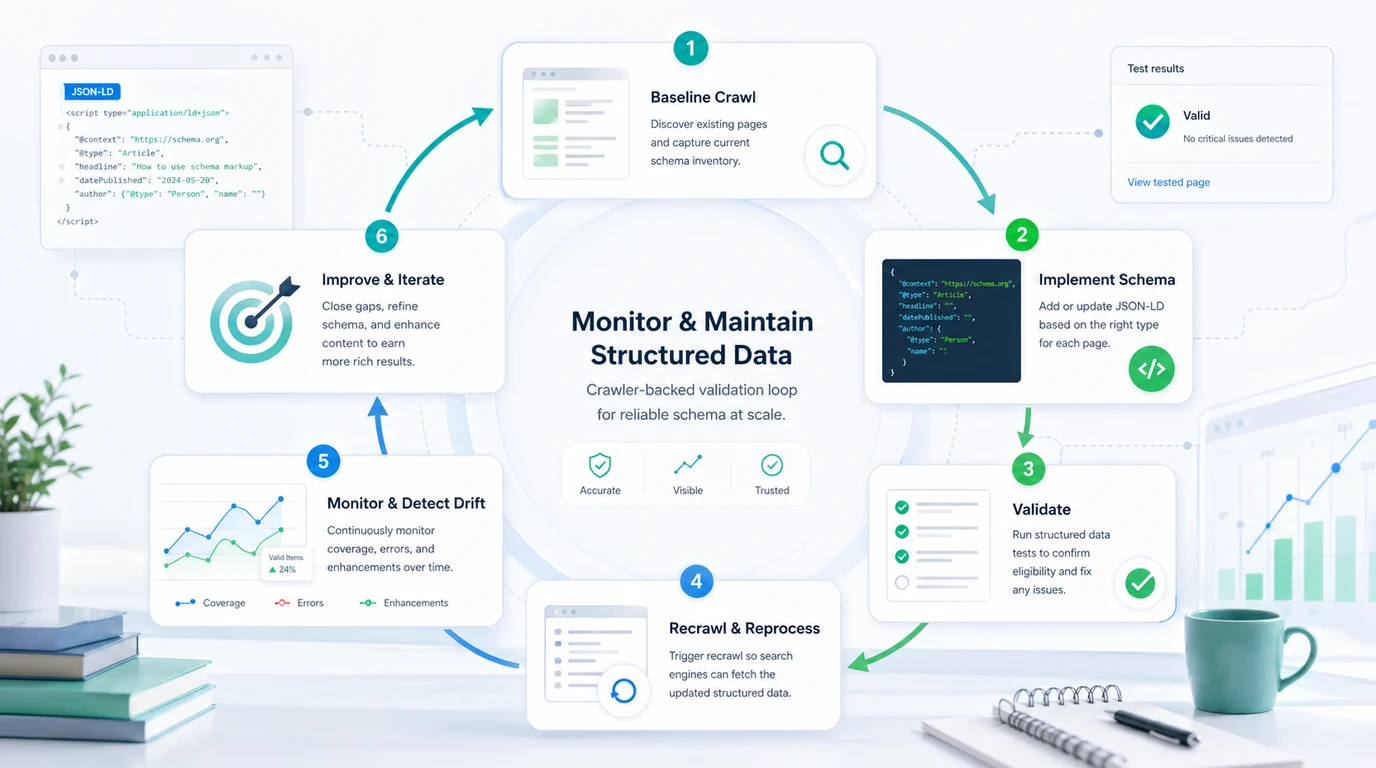
Use a crawler-backed loop:
| Loop step | What to capture | Why it matters |
|---|---|---|
| Baseline crawl | Canonical URL, indexability, title, H1, headings, internal links, current schema | Separates schema work from access problems |
| Implementation | JSON-LD source fields, template owner, page-type rules | Prevents random one-off markup |
| Validation | Errors, warnings, rich-result eligibility, rendered HTML | Catches syntax and rendering gaps |
| Re-crawl | Live output after deployment and later template changes | Finds drift before it spreads across many URLs |
| Prioritization | Affected template, traffic value, page type, fix owner | Turns warnings into work instead of noise |
This connects naturally to the on-page SEO workflow. Titles, headings, internal links, schema, images, and CTAs should all reinforce the same page promise. Schema is one signal inside that proof system.
Add AI Search Context Without Overclaiming
Schema markup is not an AI search visibility switch. It can still help organic growth teams because it makes important facts explicit, consistent, and easier to audit across templates.
Think of schema as evidence hygiene:
| AI search concern | Schema contribution | What still needs human work |
|---|---|---|
| Entity clarity | Organization, author, product, local business, or article facts are explicit | The page still needs original proof and clear sourcing |
| Content extraction | Dates, names, breadcrumbs, and page types are easier to parse | The main content still needs useful answers |
| Trust consistency | Markup can match visible policies, offers, and business details | Teams must remove stale or unsupported claims |
| Refresh monitoring | Re-crawls can catch template drift and stale dates | Editors still decide what changed and why |
The same discipline applies when you interpret Google ranking factors. Turn broad concepts into verifiable work: useful content, crawl access, page experience, links, trust signals, and structured facts that can be checked on the live page.
Schema Markup QA Checklist
Use this checklist before you publish a new structured data change:
- The target URL has one clear page job.
- The schema type matches that job.
- Every marked-up fact is visible or clearly supported on the page.
- The JSON-LD source fields have an owner.
- The canonical URL points to the intended live page.
- The page is crawlable, indexable, and internally discoverable.
- Required properties pass validation.
- Warnings are recorded with a fix owner or accepted rationale.
- The rendered HTML contains the expected markup.
- A post-release crawl confirms the markup did not drift.
Schema markup works best when it is boringly consistent. Choose the right type, mark up real facts, validate the rendered output, and keep crawling the templates that matter.