

Image SEO is the work of making important images discoverable, understandable, fast, and useful on the pages where they appear. It includes alt text, filenames, surrounding copy, responsive delivery, image sitemaps, structured context, performance, and validation after the page is live.
The Ahrefs Image SEO article that surfaced this opportunity is a useful tip list. Searvora's information gain is the operating layer around those tips: build an image inventory, decide which assets matter, route fixes by template and owner, and prove the rendered page exposes the right image signals after release.
Start With The Page And Image Job
Do not optimize every image the same way. A decorative divider, a product photo, a workflow diagram, a chart, and a hero image all carry different search and accessibility jobs.
Use this first-pass triage before editing anything:
| Image role | SEO job | What to inspect first |
|---|---|---|
| Product or category image | Helps the page satisfy commercial and visual discovery intent | Alt text, filename, dimensions, image quality, product context, structured data fit |
| Editorial diagram or screenshot | Explains a process, decision, interface, or evidence point | Surrounding copy, caption context, alt text, crawlable file path |
| Hero image | Supports the page promise and social/search preview | Preferred image metadata, file weight, responsive versions, visual relevance |
| Decorative image | Adds layout or mood but no unique meaning | Empty alt behavior, lazy loading, size, whether it creates accessibility noise |
| Repeated template image | Appears across many pages through a CMS or component | Template rule, repeated alt pattern, compression defaults, owner |
Google's image SEO best practices tie image discovery to HTML image elements, image sitemaps, responsive images, supported formats, speed, and the landing page around the image. That is why the workflow has to include both media files and page context.
Build An Image Inventory Before Editing
An Image SEO pass should start with a crawl, not a blank spreadsheet. The crawl tells you where images appear, which pages carry organic value, and whether one bad template rule is repeating across many URLs.
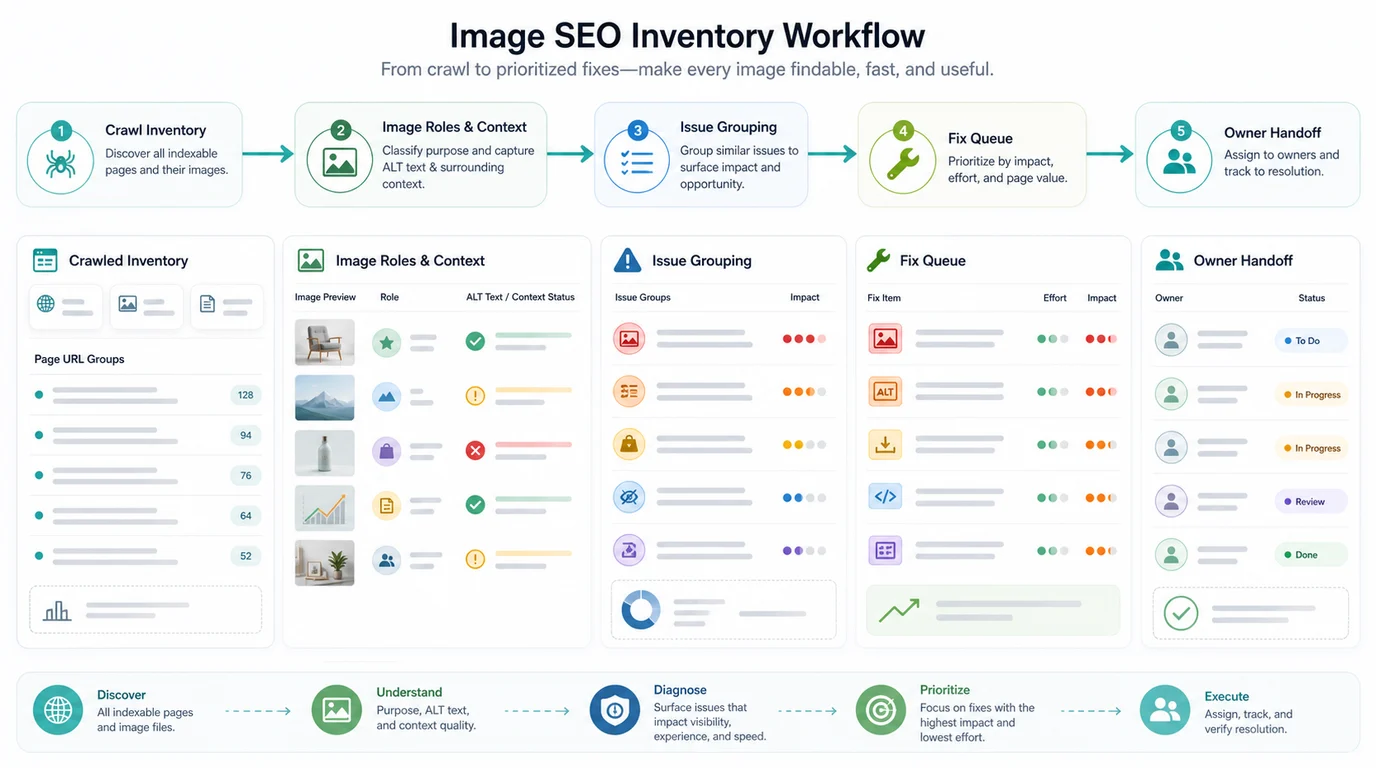
Pull these fields into the inventory:
| Crawl field | Why it matters |
|---|---|
| Page URL, canonical, and status | Confirms the page is the version search systems should evaluate |
| Image source URL | Shows whether the issue lives in the asset library, CDN, CMS, or page content |
| Alt text and empty-alt state | Separates useful missing context from intentionally decorative images |
| Image placement | Distinguishes hero, product, body, icon, navigation, and background usage |
| File type, dimensions, and weight | Finds oversized files and format mismatches before speed suffers |
| Lazy-load and rendered visibility | Confirms the image appears when crawlers and users can process the page |
| Template, directory, and page type | Turns scattered issues into a short owner-ready fix queue |
| Internal links and search value | Prioritizes images on pages that already matter |
This keeps Image SEO distinct from an image alt text checker workflow. Alt text is one important defect class. Image SEO is the larger operating system around discoverability, context, performance, and validation.
Fix Discovery, Context, And Speed Together
Image SEO gets weak when teams fix one layer and ignore the others. A page can have good alt text but load a huge file. It can use modern responsive markup but bury the image in a CSS background. It can compress images well while leaving product context vague.
Use this repair matrix:
| Issue | Good fix | Validation check |
|---|---|---|
| Important image is not discoverable | Use standard HTML image elements with a stable src fallback | Rendered crawl shows the image URL on the canonical page |
| Image lacks useful context | Improve alt text, nearby copy, headings, captions, or product details | The page still reads clearly without relying only on the image |
| Image file is too heavy | Resize, compress, choose a modern format, and keep quality high enough for users | Check page weight, responsive variants, and visual quality |
| Lazy loading hides key content | Keep critical above-the-fold images available early and test rendered output | Rendered page QA shows the image and surrounding text in the expected state |
| Product or article image is not preferred | Add visible page facts and supported metadata only when accurate | Structured context matches what users can see |
| Same issue repeats across pages | Fix the CMS, component, theme, or template rule | Sample multiple affected URLs after release |
The MDN reference for the HTML image loading attribute is useful for implementation context, but the SEO decision is still page-specific. Lazy loading is not good or bad by itself. It becomes risky when important images, internal links, or page context fail to appear in the rendered state search systems evaluate.
Use Structured And Product Context Carefully
Structured data can help identify the preferred or relevant image for a page, but it should describe visible facts. Do not generate product images, ratings, prices, or awards that the page does not actually show.
For product, recipe, video, local, or article pages, review these questions before adding image-related markup:
- Is the image visible on the canonical page?
- Does the image represent the main entity, product, step, or evidence the page discusses?
- Is the file stable enough that metadata will not drift after the next CMS update?
- Does the page include the surrounding facts a user needs to verify the image context?
- Can the team crawl a sample of matching templates after release?
This overlaps with rich snippets validation. Schema can express facts, but crawl access, visible content, canonical state, and template upkeep decide whether those facts stay trustworthy.
Validate The Rendered Page After Release
An Image SEO fix is not done when the CMS field is filled in or the file is compressed. It is done when the live rendered page exposes the intended image, context, and performance state.
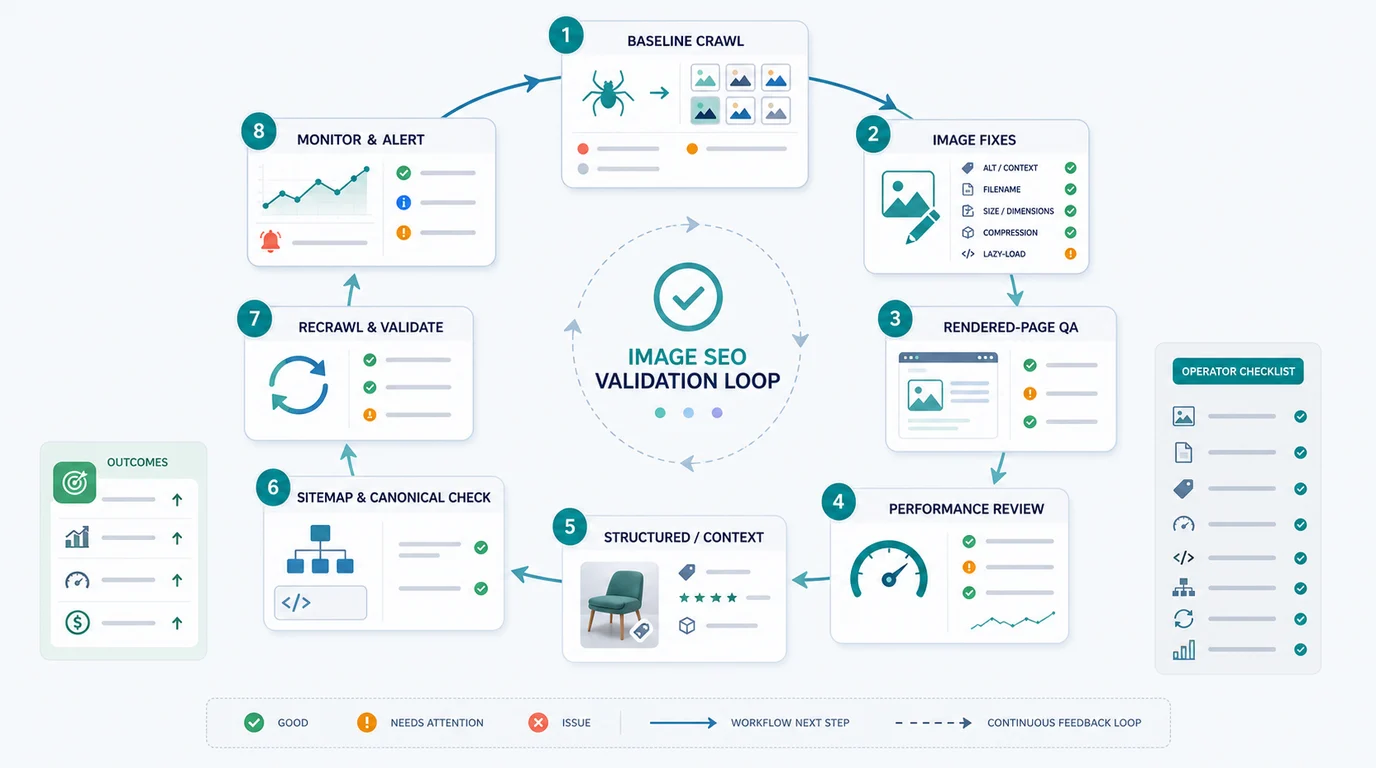
Run this validation loop:
- Save the baseline crawl export for the affected URL group.
- Decide whether each fix is asset-level, page-level, template-level, or CDN-level.
- Update alt text, filenames, compression, responsive sources, and surrounding copy only where they serve the image job.
- Render the page and inspect the final image, nearby text,
src, lazy-load behavior, canonical, and indexability signals. - Review file weight and layout impact alongside Core Web Vitals when the page has important demand.
- Re-crawl the same URL group after release.
- Confirm the sitemap, canonical, internal links, and preferred image signals still point to the right page.
- Monitor image search, page impressions, CTR, and template drift after the next recrawl window.
The important point is ownership. Writers can improve alt text and nearby copy. Designers may need to replace weak visuals. Engineers may need to change responsive image markup or lazy-loading defaults. Ecommerce teams may need to update product media. The crawl should make those owner paths visible.
Where Searvora Fits
Searvora SEO Spider Crawler fits the inventory and validation layer of Image SEO. The product page positions the crawler around online crawls, JavaScript rendering, metadata and content QA, image alt and weight checks, issue clustering, owner-ready handoffs, exports, and recurring crawls.
Use the technical SEO crawler when the team needs to move from "we should optimize images" to a fix queue that can ship:
| Workflow step | Searvora role | Output |
|---|---|---|
| Crawl priority templates | Collect page URLs, image files, metadata, status, canonical, and rendered context | Baseline inventory |
| Group issues | Separate missing alt text, oversized assets, lazy-load risk, and repeated template patterns | Shorter owner queues |
| Prioritize fixes | Rank by page role, template footprint, organic value, and implementation effort | Sprint-ready tasks |
| Validate release | Re-crawl affected pages and compare rendered output to the baseline | Evidence that the fix worked |
| Monitor drift | Repeat checks after template or CMS changes | Early warning before the issue spreads |
Image SEO Checklist
Use this sequence when visual assets need to support organic search:
- Identify the pages where images affect understanding, conversion, trust, or visual discovery.
- Crawl those URL groups and export image sources, alt text, placement, dimensions, weight, status, canonical, and template data.
- Separate decorative images from meaningful images before assigning copy work.
- Fix discoverability with standard HTML image elements and stable fallback URLs.
- Improve image context through alt text, nearby copy, captions, headings, and product facts.
- Reduce oversized files while preserving visual quality.
- Check lazy-loading behavior on critical images in the rendered page.
- Use image sitemaps or structured context only when they reflect visible, maintained facts.
- Group repeated problems by CMS block, component, theme, or template owner.
- Re-crawl after release and confirm rendered images, canonical signals, internal links, sitemap state, and performance checks.
Image SEO is not a pass/fail score for media files. It is a way to make important visuals easier to discover, easier to understand, faster to load, and safer to maintain across real pages.