

Log file analysis for SEO shows which crawlers actually requested your URLs. A crawl tells you what a crawler could find. Server logs show what Googlebot, Bingbot, AI crawlers, or other agents did reach, which status they received, and whether important pages are getting real crawl attention.
Use logs when the SEO question depends on crawler behavior: crawl budget waste, indexation gaps, release validation, bot access, or a traffic drop that normal crawl exports cannot explain. The win is not a bigger spreadsheet. The win is a short queue of page groups, fixes, and rechecks.
Start With The Decision The Log Should Answer
Do not open a raw log export just because it is available. Start with the SEO decision, then collect only the fields needed to make that decision.
| SEO question | Log evidence to collect | Crawl evidence to compare |
|---|---|---|
| Are important URLs requested by Googlebot? | User agent, URL, timestamp, status code | Sitemap inclusion, internal links, indexability, canonical state |
| Is crawl budget wasted on low-value paths? | Bot hits by directory, parameter, template, and status | Faceted paths, robots rules, canonical targets, crawl depth |
| Did a migration or release break access? | Before and after requests, redirects, 4xx/5xx rates | Redirect map, canonical output, rendered HTML, sitemap state |
| Are AI crawlers reaching source pages? | Verified AI crawler user agents and requested URLs | Robots access, page value, internal links, citation-ready source pages |
| Is a blocked page still being requested? | Bot requests to blocked, noindex, or redirected URLs | Robots.txt, meta robots, canonical, final status |
The competitor pages that surfaced this gap show why the topic is useful. Screaming Frog explains how Apache access log formats can be customized for SEO analysis, and Ahrefs frames log files as evidence for how search engines crawl URLs. Searvora's information gain is the operator workflow: normalize the log fields, reconcile them with crawl diagnostics, then assign only the fixes that can be validated.
Build A Clean Log File Schema Before Analysis
Apache, NGINX, CDN, and hosting logs can all expose similar crawler evidence in different formats. Apache's mod_log_config documentation shows how the LogFormat directive controls access log fields. NGINX documents a similar access log format model.
For SEO analysis, normalize the export into a small schema before you score anything:
| Field | Why SEO needs it | Example use |
|---|---|---|
| Timestamp | Separates pre-release and post-release behavior | Validate a migration window or robots change |
| URL path and query | Groups crawler attention by page type | Find bot waste on parameters or filters |
| Status code | Shows what the crawler received | Spot 404s, 5xx errors, redirect loops, and soft failures |
| User agent | Separates Googlebot, Bingbot, AI crawlers, and noise | Measure crawl behavior by verified crawler class |
| Referrer or host | Helps debug edge cases on multi-host setups | Confirm the right host, protocol, or CDN route |
| Response bytes or time | Finds heavy or failing responses | Prioritize performance and server-error triage |
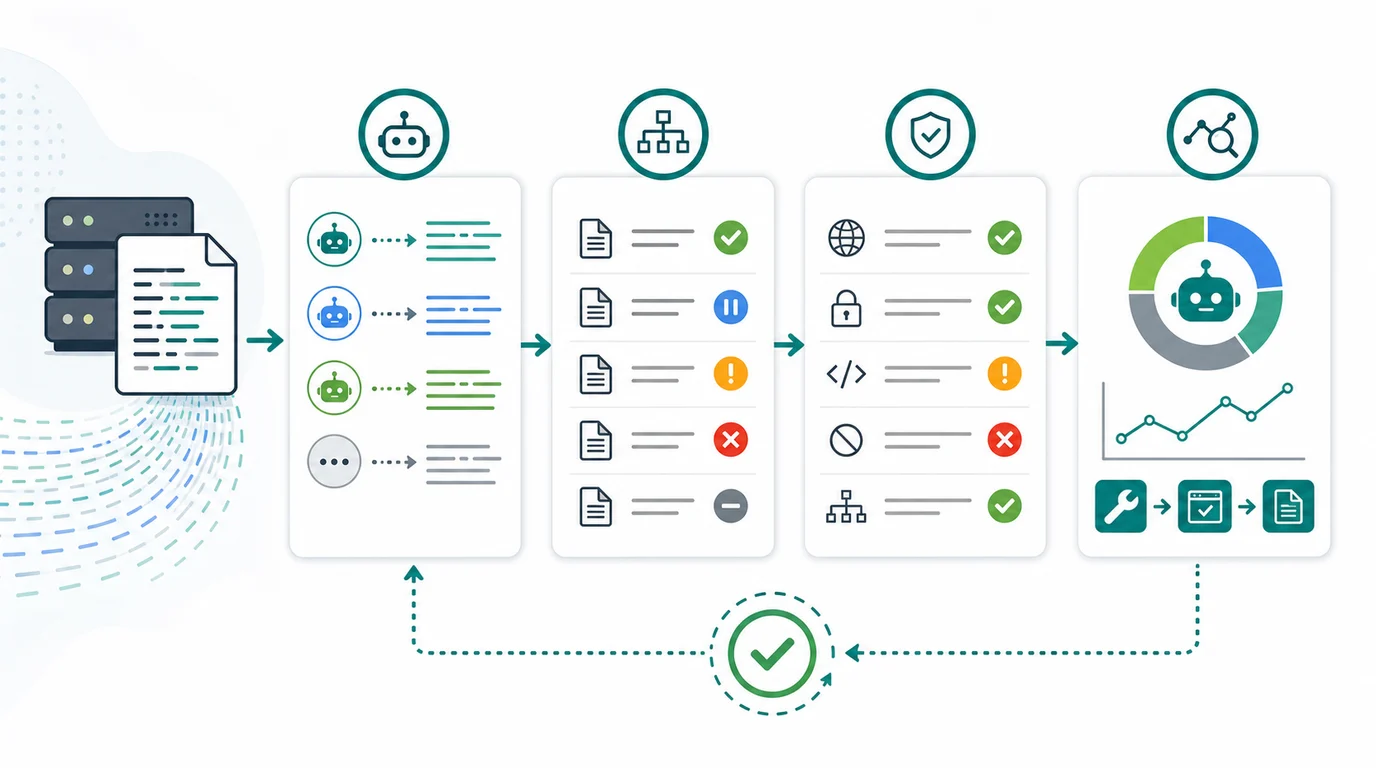
Keep raw examples out of the published report unless they are anonymized. Logs can include paths, query strings, IPs, user agents, and timestamps that create privacy or security exposure. The SEO report needs aggregated URL groups, not private request lines.
Separate Crawlers You Trust From Traffic Noise
The first useful segmentation is crawler identity. A raw user-agent string is not proof by itself, but it is the first routing clue.
Google maintains current guidance for Googlebot and Google crawlers. For AI search monitoring, keep a small verified bot registry and update it from official crawler documentation before changing robots policy. The AI bot monitoring workflow is the companion when AI crawlers matter.
Use this triage table:
| Log segment | Treat as | First action |
|---|---|---|
| Verified search crawlers on important 200 URLs | Healthy access evidence | Compare with rankings, impressions, and source-page quality |
| Search crawlers hitting 4xx, 5xx, or long redirect chains | Technical risk | Re-crawl affected URLs and assign status/redirect fixes |
| Crawlers spending time on parameters, filters, or internal search | Crawl waste | Review robots, canonicals, internal links, and faceted navigation |
| AI crawlers reaching source pages | AI access evidence | Compare with AI visibility and citation checks |
| Unknown or aggressive agents | Noise or security review | Validate IPs and behavior before calling it search demand |
This prevents the common mistake: counting every bot hit as SEO value. A crawler request matters only when it touches a page group that should be discovered, indexed, cited, or protected.
Reconcile Logs With A Fresh Crawl
Log file analysis for SEO works best when it is paired with a crawler. Logs show what happened on the server. A crawl shows the technical state that may have caused it.
Use this reconciliation sequence:
- Export the log window that matches the SEO problem.
- Segment requests by crawler class, host, directory, template, status code, and query pattern.
- Crawl the same URL groups with status, redirects, canonicals, robots, internal links, sitemap inclusion, and metadata.
- Mark mismatches where logs and crawl evidence disagree.
- Assign fixes only where the mismatch affects important pages.
- Re-crawl and review a new log window after the fix ships.
| Mismatch | What it usually means | Better fix path |
|---|---|---|
| Logs show Googlebot hits on URLs your crawler cannot discover | External links, old sitemaps, legacy paths, or redirects still expose them | Clean sitemaps, redirects, canonicals, and internal links |
| Logs show no requests to pages you want indexed | Discovery or crawl priority is weak | Improve internal links, sitemap quality, and page prominence |
| Logs show bots hitting redirected or canonicalized variants | Consolidation signals are noisy | Align internal links, canonical targets, and redirect rules |
| Logs show many 5xx responses during crawl windows | Server reliability can block crawl access | Fix server errors, then verify with logs and crawl status |
| Logs show AI crawler access but no visibility movement | Technical access exists, but source evidence may be weak | Review entity clarity, answer blocks, internal links, and monitoring |
The Googlebot checks workflow is useful when the log segment is mostly Google crawler behavior. The technical SEO site audit workflow is the safer parent when the log issue is only one part of a bigger audit.
Prioritize By Page Value, Not Hit Count
High log volume is not automatically high priority. Bot hits on junk paths can be expensive noise. A smaller number of requests on a revenue page, migration URL, source page, or category template can matter more.
Score each log finding by five factors:
| Factor | High priority looks like | Low priority looks like |
|---|---|---|
| Page value | Product, service, category, article hub, or key source page | Internal search, cart, duplicate parameter, stale archive |
| Crawler class | Verified search or AI crawler that matters to the goal | Unknown bot with no SEO role |
| Technical state | Blocked, broken, redirected badly, canonicalized away, or slow | Clean 200 with no strategic importance |
| Footprint | Pattern affects a template or directory | One isolated URL with no demand |
| Validation confidence | A recrawl and new log window can prove the fix | Expected impact is vague |
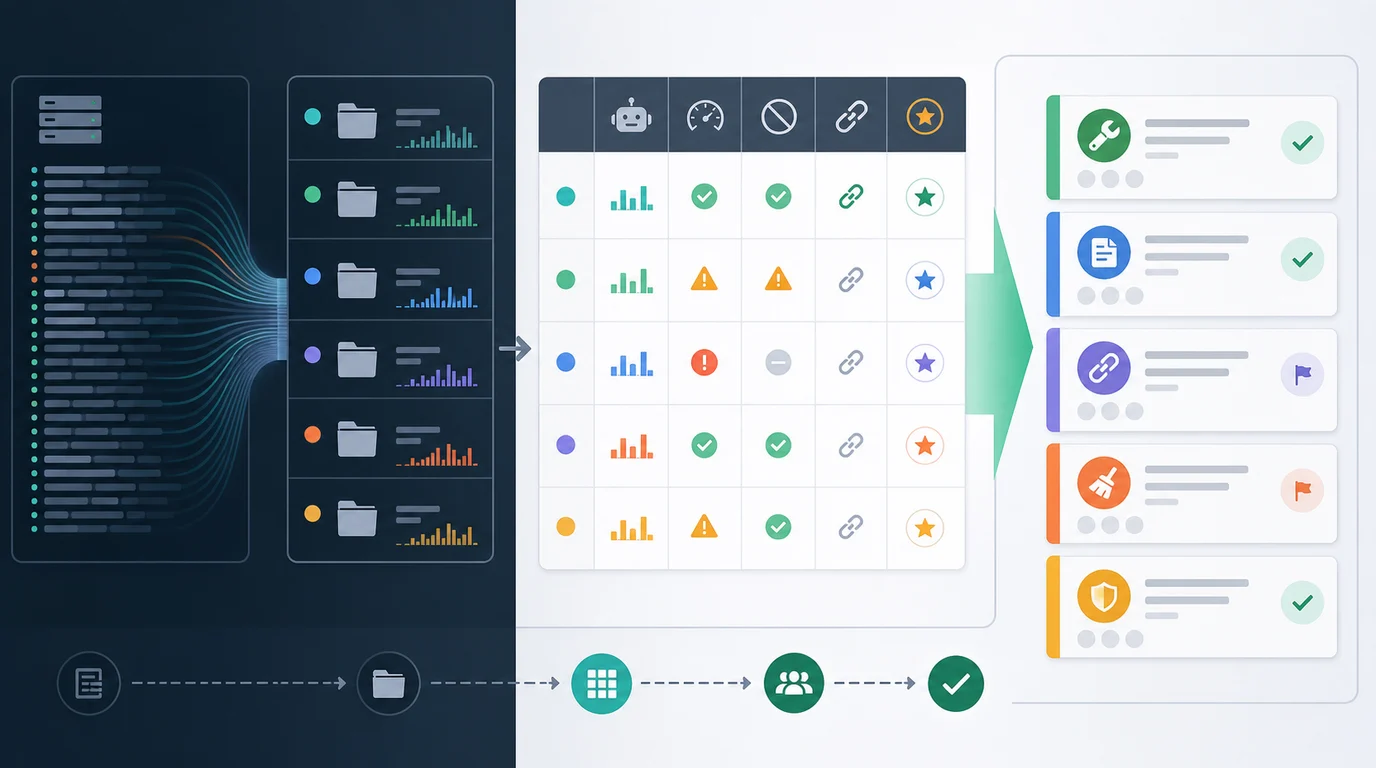
This is where log analysis becomes an operating system for technical SEO work. The finding should name the URL group, the crawler evidence, the crawl diagnosis, the owner, and the validation window.
Where Searvora Fits
Searvora's SEO spider crawler fits the reconciliation and handoff layer. Use logs to see what crawlers requested. Use the crawler to validate whether those URLs are indexable, canonicalized correctly, internally linked, present in sitemaps, and free of status-code or rendering problems.
Searvora is strongest after the raw log evidence has been grouped:
| Workflow layer | What logs answer | What Searvora should validate |
|---|---|---|
| Crawl access | Which crawlers requested which URL groups | Status, redirects, robots, canonicals, and sitemap behavior |
| Crawl waste | Where bots spend time without SEO value | Faceted paths, duplicate templates, internal links, and crawl depth |
| Release QA | What changed after a migration or deploy | Before/after crawl states and owner-ready fix queues |
| AI search readiness | Whether AI crawlers reached source pages | Crawl eligibility, source-page clarity, and follow-up monitoring |
| Handoff | Which issue deserves work | Priority, owner, fix definition, and recrawl validation |
If the log issue becomes a visibility trend, route the affected page group into the AI SEO Dashboard after the technical fix ships. Logs prove access. Dashboard evidence helps decide whether the repaired page group is recovering, drifting, or still waiting on content work.
A Weekly Log File Analysis Checklist
Use this checklist for migrations, large sites, ecommerce stores, AI crawler monitoring, and technical traffic drops.
- Define the SEO decision before exporting logs.
- Choose a log window that matches the release, decline, or crawl question.
- Normalize timestamp, URL, status, user agent, host, and response fields.
- Verify crawler identities before making robots or access decisions.
- Group URLs by template, directory, locale, and page value.
- Compare each log segment with a fresh crawl of the same URL group.
- Prioritize by page value, technical state, footprint, and validation confidence.
- Assign fixes with owner, expected output, and recrawl criteria.
- Review a new log window after the fix goes live.
- Monitor the repaired page group separately from the raw log report.
Log file analysis for SEO is most useful when it reduces uncertainty. Use it to answer whether crawlers reached the right pages, whether the server gave them the right response, and which fix your team can prove after launch.