

People Also Ask SEO is the process of using Google's related question boxes to understand search tasks, improve answer sections, and monitor how a topic changes in the results. The useful job is not scraping every question into a giant outline. The useful job is deciding which questions deserve a page, a section, an update, or no action.
The Ahrefs page that surfaced this opportunity focuses on how to rank in People Also Ask boxes and whether the work is worth doing. Searvora's information gain is the operating layer around that decision: turn questions into page-type choices, answer eligibility checks, crawl validation, and a monitored action queue.
Use PAA As Question Evidence, Not A Keyword Dump
People Also Ask boxes often expose the follow-up questions searchers have after the first query. That makes them useful planning evidence. It does not make every question a new article.
Start by sorting questions by user job:
| PAA question pattern | Likely user job | Better SEO action |
|---|---|---|
| "What is..." | Understand a concept | Add or improve a concise definition section |
| "How do I..." | Complete a task | Build steps, examples, and validation checks |
| "Is it worth..." | Make a decision | Add a scenario table or tradeoff section |
| "Best tool for..." | Compare options | Plan a real roundup only if you can verify products |
| Brand plus support term | Solve a named-product task | Answer fairly or route to a comparison/support asset |
| Broad unrelated question | Explore a different intent | Ignore or save for another cluster |
This is where PAA work should connect to search intent. A question about what something means may belong inside a parent guide. A question about how to fix a technical problem may deserve a troubleshooting section. A question with comparison language may need a table, not another definition paragraph. The search intent workflow is the companion when the page type is still unclear.
Route Each Question To Create, Refresh, Or Ignore
Treat PAA research as a routing workflow. The question gives you the first clue. Existing pages, competitor page type, crawl eligibility, and monitoring data decide the next action.
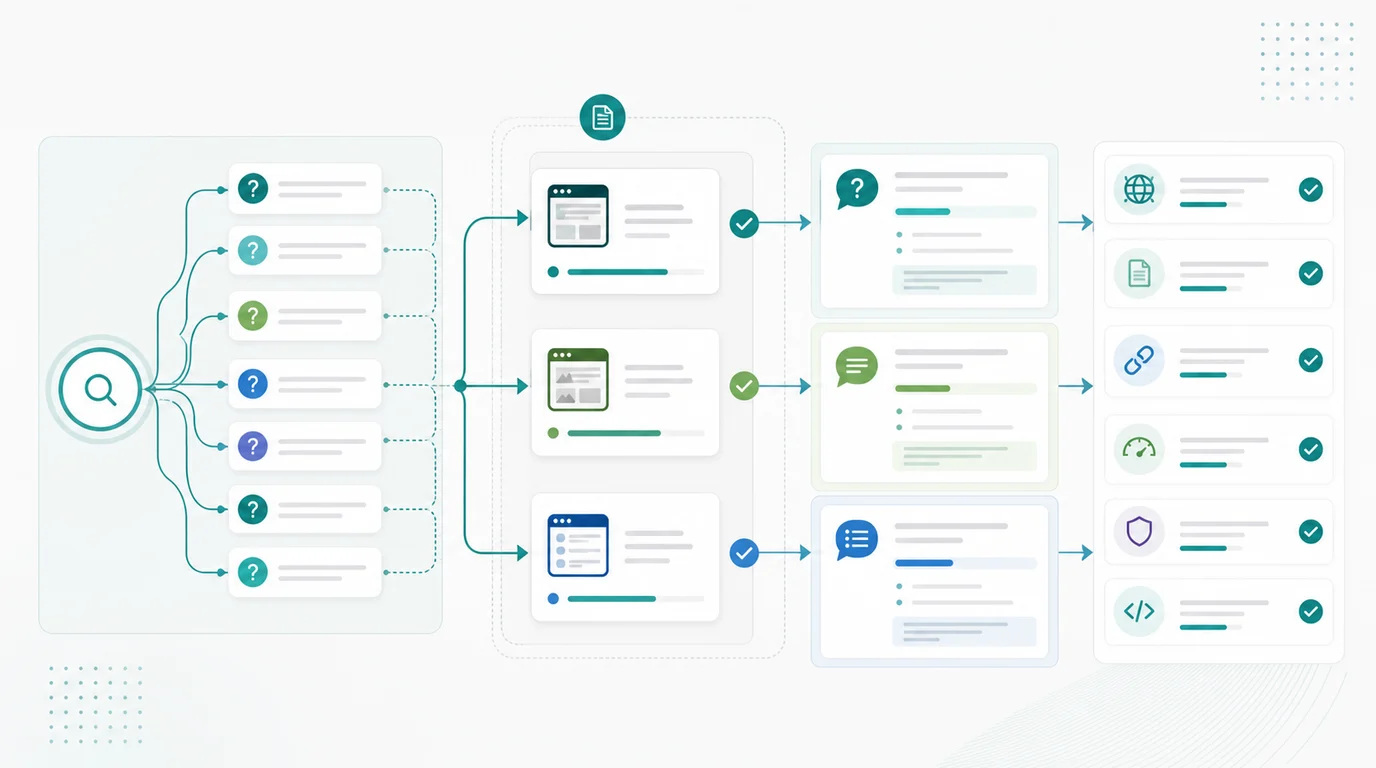
Use this routing table before writing:
| Evidence | Create a new article | Refresh an existing page | Ignore for now |
|---|---|---|---|
| Core question | Distinct task with enough depth | Same task already has a URL | Off-topic or too narrow |
| Page type | SERP rewards articles or guides | Existing article can answer better | SERP wants a tool, product, or local result |
| Internal coverage | No same-keyword, same-type, same-job page | Current page is close but incomplete | Question belongs to another cluster |
| Information gain | You can add workflow, data, examples, or decision support | You can improve an existing answer section | You would only paraphrase the current SERP |
| Validation path | You can monitor the query/page group | Existing dashboard segment already exists | No useful baseline or owner |
This prevents the two common mistakes. The first mistake is creating thin child pages for every question. The second is rejecting every question because the parent topic already exists. A good PAA workflow separates true duplicates from useful child jobs.
Build Answer Sections That Can Stand Alone
If the right action is a refresh or new article, build answer sections that are useful even when a search result lands the reader halfway down the page.
Use this structure:
- Put the plain answer near the relevant H2 or H3.
- Match the question format with a paragraph, list, table, steps, or short comparison.
- Add the caveat that prevents a misleading answer.
- Include an example, checklist, or decision rule.
- Keep important facts in visible HTML text, not only in images.
- Link to official or source-quality pages when discussing search behavior, tools, or policy.
- End with the next action the reader should take.
This overlaps with featured snippet work, but it is not the same job. The featured snippets workflow focuses on direct answer eligibility. People Also Ask SEO starts earlier: use related questions to discover the job, decide whether the current page should answer it, and then build an answer that can be monitored.
Validate Crawl And Snippet Eligibility
PAA work fails when the target page cannot be discovered, indexed, canonicalized, or understood. Before approving a rewrite, check whether the page can actually serve as the answer source.
| Check | Why it matters | What to fix |
|---|---|---|
| Canonical URL | The wrong canonical can send signals away from the answer page | Align canonical and internal links with the target URL |
| Indexability | A blocked or noindexed page cannot support the question job | Remove accidental blocks before rewriting copy |
| Heading match | The answer needs a clear local context | Rewrite vague headings and mismatched intros |
| Internal links | Search systems and readers need discovery paths | Link from the parent guide or related workflow page |
| Snippet controls | Restrictive directives can limit what Google may show | Review nosnippet, data-nosnippet, and max-snippet usage |
| Template health | One template issue can weaken many answers | Group issues by template, directory, or page type |
Use Google's Search Console performance report to review query, page, country, device, click, impression, CTR, and average position signals after the work ships. PAA observations are useful, but they need performance context.
For AI-search overlap, connect PAA questions to source clarity. Question-led sections are easier for humans to scan and easier for answer systems to interpret. The Google AI Overviews workflow covers the broader AI-search visibility loop.
Monitor PAA Changes Beside Search And AI Signals
People Also Ask boxes are not static. A question can appear, disappear, shift wording, or move to a different source as the SERP changes. That is why PAA work should be monitored like a visibility signal, not treated as a one-time content hack.
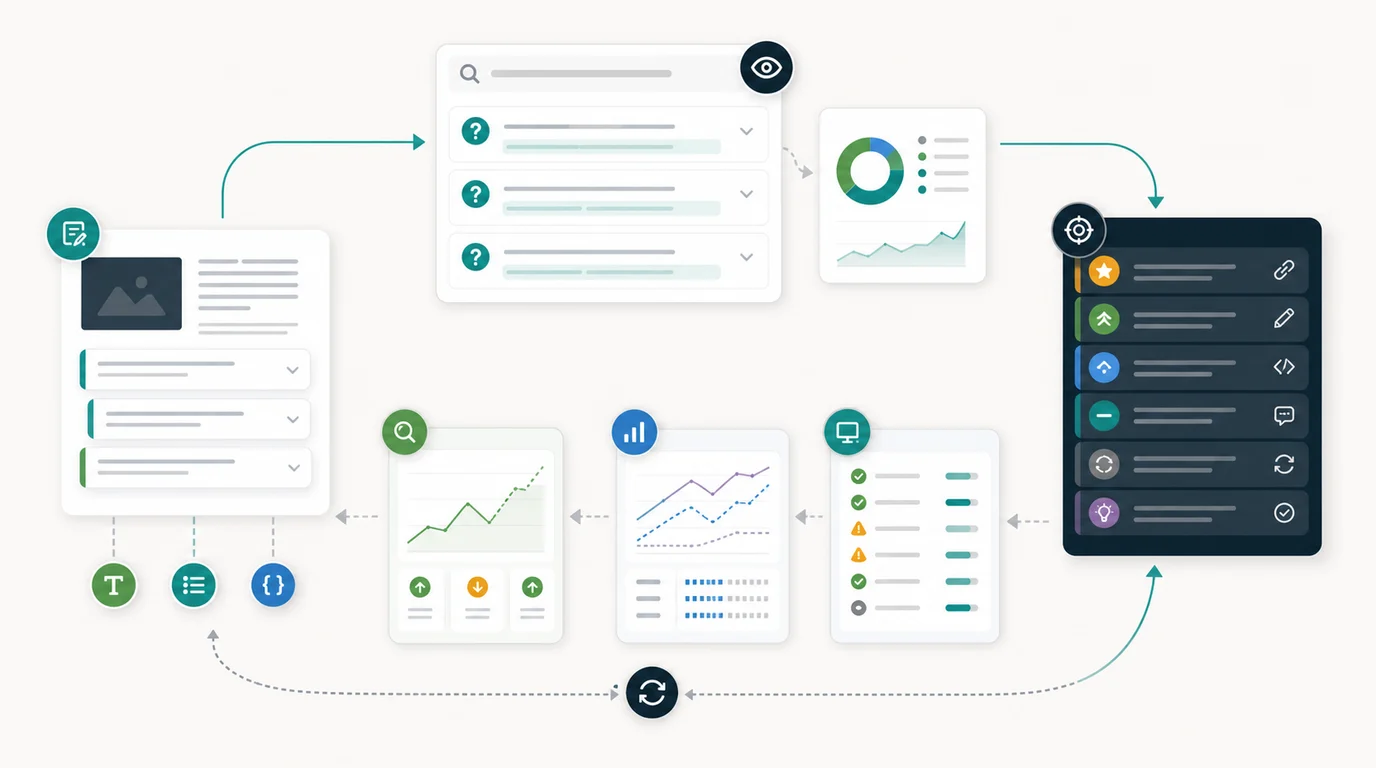
Track a small set of fields:
| Field | What to record | Why it helps |
|---|---|---|
| Query group | Primary query and related PAA questions | Prevents one-off screenshots from driving strategy |
| Target URL | The page that should answer the question | Keeps ownership clear |
| Answer format | Paragraph, list, table, steps, or comparison | Lets you test structure, not only wording |
| Technical baseline | Indexability, canonical, internal links, and snippet controls | Separates content problems from crawl problems |
| Change log | What section changed and when | Makes post-publish review possible |
| Review signal | Query movement, CTR, PAA presence, AI answer notes | Turns observation into a next action |
Do not overreact to one SERP check. If a question is valuable, review it beside Search Console movement, page-group performance, crawl health, and AI-search observations. If the answer section improved but clicks did not move, the page may need a stronger title promise, more internal links, or a broader refresh. If the page is not eligible, rewrite quality is not the first problem.
Where Searvora Fits
Searvora AI SEO Dashboard is the natural product layer for People Also Ask SEO because the work is part research, part monitoring, and part action routing. Use it to group candidate pages by topic cluster, page type, and directory, then watch whether question-led updates affect impressions, CTR, page-group trends, and crawl health.
The goal is not to maintain a spreadsheet of every PAA question. The goal is to run a weekly review that asks:
- Which questions reveal a real user job?
- Which existing URL should own that job?
- What technical or content blocker prevents the page from answering well?
- Which update has enough upside to assign this week?
- What signal will prove whether the update worked?
When the PAA question exposes a larger topic gap, pair it with the content gap analysis workflow. That keeps the decision honest: create a new page when the job is distinct, refresh the current page when it already owns the task, and skip the question when it does not support the organic growth plan.
A Practical People Also Ask SEO Checklist
Use this checklist before approving the next PAA-driven update:
- Choose one query group, not a random list of questions.
- Sort PAA questions by user job.
- Remove questions that are off-topic, brand-only, or too narrow to act on.
- Check whether an existing Searvora URL already owns the same core keyword, page type, and user job.
- Decide whether the action is create, refresh, merge, internal link, monitor, or ignore.
- Pick the answer format that matches the question.
- Validate indexability, canonical, internal links, and snippet controls.
- Add examples, caveats, and decision support where the answer needs trust.
- Record the change date and target query group.
- Review Search Console, SERP observations, crawl health, and AI-search notes together.
- Turn the result into one next action, not another unowned report.
People Also Ask SEO is most useful when it makes content teams more selective. The questions show what searchers may ask next. The SEO work is deciding which answers deserve to exist, which page should own them, and how the team will know whether the update helped.