

Should you block SEO bots? Usually not by default. First identify what each bot does, verify that the traffic is genuine, measure the server and business impact, and decide whether the right outcome is to allow, limit, block, or monitor it. Search crawlers, SEO-tool crawlers, AI-search crawlers, training crawlers, and user-triggered fetchers do different jobs. One blanket rule can remove useful visibility or data along with the traffic you meant to stop.
The Ahrefs study that surfaced this competitor opportunity found that several major SEO-tool bots were blocked by roughly six percent of the sites in its large dataset. The number is interesting, but it does not tell an individual site what to do. Searvora's information gain is the decision workflow after the statistic: classify the bot, connect access to a page group and business outcome, then validate the policy after it changes.
Separate Bots By Job Before You Change Access
The user-agent name is not the decision. The crawler's job is.
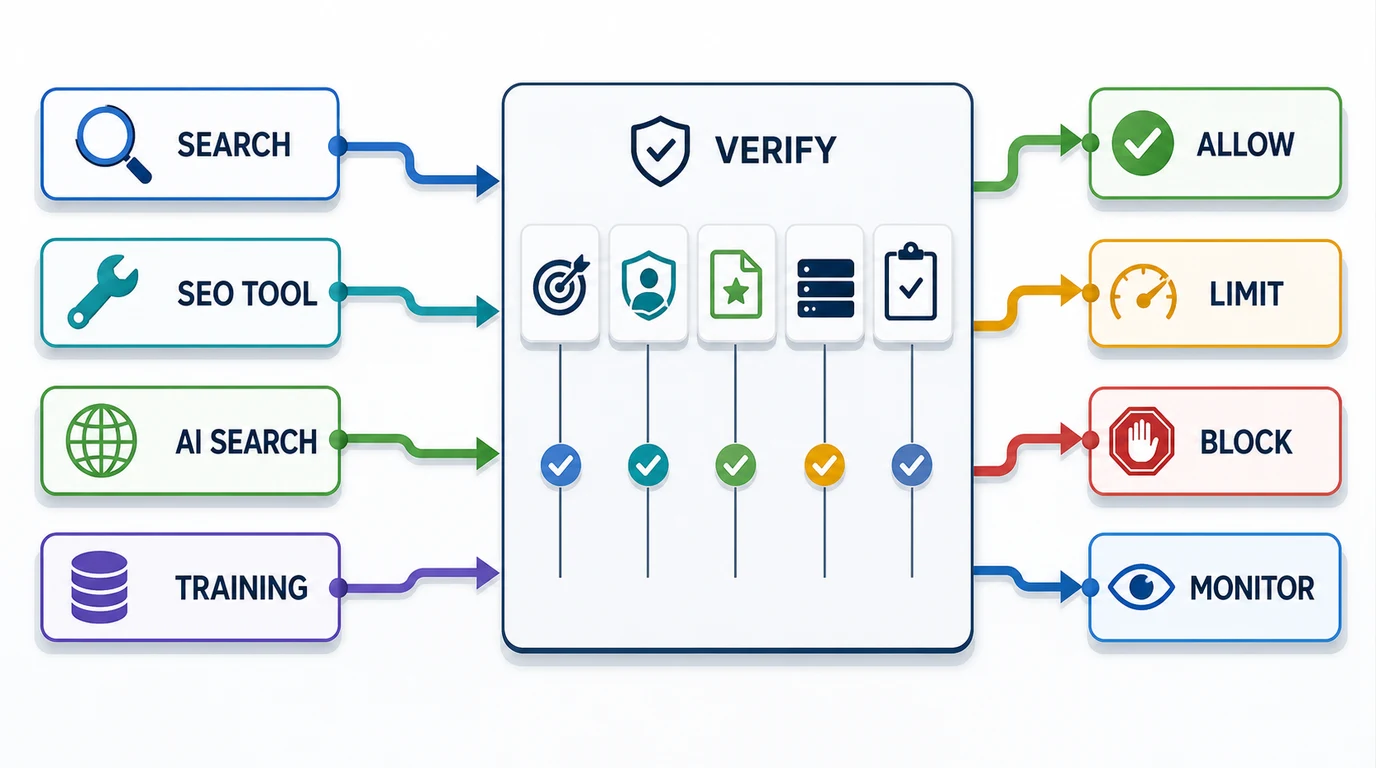
Use this classification before editing robots.txt or adding an edge rule:
| Bot class | Typical purpose | Default starting position | Main tradeoff |
|---|---|---|---|
| Search engine crawler | Discover and process pages for search results | Allow public, indexable page groups | Blocking can reduce discovery, refreshes, and search visibility |
| SEO-tool crawler | Build link, content, and technical datasets | Allow or limit when the data is useful | Blocking may reduce third-party backlink and page data while saving resources |
| AI-search crawler | Index sources for AI-assisted search and citations | Allow source pages when AI visibility matters | Blocking can reduce eligibility or accuracy in answer surfaces |
| Model-training crawler | Collect public web content for model development | Make a separate legal, content, and business decision | Training choice is not the same as search visibility |
| User-triggered fetcher | Retrieve a page because a person requested it | Review separately from automatic crawling | Robots behavior and product impact may differ from scheduled crawlers |
| Unknown or abusive bot | Scrape, probe, or consume resources without a verified purpose | Challenge, rate-limit, or block at the edge | A user-agent string can be spoofed, so identity needs evidence |
This separation is now practical, not theoretical. OpenAI's official crawler documentation distinguishes OAI-SearchBot for search, GPTBot for model training, and ChatGPT-User for user-initiated actions. Anthropic's site-owner guidance similarly separates Claude-SearchBot, ClaudeBot, and Claude-User. A policy that treats all three purposes as one switch throws away that control.
Verify The Bot Before You Trust The Name
User-agent strings are easy to copy. A request that says Googlebot or AhrefsBot is not automatically genuine.
Start with server or CDN logs and collect:
- Timestamp, URL, method, status code, response time, and bytes served.
- User-agent and source IP.
- Request rate by minute and hour.
- Page type, directory, locale, and parameter pattern.
- Cache hit or miss state when the edge exposes it.
- A verified IP range or reverse-DNS result when the crawler publishes one.
Google explicitly warns that Googlebot user agents can be spoofed. Its Googlebot documentation recommends reverse-DNS verification or matching requests against published IP ranges before taking action. Ahrefs also publishes user agents, IP ranges, reverse-DNS information, robots behavior, and crawl controls on its official bot page.
Do not skip the page group. Ten thousand requests to cached documentation pages are a different infrastructure problem from ten thousand requests that render faceted URLs, internal search pages, or expensive application routes.
For a reusable log workflow, see how to monitor AI bots. That article is about collecting and interpreting crawler activity. This one starts after the evidence exists and asks which policy should change.
Use Four Outcomes Instead Of One Block List
A practical bot policy needs more than allow or deny.
| Outcome | Use it when | Implementation direction | Proof after launch |
|---|---|---|---|
| Allow | The bot is verified, its purpose supports the business, and the target pages should be discoverable | Keep important paths crawlable and required assets accessible | Valid 200 responses, clean canonicals, sitemap agreement, continued search or AI visibility |
| Limit | The bot is useful but creates avoidable load or crawls low-value patterns | Narrow paths, reduce crawl traps, apply documented crawl controls, or rate-limit carefully | Lower resource cost without losing priority-page access |
| Block | The traffic is abusive, unauthorized, policy-incompatible, or has no acceptable value | Use robots.txt for cooperative crawlers and edge enforcement for unwanted traffic | Requests stop or fall to the intended level while wanted bots remain unaffected |
| Monitor | Identity, impact, or business value is still uncertain | Log separately, set a review window, and avoid a premature site-wide rule | Enough evidence to make a later allow, limit, or block decision |
SEO-tool crawlers often fit the limit decision better than a blanket block. Ahrefs states that AhrefsBot supports its marketing intelligence data and Yep search index, follows robots.txt, and supports crawl-delay directives. If your team uses that external data but the crawler is expensive on a specific directory, a narrow policy can preserve useful coverage without leaving every path open.
The AI-search decision is also separate from training. OpenAI says a site can allow OAI-SearchBot for search while disallowing GPTBot for training. Anthropic documents separate controls for its search, training, and user-directed agents. Perplexity's current robots.txt guidance says PerplexityBot follows robots directives and is used for search indexing rather than foundation-model pre-training.
Know Where Robots.txt Stops
Robots.txt is a cooperative crawl policy. It is not authentication, a firewall, a rate limiter, or a guarantee against malicious scraping.
Use the robots.txt workflow when a documented crawler supports the standard and the goal is to control which paths it requests. Use edge controls, bot management, application authorization, or network rules when the traffic is abusive, ignores robots directives, spoofs a trusted identity, or reaches private functions.
Keep the controls separate:
| Goal | Primary control | Common mistake |
|---|---|---|
| Guide a cooperative crawler away from paths | Bot-specific robots.txt rules | Using a global wildcard that also blocks valuable crawlers |
| Reduce request bursts | Supported crawl controls or rate limiting | Returning errors to every bot without measuring the visibility cost |
| Protect private data | Authentication and authorization | Publishing sensitive paths in robots.txt and treating that as security |
| Keep a page out of search | noindex, removal workflows, or access control | Blocking the crawl before a search engine can process the noindex |
| Stop malicious automation | Edge and application enforcement | Trusting the claimed user agent without verifying the source |
If the policy is meant to protect server capacity, measure cache behavior, render cost, and expensive URL patterns first. A broad block can hide an architecture problem such as unbounded filters, calendar URLs, search-result pages, or session parameters that also waste crawl attention for wanted bots.
Protect Search And AI Visibility Deliberately
The safest policy starts with the pages the business wants found.
Create three page groups:
| Page group | Examples | Default access question |
|---|---|---|
| Visibility-critical | Product pages, category pages, evergreen articles, public docs, comparison pages | Which search and AI-search crawlers need these sources? |
| Operationally public but low value | Tag archives, thin filters, internal search, duplicate parameters | Can path controls reduce waste without hiding canonical pages? |
| Private or transactional | Accounts, admin, staging, carts, internal APIs | Why is any crawler able to reach this surface? |
Then decide by crawler class and page group, not by a single site-wide opinion about bots. A company may allow search and AI-search crawlers to access public source pages, limit an SEO-tool bot on faceted URLs, disallow training crawlers, and enforce authentication on private routes. Those decisions can coexist.
This is also what keeps the article distinct from AI crawlability and GEO visibility. That guide asks whether answer systems can discover and use a source page. This guide asks which crawler classes should receive access in the first place.
Turn The Policy Into A Crawl Fix Queue
Searvora's public SEO Spider Crawler page positions the product around crawl discovery, robots parsing, indexability, canonicals, rendering, issue grouping, and owner-ready fix queues. Those capabilities fit the validation stage: after the policy changes, crawl representative page groups and prove that wanted access still works.
Use the crawl results to answer:
- Are priority URLs still reachable and returning the expected status?
- Do robots rules match the intended crawler and path group?
- Are canonical pages, sitemaps, and internal links aligned?
- Did a broad rule block rendering assets or important localized pages?
- Can the failure be grouped by template, directory, owner, and acceptance criteria?
Validate Every Bot Policy Change
Do not call the work finished when the robots.txt file or edge rule deploys. The finish line is evidence that unwanted cost fell and wanted discovery survived.
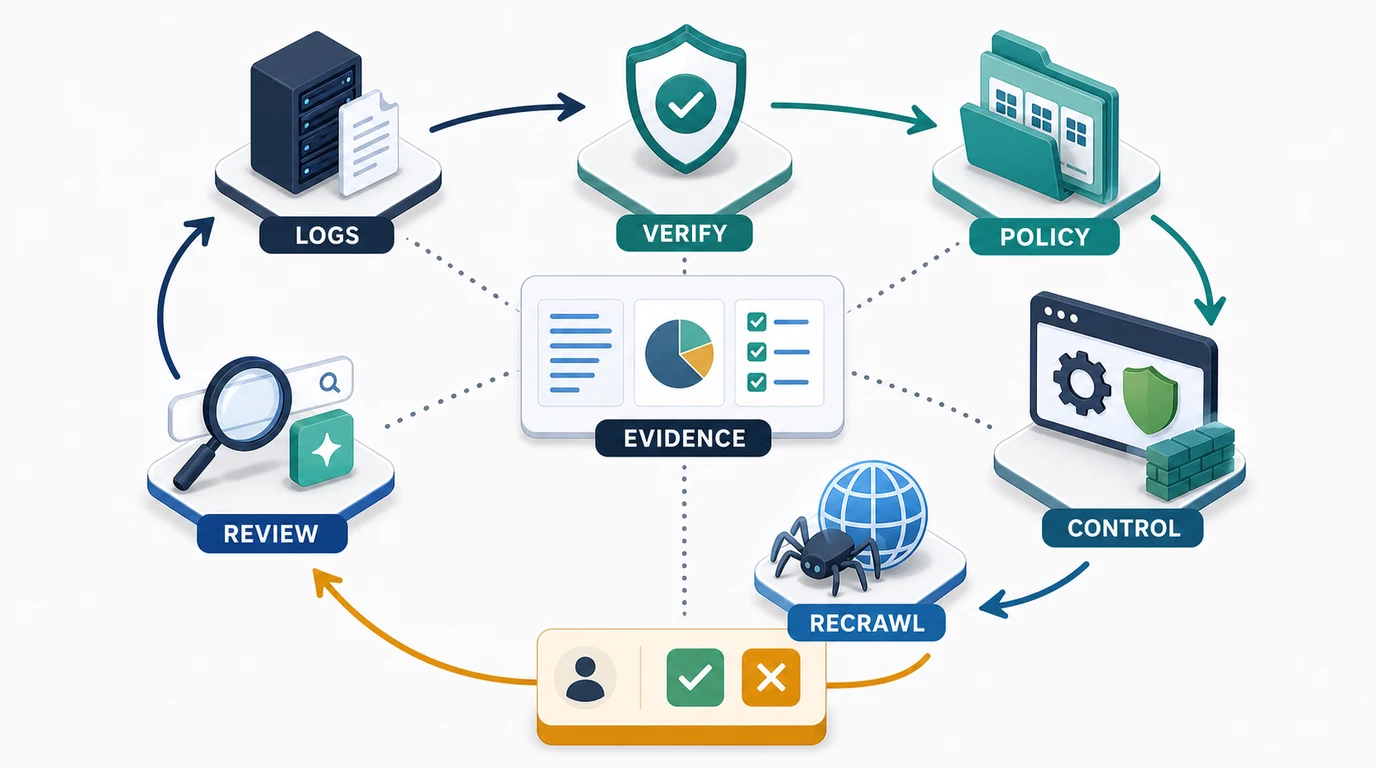
Run this sequence:
- Save a baseline of request volume, server cost, status codes, and page groups.
- Verify the crawler identity and purpose from current official documentation.
- Write the desired outcome for each bot class and page group.
- Test representative allowed and blocked URLs before deployment.
- Ship the narrowest robots, edge, or application rule that meets the policy.
- Recheck logs to confirm the traffic changed as expected.
- Recrawl visibility-critical pages and verify status, rendering, robots access, canonicals, internal links, and sitemap state.
- Review search, backlink-tool, or AI-visibility evidence on the appropriate timeline.
- Record the owner, rationale, and rollback condition.
If a policy cannot name the crawler's job, the affected page group, the expected benefit, and the validation signal, it is not ready to ship.
Use This SEO Bot Blocking Checklist
Before blocking an SEO bot, confirm:
- The traffic is real and not a spoofed user agent.
- The crawler's current purpose comes from official documentation.
- Search, SEO-tool data, AI search, training, and user-triggered retrieval are treated separately.
- Request volume is segmented by page type and infrastructure cost.
- The policy names visibility-critical pages that must stay crawlable.
- A narrow limit or path rule cannot solve the problem more safely than a site-wide block.
- Robots.txt is used only for cooperative crawl control.
- Private and abusive traffic is handled with real security or edge enforcement.
- Representative URLs are tested before launch.
- Logs and crawl evidence will be compared after launch.
- Search, backlink-data, and AI-visibility tradeoffs have owners.
- The rule has a review date and rollback condition.
The useful answer to "should you block SEO bots?" is not a universal yes or no. It is a policy that distinguishes crawler jobs, protects important pages, reduces unwanted cost, and leaves enough evidence to prove the result.