

Sitelinks are the extra links from the same domain that can appear under a normal Google result. You cannot force them, buy them, or mark them up directly. Google says sitelinks are automated and based on whether its systems can find useful shortcuts in your site's link structure.
That makes sitelinks a technical SEO workflow, not a cosmetic SERP feature. The useful work is to make important pages clear, crawlable, internally supported, and distinct enough that search systems can understand why they deserve to surface.
What Sitelinks Actually Depend On
Google's sitelinks documentation is direct about the constraint: sitelinks are automated, and they only appear when they seem useful for the query. The same page lists the practical levers site owners can influence: informative titles and headings, logical site structure, relevant internal links, concise anchor text, and less repetitive content.
For operators, that becomes an audit model:
| Sitelinks signal | What to audit | Why it matters |
|---|---|---|
| Page title and H1 | Important pages have compact, unique, intent-matched titles and headings | Google needs a clear label for each shortcut |
| Logical structure | Priority pages sit in a hierarchy users can navigate | Shortcuts are easier to infer when the site route is coherent |
| Internal links | Important pages receive relevant links from related pages | Link structure helps Google discover and understand priority pages |
| Anchor text | Internal anchors describe the destination without keyword stuffing | Generic anchors make shortcut labels and page purpose harder to infer |
| Duplicate content | Near-duplicate pages are consolidated, differentiated, or removed | Repetition weakens confidence about which page deserves attention |
| Removal choices | Low-value pages are removed or noindexed when needed | A page that should not surface should not stay eligible by accident |
The Searvora angle is to treat those signals as a crawl-backed eligibility system. Do not ask, "How do we get sitelinks?" Ask, "Which pages are important enough to deserve shortcuts, and can we prove the site supports them?"
Audit Eligibility Before Chasing Shortcuts
Start with the pages you would be comfortable seeing as shortcuts under a branded or category result. For most sites, that means product pages, core service pages, pricing, docs, parent hubs, login or account routes only when appropriate, and major category pages.
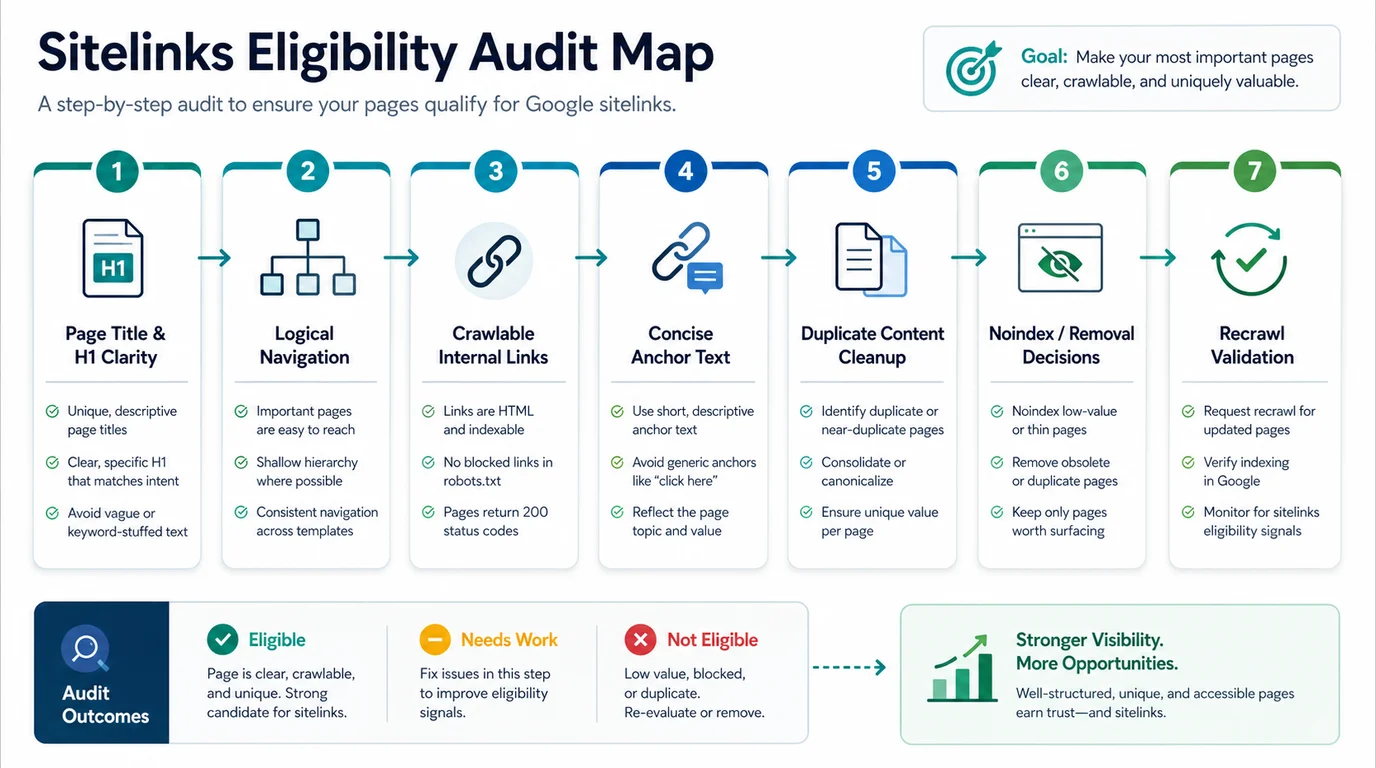
Export these fields before you rewrite anything:
| Crawl field | Sitelinks use |
|---|---|
| URL and page type | Separates product, hub, article, utility, and support pages |
| Status code | Keeps broken, temporary, or redirected URLs out of the shortcut candidate list |
| Indexability | Confirms whether the page is eligible to appear in search at all |
| Canonical | Prevents alternate versions from competing with the intended page |
| Title and H1 | Shows whether the visible and metadata labels agree |
| Inlinks and source pages | Shows whether important pages are actually supported by relevant internal links |
| Anchor text | Reveals vague labels, repeated anchors, and mismatched page promises |
| Duplicate or near-duplicate group | Identifies pages that need consolidation before they confuse the structure |
This is where a website structure audit and a sitelinks audit overlap. A clean hierarchy does not guarantee sitelinks, but a messy hierarchy makes useful sitelinks harder to infer.
Fix Labels Before Fixing Navigation
Titles and headings are the first labels to inspect because sitelinks need names that make sense out of context. Google's title link guidance says title links are generated from several sources, including title elements, prominent visible text, headings, anchor text, and linked text.
That means a page can have a decent title tag and still look unclear when the rest of the site describes it differently.
Use this label check:
| Problem | Example symptom | Better fix |
|---|---|---|
| Vague utility label | "Tools" appears on several different pages | Rename by task, such as "SEO Spider Crawler" or "Canonical Checker" |
| Repeated template title | Every feature page repeats the same brand-first pattern | Add the specific job or audience to each title |
| H1 and title disagree | Title promises pricing while H1 says plans | Align the visible page promise with the search-result promise |
| Anchor text is generic | Many internal links say "learn more" | Use concise anchors that explain the destination |
| Page title is keyword-stuffed | The label tries to cover every variation | Choose the primary job and move supporting terms into the body |
If the label problem is broad, use the page title SEO workflow first. Sitelinks are easier to influence when every important page has one clear job and one clear label.
Use Internal Links To Point At Real Page Jobs
Internal links are the second major lever. Google's link best practices explain that links help Google find new pages and understand relevance, and that anchor text should be descriptive, concise, and useful for people.
For sitelinks work, internal links should answer three questions:
- Which pages are important enough to be shortcuts?
- Which related pages naturally point to them?
- Does the anchor tell a user what they will get after the click?
Do not solve this by adding a giant footer block. Footer links can help navigation, but sitelinks quality usually improves when important pages are supported by contextual routes from relevant hubs, product pages, docs, and articles.
| Page you want eligible | Useful internal support | Internal link mistake to avoid |
|---|---|---|
| Product page | Related feature pages, comparison pages, use-case pages, technical guides | Linking only from the main nav with a vague product label |
| Parent hub | Child articles, category navigation, related product pages | Listing every child page without grouping the route |
| Pricing or plans | Product pages, feature pages, implementation docs | Sending users through redirects or old plan URLs |
| Support or docs page | Relevant product surface and troubleshooting guides | Isolating docs so only the sitemap can find them |
| Important article | Parent hub, related guides, and product CTA when relevant | Adding exact-match anchors from unrelated articles |
The internal links for SEO workflow is the deeper companion when you need to audit orphan pages, crawl depth, anchor patterns, and destination health before changing links.
Remove Or Noindex Bad Shortcut Candidates
Sometimes the right sitelinks fix is not adding links. It is removing pages that should not be eligible.
Google's sitelinks guidance says that if you need to remove a sitelink, you should consider removing the page or using noindex. That is a serious decision, so treat it like indexability work rather than a quick preference change.
Use this decision table:
| Page situation | Default decision | Validation |
|---|---|---|
| Outdated page with a better replacement | Redirect or consolidate if the user job still exists | Crawl old URL, final URL, canonical, and internal links |
| Low-value utility page that should not rank | Noindex or remove from organic routes | Confirm robots and meta directives after rendering |
| Duplicate page with a canonical winner | Consolidate content and align canonical/internal links | Recrawl the duplicate cluster |
| Important page with a poor label | Keep indexable, rewrite labels and anchors | Recheck title, H1, and anchor distribution |
| Page that users need but search should not show | Keep usable, remove from SEO shortcuts with noindex when appropriate | Confirm it does not remain in sitemap or internal SEO modules |
Do not noindex a page only because it looks awkward in a search result today. First decide whether the page should exist in search at all. If it should, improve the page job, label, and internal support instead of hiding it.
Validate Sitelinks As A Workflow
Sitelinks can change slowly because Google needs to crawl, process, and decide whether the updated structure is useful. The practical validation loop is to prove that the site signals improved, then monitor whether search behavior follows.
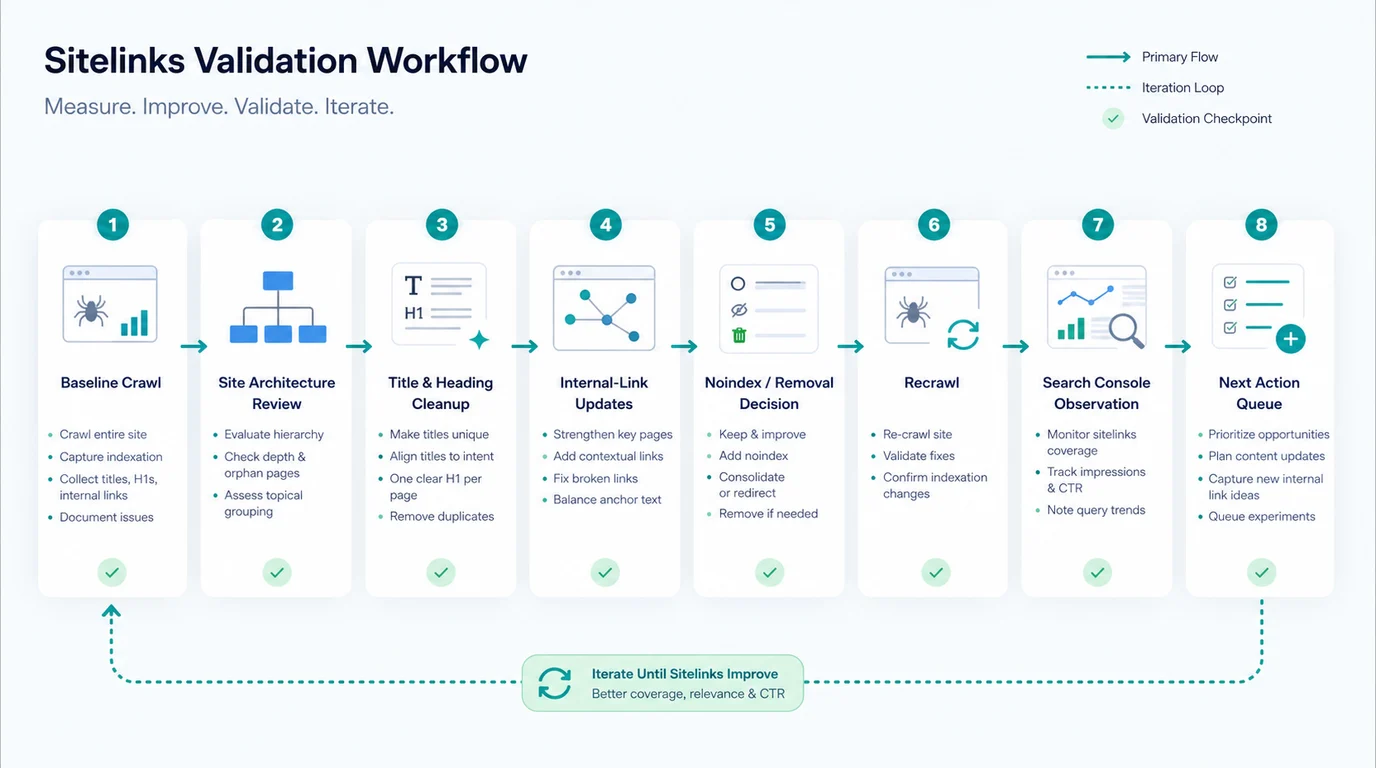
Run this sequence:
- Save a baseline crawl for important pages and their internal-link sources.
- Pick the pages you want to strengthen as potential shortcuts.
- Audit titles, H1s, internal anchors, canonicals, status codes, sitemap inclusion, and duplicate groups.
- Rewrite labels where the page promise is unclear.
- Add or update contextual internal links from relevant pages.
- Remove, consolidate, or noindex pages that should not surface.
- Re-crawl to confirm the live HTML, links, indexability, canonical signals, and sitemap agree.
- Watch Search Console for page-level query, CTR, and impression movement, and spot-check priority SERPs after recrawl.
- Record the next action: keep, improve labels again, change internal links, consolidate a page, or stop.
The point is not to celebrate a specific sitelink the moment it appears. The point is to make the site easier to understand, then keep the shortcut candidates healthy.
Where Searvora Fits
Searvora SEO Spider Crawler is the right product surface when sitelinks work needs evidence instead of guesses. Use it to crawl page inventory, titles, H1s, internal links, depth, status codes, canonicals, noindex directives, duplicate patterns, sitemap coverage, and post-fix validation.
| Workflow layer | Searvora role | Output |
|---|---|---|
| Candidate inventory | Find indexable, canonical pages that deserve stronger shortcut support | Candidate list by page job and section |
| Label QA | Group title and H1 problems by template or page type | Owner-ready metadata fixes |
| Internal-link audit | Find weak inlinks, vague anchors, orphan pages, and redirected destinations | Internal-link fix queue |
| Removal review | Identify noindex, canonical, duplicate, or obsolete pages | Safer decisions for pages that should not surface |
| Recrawl validation | Confirm changes landed in rendered HTML and crawl data | Evidence before monitoring SERP behavior |
Sitelinks Audit Checklist
Use this checklist when a site has missing, messy, or unwanted sitelinks:
- List the pages that would make useful shortcuts for users.
- Confirm those pages return 200, are indexable, and self-canonicalize.
- Check whether titles and H1s are unique, compact, and aligned with the page job.
- Audit internal links from relevant pages to each shortcut candidate.
- Rewrite vague anchors so they describe the destination naturally.
- Remove redirected, noindex, duplicate, or obsolete URLs from internal shortcut paths.
- Consolidate pages that repeat the same user task.
- Keep sitemaps focused on canonical, indexable URLs.
- Re-crawl after label, link, canonical, or noindex changes.
- Monitor page-level performance and spot-check priority SERPs after Google recrawls.
Sitelinks are not a standalone optimization trick. They are a visible clue that search systems understand which parts of your site matter. Build the structure, labels, links, and validation loop first; the shortcut display is the outcome, not the control panel.