

Technical SEO issues become expensive when a crawl report turns into a long, unowned list. The useful question is not “how many warnings did we find?” It is which finding blocks search access, repeats across an important page group, or creates a risk that can be proven after a fix ships.
Use this article as the triage hub between a crawl and a backlog. Classify the finding, score its reach and page value, write an owner-ready acceptance check, then recrawl the same URL set. That keeps a technical SEO queue tied to live evidence instead of tool noise.
Classify the Finding Before You Score It
Start by separating blockers from warnings and opportunities. A blocker prevents an important page from being fetched, rendered, indexed, or selected as the intended URL. A warning deserves inspection but may be acceptable in context. An opportunity can improve an already healthy page, but should not displace access work.
Screaming Frog’s public Issues reference explicitly separates issues, warnings, and opportunities. That is a useful audit vocabulary, but the priority still depends on your own pages, templates, and business role.
| Finding class | What it usually means | First response |
|---|---|---|
| Blocker | An important URL cannot be reached, rendered, indexed, or represented correctly | Confirm the affected URL set and route it to the owner who can restore the expected state |
| Warning | A crawl signal conflicts with the intended page job or might become a wider pattern | Check template reach, links, sitemap state, canonical behavior, and real page value |
| Opportunity | A healthy page could become clearer, faster, or easier to understand | Keep it in an improvement queue after blockers and material warnings are controlled |
Sort Technical SEO Issues Into Five Fix Paths
Issue labels are useful, but labels alone do not tell a team what to do next. Put each finding into one fix path so similar problems share an owner, evidence standard, and validation step.
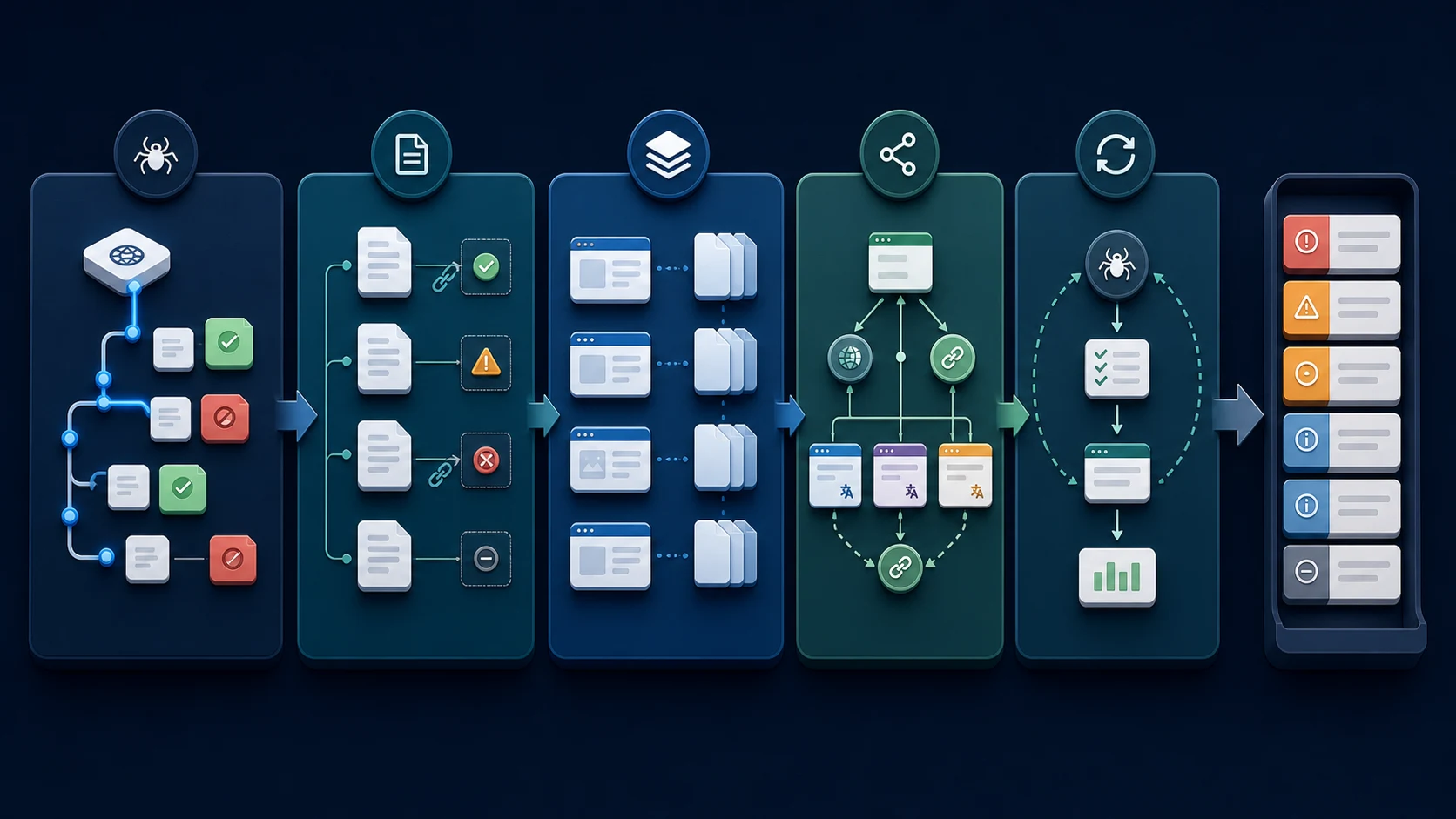
| Fix path | Typical signals | Useful owner question |
|---|---|---|
| Access and response | Server errors, blocked pages, failed rendering, redirect loops, broken internal destinations | Can the intended crawler and user receive the expected final response? |
| Indexability and URL selection | noindex, conflicting canonicals, duplicate variants, sitemap disagreement, broken hreflang clusters | Which URL should represent this page job, and do every related signal agree? |
| Discovery and architecture | Orphaned pages, excessive crawl depth, weak internal links, generated URL traps | Can important pages be found through purposeful links and a clean crawl path? |
| Template and page meaning | Missing titles, duplicate H1s, thin template states, image-alt gaps, invalid visible schema claims | Does the rendered page explain its task consistently to search systems and people? |
| Evidence and measurement | Missing baselines, unclear release scope, stale crawl exports, unexplained visibility changes | What proof would show that this fix changed the live state rather than just the ticket? |
The broader technical SEO workflow explains how crawl access, indexability, meaning, priority, and validation fit together. Use this issue hub when the immediate job is choosing the next fix rather than re-running a full audit.
Prioritize the Page Group, Not the Loudest URL
One broken URL may be harmless; one template rule can affect every category, locale, product, or article page. Score the page group before the individual alert. A small set of high-value URLs with a repeatable root cause usually deserves more attention than a large count of low-value cleanup items.
| Priority signal | High-priority pattern | Lower-priority pattern |
|---|---|---|
| Search access | Indexable product, category, hub, or article pages are blocked or unstable | Retired, intentionally private, or utility URLs behave as intended |
| Template reach | One fix resolves a repeated template or CMS rule | One isolated URL has no repeated source pattern |
| Page value | Affected pages support demand, conversions, key entities, or navigation | Pages have no search job and no meaningful internal role |
| Signal conflict | Status, canonical, sitemap, internal links, and rendered HTML disagree | Signals agree and the finding is cosmetic |
| Validation confidence | A crawl, rendered-page check, or URL inspection can verify the change | Success depends on a vague future ranking outcome alone |
For example, a broken canonical on a localized template can outrank dozens of duplicate meta descriptions. A persistent 5xx on a conversion-supporting section should be escalated before a minor image-alt cleanup. Use the HTTP status codes for SEO workflow when the crawl response itself is the suspected access failure, and the canonical tags workflow when URL selection is the source of disagreement.
Turn One Finding Into an Owner-Ready Fix
Do not hand engineering or content a raw crawler label. A useful fix ticket names the page group, evidence, desired state, owner, and proof required after deployment. That makes it harder for a task to be marked complete before the live page actually changes.
| Ticket field | Example for a canonical conflict |
|---|---|
| Scope | Localized product pages generated from one template |
| Evidence | Crawl export shows self-referential links but the rendered canonical points to the default-language URL |
| Intended state | Each indexable locale page self-canonicalizes and hreflang references the matching canonical URL |
| Owner | Engineering for template output; SEO for URL-set verification |
| Acceptance check | Re-crawl the affected template, inspect rendered HTML, confirm sitemap and internal links use final canonical URLs |
Keep the action small enough to verify. “Fix international SEO” is not an acceptance criterion. “Restore self-canonicals for the affected locale template and verify the reciprocal alternates after recrawl” is.
Verify the Fix With the Same Crawl Evidence
Technical SEO work is incomplete when the ticket closes. The real stop condition is a live, repeatable check: the affected URL returns the expected response, the page renders the expected markup, related signals agree, and the updated crawl no longer shows the original pattern.
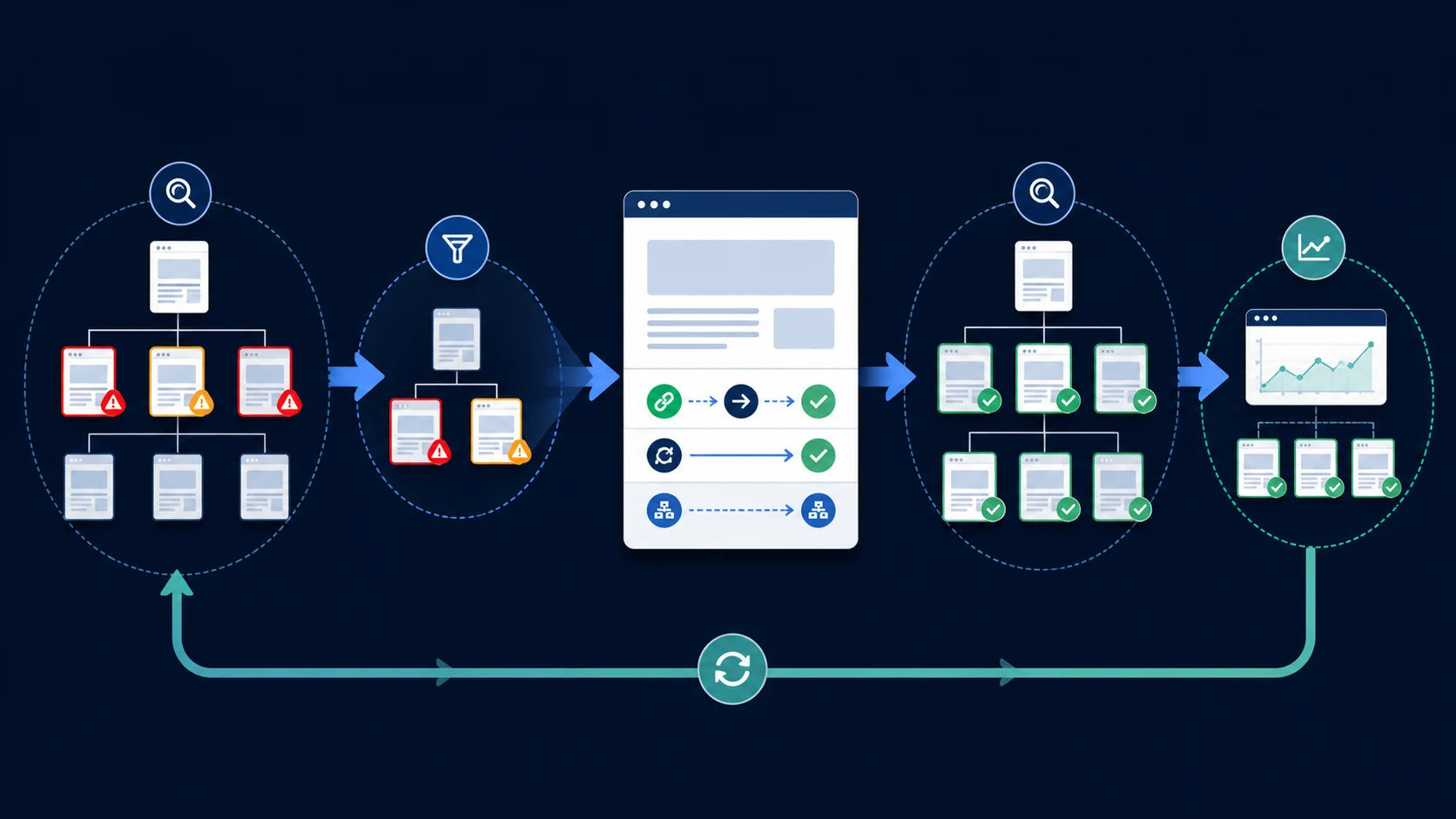
Use the same comparison set before and after a release:
- Save the baseline URLs, issue counts, template samples, and crawl configuration.
- Define the expected change in plain language: response, canonical, indexability, rendered content, link target, sitemap entry, or hreflang relation.
- Check the production output after deployment, not only the CMS or source template.
- Re-crawl the changed URLs and representative template peers.
- Compare only like-for-like runs, then record any remaining exceptions and their reason.
- Monitor search performance after recrawl, while keeping the crawl result separate from a ranking claim you cannot yet prove.
Where Searvora Fits
Searvora SEO Spider Crawler is useful when a team needs to turn crawl evidence into an execution queue instead of sending a spreadsheet of disconnected findings. It can group issues around indexability, architecture, metadata, content quality, and release risk so the next owner has a clearer fix path and validation target.
Use This Technical SEO Issues Checklist
- Export a baseline crawl and isolate the pages that have a real search or business job.
- Classify each finding as a blocker, warning, or opportunity.
- Group repeated findings by template, directory, locale, and page type.
- Score each group by search access, page value, template reach, signal conflict, and validation confidence.
- Write the intended live state and assign the owner who can change it.
- Check source and rendered output after release.
- Re-crawl the same URL set and document the remaining exceptions.
- Link the verified fix back to the issue group so future audits do not reopen the same investigation.
The point of technical SEO triage is not to make a crawl report look clean. It is to protect the pages that need to be discoverable, understandable, and trusted before a small issue becomes a template-wide failure.