

If you need to remove URLs from Google, the safe path starts with matching the removal method to the reason. A private page, a deleted product, a duplicate parameter URL, an outdated article, and an emergency takedown should not all get the same fix.
The useful workflow is to prove what the URL is doing now, choose the least risky removal path, clean every discovery signal that still points to it, and validate the result after Google recrawls. Otherwise the page may stay visible, disappear only temporarily, or pull a good canonical page into the mess.
Decide What Should Happen To The URL
Start with the desired search outcome, not the button you plan to click. The right method depends on whether the content should disappear quickly, stay accessible to users, consolidate with another URL, or vanish from the site entirely.
The Ahrefs page that triggered this competitor opportunity explains common removal methods. Searvora's information gain is the operating layer around those methods: crawl evidence, signal cleanup, owner handoff, and validation after the change.
Use this first decision table:
| Search outcome | Better method | Do not use as the main fix |
|---|---|---|
| Hide a page urgently while a permanent fix ships | Search Console temporary removal | Robots.txt alone |
| Keep the page live for users but remove it from search | noindex in meta robots or X-Robots-Tag | Canonical tag to an unrelated page |
| Remove a page that no longer exists | 404 or 410 plus sitemap and internal-link cleanup | Leaving the URL in navigation |
| Move users and search signals to a replacement | Redirect and update internal links | Temporary removal without a redirect plan |
| Consolidate duplicate or parameter variants | Canonicalization, redirects, and normalized internal links | Blocking crawlers before they can see the canonical |
| Remove sensitive content from the web | Remove or restrict the content itself, then request removal | Only removing the search result |
Build The Baseline Before You Remove Anything
Teams often create new indexing problems because they remove a URL before documenting what it was connected to. Crawl first. You need to know where the URL is linked, whether it is canonical, whether it appears in a sitemap, whether it has alternates, and whether another page depends on it.
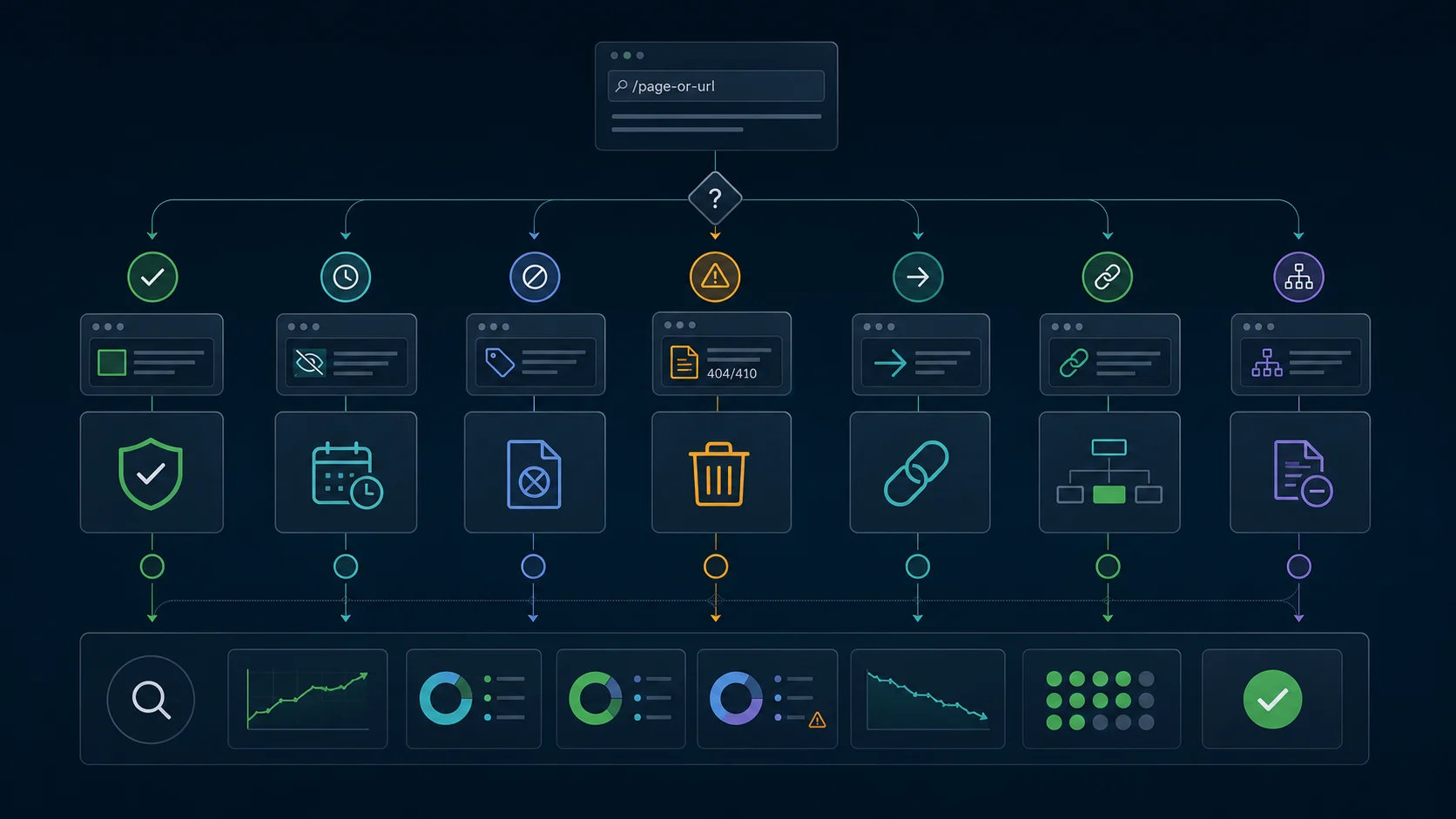
Collect this baseline evidence:
- Final URL, status code, and redirect chain.
- Meta robots,
X-Robots-Tag, canonical target, and hreflang state. - Internal inlinks, navigation links, breadcrumbs, and related modules.
- XML sitemap inclusion and last modified date.
- Important backlinks or external references when available.
- Page type, template, locale, owner, and business reason for removal.
- Whether the URL has a better replacement page.
This evidence prevents two common mistakes. The first is removing a URL that should have been redirected or canonicalized. The second is submitting a removal request while the site still advertises the URL through sitemaps, internal links, or stale templates.
If the issue is really a page that should be indexed but is missing from search, use the Google indexing workflow instead. Removal and indexing recovery are opposite jobs, even though they use many of the same signals.
Match The Method To The Removal Reason
Google's Removals tool documentation describes temporary blocking for URLs on properties you own. Google's separate removal guidance warns that the tool is temporary and the content itself still needs to be removed, blocked, or changed for a durable outcome.
Use the method that matches the job:
| Method | Use when | Validation check |
|---|---|---|
| Temporary removal request | The page must leave Google quickly while the permanent fix is prepared | Search result disappears temporarily and the permanent fix is shipped before expiry |
noindex | The page should stay live for users but not appear in search | Crawler can access the page and sees noindex in rendered output |
| 404 or 410 | The page is gone and has no useful replacement | Sitemap and internal links stop pointing to the removed URL |
| Redirect | A close replacement exists for users and search signals | Source links point to the final canonical URL, not a redirect chain |
| Canonical | Duplicate or parameter variants should consolidate into one preferred URL | Canonical target is indexable, linked, and listed in the sitemap |
| Access control | The content is private, gated, or sensitive | The content is not publicly accessible and search has no reusable copy |
Google's robots meta tag documentation is important here because noindex only works when crawlers can access the page and read the directive. If robots.txt blocks the URL first, Google may not be able to see the noindex instruction.
Canonicalization is a different job. Google's canonical guidance treats redirects, canonical annotations, and sitemaps as URL selection signals. Use those when the content should consolidate, not when it should disappear because it is private, obsolete, or unsafe to show.
Clean The Discovery Signals Around The URL
A removal request can hide a result, but discovery signals can keep pulling the URL back into the crawl path. Clean the source of discovery before you call the work finished.
Check these places:
| Discovery signal | What to clean |
|---|---|
| XML sitemap | Remove URLs that are noindex, redirected, canonicalized away, 404, 410, or private |
| Internal links | Replace links with the best live canonical URL or remove the link entirely |
| Navigation and templates | Fix menus, related posts, product cards, filters, and generated modules |
| Canonicals | Avoid canonicalizing removed pages to unrelated URLs |
| Hreflang | Remove alternates that point to missing, redirected, or noindex pages |
| Structured data | Remove references to dead URLs, images, PDFs, and breadcrumb paths |
| External references | Decide whether important external links need a redirect or source update |
For sitemap-specific cleanup, the XML sitemap generator workflow gives you a repeatable way to publish only canonical, indexable URLs. For duplicate variants, pair the removal work with the canonical tags audit so you do not hide URLs that should have consolidated signals into a preferred page.
Validate The Result After Google Recrawls
Validation should prove two things: the unwanted URL is no longer eligible to appear, and the replacement or remaining page set still has clean crawl signals.
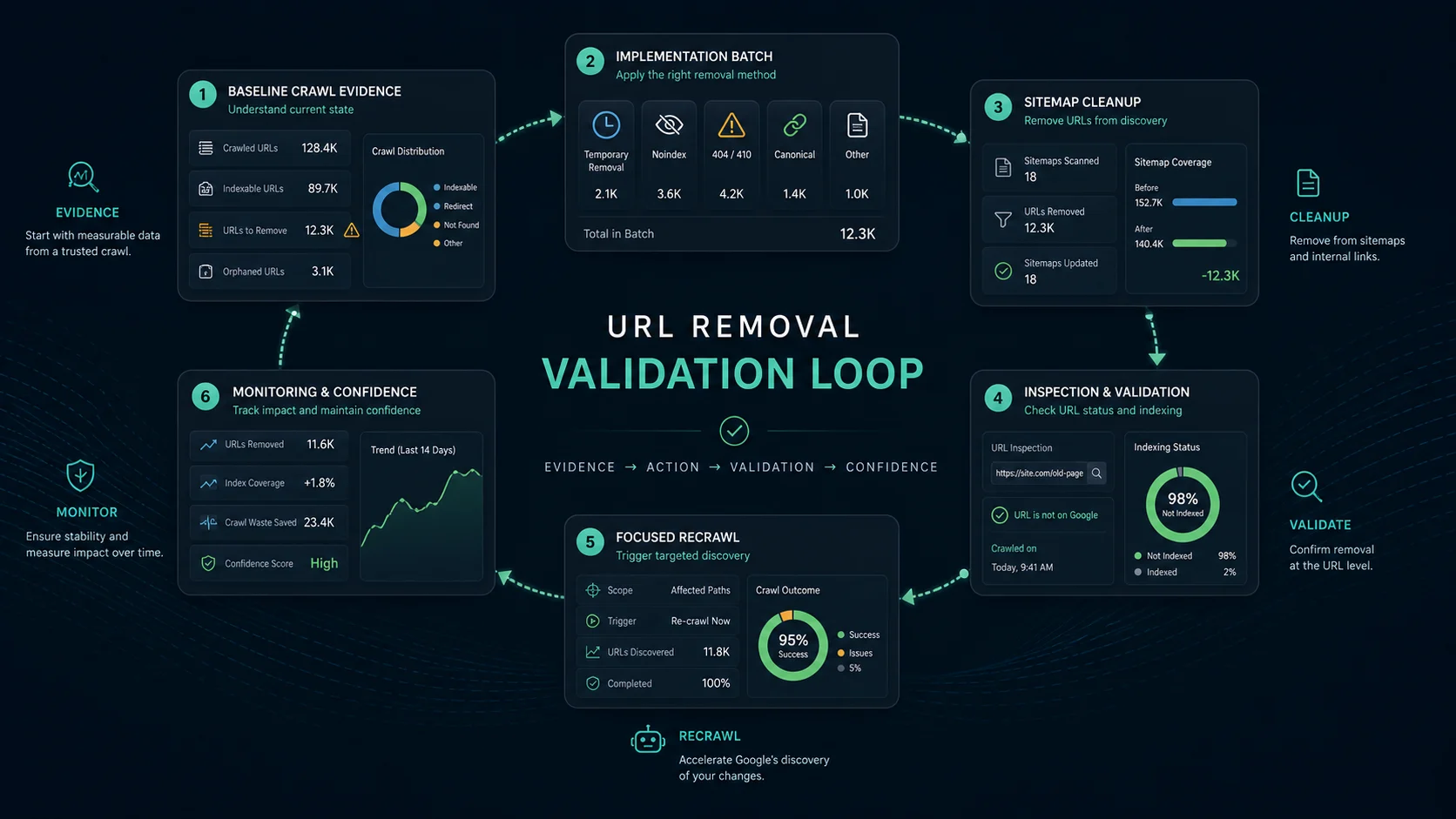
Use this validation loop:
- Save the baseline crawl before any removal action.
- Apply the chosen method to a focused URL batch.
- Remove stale sitemap entries and internal links.
- Re-crawl the affected URLs, replacement URLs, and source pages.
- Confirm status, robots, canonical, hreflang, and sitemap behavior.
- Use Search Console URL Inspection for priority URLs.
- Watch whether impressions, clicks, indexed URL count, and crawl errors move as expected.
- Record the rule so the CMS or template does not recreate the same URL.
Google's URL Inspection documentation helps when you need URL-level confirmation, but keep your own crawl export as the operating evidence. Search Console tells you how Google reports the URL; a crawl tells your team what the site is currently sending.
Do not judge the change only by a single search query. Some removals disappear quickly from visible results but take longer to settle across sitemaps, cached references, duplicate variants, and performance reports.
Where Searvora Fits
Searvora SEO Spider Crawler fits this workflow when URL removal needs to become a controlled technical SEO change instead of a one-off emergency.
Use it to crawl the affected section, collect removal signals, group URLs by template, and turn the findings into a fix queue:
| Workflow step | Searvora role | Output |
|---|---|---|
| Baseline crawl | Capture status codes, canonicals, robots directives, sitemaps, links, and page groups | Evidence for the removal decision |
| Method selection | Separate temporary removals, noindex pages, deleted pages, redirects, and duplicates | Cleaner owner and fix-path assignment |
| Signal cleanup | Find stale internal links, sitemap entries, hreflang references, and structured-data URLs | Release tasks that prevent re-discovery |
| Validation crawl | Compare the live site after the change against the baseline | Proof that the removal method worked |
If the removal is part of a larger migration, check the redirects for SEO workflow before deleting anything. If the removal is caused by dead references, use the broken link checker workflow to clean source links and validate repaired paths.
URL Removal Checklist
Use this checklist before and after removing URLs from Google:
- Confirm why the URL should leave search.
- Decide whether the content should be hidden, noindexed, deleted, redirected, canonicalized, or restricted.
- Crawl the URL and its template group before changing anything.
- Save status code, robots, canonical, hreflang, sitemap, and inlink evidence.
- Choose one primary removal method and document why.
- Clean internal links, sitemap entries, templates, and structured data.
- Keep crawlers able to read
noindexwhennoindexis the chosen method. - Redirect only when there is a close user-relevant replacement.
- Avoid canonical tags when the content should truly disappear.
- Re-crawl the affected URL set after the fix ships.
- Use URL Inspection for priority pages.
- Monitor search visibility, crawl errors, and replacement page performance.
URL removal is not just a Search Console task. It is an indexability decision with crawl, content, and signal cleanup attached. Choose the method carefully, remove the stale discovery paths, and validate the live site before calling the job done.